


How House of Balayage Used a BOGO Offer to Turn Browsers Into Bundle Buyers

Like many growing WooCommerce stores, House of Balayage experimented with different types of promotions, including traditional percentage discounts. But one campaign stood out from the rest.
Instead of simply reducing prices on individual products, the beauty brand created a bundle-based Buy One Get One (BOGO) offer that encouraged customers to purchase a complete hair care routine. Customers who added the qualifying products to their cart received the lowest-priced item for free, turning a collection of individual products into a compelling bundled offer.
The campaign went on to become House of Balayage’s best-performing promotion, helping them increase bundle purchases and giving shoppers a stronger reason to buy the full bundle rather than a single item.
In this customer story, we’ll break down how House of Balayage used Smart Coupons for WooCommerce to build the campaign, why the offer resonated with shoppers, and how you can create a similar BOGO bundle for your own WooCommerce store.
Smart Coupons ticks all the boxes for now, but without it, the default WooCommerce options are very limited. Thank you for this awesome plugin!
– Store Admin, House of Balayage
Key Learnings
01. Bundle offers convert better than a straight discount
Positioning the offer as a complete hair care routine bundle gave customers a reason to buy products they might not have added individually.
02. Cheapest item free feels like a reward, not a clearance
Giving away the lowest-priced product in the bundle rewards shoppers without affecting the perceived value of the core items.
03. On-site promotion closes the loop for browsers who weren’t looking for a deal
Running the campaign through popups and site banners meant the offer reached shoppers already in a buying mindset.
04. New stores can run advanced campaigns from day one
House of Balayage was under a year old when this campaign ran. With the right plugin, complex discount logic isn’t a feature you unlock after years of scale. It’s available immediately.
The Problem House of Balayage Faced
House of Balayage sells physical hair care products. They were less than a year old, processing fewer than 50 orders a month, and trying to figure out which coupon approach would actually move inventory and get customers to buy more than one item at a time.
The default WooCommerce coupon system wasn’t going to cut it. Percentage discounts work, but they don’t guide buying behavior. A 15% off code on a hair serum doesn’t give a customer a reason to also pick up a conditioner and a treatment. It just makes the serum cheaper.
What the store actually needed was a way to sell a routine, not a product.
The Campaign: a BOGO Bundle Built Around a Complete Hair Care Routine
The setup was this: customers who bought a bundle of haircare products got the cheapest item in that bundle for free.
Instead of presenting three products with a discount applied, the bundle was positioned as a complete hair care routine, everything you need, start to finish. That framing changed the customer’s decision.
They were deciding whether to buy into a full haircare routine. The BOGO offer was the incentive to commit to the whole thing rather than just grab one product.
The cheapest item coming free was a deliberate choice. It rewards customers for buying the complete set without heavily discounting the hero products in the bundle. A blanket percentage off would have communicated the same savings, but it would have felt more like a clearance than a curated offer.
How They Promoted It
The campaign ran through popups and on-site banners. Not just email.
That distinction matters. Email campaigns reach existing subscribers. Popups and banners reach shoppers who are already on the site and in a buying mindset — people who found the store through search, social, or a link and landed on a product page.
That’s a different audience with a different intent. Running the offer on-site meant it captured impulse buyers who would never have seen an email campaign, which matters a lot when your subscriber list is still small.
Why Native WooCommerce Couldn’t Power This
Here’s where the plugin story comes in.
WooCommerce’s built-in coupon system supports percentage discounts, fixed cart discounts, and fixed product discounts. That’s it. There’s no native BOGO logic. There’s no way to say “give the cheapest item in this bundle for free” without either building custom code or using a plugin that handles that rule.
House of Balayage used Smart Coupons for WooCommerce. In their own words: “SmartCoupons ticks all the boxes for now, but without it the default WooCommerce options are very limited.”
For a store less than a year old, that matters. You shouldn’t need a developer to run a BOGO campaign. The plugin handles the coupon logic so the store owner can focus on the framing, the promotion, and the product grouping — the parts that actually require creative judgment.
The Outcome of the BOGO Campaign
House of Balayage identified this BOGO bundle as their best-performing campaign. Many customers used it to purchase the complete routine, which is exactly what the framing was designed to do.
For a store under a year old, becoming their best-performing campaign is a result worth paying attention to. The campaign didn’t just drive a one-time spike; it established a repeatable template. The same offer (bundle + BOGO + on-site promotion) can be redeployed for new product launches, seasonal pushes, or whenever inventory needs to move as a set rather than individually.
Before and After Smart Coupons
| Before | After | |
| Coupon flexibility | WooCommerce’s native coupon options were too limited to build multi-product bundle offers or BOGO logic. | BOGO rules set up with full control over which products qualify, and which item is given free. |
| Campaign framing | Discounts were applied to individual products, with no way to bundle them into a complete routine narrative. | Products grouped as a “full hair care routine” bundle. The cheapest item came free, giving customers a reason to buy the set. |
How to Set Up a Similar BOGO Offer on Your WooCommerce Store?
- Install and activate Smart Coupons for WooCommerce (Pro) on your WordPress site.
- Go to Smart Coupons → BOGO from your WordPress dashboard.
- Click Add New to create a new offer.
- Select Custom and choose Cheapest / Most expensive item in cart as the offer type.
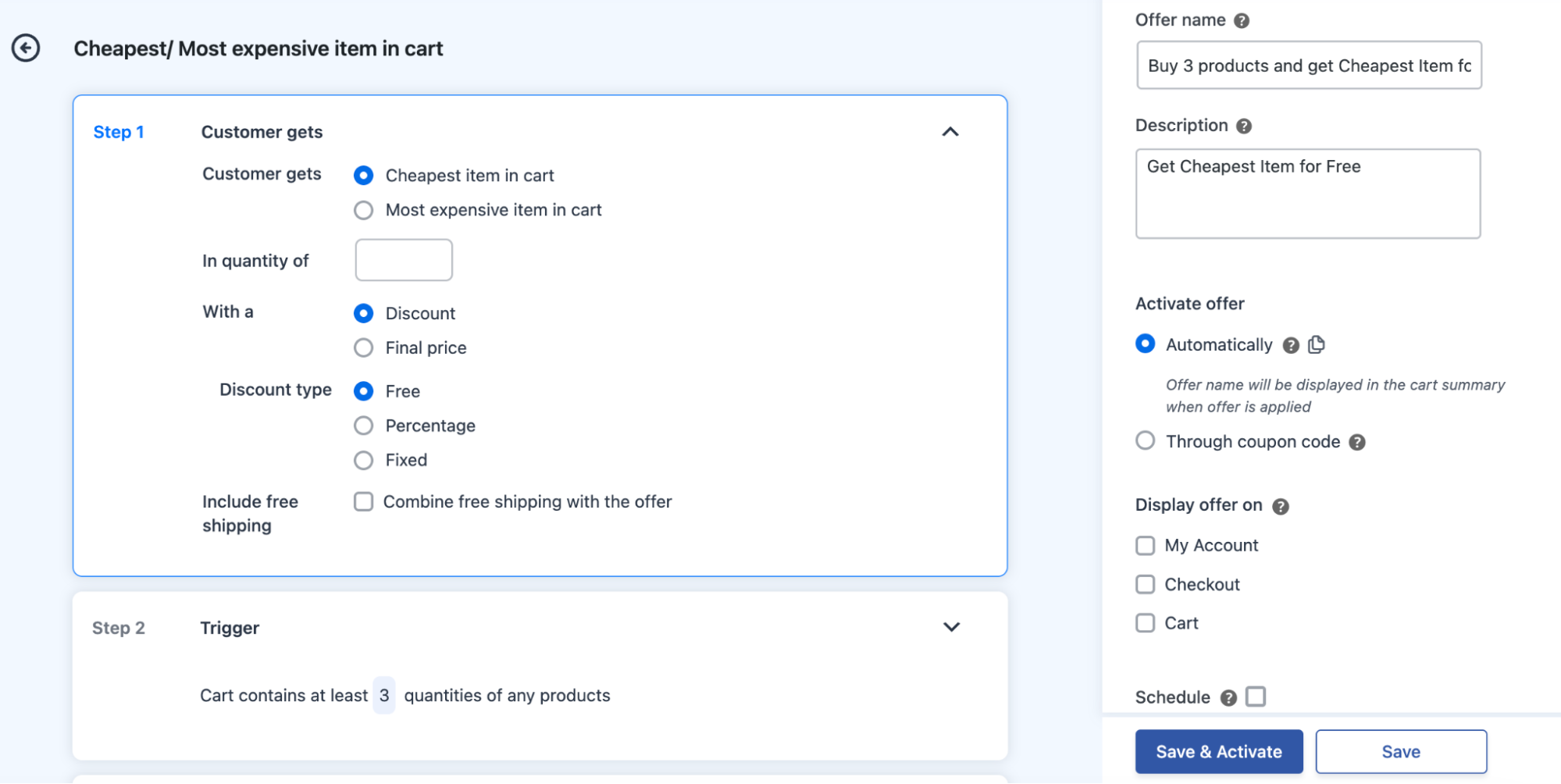
- Under Customer gets, select Cheapest item in cart.
- Set the In quantity of field to the number of free items — leave it at 1 for a standard get-one-free offer.
- Under With a, keep it set to Discount.
- Under Discount type, select Free. Choose Percentage or Fixed if you want a partial discount instead.
- If you want to add free shipping on top, check Combine free shipping with the offer.
- Under Trigger, set the cart quantity condition to match your bundle — e.g., “Cart contains at least 3 quantities of any products.”
- Under Apply offer, set it to Once for a standard single-use-per-cart rule.
- On the right panel, enter an Offer name — this shows up in the cart summary when the offer is applied.
- Under Activate offer, select Automatically so it applies without a coupon code, or Through coupon code if you want it code-gated.
- Use Display offer on → + Add to choose where the offer is shown on your store.
- Hit Save & Activate to go live, or Save to draft it.
Plugins used

Browse our Products
With an impressive 99% customer satisfaction rating, our Plugins are highly regarded among WordPress and WooCommerce niches.

