



EU Withdrawal Button for WooCommerce
Add a legally compliant EU withdrawal button to your WooCommerce store. Covers the entire flow, from the customer-facing request form to the admin dashboard for managing withdrawal requests.

Request
Withdrawal Button

Two Step
Confirmation

Admin
Dashboard

Automatic Refund
Processing

EU Geo
Targeting
30 Days Money Back Guarantee
99% Customer Satisfaction Rating
A subscription entitles you to 1 year of updates and support from the date of purchase. Cancel renewal anytime.
All the prices shown are in USD
Trusted by 1.8+ Million Websites
5.0

1.0.0
Plugin Version

1,000+
Downloads

18-08-2026
Last Updated
Ensure Compliance With EU Right of
Withdrawal for WooCommerce Stores
Add a WooCommerce Withdrawal Button to the Orders Page
A "Request Withdrawal" button appears directly on the customer's My Account orders list, visible only within the active withdrawal window.
Guided Withdrawal Form with Two-Step Confirmation
Customers fill in a simple form, select the items they want to withdraw, and confirm their intent in a second step.
Support Partial Withdrawal Requests
Customers can partially withdraw individual items from an order rather than canceling the whole order.
Dedicated Admin Withdrawals Dashboard
View all withdrawal requests, approval stats, and order details from a single, dedicated WooCommerce Withdrawals dashboard.
Approve Requests and Issue Refunds Automatically
Auto-approve eligible withdrawal requests, issue the WooCommerce refund, and restock inventory without touching the order manually.
Restrict the Withdrawal Button to EU Shoppers
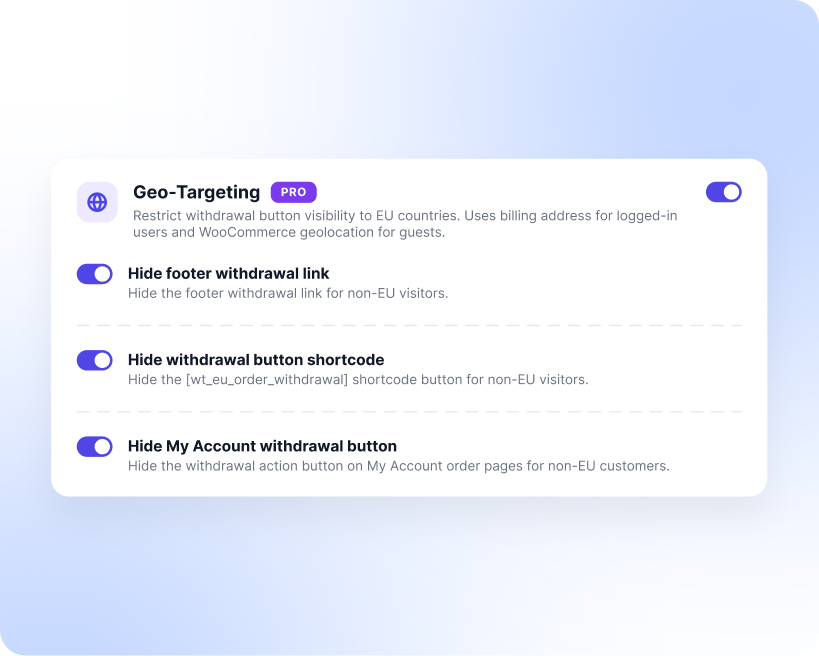
Show the withdrawal button only to customers in EU countries, using billing address for logged-in users and WooCommerce geolocation for guests.
Generate a Withdrawal Terms and Conditions Page
Create a withdrawal T&C page built on EU consumer rights directives, with shortcodes that stay in sync with your exclusion settings.
Set Withdrawal Period for WooCommerce Orders
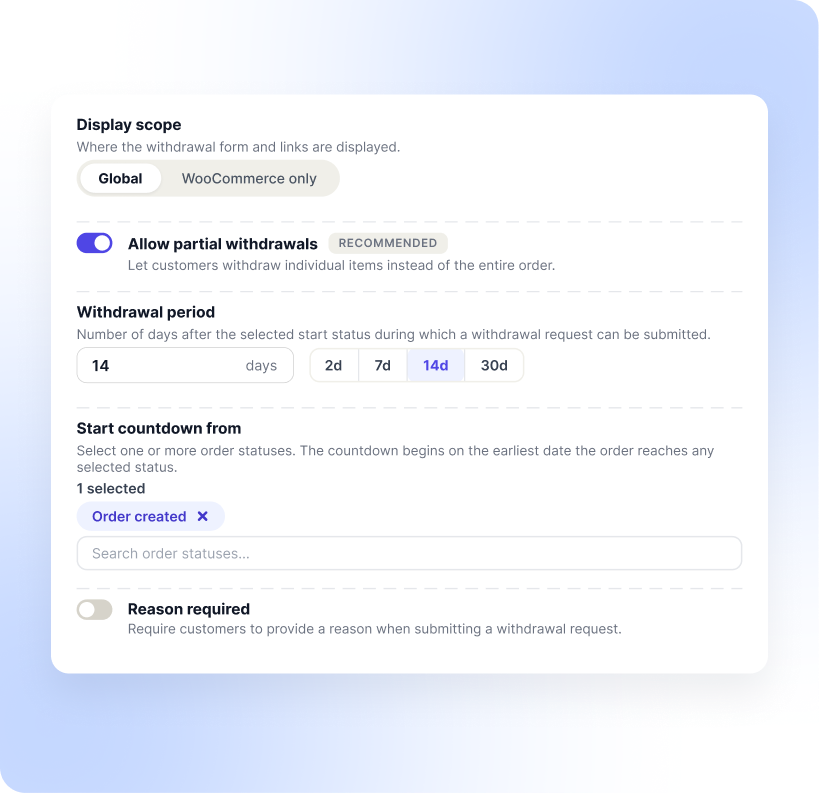
Set the window to 2, 7, 14, or 30 days and choose which order statuses start the countdown. The EU standard is 14 days.
Customize WooCommerce Withdrawal Button
Add the button to your footer, My Account pages, or any post via shortcode, then match its text and colors to your theme.
Exclude Products from Withdrawal Requests
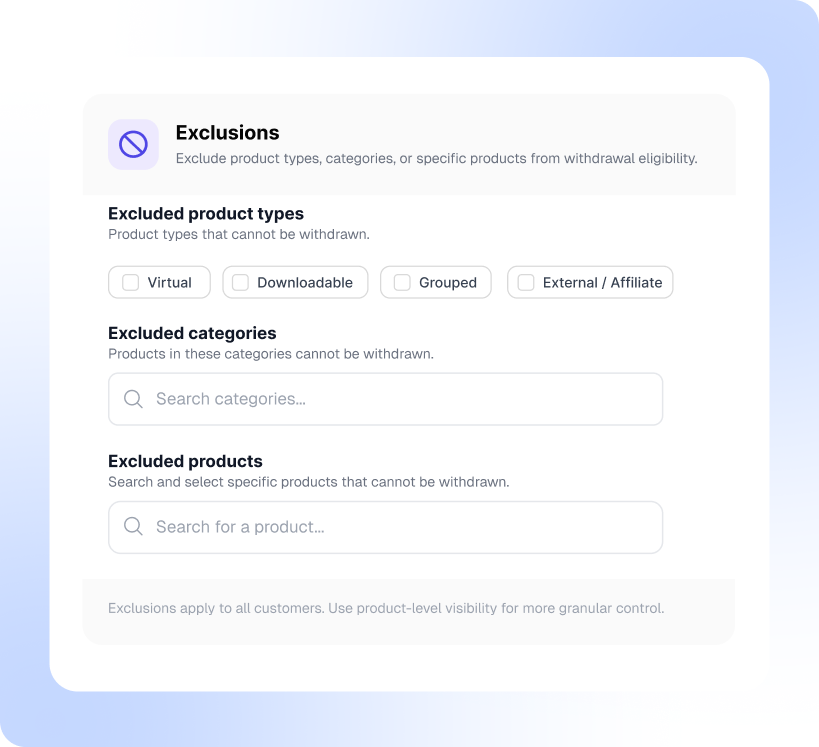
Exclude virtual, downloadable, grouped, or external/affiliate products, entire categories, or individual products from eligibility for withdrawal.
Update Order Statuses Automatically
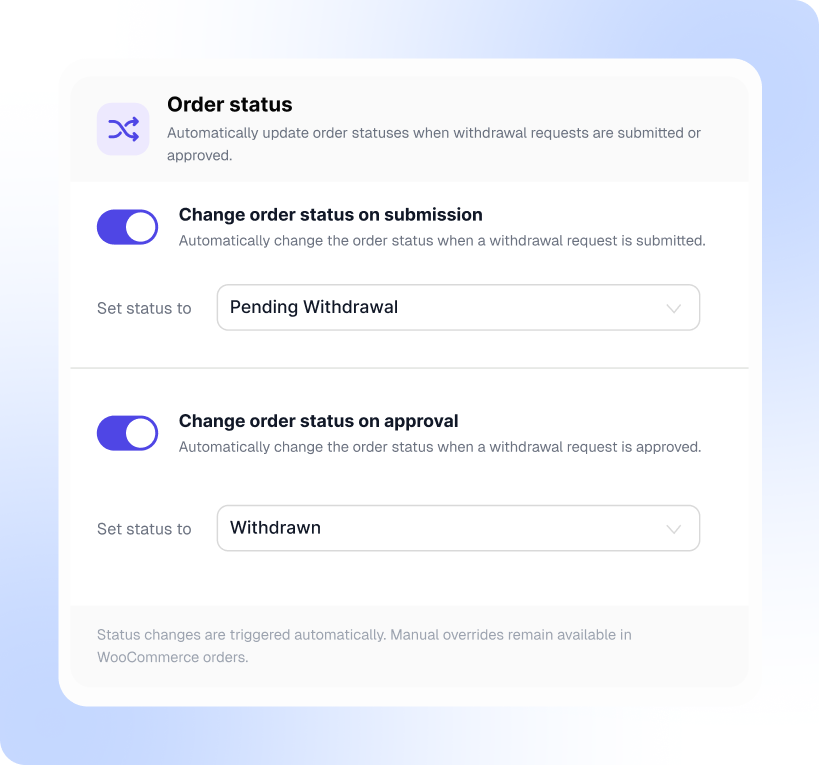
Automatically update order status when a withdrawal request is submitted or approved.
Send Withdrawal Request Notification Email
Automatically email customers when a request is submitted, and alert one or more admin addresses on every new withdrawal.
Try with Confidence

99% Satisfaction Rating
We make every effort to make sure our customers are happy.
Average 4.9 out of 5 Stars Rating
Our plugins are highly regarded in WordPress forums and review platforms.

100% Money-Back Guarantee
Our 30-day No-Risk Money Back Policy assures 100% money back.
Add an EU-Compliant Order Withdrawal Button to WooCommerce
This plugin adds a "Request Withdrawal" button on the customer's My Account page, next to every eligible order that is still within the active withdrawal window.
When a customer clicks the button, a structured withdrawal form opens. They can select the full order or individual items to withdraw, enter their name and email, and optionally provide a reason. A two-step confirmation screen follows before the request is submitted. This two-step flow is specifically required by EU Directive 2023/2673 to prevent accidental withdrawals.
Once submitted, the customer receives an automatic confirmation email. That email satisfies the directive's requirement to acknowledge receipt on a durable medium.
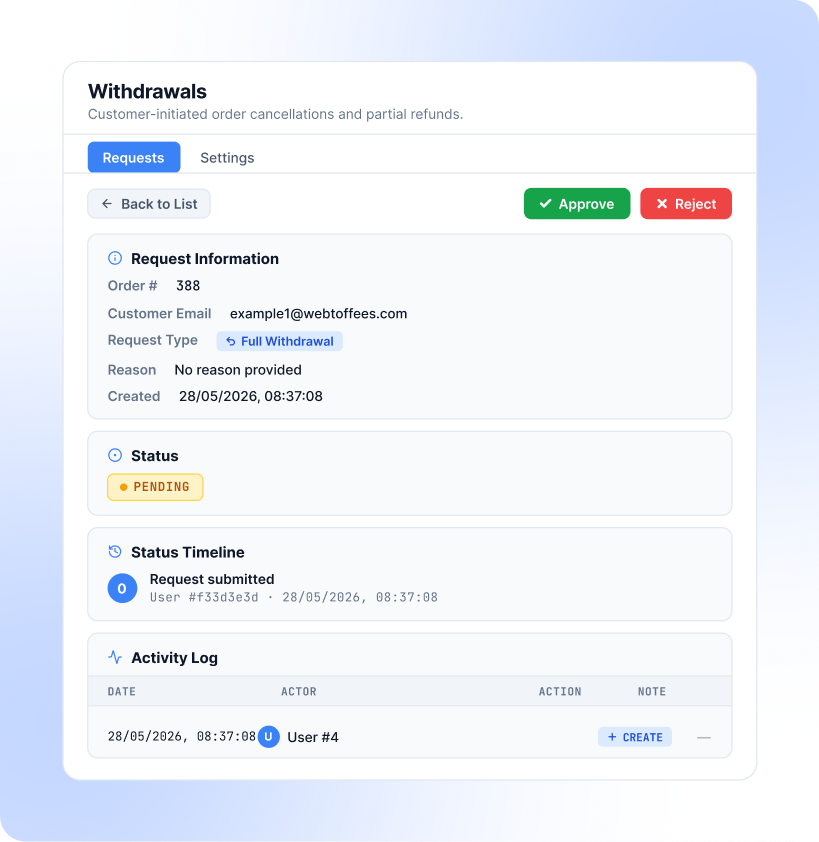
Manage WooCommerce Withdrawal Requests from One Dashboard
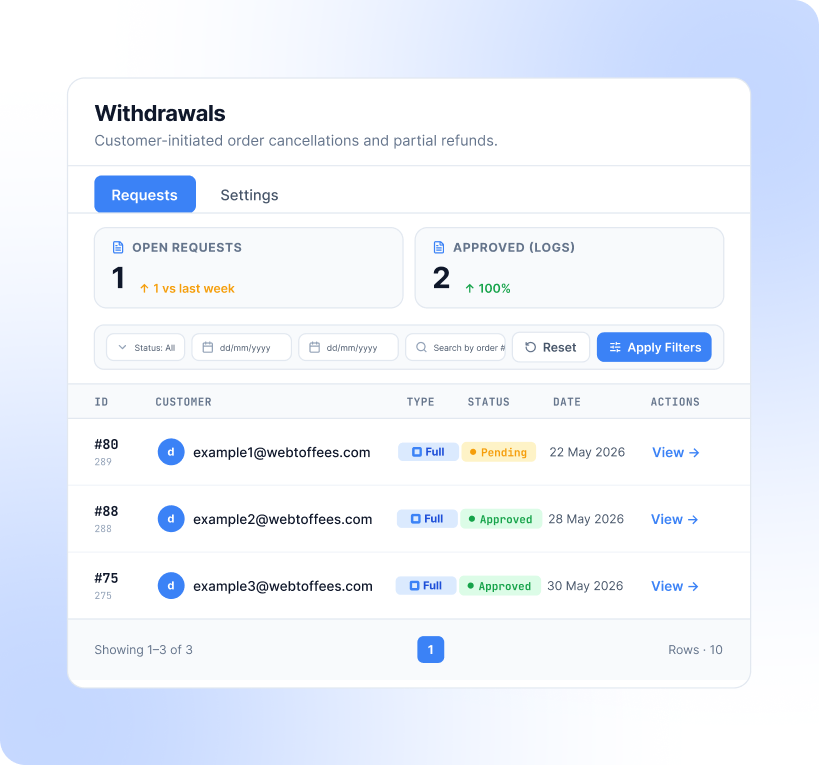
Every incoming withdrawal request lands in WooCommerce > Withdrawals. The dashboard shows open request counts, approvals over the last 30 days, and a filterable list of all requests by status, date range, or order number.
Opening a request gives you the full picture, including the order number, customer email, request type (full or partial), the reason (if provided), and a complete activity log showing every status change. You can approve or reject withdrawal requests directly from this view.
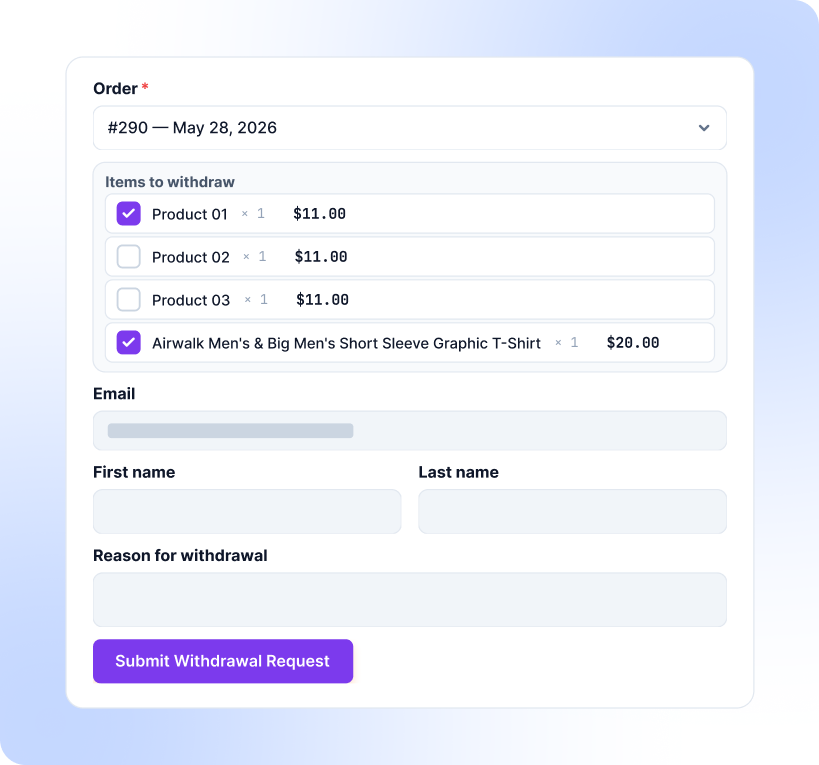
Support Partial Withdrawals for Individual Order Items
When partial withdrawals are enabled in settings, customers can select specific items from an order rather than canceling the entire order. This matters for stores that sell bundles or multi-item orders, where a customer may only want to return one product.
The withdrawal form displays all items in the selected order, each with a checkbox. The customer selects what they want to withdraw, and the request captures exactly those items. The rest of the order stays intact. This reduces unnecessary full-order cancellations and gives customers a more precise way to exercise their rights.
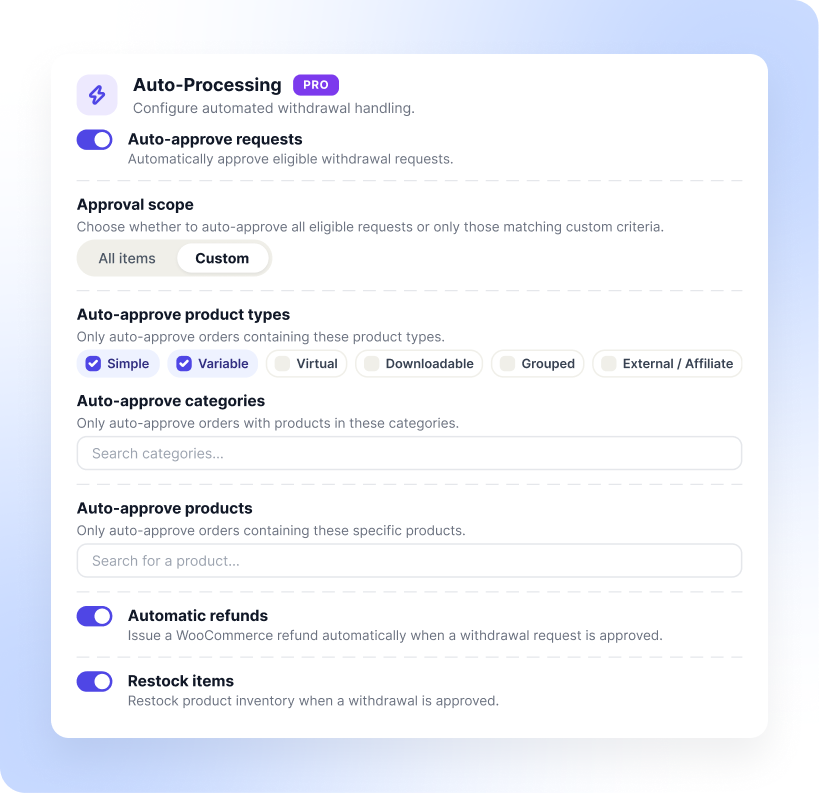
Approve Withdrawal Requests, Issue Refunds, and Restock Automatically
Reviewing every withdrawal request by hand gets old fast, especially once volume picks up. Auto-processing handles the routine ones for you. Turn on auto-approve, and eligible requests get approved the moment they come in.
You control the scope. Approve everything that qualifies, or set custom criteria so only requests that match your rules go through automatically, and the rest wait for a manual review.
Two more toggles sit alongside it. Automatic refunds issue the WooCommerce refund as soon as a request is approved, and restock items put the returned products back into inventory. Between them, an approved withdrawal can move from request to refunded and restocked without anyone opening the order.
Configure the Withdrawal Period and Withdrawal Form Display Scope
The settings panel gives you full control over how and when the withdrawal option appears to your customers. Set the withdrawal window to 2, 7, 14, or 30 days. The EU standard is 14 calendar days from the date of delivery, and the field accepts any custom value if your store policy differs.
You also choose which order statuses start the countdown. Select one or more, and the clock begins on the earliest date the order reaches any of them, so the window opens exactly when it should for your fulfillment workflow.
Display scope lets you decide whether the withdrawal form appears globally across your site or only on WooCommerce pages. There is also a reason required toggle if you want customers to explain why they are withdrawing, which is useful for spotting product or fulfillment issues in your own data.
You are not limited to showing the withdrawal button only on order pages. The plugin includes a shortcode that lets you place the button on any page or post, with options to customize the button label and apply additional CSS classes to match your theme.
Restrict the EU Withdrawal Button to EU Shoppers Only
The right of withdrawal applies to EU consumers. If you sell worldwide, there is no reason to surface a withdrawal button to shoppers in markets where the directive does not apply.
Geo-targeting handles the detection for you. For logged-in customers, it reads the billing address on file. For guests, it falls back to WooCommerce geolocation.
From there you decide what gets hidden. Three separate toggles control the footer withdrawal link, the shortcode button, and the My Account withdrawal button, so you can hide all three for non-EU visitors or keep some visible if your own policy is more generous than the directive requires.
Exclude Products, Categories, and Product Types from Withdrawal
Not every product in your store needs to be eligible for withdrawal. The plugin lets you define exclusions at multiple levels, by product type, category, or individual product, giving you precise control over what can and cannot be withdrawn.
Virtual, downloadable, grouped, and external/affiliate products can each be excluded independently. Under EU law, certain digital goods are exempt from the right of withdrawal once downloaded, so this keeps your store compliant without extra configuration.
Whatever you exclude here also flows through to your withdrawal terms and conditions page. The shortcodes on that page pull directly from these settings, so your published policy and your actual configuration never drift apart.
Automate Order Status Updates on Withdrawal
No need to manually update orders every time a withdrawal request comes in. The plugin can automatically update the order status when a request is submitted and when it is approved, keeping your WooCommerce order management in sync.
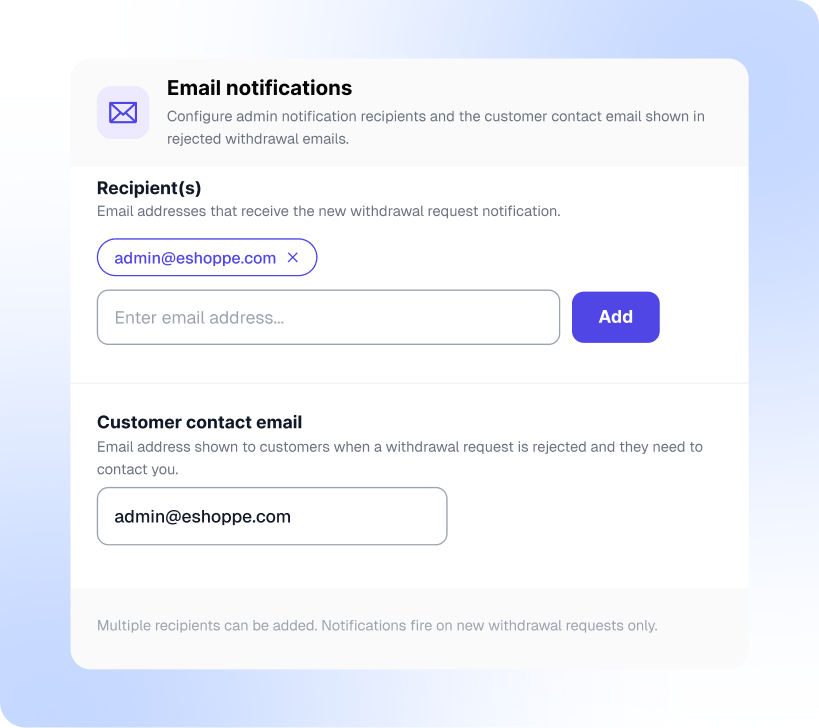
Set Up Email Notifications for Withdrawal Requests
Stay on top of every withdrawal request without checking your dashboard constantly. Add one or more admin email addresses to receive notifications whenever a new request is submitted.
Customers also get a SHA receipt with their confirmation email as tamper-proof proof of their request. You can also set a customer-facing contact email that gets shown when a withdrawal request is rejected, giving customers a direct point of contact instead of leaving them without next steps.
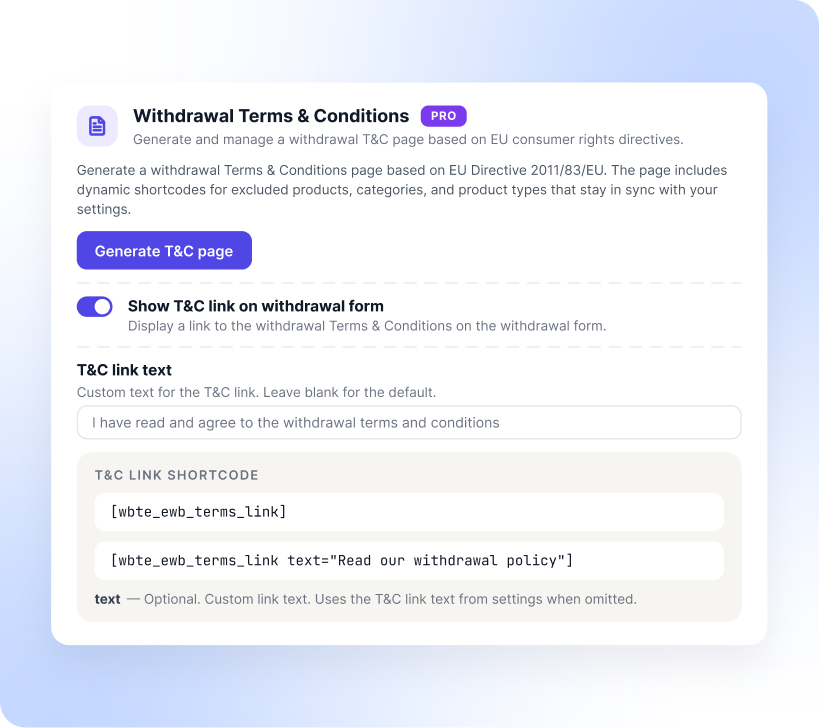
Generate a Withdrawal Terms and Conditions Page
Writing a withdrawal policy from scratch means reading the directive, translating it into plain language, and then keeping it accurate every time you change a setting.
The plugin does the first draft for you. Click generate and you get a withdrawal terms and conditions page built on EU consumer rights requirements, ready to review and publish.
The page uses dynamic shortcodes for your excluded products, categories, and product types, so it updates itself whenever your exclusion settings change. You can then surface it wherever it makes sense. A toggle adds a T&C link directly to the withdrawal form, and the [wbte_ewb_terms_link] shortcode lets you drop the link anywhere else, with optional custom link text.
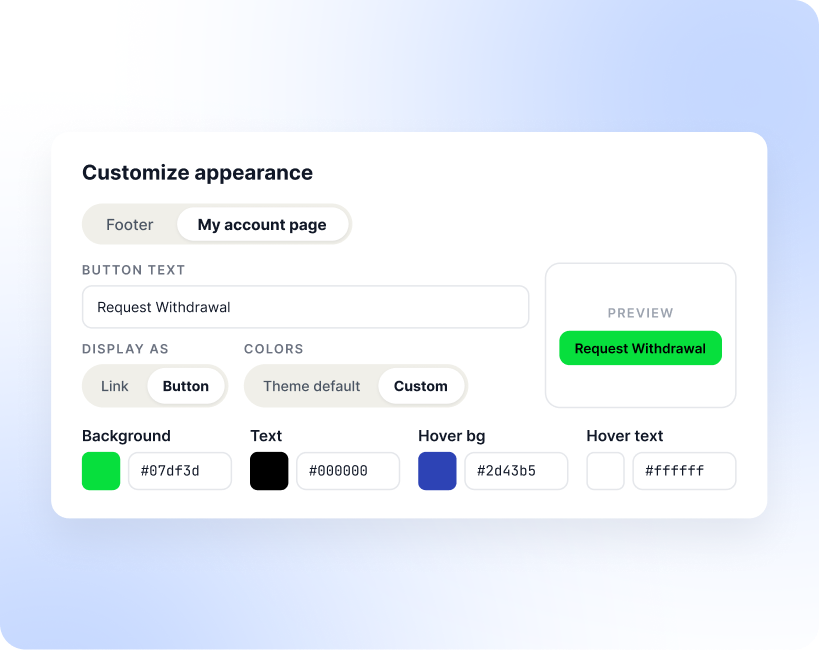
Customize the Withdrawal Button Text, Style, and Colors
A compliance button that clashes with your theme looks like an afterthought. The appearance settings let you style the withdrawal button so it reads as part of your store.
Footer and My Account placements are configured separately, each with its own button text, so you can say Request Withdrawal in one spot and something more specific in the other.
Display each one as a plain text link or a full button, depending on how much attention you want it to draw. Colors follow your theme by default. Switch to custom and you get hex controls for background, text, hover background, and hover text, with a live preview so you can check the result before saving.
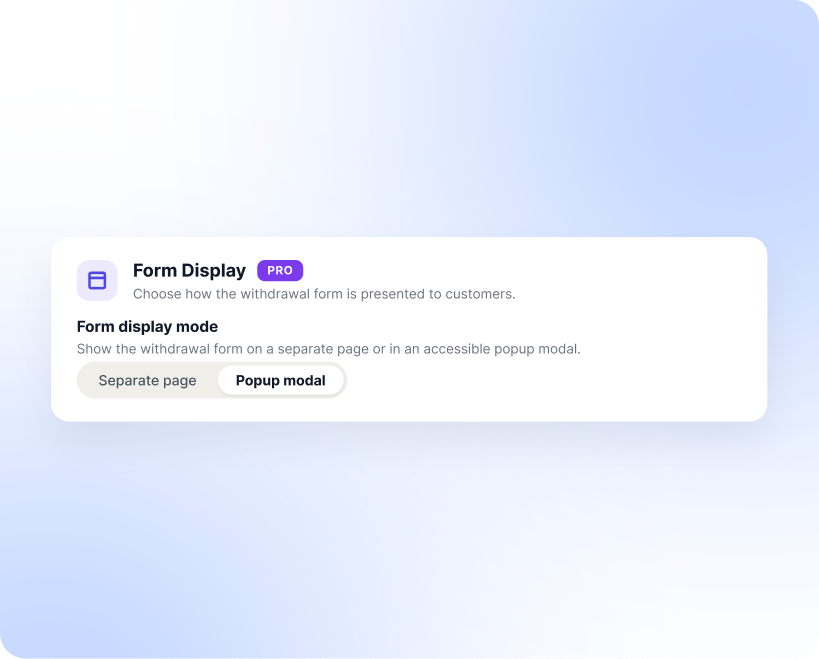
Show the Withdrawal Form on a Page or in a Popup Modal
Some stores prefer sending customers to a dedicated withdrawal page. Others would rather keep them where they are. The form display setting supports both. Choose separate page and the withdrawal button links through to your configured withdrawal page.
Choose popup modal and the form opens in place, in an accessible modal, so customers do not lose their spot in their order history. Either way, the form is a public entry point, which means bots will find it. Google reCAPTCHA v3 support is built in.
Add your site key and secret key, and spam submissions get filtered out before they reach your withdrawals dashboard, without making real customers solve a puzzle.
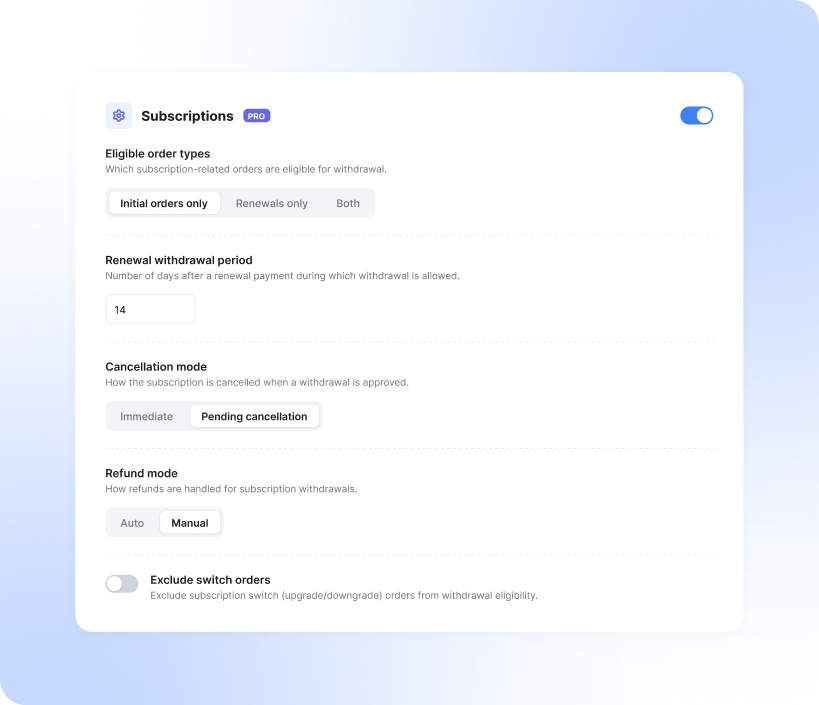
Handle Withdrawal Requests for WooCommerce Subscriptions
Subscription orders don't fit the standard withdrawal flow, since customers pay again on every renewal. You can enable withdrawal for subscription orders, renewals, or both, with a separate withdrawal window for renewal payments (14 days by default).
Choose whether approval cancels the subscription immediately, and whether refunds are processed automatically or need manual review. You can also exclude subscription switch orders (upgrades/downgrades) from withdrawal eligibility entirely.
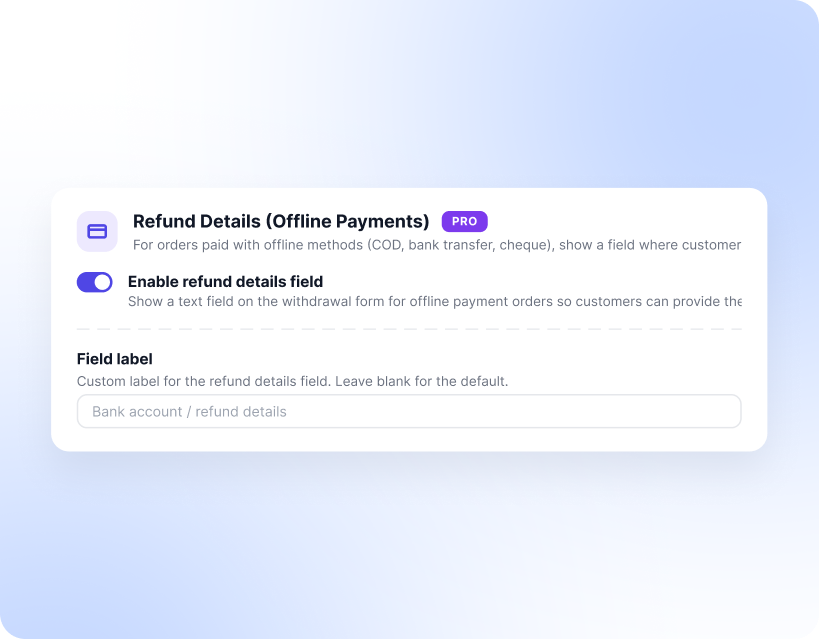
Collect Refund Details for Offline Payment Orders
Refunding a card payment is easy. WooCommerce sends it back to the original method. Orders paid by cash on delivery, bank transfer, or cheque are a different story, because there is no payment method to refund to.
For those orders, the plugin adds a refund details field to the withdrawal form. Customers enter the bank account or IBAN where they want the money sent, so you are not chasing them over email after the request comes in.
The field label is yours to set. Leave it blank for the default, or use wording that matches how your customers actually talk about their bank details in your market.
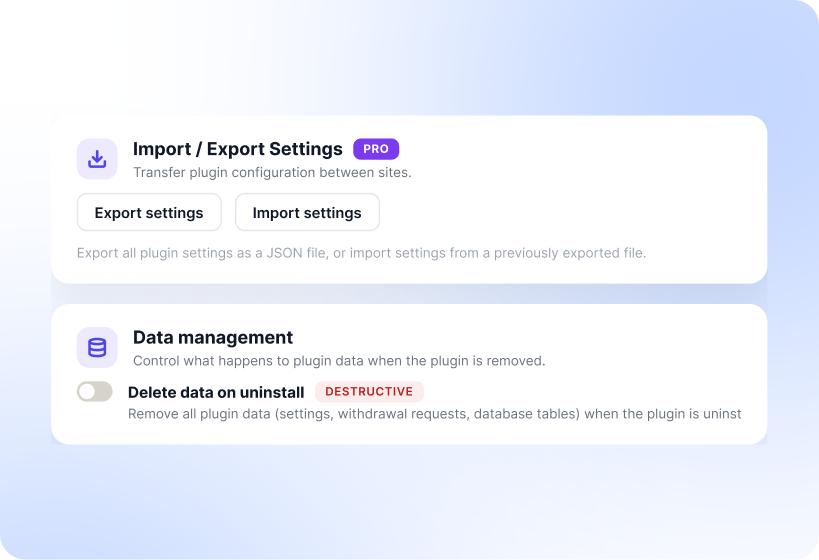
Manage Plugin Data and Move Settings Between Sites
If you ever remove the plugin, you decide what happens to your data. The delete data on uninstall option is off by default to prevent accidental data loss. Enable it only when you are certain you no longer need the stored withdrawal requests, settings, and database tables.
Settings can also travel between sites. Export your full plugin configuration as a JSON file and import it elsewhere, saving you from rebuilding everything by hand when you move from staging to live or roll the same setup out across multiple stores.
| Technical info |  |
 |
 |
|---|---|---|---|
| Minimum Version | 7.4 or higher | 6.0 or higher | 7.0 or higher |
| Tested upto | 8.3 | 7.1.2 | 11.1.2 |
You may also like these plugins
WooCommerce PDF Invoices, Packing Slips and Credit Notes
Customize, auto-generate, and print WooCommerce PDF invoices, packing slips, and credit notes using a single plugin. You can send these documents to customers by attaching them to the order emails.

GDPR Cookie Consent Plugin for WordPress
The plugin enables compliance with GDPR, CCPA, and other major cookie laws. You can use it to create and customize cookie consent banners, scan and manage website cookies, and integrate Google Consent Mode, Microsoft Clarity Consent Mode, and UET Consent Mode.