Share:


Table of Contents
- PXM connects product data with customer-facing information to deliver tailored experiences across multiple platforms.
- It involves five key stages: collecting, organizing, enriching, distributing, and optimizing product information.
- PXM differs from Product Information Management (PIM) by emphasizing how product data is presented rather than just managing the data itself.
- Effective PXM helps reduce product returns by providing clear and accurate information that sets customer expectations correctly.
- Implementing a PXM strategy can significantly improve product discovery and customer engagement, ultimately driving sales growth.
- Businesses can utilize various tools, including PIM systems and digital asset management, to support their PXM initiatives and enhance product content across channels.
Imagine finding the perfect pair of running shoes online, only to discover that the product page lacks sizing details, material information, or important specifications. You check another marketplace, but the product description is completely different. Would you feel confident making a purchase?
This is exactly the problem product experience management (PXM) aims to solve.
With customers discovering products across online stores, marketplaces, and search engines, businesses need to deliver accurate, consistent, and relevant product information at every touchpoint.
In this guide, we’ll explore what product experience management is, how it works, how it differs from PIM, and how eCommerce businesses can use it to improve the shopping experience.
Product Experience Management (PXM) is the process of managing, optimizing, and delivering accurate, relevant, and engaging product information across different customer touchpoints.
It ensures that shoppers receive the right product information, in the right format, at the right time, regardless of where they discover or purchase a product. This includes product titles, descriptions, specifications, images, videos, customer reviews, and other information that helps shoppers make informed purchasing decisions.
Unlike traditional product data management, which focuses primarily on organizing product information, PXM emphasizes how that information is presented to customers.
For example, consider an electronics retailer selling wireless headphones through its website, Amazon, and Google Shopping. The underlying product details, such as battery life, connectivity, and technical specifications, remain the same. However, the presentation differs across channels:
- Online store: Detailed product descriptions, comparison charts, demonstration videos, and customer reviews.
- Amazon: Marketplace-optimized titles, structured attributes, and concise feature highlights.
- Google Shopping: Product titles, prices, availability, images, and attributes formatted according to Google’s requirements.
PXM helps businesses deliver these channel-specific experiences while maintaining accurate and consistent product information.
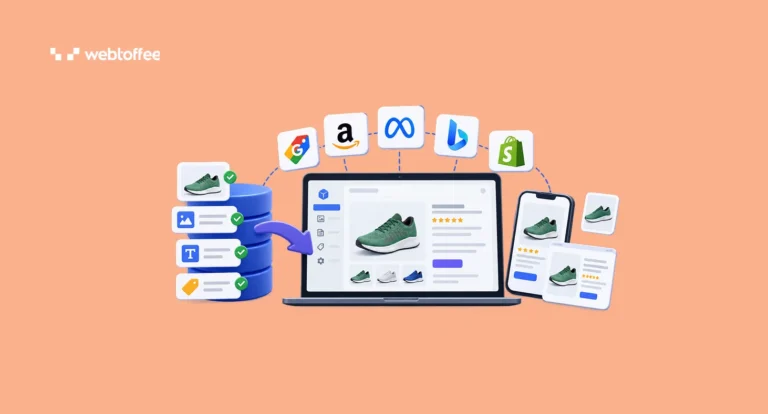
Product experience management connects product data with the information customers see across different shopping channels.
The process typically involves five stages:
- Collect: Gather product information from suppliers, manufacturers, inventory systems, and internal catalogs.
- Organize: Validate product details, correct inconsistencies, and maintain a reliable source of product information.
- Enrich: Add useful content, including detailed descriptions, specifications, images, videos, and product benefits.
- Distribute: Adapt and publish product information across online stores, marketplaces, search engines, and other channels.
- Optimize: Monitor product performance and customer feedback to identify improvement opportunities.
For example, a clothing retailer might collect basic product information from a supplier, add size charts and fabric details, and adapt the content for its website and marketplaces. As product details change or customers raise new questions, the retailer can update the information to improve the shopping experience.
These activities form a continuous process rather than a one-time product catalog update.
Product Experience Management (PXM) and Product Information Management (PIM) are closely related, but they serve different purposes.
PIM focuses on managing product information, while PXM focuses on how that information is delivered and experienced by customers.
A PIM system serves as a centralized source for collecting, organizing, validating, and maintaining product data. PXM builds on this foundation to create relevant, engaging product experiences across channels and customer touchpoints.
Here’s how they compare:
| Feature | Product Information Management (PIM) | Product Experience Management (PXM) |
|---|---|---|
| Primary focus | Managing and organizing product data | Delivering relevant product experiences |
| Main objective | Data accuracy and consistency | Customer engagement and informed purchases |
| Core activities | Data collection, validation, and enrichment | Content optimization, personalization, and distribution |
| Primary users | Product data teams, catalog managers, and operations teams | eCommerce, marketing, merchandising, and content teams |
| Key outcome | Reliable product information | Consistent, customer-focused product experiences |
For example, a PIM system might store the technical specifications, dimensions, and materials of a laptop. PXM determines how that information should be presented to different audiences.
A business customer may prioritize processor specifications, connectivity, and compatibility, while a student may be more interested in battery life, portability, and everyday performance. The product information remains accurate, but its presentation changes based on the customer’s needs.
PIM and PXM are therefore complementary, not competing, approaches. A reliable product information foundation makes it easier to deliver effective product experiences.
As eCommerce businesses expand across multiple sales channels, accurate, engaging product information becomes increasingly important. Here are five benefits of implementing product experience management.
1. Helps Customers Make Informed Purchasing Decisions
Unlike physical stores, online shoppers cannot always see, touch, or try products before purchasing them. They rely on descriptions, images, specifications, and reviews to understand what a product offers.
Complete, relevant product information helps customers compare alternatives, evaluate features, and decide whether a product meets their needs.
For example, detailed compatibility information can help shoppers choose the right electronic accessories without contacting customer support.
2. Improves Product Discovery
Accurate, structured product information can make products easier to find through website search, filters, marketplaces, and shopping platforms. Attributes such as product categories, sizes, colors, brands, and technical specifications help search and filtering systems identify relevant products.
For instance, properly categorized products with complete attributes are better positioned to appear in relevant filtered search results.
This can improve product visibility and make it easier for shoppers to find what they need.
3. Creates Consistent Experiences Across Channels
Customers often interact with a product across multiple platforms before purchasing it. They might discover an item through Google Shopping, compare prices on a marketplace, and eventually purchase it from the retailer’s website.
Conflicting specifications, outdated prices, or inconsistent product details can create confusion and reduce trust.
PXM helps maintain consistent product information while adapting its presentation to each platform’s requirements.
4. Can Reduce Product Returns
Incomplete or misleading product information can cause customers to purchase products that don’t meet their expectations. For example, unclear sizing details may lead shoppers to order clothing that doesn’t fit.
Accurate measurements, detailed specifications, compatibility information, and realistic images can help customers choose more suitable products.
While PXM cannot eliminate returns caused by product defects or shipping damage, it can help reduce returns resulting from inaccurate expectations.
5. Supports Business Growth
Managing product content manually becomes increasingly difficult as product catalogs and sales channels expand.
A structured PXM strategy makes it easier to introduce new products, maintain consistent information, and adapt content for additional markets.
It also reduces the need to recreate product information separately for every platform, helping businesses scale their product content operations more efficiently.
Let’s look at three practical examples of how businesses can apply PXM to improve the shopping experience.
Example 1: Improving Product Listings for Fashion Retailers
Consider an online clothing store receiving frequent returns because customers order the wrong sizes.
Its product pages display basic information such as product names, prices, and available sizes. However, they lack detailed measurements, fit descriptions, and fabric information.
The retailer improves its product experience by adding:
- Detailed size charts and measurement guides
- Fabric composition and care instructions
- Fit descriptions, such as slim fit or relaxed fit
- Images showing different product variations
- Model measurements to help customers understand sizing
Customers can now compare their measurements with the size guide and better understand how the clothing will fit.
This creates a more informative shopping experience and may reduce size-related returns.
Example 2: Localizing Product Content for International Markets
An electronics retailer wants to expand into European markets.
Previously, its product listings were available only in English and displayed technical information primarily for US customers.
To improve the experience for international shoppers, the retailer translates product descriptions, adapts measurement units, and provides region-specific compatibility information. For example, electrical products may require information about voltage requirements, plug types, and regional compatibility.
Instead of simply translating existing descriptions, the retailer ensures that customers receive information relevant to their location.
This helps international shoppers make better purchasing decisions.
Example 3: Delivering Better Product Experiences Across Sales Channels
A WooCommerce store sells kitchen appliances through its website, Google Shopping, and online marketplaces. The store maintains accurate product information in its catalog but needs to adapt that information for each channel.
On its website, it provides detailed product descriptions, comparison tables, and instructional videos. For Google Shopping, it creates structured product feeds containing relevant attributes such as product identifiers, prices, availability, and categories.
Marketplace listings are optimized according to the respective platform’s requirements.
By maintaining a reliable product catalog and adapting content for different channels, the store can deliver more consistent shopping experiences without managing every listing independently.
You don’t necessarily need enterprise-level PXM software to start improving product experiences.
Small and medium-sized eCommerce businesses can begin with their existing product catalogs and introduce improvements gradually. Here are six practical steps to get started.
Step 1: Audit Your Existing Product Information
Start by evaluating the quality of your current product catalog.
Look for missing descriptions, outdated specifications, incorrect prices, inconsistent attributes, and low-quality product images. Pay particular attention to products that generate frequent customer inquiries or have high return rates.
Create a product information checklist that includes essential details such as:
- Product names, descriptions, and SKUs
- Prices, availability, and variations
- Technical specifications and dimensions
- Product images and supporting media
- Usage instructions and compatibility information
Identify which products require immediate improvements and prioritize them based on their importance to your business.
Step 2: Establish a Reliable Product Data Source
Once you’ve identified the gaps, decide where your master product information will be maintained.
Depending on the size of your business, this could be an eCommerce platform, ERP system, PIM solution, or another centralized database. Ensure that product information follows consistent formatting and naming conventions. For example, products should use standardized attributes for sizes, colors, measurements, and categories.
Define who is responsible for maintaining product information and how updates should be communicated across systems.
This helps prevent different sales channels from displaying conflicting product details.
Step 3: Enrich Your Product Content
With accurate product information in place, focus on making it more useful to customers.
Instead of simply listing product specifications, explain how those features benefit shoppers. For example, rather than describing a portable blender only as having a rechargeable battery, provide information about its battery capacity, charging method, portability, and how it can be used while traveling.
Supplement descriptions with appropriate images, videos, comparison tables, or instructional content. Also consider the information different customers may need.
A first-time buyer may benefit from simple explanations, while an experienced customer might look for detailed technical specifications.
The goal is to help customers understand the product without having to search elsewhere for essential information.
Step 4: Optimize Product Content for Different Channels and Markets
Review the product information requirements of every platform where your business sells or promotes products.
A description suitable for your website may need additional attributes, different formatting, or a shorter title on a marketplace. For instance, Google Merchant Center requires structured product data, including attributes such as price, availability, and product identifiers where applicable.
Use product category mapping, attribute mapping, and feed management tools to prepare content for each channel. If you sell internationally, consider localization requirements such as languages, currencies, measurement units, and regional product information.
Maintain consistency in the underlying product details while adapting the presentation to different audiences.
Step 5: Automate Product Data Updates
Product information changes frequently, especially for businesses managing large catalogs or selling across multiple channels. Prices, inventory levels, product availability, and specifications may need regular updates.
Manually maintaining this information across different platforms can be time-consuming and increase the risk of inconsistencies. Where possible, use automated imports, scheduled product feed updates, and integrations to keep information current. For example, a WooCommerce store can schedule product feed updates to reflect changes in its catalog.
Regularly check for failed updates, missing attributes, and rejected product listings to ensure that automation is working as expected.
Step 6: Measure and Improve Product Experiences
Product experience management is an ongoing process.
Once you’ve made improvements, monitor how customers interact with your product information and identify areas that need further attention. Here are some useful metrics to track:
| Metric | What it measures |
|---|---|
| Product page conversion rate | Percentage of product page visitors who complete a purchase |
| Product content completeness | Percentage of required product information that is available |
| Product-related return rate | Returns associated with sizing, compatibility, or inaccurate product expectations |
| Product feed rejection rate | Percentage of submitted products rejected by shopping platforms |
| Customer support inquiries | Recurring questions that may indicate missing or unclear information |
| Product search performance | How effectively shoppers discover relevant products |
For example, if customers frequently contact support about product compatibility, consider adding clearer compatibility details to the relevant product pages.
Similarly, if shopping platforms reject listings because of missing attributes, review your product data and feed mapping.
Use these insights to make continuous improvements rather than treating product content optimization as a one-time task.
Businesses use different technologies to manage product information and deliver consistent product experiences.
Some common tools include:
- Product Information Management (PIM) systems: Centralize product information and support data validation, enrichment, and governance.
- Digital Asset Management (DAM) systems: Organize product images, videos, manuals, and other digital assets.
- Product feed management tools: Format, map, and distribute product information to shopping platforms and marketplaces.
- Personalization tools: Adapt product recommendations and content based on customer preferences, behavior, or context.
- Analytics tools: Measure product engagement, search performance, conversions, and other indicators of product experience quality.
Larger businesses may use dedicated PXM platforms that combine several of these capabilities, while smaller businesses can integrate specialized tools based on their requirements.
Managing Product Data and Feeds in WooCommerce
For WooCommerce businesses, product import/export and feed management tools can support important parts of a PXM strategy.
For example, WebToffee’s Product Import Export plugin for WooCommerce helps store owners import, export, and bulk update product information, including descriptions, prices, attributes, images, and custom fields. It also supports scheduled imports and exports, helping businesses maintain updated product catalogs.
Similarly, WebToffee’s WooCommerce Product Feed plugin helps merchants generate product feeds for different shopping channels, map product attributes, and schedule feed updates.
These tools can help businesses maintain accurate product information and distribute it across sales channels.
However, they are not PXM platforms. Advanced capabilities such as customer-level personalization, centralized digital asset management, and product experience analytics may require additional solutions.
PXM stands for Product Experience Management. It involves optimizing and delivering relevant product information across different sales and marketing channels to improve how customers discover, evaluate, and purchase products.
No. PIM focuses on organizing and maintaining product information, while PXM focuses on delivering relevant, customer-facing product experiences. PIM typically provides the reliable product data foundation that supports PXM.
PXM software helps businesses manage and optimize product content across customer touchpoints. Depending on the platform, it may support product data enrichment, digital asset management, localization, channel syndication, personalization, and performance analytics.
Small eCommerce businesses can benefit from PXM practices even without dedicated software. Improving product descriptions, maintaining accurate attributes, adding useful images, and ensuring consistent information across sales channels are practical starting points.
Customer experience management (CXM) focuses on the customer’s overall relationship with a business, including browsing, purchasing, delivery, support, and retention.
PXM focuses specifically on the product-related information and experiences that help customers discover, understand, evaluate, and choose products.
Conclusion
Product experience management goes beyond maintaining accurate product information. It focuses on presenting that information in ways that help customers discover, understand, and confidently purchase products.
As eCommerce businesses expand across websites, marketplaces, and international markets, delivering consistent and relevant product experiences becomes increasingly important.
The best place to start is with accurate product data. From there, businesses can enrich their content, adapt it for different channels, automate updates, and use performance insights to make continuous improvements.
Whether you manage a small WooCommerce store or a large multichannel catalog, adopting these practices can help create a more consistent, informative, and customer-friendly shopping experience.


Subcribe to our newsletter