


The QR Code feature in the WooCommerce PDF Invoices, Packing Slips and Credit Notes Plugin makes it easy to access order information by adding a scannable QR code to every invoice. With a quick scan from a printed invoice or an email attachment, users can instantly view the related order or invoice number along with useful details like the seller name, tax ID, and invoice date. This removes the need for manual searches, helping store owners and customers quickly track, verify, and review order details while enjoying a smooth experience across both digital and printed invoices.
Settings: QR Code
You can add a QR code to your invoices that reads the order number or invoice number. The QR code can be customized to include other custom details as well.

You can choose what to view by scanning the QR code. That is, the plugin allows you to create a QR code for
- Order number – When selected, allows viewing the order number when the QR code is scanned.
- Invoice number – When selected, allows viewing the Invoice number when the QR code is scanned.
- Custom details – When selected, allows adding custom fields such as Invoice date, Order date, etc., when the QR code is scanned.
On choosing Custom details, you can add or remove custom info and also copy the predefined placeholders from RHS and paste them into the custom detail field.

Once done, update the settings and use an invoice template with QR Code to reflect in the invoices.
Invoice with QR Code
An invoice with a QR code will appear as shown below:
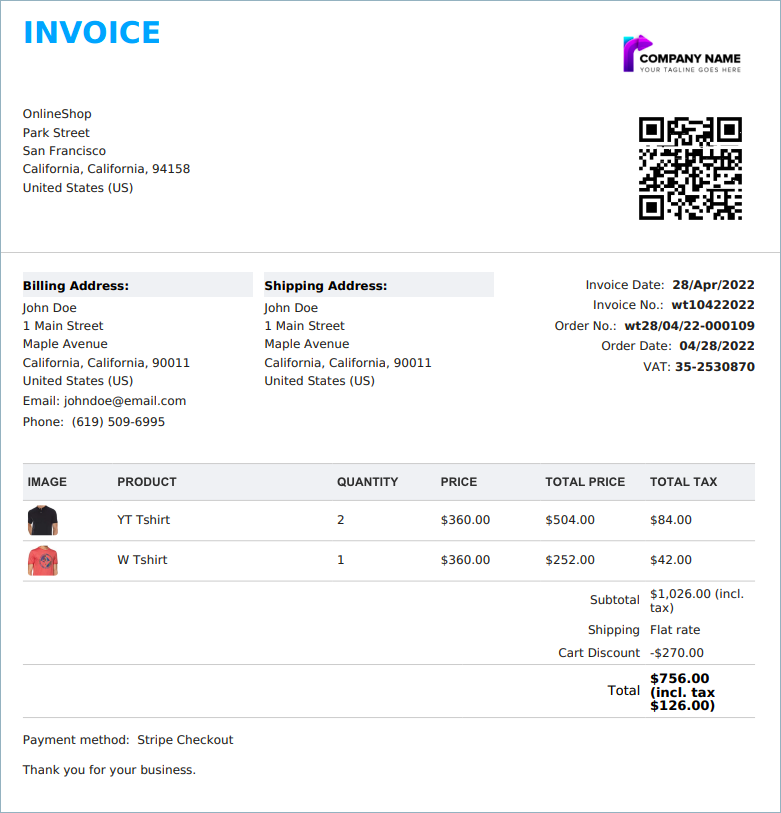
n conclusion, the QR Code feature in the WooCommerce PDF Invoices plugin enhances efficiency by enabling instant access to order details through a simple scan. By reducing manual effort and improving accessibility across both digital and printed invoices, it helps streamline order tracking and verification for both store owners and customers.

roy kerklaan
November 10, 2025
Hi, I would like to add more information to the QR code.
Is it possible to add
– the seller adres
– product table info (incl fee, shipping cost etc.)
– payment method
Thanks for your reply!
Hema
December 9, 2025
To include the Subtotal, Shipping amount, Cart discount, order discount, fee, order total and payment method in the QR code. We’ve created a custom code snippet to help you achieve this. Please activate the snippet by adding it to your theme’s functions.php file or by using a code snippet management plugin.
Once activated, simply include the placeholders [invoice_qrcode_subtotal], [invoice_qrcode_shipping_details], [invoice_qrcode_cart_discount],[invoice_qrcode_order_discount], [invoice_qrcode_fees], [invoice_qrcode_order_total] and [invoice_qrcode_payment_method] under Invoice/Packing > Invoice > QR Code > Create QR code for – Custom details. This will display the relevant details in the generated QR code.
Frederick Tee
June 16, 2025
Hi, can i add button for visitors to link to third-party link?
Sanjai Valsan
June 18, 2025
Hi Frederick,
Thank you for reaching out.
We’d love to assist you — could you share a bit more about what you’re trying to achieve? For instance, are you looking to add a button on the invoice that links to an external website, or do you have something else in mind?
If you can share a bit more detail, our support team would be happy to take a closer look and guide you through the best way to set it up.
Reynaldo GR
April 12, 2024
Hello, I want to put the product name also in the QR, how can I do it?
Sanjai Valsan
April 19, 2024
Hi Reynaldo GR,
Thank you for reaching out!
Unfortunately, it’s not possible to include the product name in the QR code.
Giacomo
February 24, 2024
Hello,
This is a pre sale question :
– does your plugin allow you to scan the qr-codes at the entrance of the event and then count the number of entries and know who came to the event? Is there a database or file where this information is stored?
If so, how do I go about it? There is a vidéo to show that?
Thanks in advance.
Sanjai Valsan
March 20, 2024
Hi Giacomo,
Thank you for reaching out!
Using the QR Code add-on for WooCommerce PDF Invoice plugin, you can easily add a QR code to the invoices generated for orders from your store. You can also assign custom information to the QR code like buyer name, order date, etc.
FL Logistics
February 5, 2024
how can i get the qr / bar code on the packing slip or shipping label?
Sanjai Valsan
February 6, 2024
Hi,
Thanks for reaching out!
Using the QR Code add-on, you can add a QR code exclusively to invoices.
Jose Pe
May 31, 2023
Why is the QR code image not visible on the customer invoice?
Hema
June 12, 2023
Hello Jose,
Thanks for reaching out. It seems we need more information to find what is causing the issue. Kindly raise a ticket via customer support to solve the issue.
Radhika
September 4, 2022
Dear Sir,
Can we add buyer’s address in QR code.
Thanks
Radhika
Mike
September 28, 2022
Hi Radhika,
Thanks for reaching out.
We understand your requirement. We can provide a custom code snippet to meet your requirement. Kindly raise a support ticket here.