


Product categories for existing WooCommerce products can be updated in bulk using the Product Import Export Plugin for WooCommerce. Update the tax:product_cat column in the CSV file and run an import with the If product exists in the store option set to Update.
Let us update the categories of these WooCommerce products.
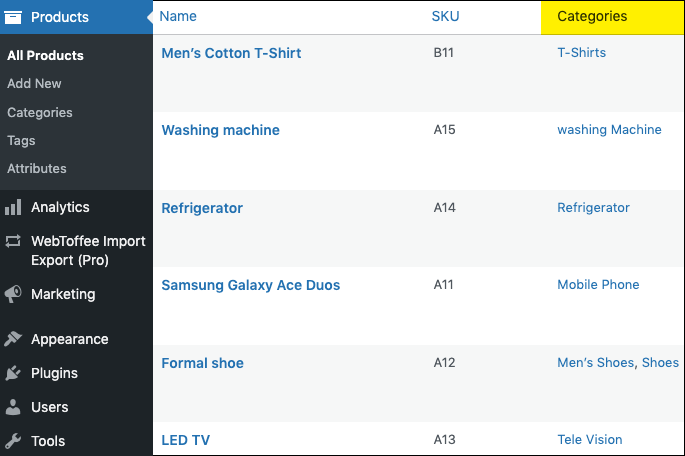
Step 1: Alter the product category column in the input file
In the CSV file, let us add one more category for some of the products as highlighted below. If a product has multiple categories, separate them by ‘|’ and if a product has a category with a hierarchical structure, separate them by ‘>’.
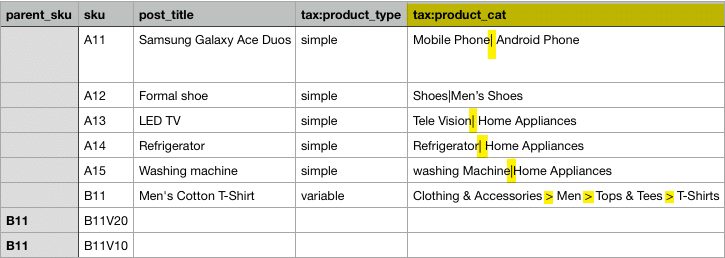
Once the changes are made, save the input file and move to the next step of updating the product categories.
Step 2: Bulk update categories
To update the product categories in bulk, begin with the import process. Follow the steps in How to import products and on reaching Step 4, choose Update for the option: If product exists in the store.

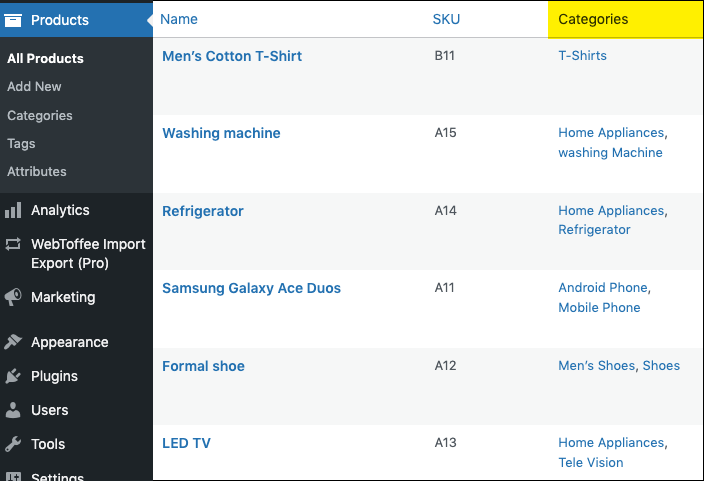
This action will update all the existing product details with the new one, which includes product categories.

Rowan
March 5, 2024
the plugin says it “organize products in multiple categories, subcategories and even update existing categories of products” – so it changes the category name, but I can’t see if it actually updates the title tag, which is different?
Hema
May 15, 2024
Hello Rowan,
Thanks for reaching out. We would like to apologize for the late reply, as our site was under maintenance.
It seems we need more information about your site to solve the issue you are facing. Kindly contact customer support for further assistance.
Michael
January 10, 2024
can you import (and then create) new categories in woo commerce
Vineetha
January 11, 2024
Hi Michael,
It is possible to import a new category. If you want to create a new category, you can just enter the category name in the tax:product_cat column and import, and the category will be created and the product will be assigned to the category.
Ali
May 1, 2024
How make Parent Child While uploading product category?
like Parent is “Men” and “T-Shirt” is Child
Hema
May 15, 2024
Hello Ali,
Thanks for reaching out. For updating parent-child categories, it is wise to use ‘>‘. So in your case It’s going to be Men > T-shirt. Make this changes in the CSV file. Once the changes are made, save the input file and move to the next step of updating the product categories.