Share:


Table of Contents
There is already so much said about SEO for WooCommerce that it just feels too much. With all the strategies and tools out there, it’s hard to know what you really need, especially when you’re only starting out. And now, with the AI search, what should you focus on in 2026?
This is a very good question that many online shop owners have. That’s why in this guide, we’ve collected all the best tips to optimize your WooCommerce store and ensure that it performs well in both traditional search engines and AI search.
Before we get into the actual tips to improve your e-store’s SEO performance, let’s first understand the basics. What are we even optimizing for? How do Google or other search engines find your shop and decide to rank it higher or lower?
It’s a complex process with many internal operations, but if we were to summarize it simply, it comes down to the following 3 steps:
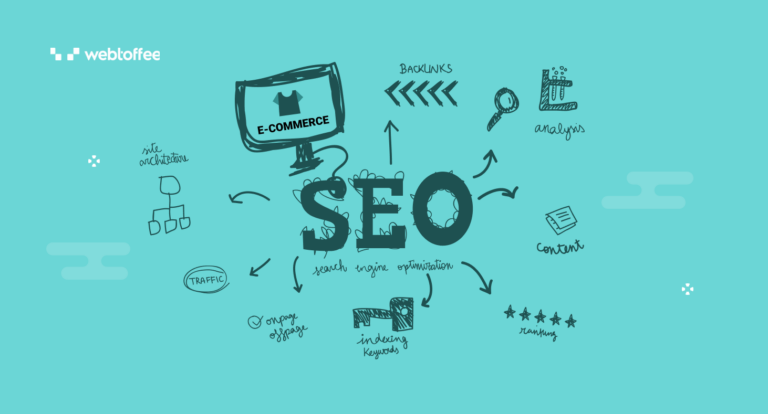
- Crawling: Google search bots crawl (i.e., go through) all the pages on the web they can find and access.
- Indexing: The search engine indexes pages (i.e., adds them to its “database”).
- Ranking: Based on numerous factors, Google algorithms decide what position in search results each page deserves.

It might seem like you can’t really influence the process, as it’s all up to Google bots and algorithms to decide. But in reality, it isn’t like that.
You have to make sure that your website is crawlable, indexable, and optimized to rank better in SERPs (search engine results pages). And this is where all the WooCommerce website optimization tips will come into play.
SEO is evolving faster than ever, largely because of AI-powered search experiences. Earlier, ranking on the first page of Google was the main goal. In 2026, that alone is no longer enough.
AI-driven results, such as Google AI Mode and ChatGPT search, often pull information from a wider range of sources. These sources do not always match the top-ranking websites in traditional search results.
This means you can’t rely only on technical SEO and keyword optimization anymore. To stay visible, your store needs:
- Original and helpful content
- Strong brand signals across the web
- Clear expertise and trustworthiness
- A smooth and reliable user experience

SEO today is not just about rankings. It’s about making your store easy to understand, trustworthy, and worth mentioning for both search engines and AI systems.
Below are some reasons why you should focus on improving SEO for your eCommerce website.
- A major portion of buyers search before they buy a product. SEO enhances a website’s ranking in the SERPs, boosting the store’s visibility and leading to increased sales opportunities.
- Businesses can focus on specific keywords or phrases, attracting relevant traffic that is more likely to convert into sales. This targeted approach ensures the leads generated are of higher quality.
- Organic traffic generated through SEO is free, as compared to paid ads.
- Websites that rank higher in the SERPs are often perceived as more credible sources by users. By achieving a higher ranking, eCommerce websites can build authority in their niche and build trust.
Besides these benefits, search engine optimization provides a competitive edge in the marketplace. Outranking competitors in search results increases the likelihood of product discovery and purchase, particularly if the website offers an exceptional shopping experience.
Now, let’s get into the actual tactics you can use to optimize your WooCommerce store.
1. Build Your SEO Foundation
This is something you often need to do just once. You might have to update or adjust some things later on, but you won’t change most of the basics.
First things first, you need to choose an SEO plugin that supports WooCommerce (e.g., RankMath, YoastSEO, etc.). Just pick one you prefer and avoid getting tons of random plugins, as they will just create a mess and decrease your store’s performance.
Next, you have to set up a couple of things:
- Add templates for meta titles and meta descriptions: These are important to let your plugin know exactly what you need. A template could be something simple, like Category Name – Product Name | Your Store Name.

- Leave canonicals on: Canonical is a tag that helps you avoid duplicates, a common issue for online shops. It basically tells Google what page to prioritize. So, unless you know what you’re doing, keep these enabled.
- Submit a clean sitemap: A sitemap is a document with all your web pages that helps search engines discover your content faster. Just submit it to Google Search Console.
- Enable breadcrumbs: These are the typical paths both users and search engines follow on your site (e.g., Shop > Men > Footwear, etc.).

- Create natural URLs: This is a major one, since changing your URL structure later on could be really challenging. You know this if you’ve ever done product migration. So, your URLs have to be clean and logical from the start (shop/category/product).

- Make sure you only index necessary pages: Online stores don’t need to have every single page in search results. So, make sure you add a noindex tag to cart, checkout, order confirmation pages, etc. Most plugins will do this automatically, but still double-check it.
After you complete the six steps above, you can start doing more advanced WooCommerce website optimization. But before you make sure everything we’ve talked about is in order, any further tweaks make no sense.
2. Do Proper Keyword Research
When it comes to keyword research, try to look at the bigger picture. If you check any online store, you will see three main types of pages:
- Informational (e.g., blog): These are rather optional, as not every e-commerce website will have these. But it’s a great opportunity to target informational search intent where you can write about “how to choose XYZ product,” for example.
- Category: These are some of the most competitive keywords you have to optimize for. The intent here is broader, but that’s what more people search for. After all, there are more users looking for “dresses” than “floral dress”.
- Product: These are the exact products people look for, so many of them will be long-tail keywords. Search volume is usually lower for these queries, but when users know exactly what they need, they are also more likely to buy.

3. Start Building Authority With Backlinks
This is an important point for both traditional SEO and AI search discoverability.
The more other pages online mention you and link to you, the higher your rankings will be. Of course, it’s a very simplified claim because there are other major factors that influence rankings. Still, it is one of the key parts of being more visible in search.

How can you get these backlinks? There are many strategies out there, but some of the most effective ones any eCommerce SEO expert would recommend are:
- Suppliers, partners, distributors, etc.: When you own a store, you definitely have some partners. And one of the easiest ways to get backlinks is by exchanging them with other businesses.
- Guest blogging: This tactic is one of the most effective ones. The idea is simple: you find websites related to your niche and write guest articles for them. Still, you’ll likely need professional SEO tools to select quality guest posting opportunities.
- Press releases: There are several platforms that can post press releases for you when something newsworthy happens. While press releases don’t have too much SEO value, they are still very useful for a natural link profile.
The only issue is that finding pages online that agree to add a backlink to your website isn’t that easy, especially if you’re still a small website. That’s why many find trusted inventories with backlinks and simply buy despite the risks.
4. Work on Your Product Pages
WooCommerce product SEO is usually considered pretty tough in almost every niche. Why? Simply because you often have thousands of similar products competing with you. While ranking well for particular products is generally hard, it is still possible if you optimize properly.
One of the most important things is to add very detailed product descriptions. It should be unique text (not just copied and pasted from your distributor). Ideally, you want to cover everything, from benefits and ingredients to use cases and application guidance.

Apart from detailed and unique product descriptions, pay attention to the following:
- Meta title and description. Make this clear and straightforward. In the meta description, you can also add some “guarantees” and perks like free returns, free delivery, etc.
- Images. Make sure that all your visuals are high-quality, optimized in terms of size, and have alt text.
- Schema. We’ll talk about this later, but it can really improve your CTR if you get rich results.
And also, we’ve already mentioned that if you target long-tail keywords with lower keyword difficulty instead of just product names, you can get higher positions in rankings.
5. Optimize Your Category Pages
Many online stores practically ignore category pages. But it could be a great additional source of traffic. In fact, when most people want to buy something, they search “categories,” not “products.”
Whether they need “white dress,” “golf clubs,” or “ceramic cookware,” these are often categories. So, if you want to show up when your potential buyers are searching for your products, you have to work on your categories as much as on your product listings.
For this, you can:
- Create a clear structure. In the example below, you can see Home / Shop All / Cookware / Ceramic Nonstick. It’s all logical and easy.

- Don’t overoptimize. Avoid adding tons of overoptimized copy. Instead, focus on an easy, slightly optimized title, intro (subheading), and maybe an FAQ. This will be more than enough.
- Organize your internal links well. Your category pages have to be logically interlinked with other pages. Internal links are really important to help search bots discover your pages.
6. Avoid Duplicate Pages
Duplicate pages are one of the most common cause of WooCommerce SEO issues. It happens because, typically, each product you add has different colors, sizes, etc. And all these filters can create tons of duplicates.
If all of them are indexed and there is no additional guidance for Google, it will be confused, not knowing which one to prioritize. As a result, you’ll waste your crawl budget (Crawl budget is the number of pages a search engine is willing and able to crawl on your website within a given time period.) and won’t rank your important pages properly. So, you have to avoid this as much as possible.
We’ve already mentioned this briefly above. But it’s an extremely important thing, so let’s see this in detail. These are the main things you can do to avoid duplicates:
- Keep only one product URL (all its variations should be inside).
- Don’t index separate links for each color or size.
- Avoid having thin pages that are almost identical (if you have very similar pages with copy-pasted content, it’s best to leave just one and make sure it’s unique).
- Add a noindex tag to pages that Google doesn’t need, like cart, checkout, etc.
- Use canonical tags when needed.
7. Set Up Schema
Schema markup is a special code that allows you to display rich results and help search engines better understand your products.

Thanks to schema markup, search engines can clearly understand details like:
- Reviews,
- Addresses,
- Images,
- Product ratings, etc.
If you search for “schema markup” now, you’ll see lines of code. And if you’re a beginner, it will most likely scare you off. But here is great news, when it comes to WooCommerce, you don’t need to code anything or manually import product metadata.
Your SEO plugin will do it all for you automatically. Your main task is to check it and not break anything. The easiest way to make sure your schema works is by using Google’s Rich Results Test (it’s free).

One more thing: although WooCommerce adds schema by default, it’s often inconsistent. So, it’s better to stick to your SEO plugin.
8. Check Your Technical SEO
Technical optimization is really boring for most. Yet, this is one of the major things you can do to improve your SEO for WooCommerce.
Today, let’s cover the three most important elements:
- Security. Any website has to be secure. But if you’re an online shop owner, you have to care even more about this. After all, who would want to enter their card details on a website that looks “shaky”? So, first of all, your store should run on HTTPS, not HTTP. Most likely, it’s already like that, depending on your hosting. Still, check it just in case.
- Mobile experience. Many people will use your website from their smartphones. So, make sure everything looks as it should. You need to have big enough icons and buttons. And the overall user experience should feel seamless.
- Core Web Vitals and page speed. This is a set of metrics that assess your website performance. You can check it for free with Google’s PageSpeed Insight. And if the results aren’t good, you can start fixing them with the suggestions on the same page.
Beyond technical optimization, the overall website experience plays a major role in how users and search engines perceive your store. Using an AI website builder, businesses can create fast, well-structured, and visually consistent pages that improve usability and engagement, both of which directly impact SEO performance and conversions.

9. Improve Your Trust Signals for AI Search
AI search is less about pure keyword optimization and more about caring for your brand and making sure that you’re visible across several platforms. This means having mentions on forums, review websites, maybe some bigger multi-brand stores, other blogs and websites, etc.
If you’re just starting out, don’t obsess over this because it will quickly get overwhelming. Instead, just keep in mind that you have to care for your brand. So, as much as you can try to:
- Register different social media accounts,
- Mention your name on Reddit and other forums (but don’t be spammy),
- Encourage your customers to leave Google reviews,
- Send your products to microbloggers so that they mention your brand on their socials,
- Get some collabs with other brands,
- Consider selling your products on multi-brand websites.
This list goes on and on. Basically, it’s an extension to your link building strategy. The only thing is that here, even your unlinked mentions are useful. If you don’t know whether you have any, you can track them with any social listening tool.

If you follow all the tips we’ve seen today, you’ll improve your WooCommerce SEO well beyond just 2026. Once you do this initial optimization, you’ll be ready for any changes in the future. And adapting to them will be much easier.
Yet, don’t forget that whether you want to optimize for traditional search engines or AI search, it’s a never-ending process. And you can’t just do it all once and forget about it for the rest of your website’s existence. So, just do something consistently, and you’ll be surprised by your store’s performance.


Subcribe to our newsletter