


Share:


Table of Contents
- Shopify Markets allows merchants to customize shopping experiences for different customer groups based on geographic and demographic factors.
- It supports various market types, including regional, B2B, retail, and channel markets, all managed from one centralized system.
- The feature includes an inheritance system for settings, allowing submarkets to adopt configurations from parent markets while enabling specific customizations.
- Shopify Markets is included in all Shopify plans, but advanced features may require higher-tier subscriptions.
- Merchants can create and manage multiple markets without a fixed limit, facilitating easy expansion into new regions.
- While Shopify Markets streamlines international selling, complex inventory needs or independent regional operations may necessitate separate stores or additional tools.
Selling internationally on Shopify sounds straightforward until you need to manage different currencies, product prices, languages, and shipping options for each country.
You might want UK customers to see prices in pounds, German customers to shop in euros, and wholesale buyers to access different product catalogs. Managing all these experiences through separate Shopify stores can quickly become complicated.
That’s where Shopify Markets comes in. Shopify Markets lets you customize how different customers experience your store, without necessarily creating separate storefronts.
But how does Shopify Markets work, what features are available on your plan, and how much does it cost?
In this guide, we’ll explain everything you need to know about Shopify Markets in 2026, including its features, pricing, limitations, and how to set up your first market.
Shopify Markets is a built-in Shopify feature that lets you create customized shopping experiences for customers in different countries, regions, customer groups, and sales channels. It allows you to manage local currencies, product pricing, catalogs, languages, and storefront settings from a single Shopify admin.
For example, suppose you run a Shopify store in the United States and want to expand into the UK and Germany.
With Shopify Markets, you can display prices in GBP for UK customers and EUR for German customers, offer localized product information, and configure different product catalogs for each region.
You can manage these experiences without creating a separate Shopify store for each country.
What Changed in Shopify Markets in 2025–2026?
Originally, Shopify Markets primarily focused on international selling.
However, Shopify introduced a more unified Markets experience that brings international, B2B, retail, and sales channel management into one system.
Shopify announced the broader rollout in its Winter 2025 updates and continued expanding its functionality through 2025 and 2026.
The newer Markets system supports:
- Regional markets: Customize selling experiences for different countries and regions.
- B2B markets: Manage wholesale pricing and catalogs for business customers.
- Retail markets: Customize product availability and pricing for physical retail locations.
- Channel markets: Manage catalogs and pricing for different sales channels.
It also introduces a more flexible market structure with parent markets, submarkets, and inherited settings. This means Shopify Markets is no longer just an international selling feature. It provides a centralized way to manage different buying experiences across your business.
Shopify Markets works by grouping customers into markets and applying specific settings to each group.
Every market has two main components:
1. Conditions determine which customers belong to a market. These can include geographic locations, B2B company locations, retail locations, or sales channels.
2. Customizations determine what customers experience, such as currency, product availability, pricing, domains, languages, and storefront content.
When a customer visits your store, Shopify identifies the markets that apply to them and displays the relevant shopping experience.
Let’s look at the main concepts.
Markets, Parent Markets, and Submarkets
A market represents a specific group of customers. For example, you could create a European market that includes Germany, France, and Italy. If these countries share similar selling requirements, you can manage them together.
But what if you want different pricing or promotional content for Germany?
Instead of creating an entirely separate configuration, you can create a Germany submarket within your European market. The Germany submarket inherits settings from its parent market by default. You only need to customize what’s different.
Here’s how this might look:
| Market | Configuration |
|---|---|
| United States | Default store settings and USD pricing |
| Europe (parent market) | Shared European product catalog and localization settings |
| Germany (submarket) | German language and country-specific pricing |
| France (submarket) | French language and France-specific promotions |
This inheritance system reduces repetitive configuration. For example, changing a shared setting in the European parent market can carry through to submarkets that haven’t overridden that setting.
How Market Catalogs Work
A catalog determines which products customers can purchase and at what prices. You can use catalogs to offer different products or prices in different markets.
Suppose your clothing store sells 200 products in the United States, but only 150 are suitable for shipping to Europe. You can create a European catalog that includes the relevant products and configure its pricing. You can also apply percentage-based price adjustments or set fixed prices for individual products.
One important detail is that catalogs don’t always replace inherited catalogs. In regional parent markets and submarkets, applicable catalogs can be combined, with more specific pricing taking precedence.
This is worth checking when configuring product availability for individual countries.
What Is the Backup Region in Shopify Markets?
Every Shopify store has a backup region. This determines what customers see when they visit your store from a country or region that isn’t included in any active market.
For example, suppose you sell only in the US, UK, and Germany, but someone visits your store from Japan. If the United States is your backup region, that visitor may see your US storefront experience, including its currency and language.
However, they won’t be able to complete checkout because Japan isn’t included in an active market. The backup region is not another market. It’s a fallback setting for unmatched visitors.
Shopify automatically sets your store’s home country as the backup region, but you can change it under Settings → General → Backup Region.
Shopify offers different ways to manage international selling, and the terminology can be confusing. The three main options are Shopify Markets, Managed Markets, and expansion stores.
Shopify Markets
Shopify Markets provides the tools for customizing regional and customer experiences within one store.
You can manage currencies, languages, pricing, catalogs, and other settings, but you’re generally responsible for international selling obligations such as tax compliance, customs, and shipping.
Shopify Managed Markets (Formerly Markets Pro)
Managed Markets builds on Shopify Markets by adding services that simplify international selling. Previously called Shopify Markets Pro, the service was renamed Managed Markets in June 2024.
Managed Markets uses Global-e as the merchant of record for eligible international transactions. This means Global-e handles supported responsibilities such as international tax registration and remittance, customs documentation, duties, and certain shipping arrangements.
Managed Markets is available to eligible businesses in the continental United States and certain stores in Canada and the United Kingdom.
Shopify Expansion Stores
Expansion stores are additional Shopify stores managed under a Shopify Plus organization. Unlike Markets, each expansion store operates independently with its own product records, inventory, settings, and storefront.
Shopify Plus supports one main store and up to nine eligible expansion stores under its standard contract, subject to Shopify’s eligibility requirements.
Expansion stores are useful when different regions need more operational independence than a single store can provide.
You don’t need Shopify Plus to use Shopify Markets. Regional markets are available across Shopify plans, including Basic, Grow, and Advanced.
However, some advanced customization options are restricted to higher-tier plans. Here’s how the main features compare.
| Shopify Markets feature | Basic / Grow | Advanced | Plus |
|---|---|---|---|
| Create regional markets | Yes | Yes | Yes |
| Customize currencies and catalogs | Yes | Yes | Yes |
| Configure domains and languages | Yes | Yes | Yes |
| Create B2B markets | Yes | Yes | Yes |
| Active B2B market catalog assignments | Up to 3 | Up to 3 | Unlimited |
| Market-specific theme customization | No | Yes | Yes |
| Market-specific checkout and account page customization | No | Yes | Yes |
| Market-specific checkout blocks | No | No | Yes |
| Market-specific business entities | No | No | Yes |
For a detailed breakdown, read our guide on Shopify Plus features, pricing, and when to upgrade.
Shopify Markets doesn’t have a separate subscription fee. Regional markets are included in your Shopify plan.
However, selling internationally can introduce additional costs.
1. Currency Conversion and Payment Processing Fees
If customers pay in a currency different from your store’s payout currency, currency conversion fees may apply.
The exact fee depends on your Shopify Payments region and payment configuration. Standard payment processing fees also apply. You should account for these expenses when determining your international product prices.
2. Shipping, Taxes, and Localization Costs
Creating markets is free, but fulfilling international orders isn’t.
You may need to budget for international shipping, customs handling, taxes, translation services, and additional apps. For example, translating a product catalog into German may involve additional expenses if you use a professional translation service.
You might also need to purchase country-specific domains or configure additional integrations.
3. Managed Markets Fees
Managed Markets has separate transaction-based charges. According to Shopify’s current documentation:
| Shopify plan | Managed Markets transaction fee |
|---|---|
| Basic | 3.5% |
| Grow | 3.5% |
| Advanced | 3.5% |
| Plus | 3.25% |
These fees apply to eligible international orders. Shopify Payments processing fees and applicable currency conversion fees are additional.
Managed Markets doesn’t have a separate monthly subscription fee.
Before choosing it, review your expected order volume, shipping costs, and profit margins to determine whether the additional services justify the fees.
Let’s walk through setting up a Shopify Market for a US-based store expanding into the United Kingdom.
Step 1: Access Shopify Markets
Log in to your Shopify admin and go to Markets.
You’ll see two default markets:
- Domestic: Your home country or region.
- International: A suggested group of countries or regions, inactive by default.
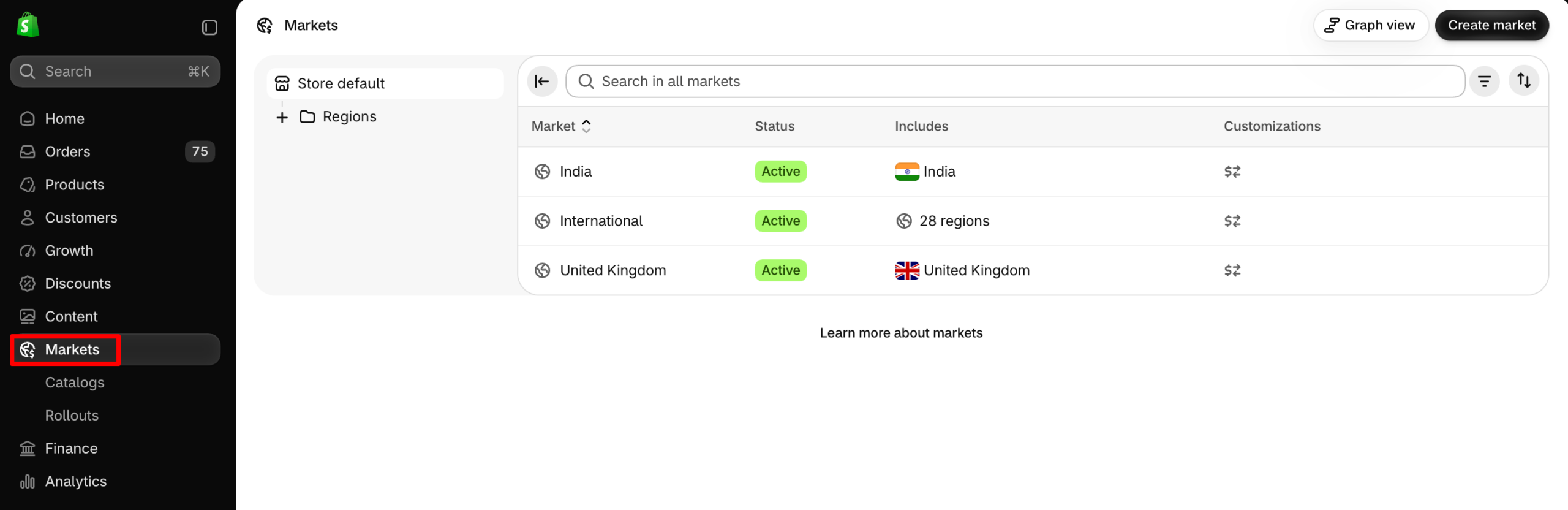
Review these before creating a new market.
Step 2: Create a New Market
From the Markets dashboard,
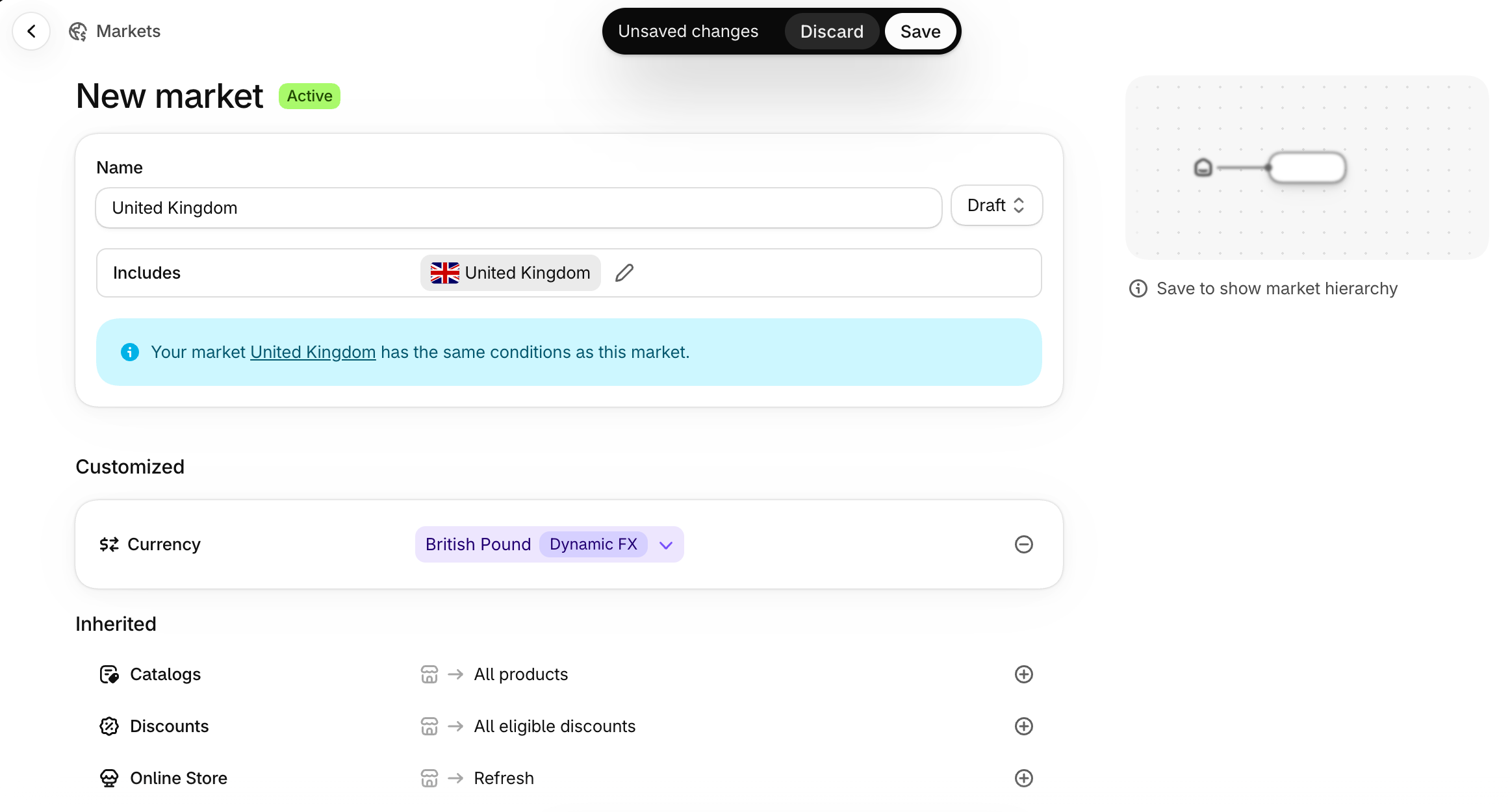
- Click Create market and enter a name, such as United Kingdom.
- Set the publishing status to Draft so you can configure the market before launching.
- Under Includes, click Add condition → Regions, select United Kingdom, and click Save.
Step 3: Configure Currency and Product Pricing
Open your new market, click the plus icon next to Currency, and select GBP. Depending on your payment setup, you can use dynamic or manual exchange rates.

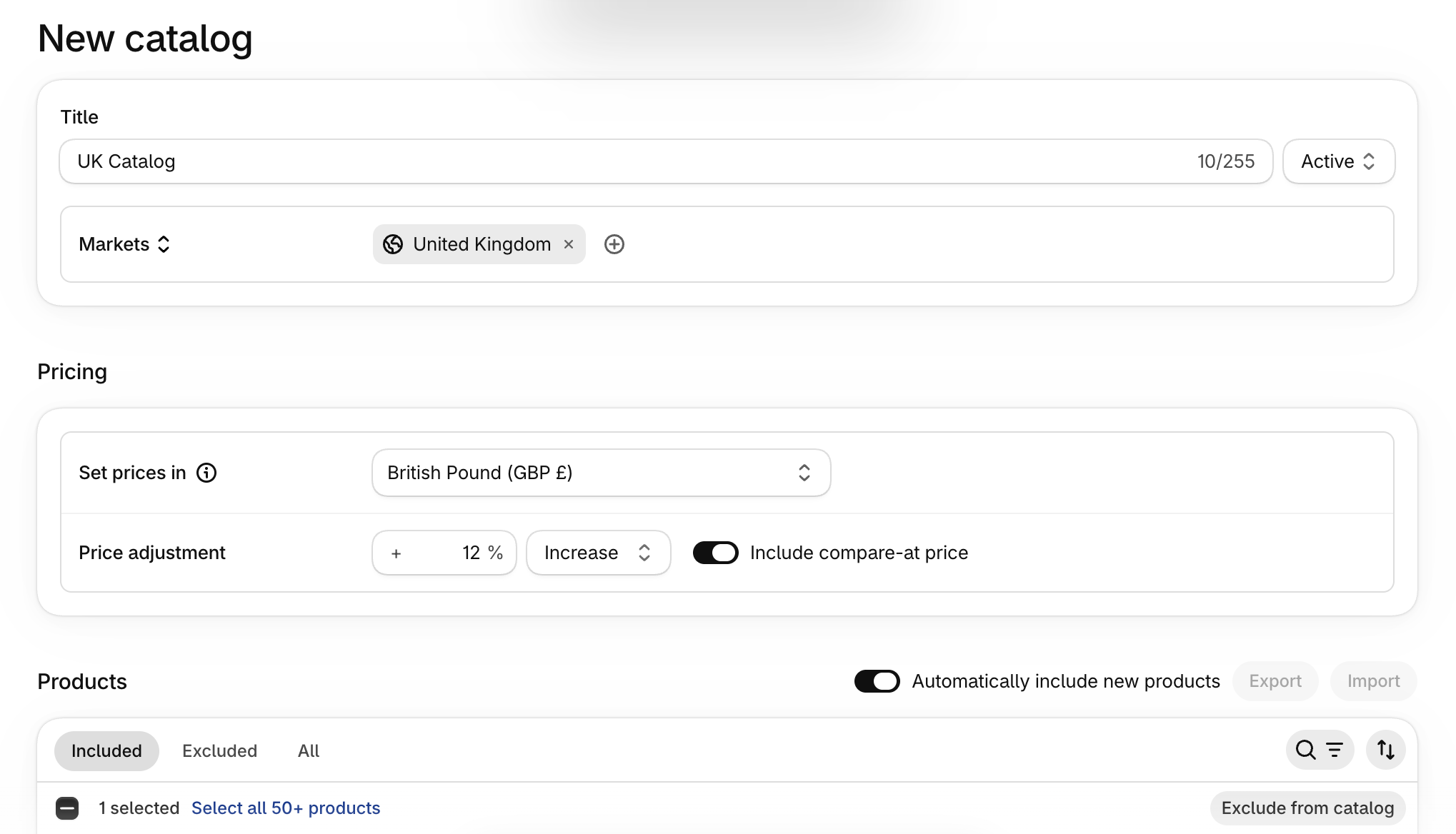
To customize products and prices, go to Markets → Catalogs → Create catalog.
Create a catalog, choose which products to include, and set percentage-based price adjustments or fixed prices. Assign the catalog to your UK market and save.
Step 4: Configure Domains and Languages
Open the market and select Domain/language.
Choose your preferred URL structure:
- Subfolder: yourstore.com/en-gb/
- Subdomain: uk.yourstore.com
- Separate domain: yourstore.co.uk
Subfolders are generally the simplest option for stores starting international expansion.
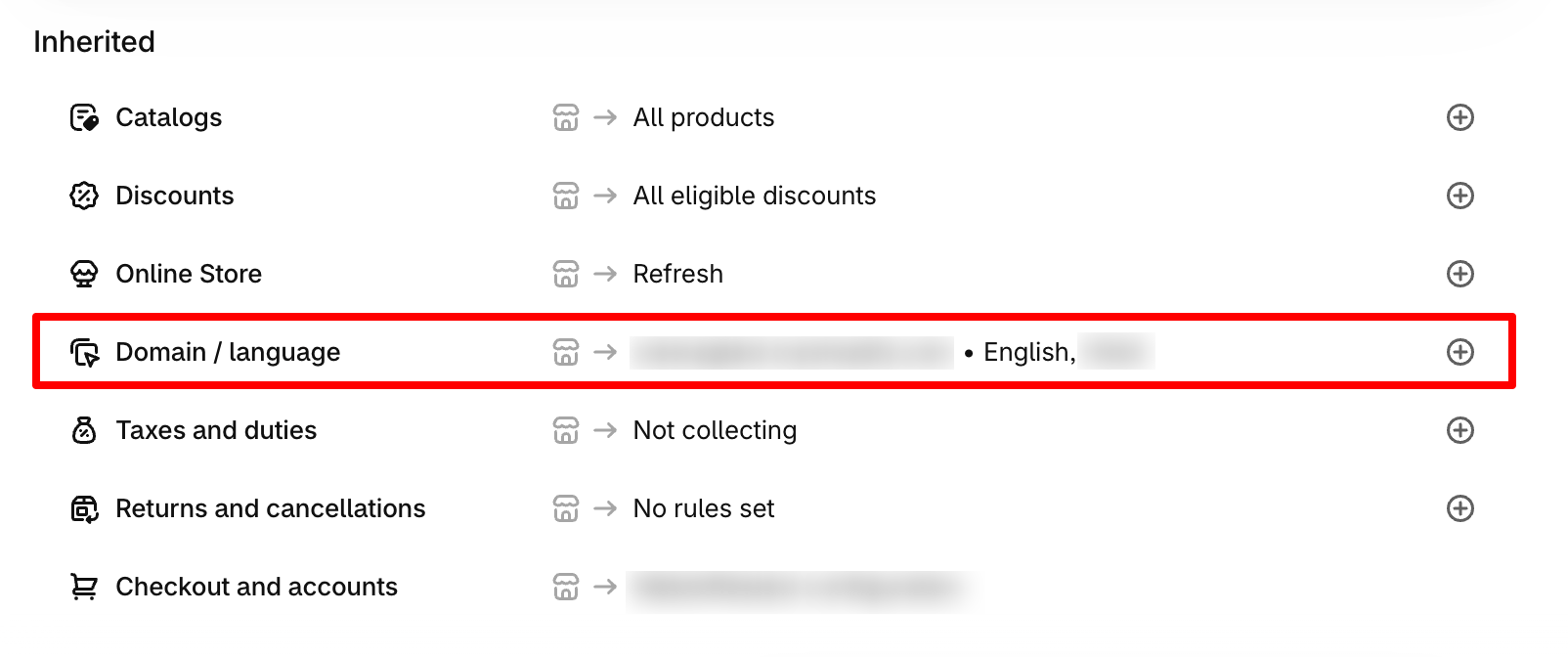
To add a language, go to Settings → Languages → Add language. You can use Shopify’s Translate & Adapt app to localize storefront content.
Step 5: Configure Shipping and Taxes
Go to Settings → Shipping and delivery and ensure the UK has valid shipping rates.
Next, return to your market and review the Duties and taxes settings to configure applicable tax display and duty collection options.
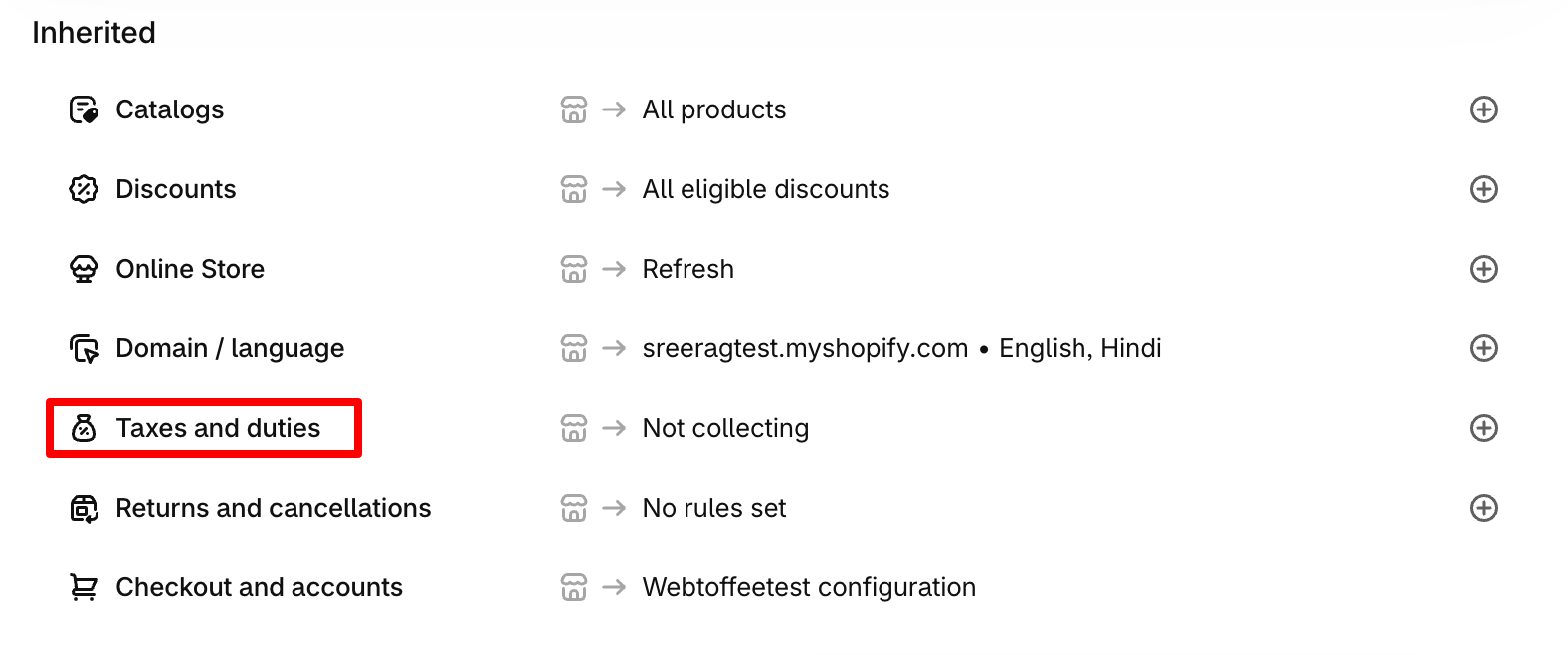
Remember that Shopify Markets doesn’t automatically handle all international tax and compliance obligations.
Step 6: Preview and Test Your Market
Before activating the market, verify that:
- Products and prices display correctly in GBP.
- Localized URLs and storefront content work.
- Shipping rates and applicable taxes are configured.
- Customers can complete checkout using the expected settings.
Use Shopify’s View as feature to check market-specific product availability and pricing. Test checkout using an appropriate test-order method once the market is ready.
Step 7: Activate Your Market
Return to Markets, open your UK market, change its status from Draft to Active, and click Save.
Make sure valid shipping rates are configured before activation. Your UK market is now ready to serve eligible customers. You can follow the same process to expand into additional countries or create submarkets for more specific requirements.
Setting up international markets isn’t only about displaying prices in different currencies.
You also need to help search engines identify which version of your store is relevant to customers in different countries and languages. Shopify Markets includes several features that support international SEO.
Subfolders vs. Subdomains vs. Country-Specific Domains
The URL structure you choose affects how you organize localized storefront content.
Here’s how the three options compare.
| URL structure | Example | Best suited for |
|---|---|---|
| Subfolder | yourstore.com/de/ | Most stores starting international expansion |
| Subdomain | de.yourstore.com | Stores that prefer separate regional URL structures |
| Country-specific domain | yourstore.de | Businesses establishing a dedicated presence in a particular country |
Subfolders are generally a good starting point because they use your existing domain and are relatively simple to manage.
Country-specific domains can provide stronger geographic signals for search engines, but they require separate domain registration and management. Unless you have a specific reason to use another structure, subfolders are often sufficient for smaller Shopify stores.
How Shopify Handles Hreflang Tags
Hreflang tags help search engines understand which language or regional version of a page should appear in search results.
For example, suppose you have these storefront URLs:
- yourstore.com — United States
- yourstore.com/fr/ — France
- yourstore.com/de/ — Germany
Hreflang tags help Google understand that these URLs serve different audiences. Shopify automatically generates hreflang tags for supported market and language configurations with distinct URLs. It also handles related technical SEO elements, including canonical URLs and international sitemap generation.
However, automatic hreflang generation doesn’t guarantee that every localized page will rank. You still need useful, relevant content for the markets you’re targeting.
Don’t Translate Your Store Into Languages Nobody Is Searching In
Just because Shopify allows you to add another language doesn’t mean you should immediately translate your entire store. Before enabling a new language, evaluate whether there’s sufficient customer demand to justify the effort.
Consider:
- Where your customers and website visitors are located.
- Which languages they prefer when shopping.
- Whether relevant products have search demand in those languages.
- Whether you can maintain accurate translations over time.
For example, if you’re expanding into Germany, offering German product descriptions and category pages may be worthwhile.
But adding several additional languages without clear customer demand can create unnecessary work and poorly maintained storefront content. Also, avoid relying entirely on automatic translation for important product details, policies, or checkout-related information.
Review translations for accuracy and adapt terminology where necessary.
The goal isn’t simply to make your store available in more languages. It’s to create useful localized experiences for the customers you’re actually trying to reach.
Shopify Markets covers many international selling requirements, but it isn’t a complete solution for every business. Here are some situations where you may need additional tools or a different store structure.
1. Advanced Customization Requires Higher Plans
Basic and Grow support essential Markets features, but market-specific theme customization requires Advanced or Plus.
If you need advanced checkout customization, customer-specific B2B catalogs, or market-specific business entities, you may need Shopify Plus. This can limit how extensively you can customize individual markets on lower-tier plans.
2. Multi-Currency Payments Require Supported Payment Providers
Shopify Markets lets you configure regional currencies, but processing payments in multiple currencies requires Shopify Payments or a supported Adyen integration.
With other payment processors, customers generally pay in your store’s default currency. This is important if localized checkout is a major part of your international selling strategy.
3. Complex Inventory and Fulfillment Needs
Shopify Markets manages product availability and pricing, but it doesn’t replace specialized inventory management or warehouse software. For example, if you have multiple warehouses, different regional fulfillment partners, or complicated inventory allocation rules, you may need additional tools.
Read our guide to Shopify inventory management to learn how Shopify handles stock tracking, locations, and inventory updates.
4. Separate Regional Operations May Need Separate Stores
Shopify Markets works well when your business can share much of its underlying store infrastructure.
However, separate Shopify stores may be more practical when different regions have independent teams, product systems, integrations, or operational requirements. For businesses consolidating existing storefronts or moving data between stores, a Shopify import/export app such as StoreRobo can help transfer products, customers, orders, and other store data.
This can simplify parts of a migration, although market settings and configurations still need to be planned separately.
Yes. Shopify Markets is included in Shopify plans, and creating regional markets doesn’t require a separate subscription. However, international payment processing, currency conversion, shipping, and optional services such as Managed Markets can involve additional fees.
No. Shopify Markets is available on Basic, Grow, Advanced, and Plus plans. However, some advanced features, such as unlimited B2B market catalogs and market-specific business entities, require Shopify Plus.
Shopify doesn’t impose a fixed limit on the number of country or region markets you can create. You can create markets for individual countries or group multiple regions together. However, specific features, such as B2B catalog assignments, have plan-dependent restrictions.
Yes. You can create and manage markets without Shopify Payments. However, processing payments in multiple currencies requires Shopify Payments or a supported Adyen configuration. Otherwise, customers generally pay in your store’s default currency.
Managed Markets may be worthwhile if you sell internationally and want Global-e to handle supported merchant-of-record responsibilities, including international tax and customs obligations. However, its transaction and currency conversion fees should be considered when evaluating your profit margins.
Shopify Markets is generally better when you want centralized operations with localized customer experiences.
Separate stores make more sense when regions require independent storefronts, product data, integrations, or business operations. If you mainly need different currencies, languages, and regional pricing, Shopify Markets is usually the simpler option.
Conclusion
Shopify Markets makes it easier to sell to different countries, regions, and customer groups without managing a separate store for every audience. It brings essential features such as localized currencies, product catalogs, languages, and regional pricing into one place.
For most Shopify merchants expanding internationally, Markets is a good starting point. You can begin with one or two countries, test the customer experience, and introduce more markets as your business grows.
If your requirements become more complex, Managed Markets, additional Shopify apps, or separate storefronts can help address the limitations of a single-store setup.


Subcribe to our newsletter


