Share:


Table of Contents
- Composable commerce allows businesses to integrate various specialized tools for different eCommerce functions, enhancing flexibility and customization.
- It operates on a modular architecture where packaged business capabilities (PBCs) handle specific tasks, such as inventory management or checkout processes.
- The approach supports multichannel operations, enabling businesses to connect various sales channels seamlessly.
- While offering significant advantages, composable commerce also introduces challenges related to integration complexity, maintenance costs, and data consistency.
- Businesses should evaluate their specific needs and technical capabilities before adopting composable commerce to ensure it aligns with their operational goals.
- Gradual implementation is recommended, starting with one capability to address a specific limitation before expanding to other areas.
Running an online store is straightforward when one platform can handle everything. But as a business grows, its needs can become more complicated. Perhaps the built-in product search isn’t good enough, the inventory system can’t keep up with multiple warehouses, or expanding into new markets requires features the platform doesn’t offer.
Replacing the entire eCommerce platform isn’t always the best answer. What if you could improve individual parts of your store without rebuilding anything else?
That’s the idea behind composable commerce. It lets businesses bring together specialized commerce tools instead of depending on one system for every function.
In this guide, we’ll explain how composable commerce works, how it compares with headless and traditional eCommerce, and what to consider before adopting it.
Composable commerce is an approach to building an eCommerce system using separate, specialized software components that communicate through APIs. Instead of relying on a single platform to provide every feature, businesses select the services that best meet their requirements and connect them into one shopping experience.
For example, an online retailer might use one system to manage products, another to power search, and a third to track inventory across warehouses. These systems work together behind the scenes, even though shoppers experience them as one store.
Think of it like assembling a toolkit: you choose the tools needed for each job rather than buying one package and using every tool it contains.
The individual building blocks are often called packaged business capabilities (PBCs). Each PBC handles a specific business function, such as checkout, product management, or promotions.
This modular approach offers several benefits:
- Greater flexibility: Choose specialized tools for different business functions instead of relying entirely on one platform.
- Easier upgrades: Improve or replace individual components without rebuilding the entire eCommerce system.
- Multichannel support: Connect websites, mobile apps, and other sales channels to shared commerce services.
- Better scalability: Add new capabilities as your business expands into new markets or sales channels.
- Reduced vendor dependency: Replace services that no longer meet your requirements without necessarily changing the entire platform.
However, composable commerce also introduces additional integration and maintenance responsibilities. For smaller businesses with straightforward requirements, an all-in-one eCommerce platform may still be the more practical choice.
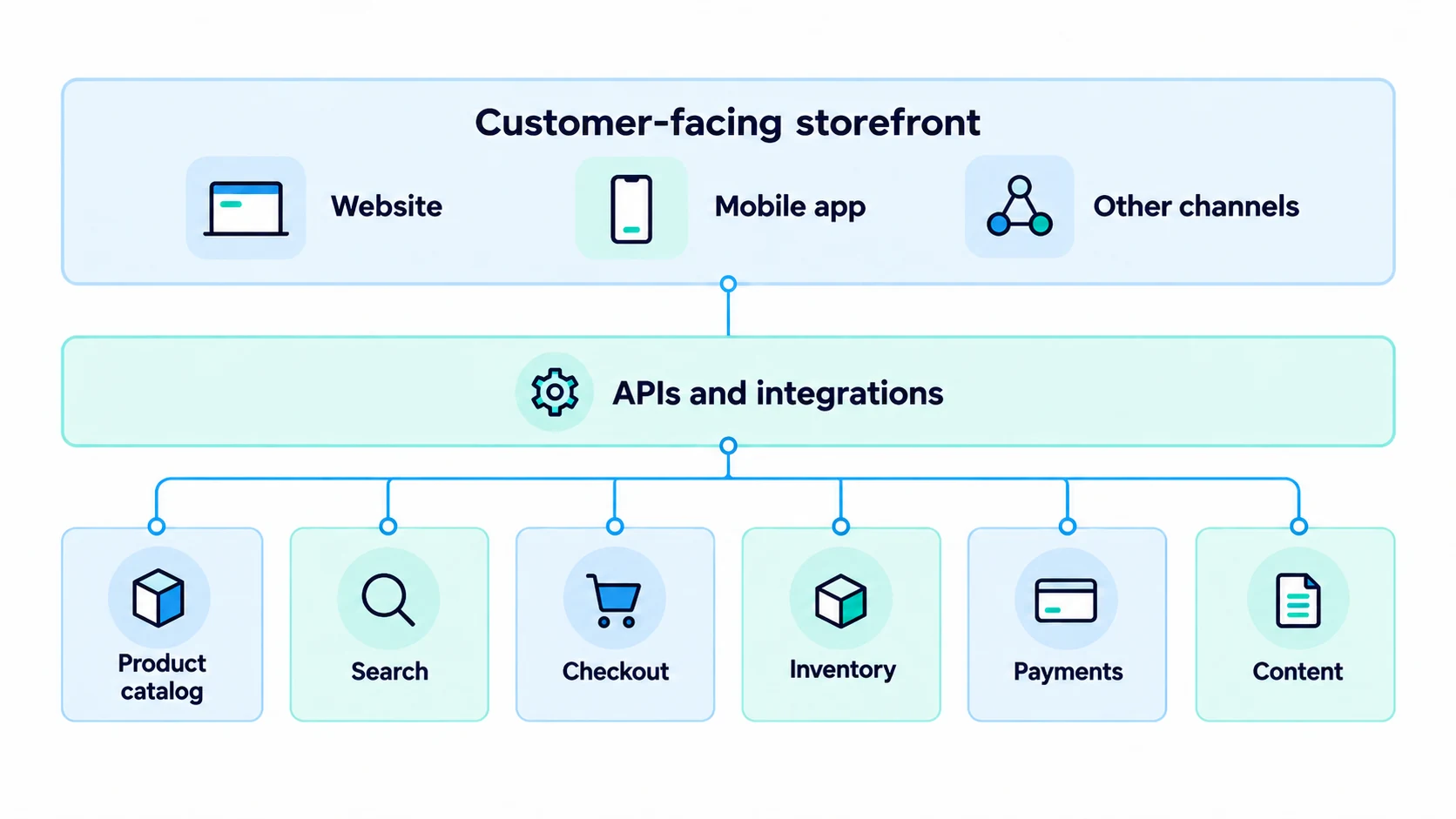
A composable commerce architecture connects independent business capabilities using application programming interfaces (APIs). An API allows one application to request information or trigger an action in another without requiring both to be built as a single system.
A typical setup might include these components:
- Storefront: The website or app where customers browse and buy products.
- Commerce engine: The core system handling carts, pricing, checkout, and orders.
- Product information management (PIM): A centralized source for product descriptions, specifications, and other catalog details.
- Search and discovery: Tools for search results, filters, and product recommendations.
- Inventory management: A system tracking stock across locations and sales channels.
- Payments and content: Services for processing transactions and managing storefront content.
The storefront communicates with these services through APIs, either directly or through an integration layer that coordinates requests.
Example: A customer places an order
Imagine a shopper looking for running shoes. They search on the storefront, which retrieves relevant products from a dedicated search service. The product page displays descriptions from the PIM and checks available stock through the inventory system. When the shopper buys a pair, the commerce engine handles checkout and creates the order. The inventory service then receives an update so the stock count stays accurate.
The shopper sees one continuous experience, even though multiple systems have contributed to it.
This setup creates flexibility, but it also requires careful planning. Product IDs, prices, stock quantities, and order statuses must remain consistent across systems. APIs connect the components; they don’t automatically eliminate integration problems.
Composable commerce is built around modularity, interoperability, and independent change. Businesses aim to choose capabilities based on their needs, connect them reliably, and update one area without unnecessarily disrupting others.
You’ll often see these ideas explained through MACH architecture, an approach promoted by the MACH Alliance:
- Microservices: Smaller software services handle defined functions instead of placing all functionality in one application.
- API-first: Systems are designed to communicate through documented APIs, making integration a central consideration.
- Cloud-native: Software is designed to use cloud infrastructure and services to support deployment and scaling.
- Headless: The customer-facing storefront is separated from the systems that manage commerce operations.
For instance, a retailer could redesign its storefront without replacing the product catalog or order management system. It could also change its search provider without redesigning checkout, provided the integrations support that change.
Not every composable implementation has to adopt every MACH characteristic. The broader goal is to avoid unnecessary dependencies between capabilities. Also, PBCs and microservices aren’t identical: a PBC delivers a complete business function and may contain several microservices internally.
These terms describe different ways to organize ecommerce technology, but they aren’t interchangeable.
Traditional eCommerce typically provides storefront, catalog, checkout, and administrative tools within one primary platform. This makes setup and day-to-day management simpler, although customization may depend on the platform’s built-in features and extensions.
Headless commerce separates the customer-facing storefront from the ecommerce backend. Businesses can develop a custom website or app while the backend continues to manage products, carts, and orders.
Composable commerce extends the concept of separation to other capabilities. Rather than changing only the storefront, a business can choose independent services for search, content, promotions, inventory, or other functions.
| Feature | Traditional eCommerce | Headless commerce | Composable commerce |
|---|---|---|---|
| Storefront | Usually integrated | Separate from backend | Often separate |
| Backend | Mostly unified | Can remain unified | Selected capabilities are modular |
| Customization | Platform-dependent | Strong storefront flexibility | Flexibility across multiple capabilities |
| Technical effort | Usually lower | Moderate to high | Often high |
| Best suited for | Standard store requirements | Custom shopping experiences | Complex or evolving business needs |
A headless storefront can be one part of a composable architecture, but going headless alone doesn’t automatically make the entire commerce system composable. Similarly, adding a few plugins to a traditional platform doesn’t necessarily create independently replaceable business capabilities.
The right choice also depends on what your team can maintain: greater architectural freedom only creates value when the connections between systems remain dependable.
While composable commerce offers greater flexibility, it also introduces challenges that businesses should consider before adopting it.
- Higher implementation and operating costs: Businesses may need to pay for multiple services, development resources, cloud infrastructure, and integration tools. Ongoing maintenance, testing, and monitoring can further increase expenses.
- Technical complexity: Connecting different services requires development expertise. Each system may use different APIs, authentication methods, and data structures, making integration and troubleshooting more complicated.
- Data consistency challenges: Delayed inventory updates or inconsistent product information across systems can lead to stock discrepancies, incorrect pricing, and fulfillment issues.
- Vendor and security management: Working with multiple providers means managing different contracts, support arrangements, and security requirements. Businesses must also protect customer data and API credentials across connected systems.
- Longer implementation times: Building and testing a composable architecture can take more time than setting up a traditional eCommerce platform, particularly when extensive customization is involved.
Ultimately, businesses need to evaluate whether the flexibility of composable commerce justifies the additional costs, technical requirements, and ongoing maintenance.
Composable commerce can be implemented in different ways depending on a business’s existing platform and technical requirements. Here are two examples.
1. Shopify With a Custom Storefront
A Shopify store can use Shopify’s commerce backend to manage products, checkout, and orders while using a separately developed storefront for the customer-facing experience.
The business can also integrate specialized services for product search, content management, or personalization through APIs. This gives retailers more control over specific parts of their shopping experience without replacing Shopify’s core commerce functionality.
2. WooCommerce with External Business Systems
A WooCommerce store can integrate external systems for inventory management, product information, or order fulfillment using APIs.
For example, a retailer managing multiple warehouses could connect WooCommerce to a dedicated inventory management system while continuing to use WooCommerce for its core store operations.
These examples demonstrate how businesses can adopt selected composable capabilities without necessarily rebuilding their entire eCommerce infrastructure.
Shopify and WooCommerce can support composable approaches through APIs and integrations, but this doesn’t make them fully composable. Businesses with more complex needs can consider purpose-built platforms like commercetools or Elastic Path, depending on their technical and customization requirements.
Composable commerce is most useful when a business has requirements that its existing platform cannot meet efficiently and has the resources to manage multiple connected systems.
| Composable commerce may be a good fit if… | A unified platform may be better if… |
|---|---|
| You operate across several channels, markets, or warehouses. | You sell through one storefront with straightforward operations. |
| Your existing platform limits important custom workflows. | Existing features and integrations meet your needs. |
| You have developers or a reliable technical partner. | You need a solution your team can manage independently. |
| You can justify ongoing integration and maintenance costs. | Your priority is a quick launch and predictable costs. |
For many small and midsize businesses, starting with Shopify, WooCommerce, or another established platform is a sensible choice. Add specialized integrations as genuine requirements arise. Composable commerce becomes more attractive when those requirements demand greater independence between systems.
If composable commerce aligns with your business needs, the next step is to identify where it can deliver the most value and plan a gradual implementation.
A complete platform rebuild shouldn’t be the first step. A gradual approach makes it easier to test whether composable commerce can solve a real business problem.
Step 1: Identify Your Biggest Limitation
Start with the functionality that’s slowing the business down.
Is product search affecting discovery? Are inventory updates inconsistent across channels? Do you need different purchasing experiences for wholesale and retail customers?
Define the issue and the outcome you want before choosing technology.
Step 2: Map Your Current Systems and Data
Document where products, prices, customers, inventory, and orders are managed. Identify which system should be the source of truth for each type of information. This helps prevent conflicting updates when you connect new services.
Step 3: Choose One Capability to Improve
Instead of separating everything at once, begin with one area that has a clear business benefit. For example, a retailer might replace basic search with a dedicated search service while keeping the existing checkout and catalog systems.
Step 4: Evaluate Providers and Integration Requirements
Check API documentation, pricing, reliability, support, data portability, and compatibility with your current platform. Include implementation, maintenance, and staffing costs in the comparison, not just subscription prices.
Step 5: Test the Complete Customer Journey
Verify that product information, stock levels, discounts, payments, and orders work together correctly. Test failed API requests, delayed updates, traffic spikes, and service outages—not just successful purchases.
Step 6: Monitor Results Before Expanding
Measure whether the change improved the original problem. Track relevant outcomes such as search conversion, inventory accuracy, checkout errors, or time spent managing data. Expand to other capabilities only when the benefits justify the added complexity.
For stores using WooCommerce, the WooCommerce REST API provides a starting point for connecting external systems. It doesn’t replace the need to plan synchronization, authentication, and error handling.
No. Headless commerce separates the storefront from the backend. Composable commerce allows businesses to assemble multiple independent commerce capabilities, which may include a headless storefront.
MACH stands for microservices, API-first, cloud-native, and headless. These principles support flexible, loosely coupled systems and are commonly associated with composable commerce.
It can be. Costs may include software subscriptions, development, hosting, integration tools, and maintenance. The total depends on how many capabilities you separate and how complex the integrations become.
No, but larger businesses with complex requirements are often better positioned to benefit. Smaller stores can adopt selected integrations without building an entirely composable system.
No. Open source describes access to software source code and its licensing terms. Composable commerce describes how software capabilities are organized and connected. A composable architecture can include both open-source and proprietary services.
For more on the distinction, see our guide to the benefits of open-source eCommerce platforms.
Conclusion
Composable commerce gives businesses the flexibility to build an eCommerce system around their requirements rather than relying on one platform for every capability. By connecting specialized services through APIs, teams can improve selected parts of the shopping experience while retaining what already works.
But that flexibility comes with integration costs, maintenance, and added technical responsibility. For stores with straightforward needs, a unified platform may still be the better option.
If you’re considering composable commerce, start with the problem you need to solve. Choose one capability to improve, measure the results, and expand only when the business case is clear.


Subcribe to our newsletter