Share:


Table of Contents
- A one-product Shopify store simplifies inventory management and marketing by focusing on a single product.
- This model can enhance customer experience by providing a clear and direct purchasing pathway.
- Choosing the right product is crucial, as the store's success depends on its demand and uniqueness.
- One-product stores often feature a streamlined website design that emphasizes product benefits and customer testimonials.
- While easier to manage, relying on one product can limit revenue diversification and increase vulnerability to market changes.
- Successful examples demonstrate the importance of effective branding, product presentation, and clear communication of the product's value.
Starting a Shopify store doesn’t necessarily mean selling hundreds of products. Sometimes, one great product is enough to build an entire business around.
Think of brands that sell a unique gadget, an innovative household product, or a specialized fitness accessory. Instead of offering a large catalog, they focus their marketing, branding, and customer experience on a single product. That’s the idea behind a one-product Shopify store.
But can you really build a successful online business with just one product? And how do you create a store that convinces customers to buy it?
In this guide, we’ll explain how one-product Shopify stores work, walk you through setting one up, and explore a few real examples you can learn from.
A one-product Shopify store is an online store that focuses on selling a single product or one main product with different variations.
Unlike a traditional eCommerce store that offers products across multiple categories, a one-product store builds its entire shopping experience around one offering.
For example, imagine launching a Shopify store that sells a portable blender. Instead of listing multiple kitchen appliances, your store focuses exclusively on that blender. Your homepage highlights its features, demonstrates how it works, and explains why customers should buy it.
You can still offer the blender in different colors or bundle it with accessories.
Generally, one-product stores follow three approaches:
- Single product with one SKU: The store sells one product without any variations.
- Single product with multiple variants: The store offers the same product in different colors, sizes, or configurations.
- Hero product with accessories: The store focuses on one main product while selling complementary items or replacement parts.
The main idea is to give shoppers a clear reason to purchase one product rather than asking them to browse an extensive catalog.
A one-product Shopify store can be easier to set up and manage than a traditional eCommerce business. However, relying on a single product also introduces certain risks.
Here’s a quick comparison:
| Advantages | Disadvantages |
|---|---|
| Simpler inventory and product management | Revenue depends heavily on one product |
| Easier to create focused marketing campaigns | Fewer cross-selling opportunities |
| Less complicated store navigation | Limited product selection |
| More attention to product branding and presentation | Harder to diversify revenue |
| Potentially lower initial inventory investment | Product demand may decline over time |
One major advantage is simplicity. You don’t have to organize dozens of collections, maintain hundreds of product descriptions, or manage an extensive inventory.
However, a smaller catalog doesn’t automatically mean higher profits or better conversion rates. If your only product fails to attract customers, faces supply issues, or becomes less popular, your entire business could be affected. That’s why choosing the right product is especially important.
You don’t need extensive technical knowledge to create a single-product store on Shopify. Here’s how to get started.
Step 1: Choose and Validate Your Product
Before creating your Shopify store, you need a product worth building a business around.
Ideally, your product should solve a specific problem, appeal to a clearly defined audience, or offer something different from existing alternatives. For example, a portable blender might appeal to fitness enthusiasts who want to prepare smoothies while traveling. A rechargeable motion-sensor headlamp could appeal to mechanics, campers, or people who work in poorly lit environments.
When evaluating a product, consider these questions:
- Does it solve a clear customer problem?
- Is there enough demand for the product?
- What makes it different from competing products?
- Can you source or manufacture it reliably?
- Will the selling price cover product costs, shipping, marketing, and other expenses?
You can use Google Trends, keyword research tools, customer reviews, and competitor websites to understand demand. Also, pay attention to profitability. A product may attract attention on social media, but if your acquisition and fulfillment costs are too high, maintaining a profitable business could be difficult.
Step 2: Create Your Shopify Store
Once you’ve selected your product, the next step is setting up your Shopify account.
Visit Shopify and sign up for an account.
During the initial setup, Shopify will ask for information about your business, including your store name, location, and the type of products you intend to sell. After creating your account, you’ll be taken to the Shopify admin dashboard. From here, you can manage your products, customize your storefront, configure payments, and process orders.
Before moving forward, review a few essential settings:
- Store details: Add your business name, address, and contact information.
- Store currency: Choose the currency you want to use for your products.
- Domain: Connect a custom domain through Settings > Domains.
- Shopify plan: Select a suitable plan before launching your store and accepting live orders.
For most beginners, Shopify Basic should provide the essential features needed to launch a single-product storefront.
Step 3: Add Your Product and Configure Its Variants
Now, let’s add your product to Shopify.
- From your Shopify admin, go to Products.
- Click Add product.
- Enter your product title and description.
- Upload high-quality product images or videos.
- Set the product price and inventory details.
- Configure shipping information and product availability.
- Click Save.
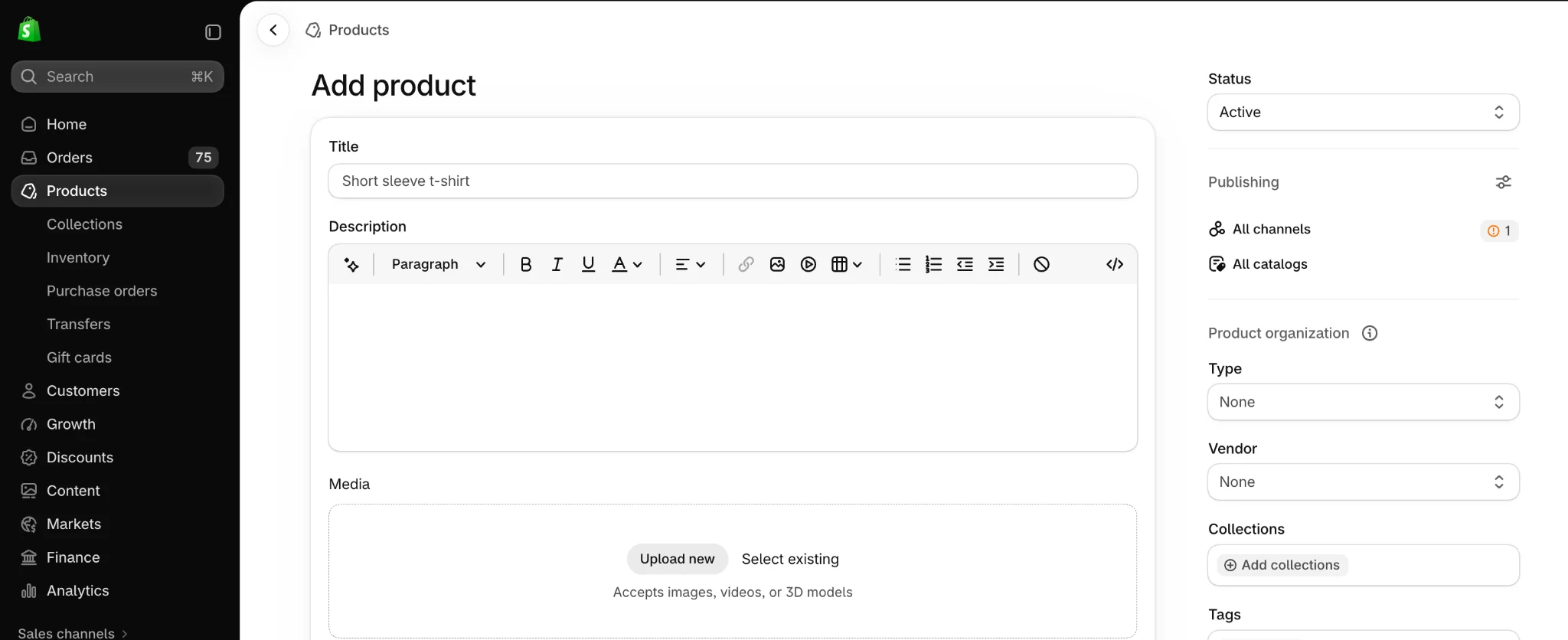
Your product descriptions should clearly highlight key features, unique selling points (USPs), and customer benefits. With AI-powered search changing how shoppers discover products, it’s important to provide detailed, relevant information that helps both customers and search engines understand what makes your product valuable.
For example, instead of simply writing “Portable blender with rechargeable battery,” you could say, “Enjoy fresh smoothies on the go with this compact, rechargeable blender. Its lightweight design, USB charging, and powerful blades make it ideal for travel, work, and everyday use.”
This approach combines product features with practical benefits while highlighting what makes the product stand out.
Adding product variants
If your product comes in different colors, sizes, or other options, you can manage these as variants instead of creating separate product listings. Assign unique Shopify SKUs to each variant to make inventory tracking and order fulfillment easier.
- Open the product in Shopify and navigate to the Variants section.
- Click Add another option, enter the option name, and add the available values.
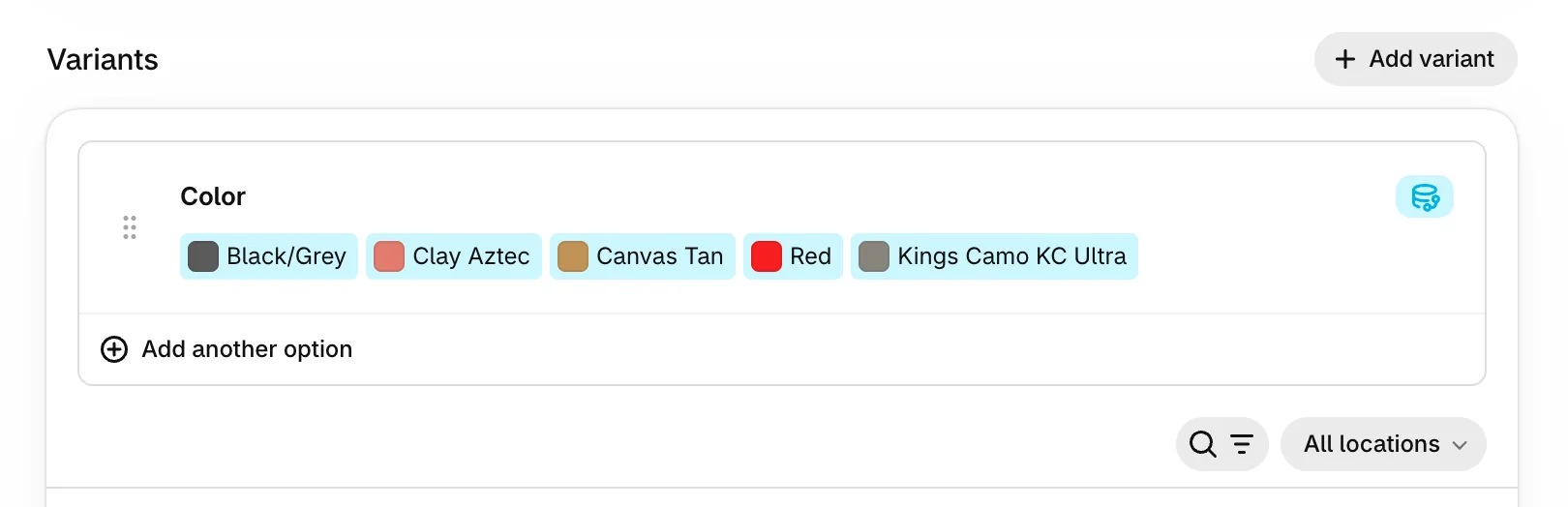
For example, you could add:
- Color: Black, White, Blue
- Capacity: 350 ml, 500 ml
Shopify generates variants based on the option combinations. You can then manage their prices, inventory quantities, and SKUs individually.
If you maintain physical inventory, enable quantity tracking and enter the available stock for each variant. This helps you manage different versions of the same product without creating an unnecessarily complicated catalog.
To learn more about tracking stock quantities, managing variants, and updating inventory, check out our guide to Shopify inventory management.
Step 4: Choose and Customize Your Shopify Theme
Your Shopify theme determines how your store looks and how customers interact with it.
Since you’re selling only one product, choose a theme that gives your product plenty of attention. Look for features such as large product images, prominent purchase buttons, mobile-friendly layouts, video support, and customizable homepage sections.
For a one-product store, you generally don’t need a complicated design or extensive navigation. A simple theme that presents your product clearly can work just as well as a premium theme.
Step 5: Design a Product-Focused Homepage
Your homepage is arguably the most important part of a one-product Shopify store.
In a traditional store, the homepage often directs shoppers toward different categories and collections. In a one-product store, its primary purpose is to explain your product and encourage visitors to purchase it.
Here’s a practical homepage structure you can follow:
| Homepage section | What to include |
|---|---|
| Hero section | Main product image, compelling headline, and Shop Now button |
| Product benefits | Three or four reasons to choose your product |
| Demonstration | Images or a short video showing the product in action |
| Social proof | Genuine customer reviews and testimonials |
| Product details | Specifications, pricing, variants, and FAQs |
| Final CTA | Clear Add to Cart or Buy Now button |
For example, if you’re selling a rechargeable headlamp, your hero section could highlight its hands-free lighting capabilities. The next section could explain its battery life, motion-sensing feature, and suitable use cases. You could then add a demonstration video showing how the product works.
This approach helps shoppers understand the product before asking them to buy.
Step 6: Set Up Payments, Shipping, and Store Policies
Before launching your store, make sure customers can complete purchases easily.
Configure payment methods
Go to Settings > Payments in your Shopify admin.
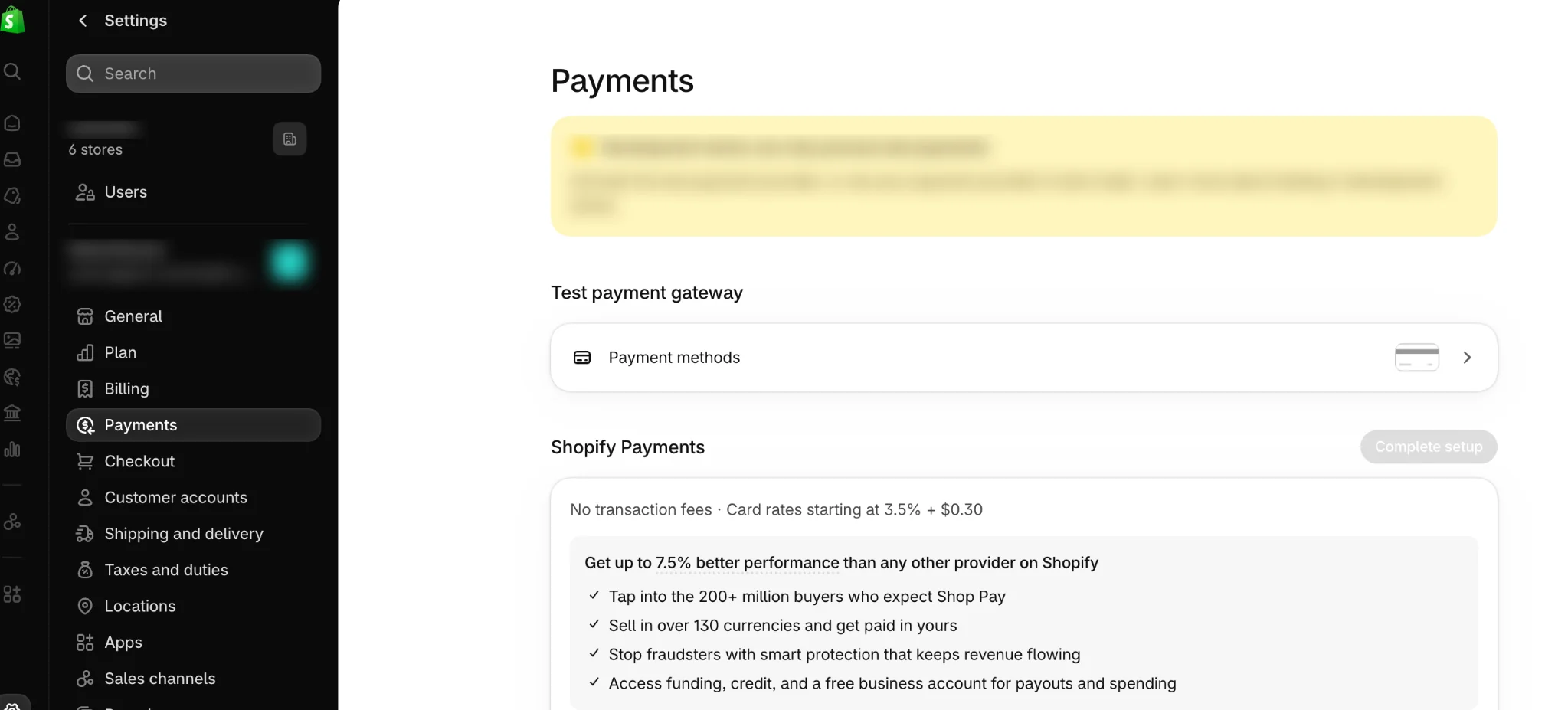
Depending on your country, you may be able to activate Shopify Payments or choose another supported payment provider.
Make sure your payment method is configured correctly, and your business information is verified where required.
Set up shipping
Next, go to Settings > Shipping and delivery.
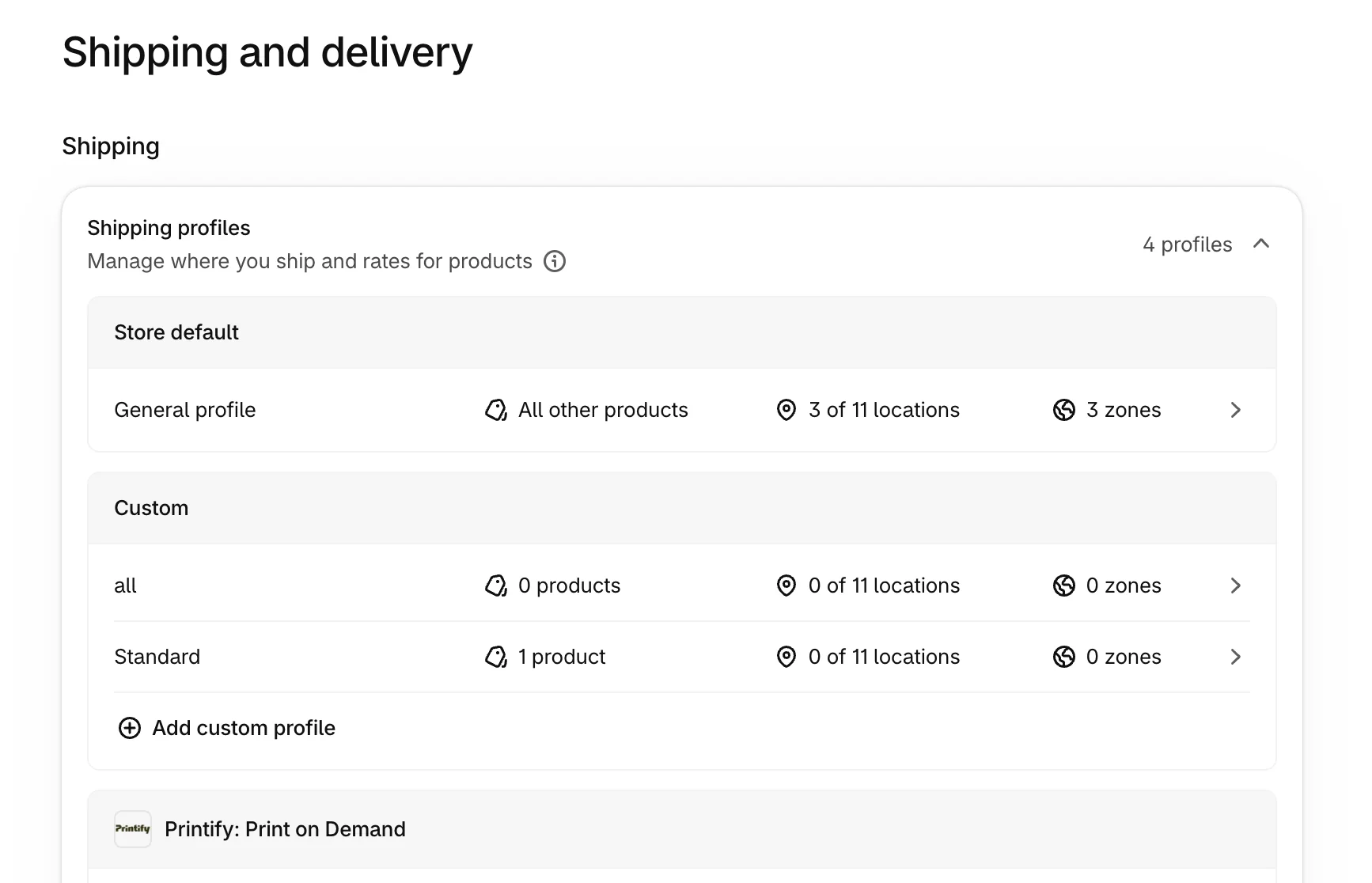
Configure the shipping regions, rates, and delivery options available to customers. For example, you might offer free domestic shipping or a flat shipping rate.
Also, ensure your product weights and fulfillment details are accurate.
Add essential store policies
Your store should clearly explain how orders, returns, and customer information are handled. Prepare your refund policy, privacy policy, terms of service, and shipping policy using Shopify’s policy settings.
You should also create contact information that customers can easily find. Even if you’re selling only one product, transparent policies and accessible support information help establish trust.
Step 7: Test Your Store and Launch
Your Shopify store is almost ready.
Before making it publicly available, go through the shopping experience as if you were a customer. Consider optimizing your product pages for search engines to help potential customers discover your store. Check that your product images load correctly, variants can be selected, and purchase buttons work as expected.
You should also:
- Preview your store on desktop and mobile devices.
- Verify product prices, inventory, and shipping charges.
- Test navigation links and contact forms.
- Review your checkout and order confirmation emails.
- Check your page titles, descriptions, and product URLs.
Shopify lets you place test orders using its Test payment gateway or supported payment test modes. This helps you verify checkout settings without processing a real payment.
Once everything is working correctly, select a paid plan if you haven’t already, deactivate payment test mode, and launch your online store by making it publicly accessible.
Your one-product Shopify store is now ready to accept customers.
Need some inspiration before building your own store?
Here are 3 real brands that demonstrate different approaches to building a business around a single product.
1. Brick – A Clear Solution to a Specific Problem
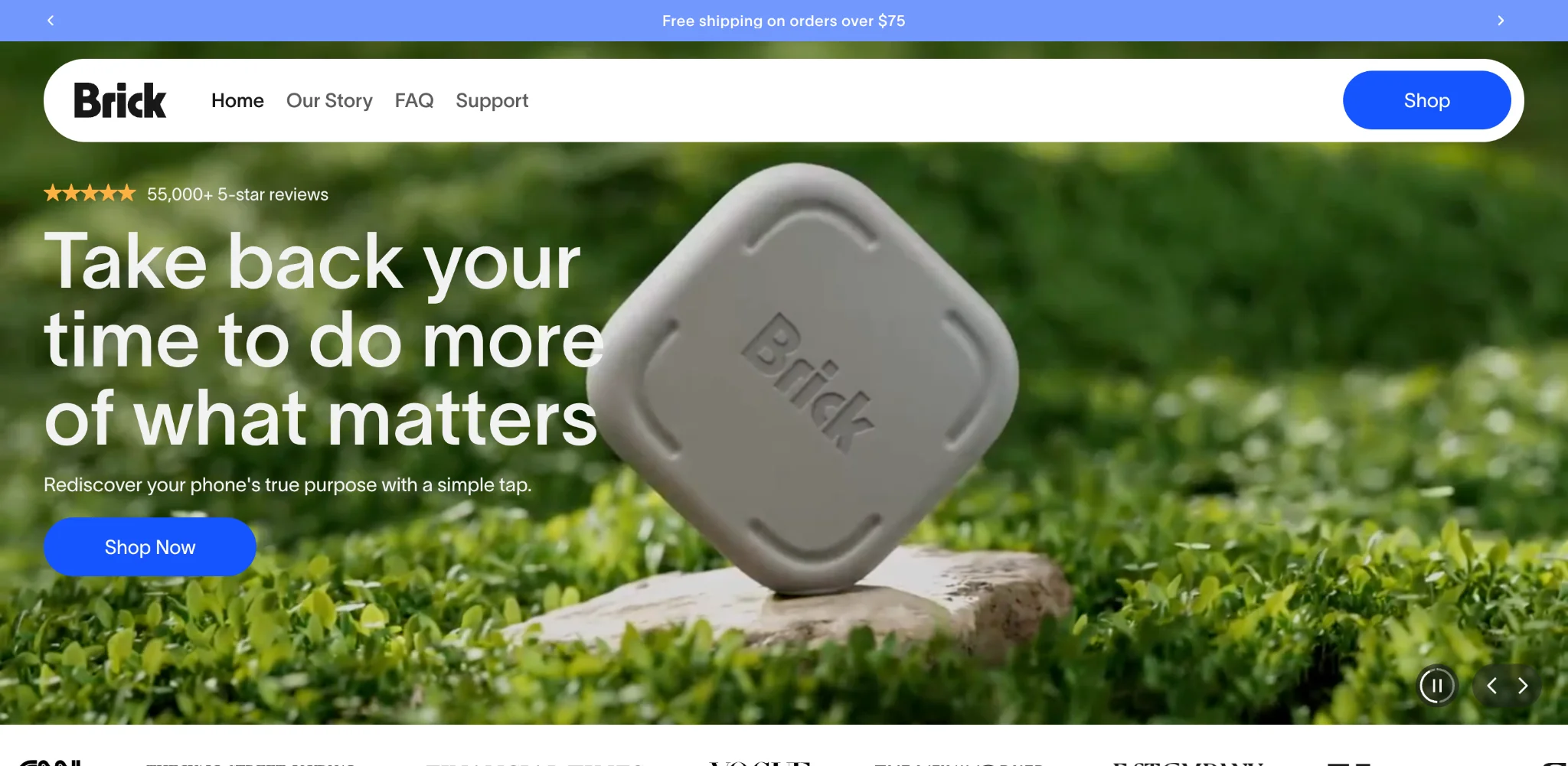
Website: getbrick.app
Brick sells a physical device designed to help users limit access to distracting smartphone apps. Instead of promoting a range of productivity tools, the brand focuses its messaging around a specific problem: excessive screen time.
Its product-focused website demonstrates the device’s purpose through visuals, explanatory content, and testimonials. The messaging emphasizes the benefit of spending less time distracted by a phone rather than overwhelming shoppers with technical specifications.
What you can learn: Build your homepage around the problem your product solves. Customers should quickly understand why they might need it.
2. Rocco – Premium Branding Around One Hero Product
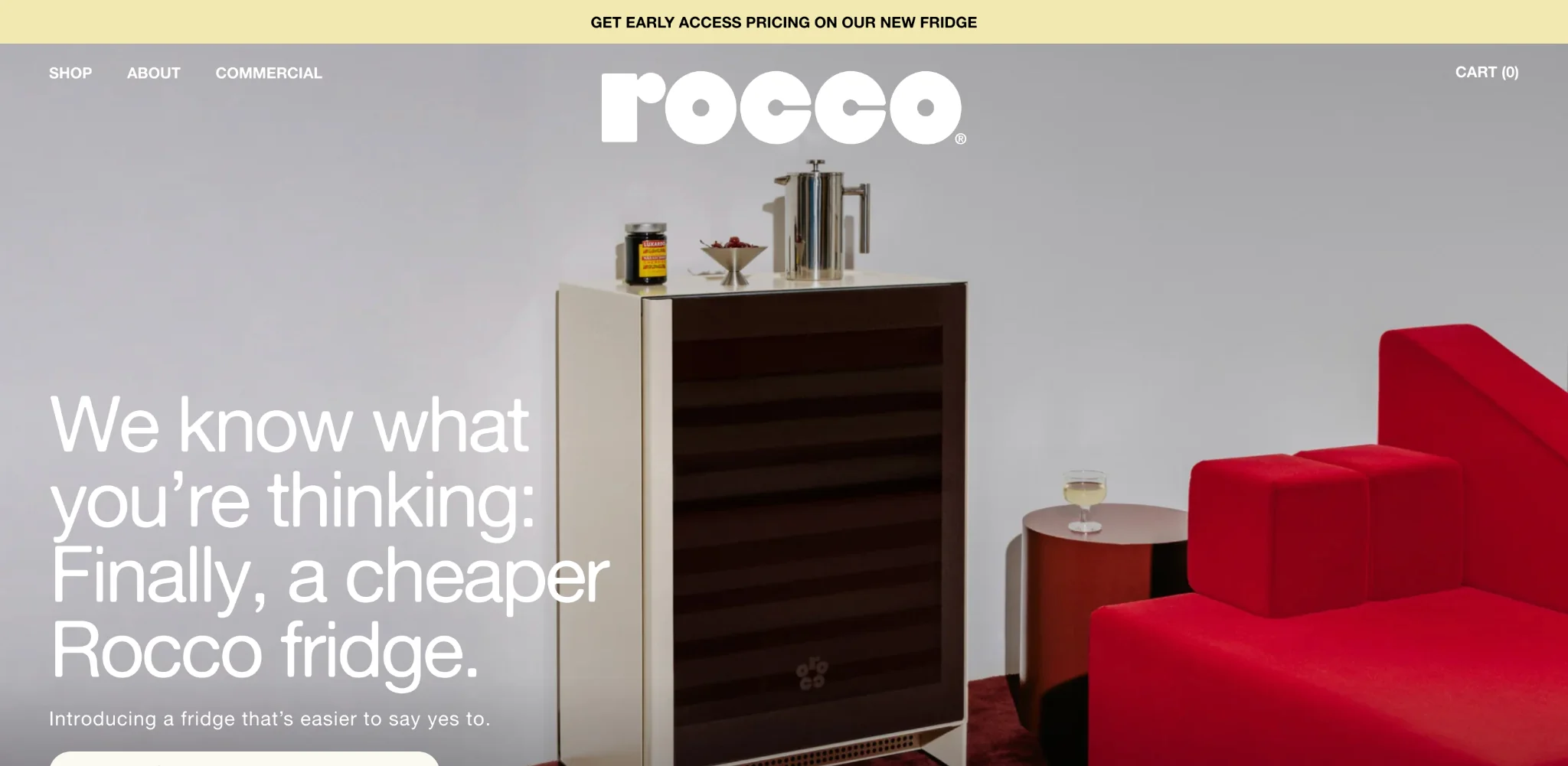
Website: roccofridge.com
Rocco is a beverage refrigerator brand known for its modern, design-focused fridge. The brand demonstrates how a single hero product can be positioned as a premium purchase. Its product presentation emphasizes the refrigerator’s appearance, functionality, and ability to complement modern living spaces.
Customers can also explore different color options and detailed specifications. Rather than competing primarily on price, the brand focuses on design and the overall product experience.
What you can learn: If you’re selling a premium product, invest in high-quality photography, detailed specifications, and messaging that explains what makes it worth the price.
3. Aerflo – Using Demonstrations to Explain a Unique Product
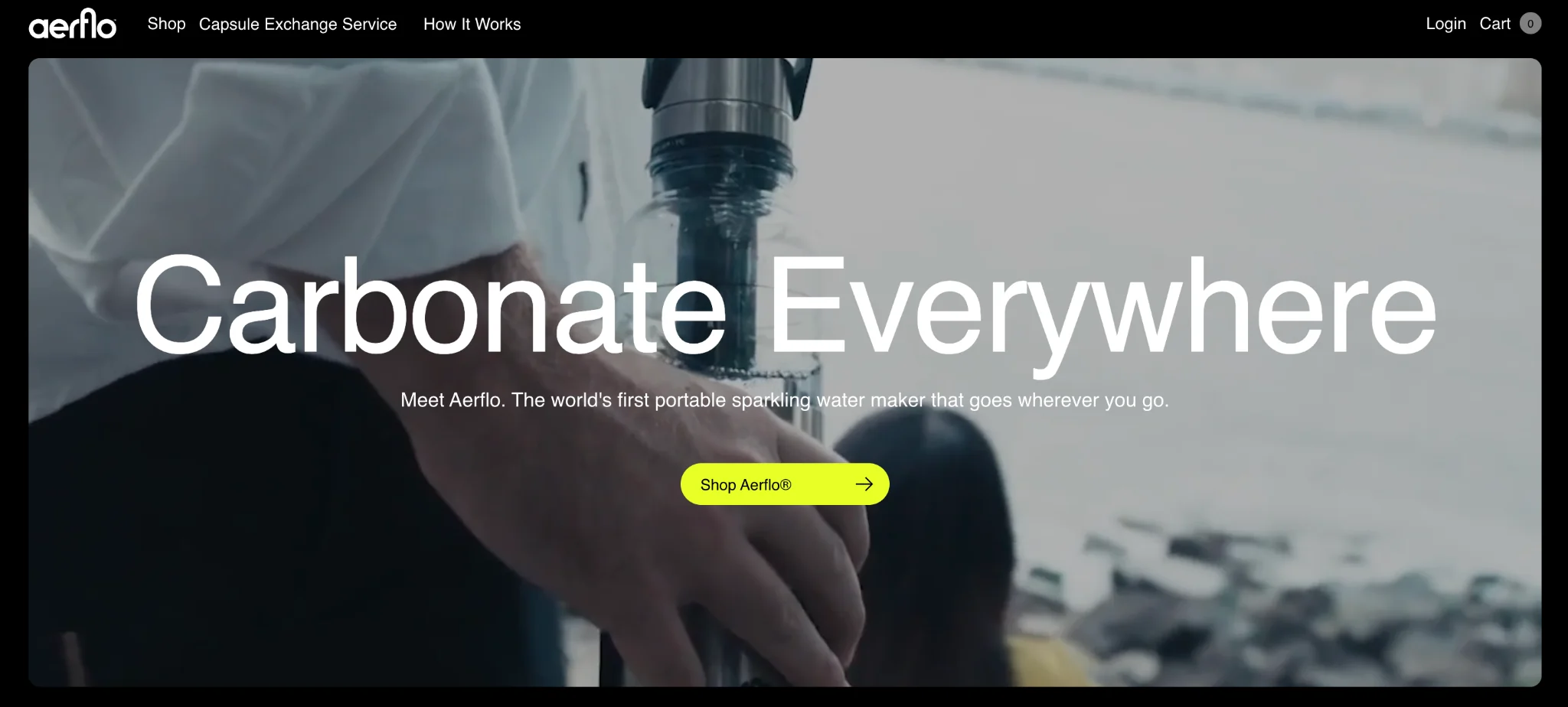
Website: aerflo.co
Aerflo offers a portable water carbonation system that allows customers to prepare sparkling water on the go. The product is different from conventional countertop soda makers, so demonstrating how it works is particularly important.
Its website uses videos, product imagery, feature explanations, and comparisons to communicate the benefits of its offering. Rather than expecting visitors to immediately understand a relatively unfamiliar product, the brand walks them through its functionality.
What you can learn: If your product introduces an unfamiliar concept, use short videos, demonstrations, and comparisons to make it easier to understand.
A one-product Shopify store can be a good option if you have a distinctive product, a clearly defined target audience, or a business idea you want to validate before expanding.
It may be particularly suitable for:
- Entrepreneurs launching an innovative product.
- Dropshippers testing a focused product offering.
- Businesses selling specialized or niche products.
- Brands built around one flagship product.
However, it may not be ideal if your customers regularly expect a wide selection of products or if your business depends on repeat purchases across different categories. For example, selling general clothing, groceries, or home essentials through a one-product store could limit what customers can purchase from you.
Also, remember that you can always expand your catalog later. If your original product performs well, you might introduce additional variants, related accessories, or new products. As your catalog grows, managing product data becomes more important. Tools such as StoreRobo Import Export can help with bulk product imports, exports, and updates when manual product management is no longer practical.
The right approach depends on your product, your audience, and your long-term business goals.
Yes. Shopify doesn’t require you to sell a minimum number of products. You can create a complete online store with just one product, customize its homepage, and accept customer orders. You can also offer different sizes, colors, or configurations of that product through Shopify variants.
They can be profitable, but profitability depends on product demand, pricing, sourcing costs, advertising expenses, shipping, and customer acquisition.
Selling one product may simplify certain operations, but it doesn’t guarantee higher conversions or profitability. Before launching, calculate your expected profit margin and determine how much you can afford to spend acquiring each customer.
The best theme is one that highlights your product clearly and makes purchasing easy. Look for large product images, video support, customizable homepage sections, mobile responsiveness, and prominent calls to action.
You can start with a free Shopify theme and upgrade to a paid theme later if you need more specialized features.
Yes. You can build a one-product dropshipping store on Shopify. Instead of purchasing and storing inventory yourself, you work with a supplier who fulfills orders on your behalf.
However, it’s important to verify product quality, supplier reliability, shipping times, and return procedures before promoting the product.
If you’re planning to source products from third-party suppliers, explore these Shopify dropshipping apps to compare available options.
Your main expenses include a Shopify subscription, domain registration, product sourcing, marketing, packaging, and shipping.
Shopify Basic currently starts at $29 per month when billed yearly, or $39 per month when billed monthly, based on standard US pricing. Payment processing fees and other charges may apply. You can use a free theme to reduce setup costs. However, you’ll still need to budget for product inventory or supplier costs, advertising, and order fulfillment.
Your total startup cost will depend on the product you choose and how you plan to market it.
Conclusion
Building a successful Shopify store doesn’t always require an extensive product catalog.
A one-product Shopify store allows you to focus your efforts on one offering, create a clear brand message, and build a shopping experience around a specific customer need. However, the success of your store ultimately depends on choosing the right product, understanding your audience, and communicating its value effectively.
Start with a product that solves a real problem, build a simple and trustworthy storefront, and validate demand before making larger investments.
Once you understand what customers want, you can decide whether to continue focusing on your hero product or expand into complementary offerings.


Subcribe to our newsletter