


Share:


Table of Contents
WooCommerce product data management is crucial for maintaining accurate and organized product information as an online store scales. The challenges associated with managing this data include inconsistencies, bulk update inefficiencies, and the complexities of variable products, all of which can hinder operational efficiency and customer satisfaction.
- Effective product data management ensures that all product information remains accurate and accessible across multiple platforms.
- Common challenges include inconsistent product details, time-consuming bulk updates, and difficulties in managing variable products and attributes.
- Automation through import-export plugins can significantly reduce human error and streamline data entry processes.
- Maintaining data consistency across various sales channels is essential to prevent discrepancies that can confuse customers.
- Migration and integration challenges often arise when transitioning between platforms, necessitating structured workflows to preserve product details.
- As businesses grow, evaluating and upgrading product data management tools becomes critical to meet increasing complexity and volume.
WooCommerce product data management is the process of keeping product information such as SKUs, prices, stock, descriptions, images, categories, attributes, and variations accurate and organized throughout your store.
Managing this data is relatively straightforward when your catalog is small. But as you add hundreds or thousands of products, work with supplier files, create complex variations, sell through multiple channels, or regularly update inventory and pricing, maintaining accurate product information becomes much harder.
Common problems include inconsistent product details, repetitive bulk updates, variation errors, duplicate products, outdated information, and mismatched data between different systems.
In this guide, we’ll look at the most common WooCommerce product data management challenges and practical ways to build more reliable workflows for managing your catalog as it grows.
What Is WooCommerce Product Data Management?
WooCommerce product data management refers to the way you organize, maintain, update, transfer, and distribute the information associated with products in your store.
That includes obvious customer-facing information such as product names, descriptions, prices, and images, as well as operational data such as SKUs, stock quantities, shipping information, attributes, variation relationships, tax settings, and custom fields.
For example, a clothing product might include:
- Product title and description
- Regular and sale price
- SKU
- Stock quantity
- Product images
- Size and color attributes
- Multiple variations
- Variation-level SKUs and inventory
- Brand and material information
- Categories and tags
- Weight and dimensions
WooCommerce needs this information to display and manage products correctly, while customers rely on it to understand what they are buying.
The challenge is not simply storing product information. It is making sure the information remains accurate, structured, consistent, and usable as products are added, updated, moved, or distributed elsewhere.
A merchant managing 20 products can do most of this directly from the WooCommerce dashboard. A store with 20,000 products receiving daily supplier updates requires a very different product data workflow.
What Data Does a WooCommerce Product Catalog Contain?
A WooCommerce product catalog contains more than just product names and prices. Each product can include multiple data fields that affect how the product appears, how it is purchased, and how it is managed in the backend.
Common WooCommerce product catalog data includes:
| Product Data Type | Examples | Why It Matters |
|---|---|---|
| Basic product information | Product title, slug, description, short description | Helps shoppers and search engines understand the product |
| Pricing | Regular price, sale price, tax status | Ensures products are sold at the correct price |
| Inventory | SKU, stock quantity, stock status, backorders | Helps prevent stock and order discrepancies |
| Product images | Featured image, gallery images, image metadata | Helps customers evaluate products visually |
| Categories and tags | Product category, subcategory, tags | Supports organization, navigation, filtering, and SEO |
| Attributes | Size, color, brand, material, weight | Supports product filtering and variations |
| Variations | Size/color combinations, variation SKUs, variation prices | Defines purchasable options for variable products |
| Shipping | Weight, dimensions, shipping class | Supports shipping calculations and fulfillment |
| Linked products | Upsells, cross-sells, grouped products | Supports merchandising and average order value |
| Custom data | Plugin-specific fields, custom product information | Supports specialized store and integration workflows |
None of these fields exists entirely in isolation.
A variation may depend on a parent product and its attributes. Inventory systems may depend on SKUs. Shopping feeds may require fields such as brand, GTIN, MPN, availability, or categories. Other WooCommerce extensions may introduce their own product metadata.
That is why product data management becomes less about editing individual fields and more about maintaining the relationships and structure between them.
Why Product Data Gets Harder to Manage as a WooCommerce Store Grows
Product data management usually becomes more complex gradually.
You may start by creating each product directly in WooCommerce. As the catalog grows, you begin using spreadsheets for bulk changes. Then a supplier sends regular stock or pricing files. Another WooCommerce store needs the same catalog. Products need to appear on Google, Meta, TikTok, or other sales channels. Your team introduces an ERP or another internal system.
Before long, product information may exist in several places:
Supplier or internal system → Spreadsheet/feed → WooCommerce → Sales channels
At this stage, the main problem is no longer simply adding products. It is deciding:
- Which system contains the authoritative information?
- How should updates move between systems?
- Which fields can be changed safely?
- How should existing products be matched?
- How frequently should updates happen?
- How should product relationships and variations be preserved?
Having a structured workflow becomes increasingly important as the number of products, users, systems, and sales channels grows.
7 Common WooCommerce Product Data Management Challenges
1. Inconsistent or Incomplete Product Information
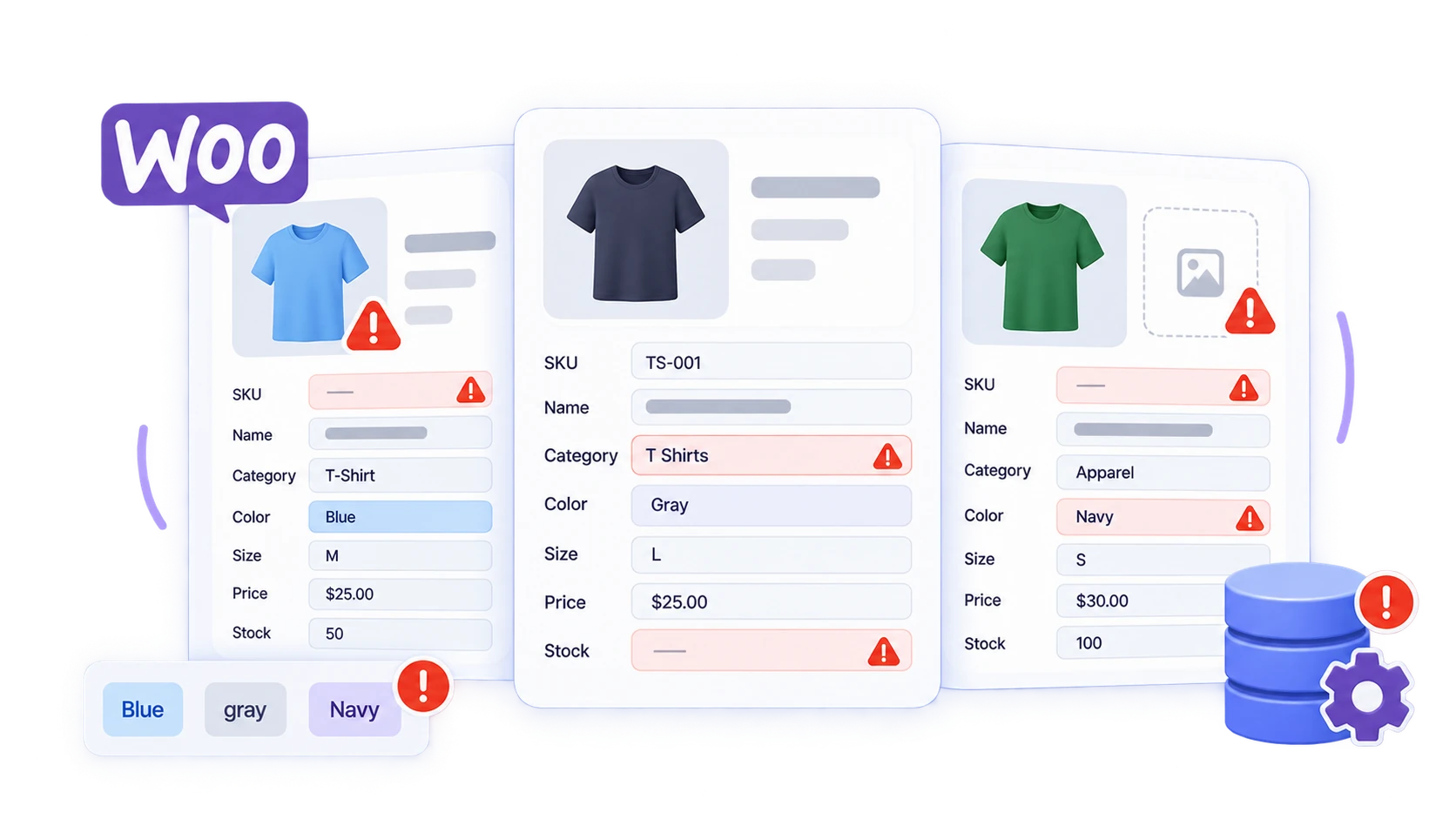
Incomplete product information is one of the most basic product data problems, but it can have consequences throughout a WooCommerce store.
One product might use T-Shirt as a category while another uses T Shirts. Colors may appear as Grey, Gray, and grey. Some products may have SKUs while others do not. Important information such as weight, dimensions, images, brand, or stock may be missing altogether.
These inconsistencies become particularly difficult to manage when working with large catalogs or importing data from multiple sources.
They can affect:
- Product filtering
- Search
- Inventory management
- Variable products
- Shipping calculations
- Product feeds
- Store migrations
- Bulk updates
The best way to reduce these problems is to define consistent data standards before the catalog becomes too large.
Decide how SKUs should be structured, how attributes should be named, which categories should be used, which product fields are mandatory, and how values should be formatted. When working with hundreds or thousands of products, spreadsheets and import/export workflows can also make it easier to review large amounts of data together instead of checking products individually.
For example, you can export WooCommerce products into a spreadsheet, identify missing SKUs or inconsistent categories, correct the data in bulk, and import the revised information back into the store.
2. Updating Large Product Catalogs Efficiently
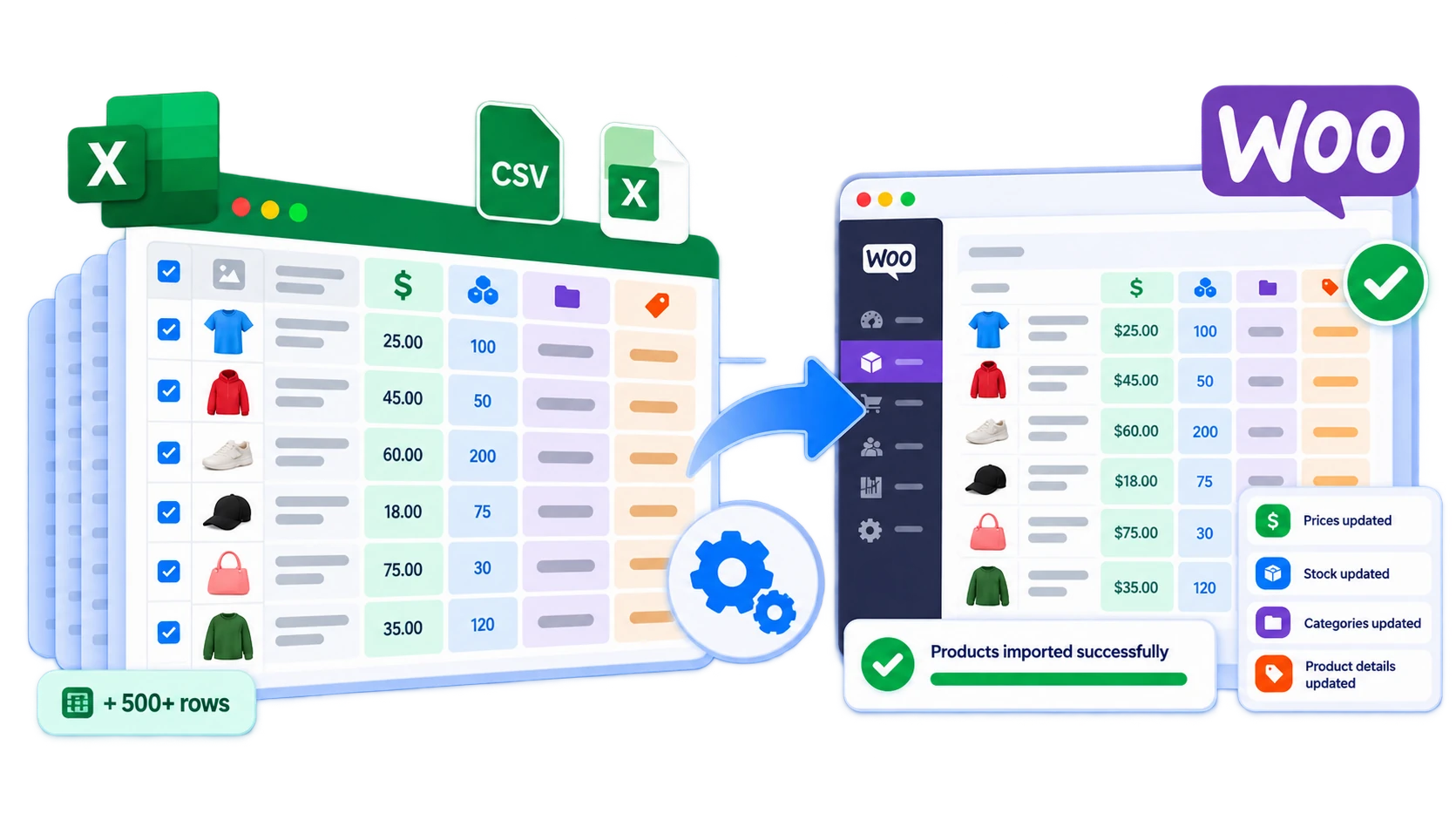
WooCommerce makes it easy to edit an individual product.
The problem begins when the same change needs to be made across hundreds or thousands of products.
Imagine that you need to:
- Increase prices across a product range
- Update stock after receiving a supplier shipment
- Change descriptions for an entire brand
- Add new product attributes
- Move hundreds of products into a different category
- Update custom product metadata
Opening each WooCommerce product individually quickly becomes impractical. A more scalable approach is to work with product data in bulk.
For example:
WooCommerce → Export product data → Edit spreadsheet → Import updated data
With a WooCommerce product import/export tool, you can export the relevant product fields, make changes in a spreadsheet such as Excel, and then import those changes back into WooCommerce.
The important part is correctly identifying existing products.
When updating products across different WooCommerce stores or external files, a stable SKU is often more useful than relying entirely on internal database IDs. Matching the imported rows to existing products prevents the update from unintentionally creating duplicates.
You also do not necessarily need to process your complete catalog every time. Advanced filters allow you to export or update specific categories, product types, stock statuses, or other subsets of the catalog. That can make large catalog operations easier to control.
3. Managing Variable Products and Attributes
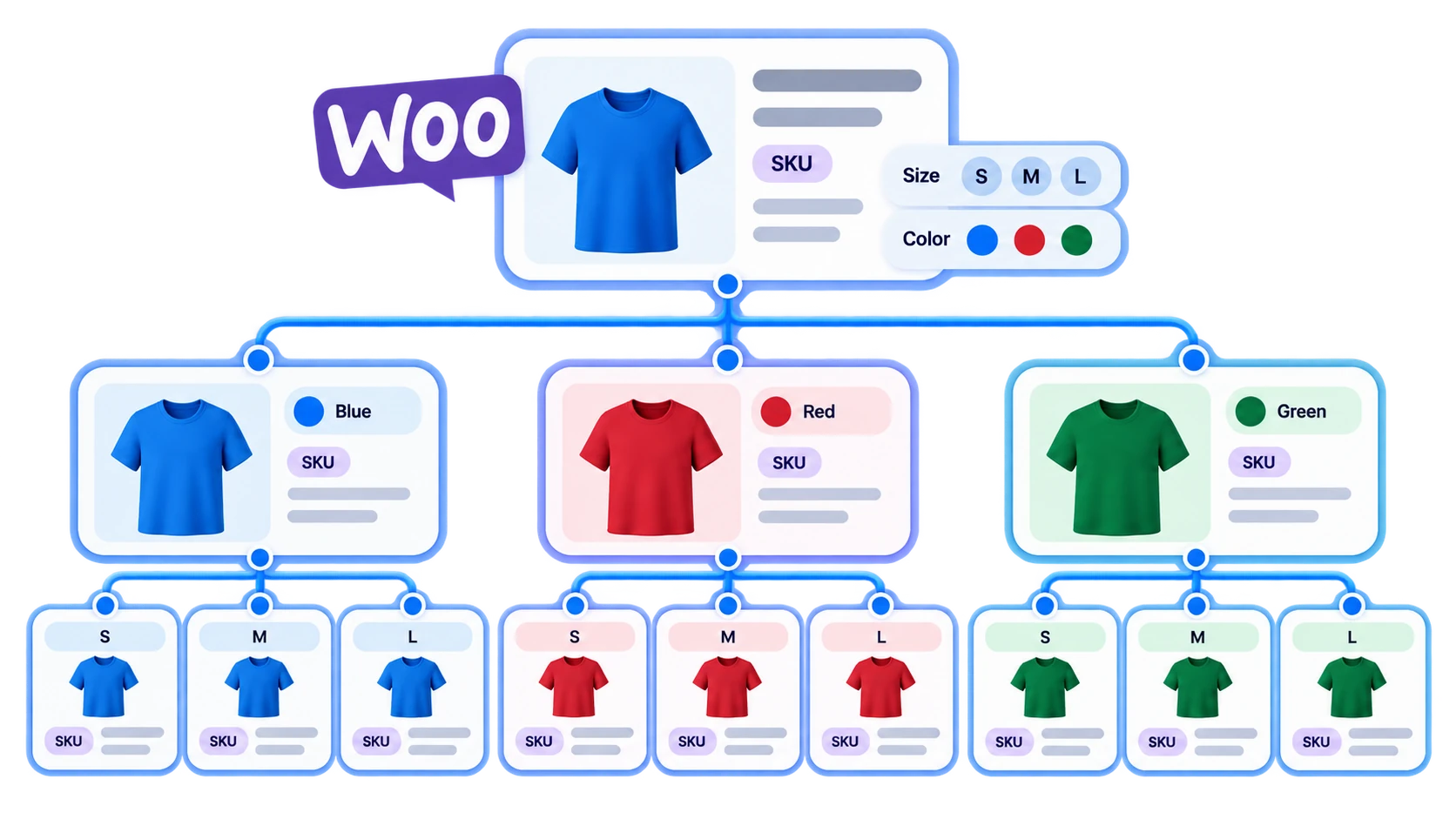
Variable products introduce an additional layer of complexity because WooCommerce needs to understand the relationship between a parent product, its attributes, and its individual variations.
Consider a T-shirt available in:
- Small / Black
- Medium / Black
- Large / Black
- Small / Blue
- Medium / Blue
- Large / Blue
This is not simply six unrelated products.
WooCommerce needs the parent product to be identified as a variable product. Its size and color attributes must be configured correctly, and each variation needs to remain connected to its parent.
Individual variations can also have their own:
- SKU
- Price
- Stock quantity
- Image
- Weight
- Dimensions
- Other metadata
If those relationships are lost during an import, bulk edit, or migration, the result may be missing variations, incorrect attribute options, or products that no longer behave as expected. This is why complex catalogs require more attention to product structure, not just individual spreadsheet rows.
When importing variable products, review the parent-child relationships, attribute configuration, variation SKUs, and mapping before running a large import. Exporting an existing correctly configured variable product can also give you a useful reference for understanding how the required fields are structured before preparing a larger import file.
4. Keeping Product Data Consistent Across Systems and Sales Channels

WooCommerce is rarely the only place where product information exists.
A store might also work with:
- Supplier files
- Google Sheets
- ERP systems
- Other WooCommerce stores
- Google Shopping
- Facebook and Instagram
- TikTok
- Bing
- Comparison shopping engines
- AI-powered product discovery platforms
Each destination may require product information in a different structure. This is where it is important to distinguish between managing WooCommerce data and distributing WooCommerce data.
An import/export plugin is useful when product information needs to move between WooCommerce and files, spreadsheets, supplier sources, or other stores. A product feed plugin, on the other hand, is better suited to creating channel-specific product feeds for shopping and advertising platforms.
For example, WebToffee’s WooCommerce Product Feed plugin can generate product feeds for channels such as Google Shopping, Meta, TikTok, Pinterest, Bing, and other shopping platforms. It also supports product and category mapping, filters, and scheduled feed refreshes.
This distinction matters.
Exporting a WooCommerce CSV does not automatically mean that inventory, prices, or other information will remain synchronized everywhere in real time. Different platforms have different feed specifications, refresh processes, APIs, and synchronization methods. The right workflow depends on where the product data needs to go and how frequently it needs to change.
5. Handling Recurring Supplier and Inventory Updates
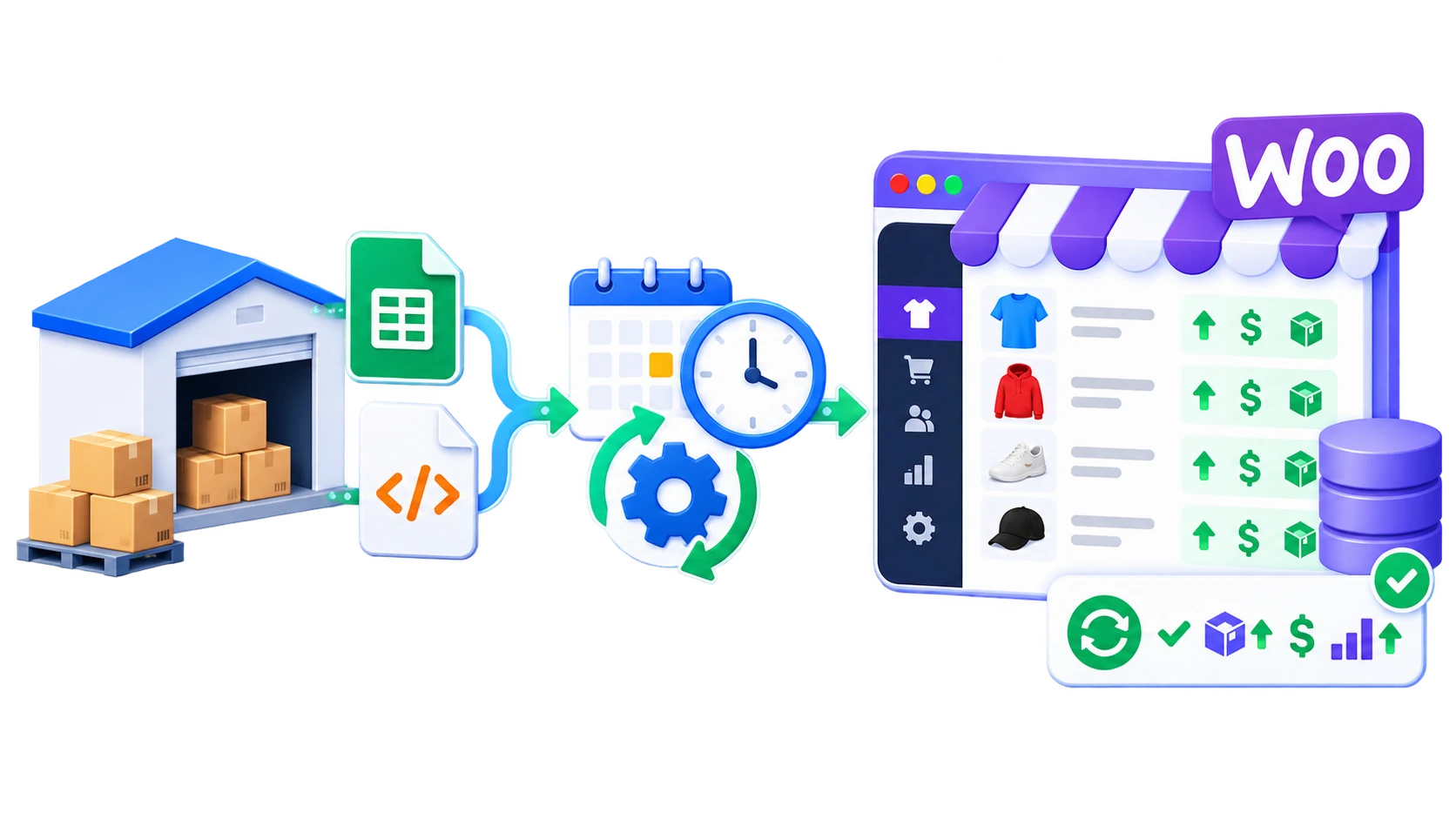
Many WooCommerce stores do not create all their product information manually. Suppliers, distributors, warehouses, or internal systems may regularly provide updated files containing:
- Product prices
- Stock quantities
- New products
- Product descriptions
- Discontinued products
- Attribute changes
Manually downloading and importing the same file every day or week creates repetitive work and increases the possibility of missing an update. These workflows are good candidates for automation.
For example:
Supplier → FTP/SFTP product file → Scheduled WooCommerce import
A scheduled import can periodically retrieve the source data and update the relevant WooCommerce products based on a defined identifier such as SKU. The WebToffee Product Import Export Plugin for WooCommerce supports scheduled import and export workflows through FTP/SFTP, along with CSV, XML, Excel, TSV, and Google Sheets-based product data workflows.
However, automation should follow a clearly defined data strategy. Before scheduling recurring imports, determine:
- Which fields the supplier is allowed to overwrite
- How existing products will be matched
- What should happen to new products
- Whether missing products should be removed or left untouched
- How often the source data needs to be refreshed
Automation can eliminate repetitive work, but it should not eliminate oversight.
6. Migrating Product Data Between Stores or Platforms
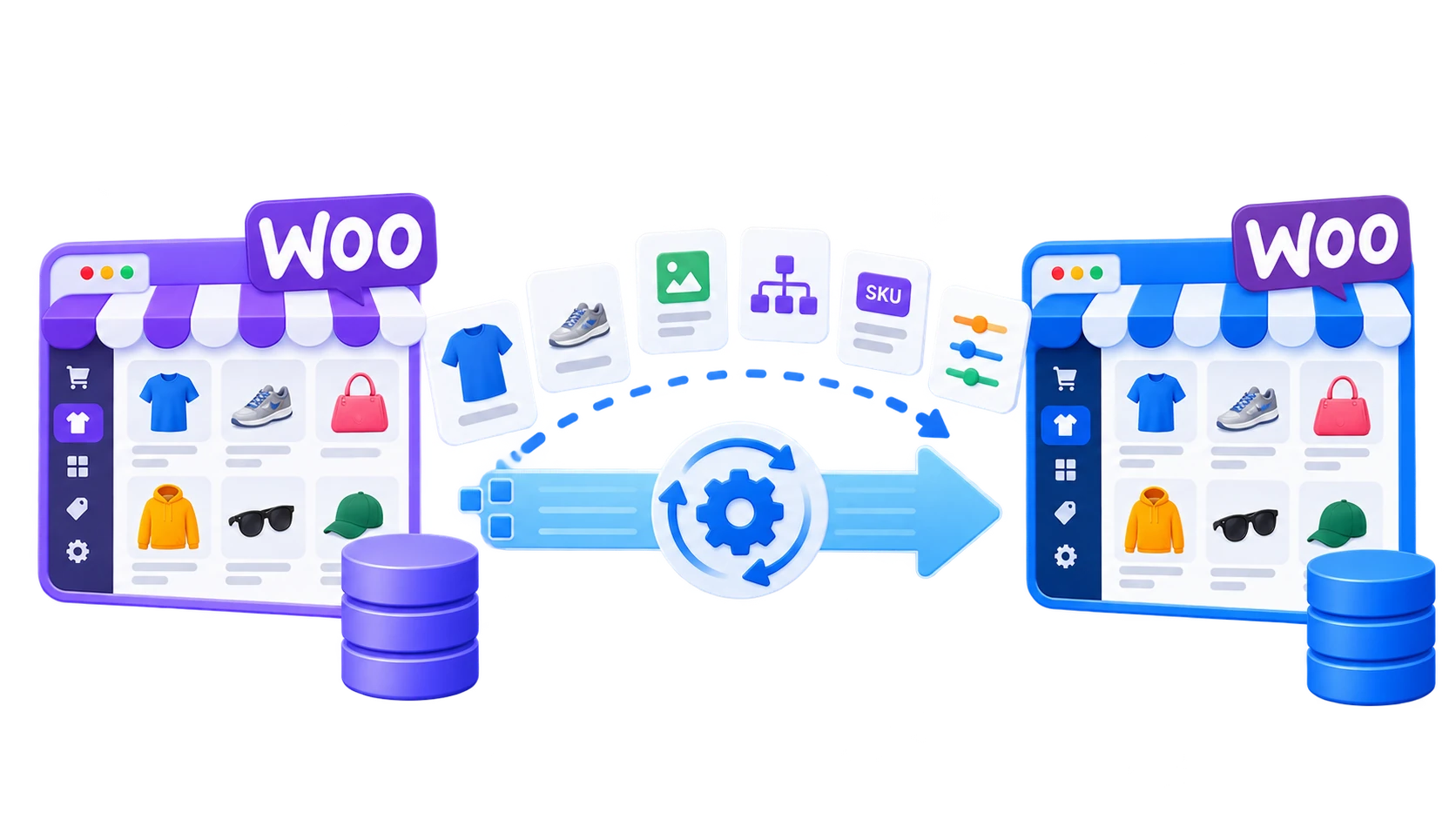
Product migration is another major product data management challenge. Moving products from one WooCommerce store to another can involve more than titles and prices. You may need to preserve:
- SKUs
- Images
- Categories
- Tags
- Attributes
- Variations
- Inventory
- Custom fields
- Linked-product relationships
- Plugin-specific data
Migration becomes even more complicated when moving between different ecommerce platforms because each platform structures its product information differently.
For example, during a Shopify-to-WooCommerce migration, Shopify variants need to be translated into the appropriate WooCommerce variation structure. Collections, images, tags, inventory information, and other product fields also need to be mapped correctly.
A structured migration workflow generally looks like this:
Export source data → Review and prepare data → Map fields → Import into WooCommerce → Validate the imported catalog
For product-focused migrations, the Product Import Export Plugin for WooCommerce can be used to import, export, and update WooCommerce product data. If the migration involves other store information such as customers, orders, coupons, subscriptions, and reviews in addition to products, WebToffee’s Import Export Suite for WooCommerce provides a broader import/export workflow.
Whatever method you use, always verify the migrated catalog before going live. Check representative examples of:
- Simple products
- Variable products
- Images
- Prices
- Stock
- Categories
- Attributes
- Custom fields
Migration is successful only when the destination store can correctly use the data, not simply when the import process finishes.
7. Scaling Product Data Workflows as the Business Grows
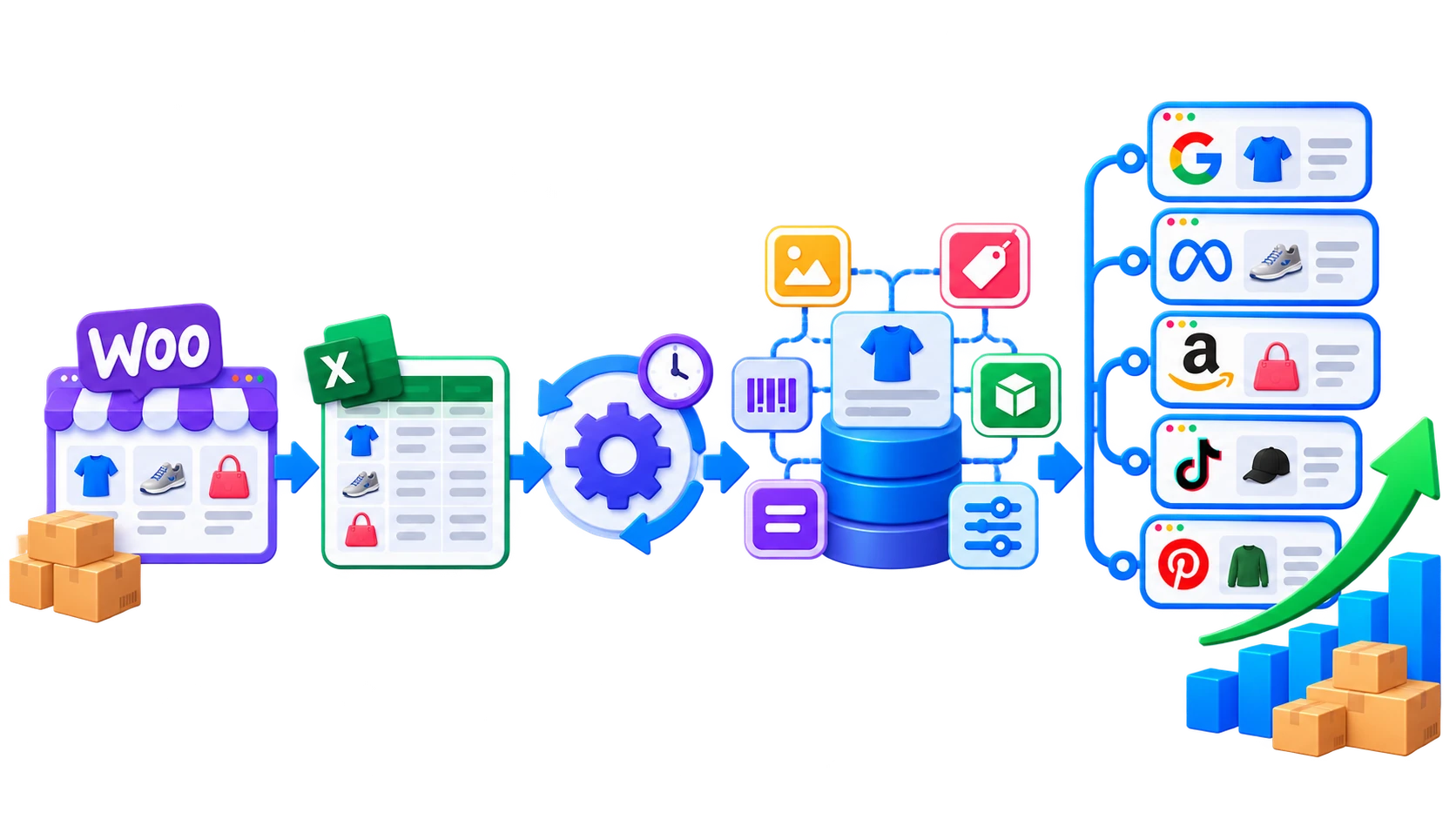
The tools you use to manage 50 products may not be the tools you need to manage 50,000. Product data management generally progresses through several stages.
A small WooCommerce store may manage products directly from the dashboard. As the catalog expands, spreadsheets and bulk import/export operations become more useful. Stores receiving frequent supplier updates may introduce scheduled imports and exports. Businesses distributing products across several advertising or shopping platforms may introduce dedicated product feed management.
Large organizations managing complex approval processes, localization, multiple brands, several ecommerce platforms, and extensive product enrichment may eventually benefit from a dedicated Product Information Management system, or PIM.
The important point is that these tools solve different levels of the problem.
You do not necessarily need to introduce enterprise product data infrastructure simply because your WooCommerce catalog is growing. But you should periodically evaluate whether your current workflow still matches the scale and complexity of the business.
Best Practices for WooCommerce Product Data Management
Tools can make catalog management easier, but a reliable workflow starts with the way your product data is structured.
Here are some practices worth establishing early.
Use Consistent SKUs and Product Identifiers
Each product should have a stable identifier.
SKUs are particularly useful when exchanging product information between different stores, spreadsheets, suppliers, or external systems because WooCommerce database IDs may not remain the same between environments.
Variations should also have their own unique SKUs when your workflow depends on variation-level inventory or updates.
Avoid changing identifiers unnecessarily once other systems begin relying on them.
Standardize Attributes, Categories, and Naming
Small naming inconsistencies can become large catalog-management problems.
For example:
Blue, blue, and Navy Blue
may be meaningful differences or simply inconsistent data entry.
Define how common values should be entered and maintain the same conventions throughout the catalog. Where suitable, reusable WooCommerce global attributes can help keep commonly used information such as size, color, material, and brand more consistent.
Define a Source of Truth
If the same product information exists in WooCommerce, a supplier file, an ERP, a spreadsheet, and several marketplaces, decide which system owns each type of information.
For example:
Supplier system → Price and inventory
WooCommerce → Product descriptions and merchandising
Product Feed → Distributes selected WooCommerce product information to external channels
Without this distinction, two systems may repeatedly overwrite each other’s changes. For simpler WooCommerce operations, the store itself may act as the main source of truth. More complex organizations may use an ERP or PIM as the authoritative product-data system and publish information from there to WooCommerce.
Test Bulk Operations With a Smaller Dataset
Before updating thousands of products, test the workflow with a representative sample. Include different types of products, especially:
- Simple products
- Variable products
- Products with images
- Products with custom fields
- Existing products being updated
- New products being created
Then verify the results before scaling up. This makes it easier to identify mapping or formatting issues before they affect the entire catalog.
Use Field Mapping Carefully
A spreadsheet column only becomes useful when the receiving system knows what it represents. During imports, make sure source columns are mapped to the correct WooCommerce fields.
This becomes particularly important when using custom files, external supplier feeds, or data exported from another ecommerce platform.
Pay additional attention to variation data, product IDs, SKUs, attributes, and custom fields because incorrect mapping can change the way WooCommerce reconstructs the product.
Update Only the Data You Need
If your goal is to update stock quantities, avoid changing descriptions, categories, prices, and other fields unnecessarily. Likewise, if you only need products from one category, filter the dataset before processing it.
Reducing the scope of an update makes the workflow easier to review and lowers the chance of unintended changes.
Back Up Before Major Catalog Changes
Bulk imports, migrations, and large product updates can change thousands of records at once.
Maintain a usable store backup before performing major data operations, especially if the import updates existing products or removes information. An export of the existing product catalog can also provide a useful reference if you need to review the previous values.
Keep Logs and Review Automated Jobs
Scheduled workflows should still be monitored.
Check whether imports or exports completed successfully and investigate errors rather than assuming an automated job ran correctly. This becomes particularly important when product information comes from external systems outside your direct control.
How Should Product Data Flow Through a WooCommerce Store?
A useful way to think about WooCommerce product data management is as a flow rather than a collection of individual tools.
For a relatively simple store, that flow might be:
Spreadsheet → WooCommerce → Customer
A store working with supplier information might use:
Supplier file → Scheduled import → WooCommerce → Customer
A multichannel store could look more like:
Supplier/ERP → WooCommerce → Product Feed → Google, Meta, TikTok, and other channels
A larger organization might use:
PIM/ERP → WooCommerce + Marketplaces + Other Storefronts
There is no single correct architecture. The goal is to make sure product information moves in a predictable direction and that each system has a defined role.
Problems usually begin when several systems are allowed to update the same information without a clear source of truth.
Managing Product Data Across Shopping Channels and AI Commerce
Accurate product data is increasingly important beyond your WooCommerce storefront.
Shopping and advertising platforms rely on structured product information to understand what you sell and decide how products should appear to shoppers.
Depending on the platform, feeds may require information such as:
- Product title
- Description
- Price
- Availability
- Image
- Brand
- GTIN
- MPN
- Category
- Product URL
- Other channel-specific attributes
This means a product can be perfectly valid inside WooCommerce but still require additional mapping or attributes before it is ready for another platform.
Product feed tools help bridge that gap by converting WooCommerce data into structures that external channels expect.
Product Data Is Becoming Important for AI Shopping Too
Product discovery is also expanding beyond traditional search engines and marketplaces.
AI shopping systems need structured product information to understand products, compare options, and surface relevant items when shoppers ask for recommendations. That makes the completeness and structure of catalog information increasingly important.
WebToffee’s Product Feed Plugin now supports an OpenAI Agentic Commerce feed, allowing WooCommerce stores to generate structured product data for OpenAI’s merchant ecosystem alongside feeds for channels such as Google, Meta, TikTok, Pinterest, and Bing.
This does not mean every WooCommerce store immediately needs a new product data strategy for AI.
But it reinforces a broader trend: product information is no longer consumed only by people visiting a product page. It is increasingly read and interpreted by search engines, marketplaces, advertising systems, recommendation engines, and AI platforms.
Clean, structured product data therefore becomes more valuable as the number of discovery channels grows.
Do You Need a PIM to Manage WooCommerce Product Data?
Not every WooCommerce store needs a Product Information Management system.
A PIM provides a centralized environment for managing and enriching product information before publishing it to ecommerce stores and other channels. It becomes particularly useful when a business has complex product information spread across multiple departments, brands, languages, regions, storefronts, or sales channels.
For many small and mid-sized WooCommerce stores, however, introducing a PIM may be unnecessary. A more practical progression might look like this:
| Your Requirement | Practical Approach |
|---|---|
| Small catalog with occasional updates | Manage directly in WooCommerce |
| Regular bulk catalog updates | WooCommerce + spreadsheet/import-export workflow |
| Supplier files and recurring catalog changes | Scheduled import/export workflow |
| Products distributed to shopping and advertising platforms | Product feed management |
| Complete WooCommerce data migration | Full import/export suite |
| Complex enterprise product governance and enrichment | PIM/ERP integrated with WooCommerce |
The question therefore is not simply:
“Do I need a PIM?”
A better question is:
“Has my product data become too complex for the workflow I currently use?”
If your primary challenge is updating thousands of WooCommerce products, importing supplier files, or migrating product data, an import/export tool may be sufficient. If dozens of teams, markets, languages, storefronts, and systems need to collaborate on a single governed product dataset, a PIM becomes much more relevant.
Which WebToffee Tool Fits Your Product Data Workflow?
Different WooCommerce product data challenges require different tools.
Product Import Export Plugin for WooCommerce
WebToffee’s Product Import Export Plugin for WooCommerce is designed for product-focused import, export, migration, and bulk-update workflows. It supports product data including images, custom fields, attributes, and variations, as well as multiple file and data sources.
It is best suited to workflows such as:
- Bulk importing and exporting WooCommerce products
- Updating existing products
- Working with CSV, XML, Excel, TSV, or Google Sheets
- Managing product images and custom metadata
- Handling variable products and attributes
- Filtering product exports
- Mapping external data to WooCommerce fields
- Scheduling recurring imports and exports through FTP/SFTP
If your main challenge is maintaining or moving product-level WooCommerce data, this is generally the most focused option.
WooCommerce Product Feed Plugin
The WooCommerce Product Feed Plugin addresses a different part of the product data workflow. It is designed to prepare and distribute WooCommerce product information to external sales, advertising, comparison shopping, and discovery channels.
Use it when you need to:
- Generate channel-specific product feeds
- Map WooCommerce product attributes to channel requirements
- Apply product filters and conditions
- Schedule feed refreshes
- Manage feeds for Google, Meta, TikTok, Pinterest, Bing, and other supported channels
- Generate an OpenAI Agentic Commerce product feed
This is different from moving catalog data between stores through an import/export process.
Import Export Suite for WooCommerce
WebToffee’s Import Export Suite for WooCommerce is more appropriate when a project involves more than products.
The suite supports data types such as:
- Products
- Orders
- Customers/users
- Coupons
- Subscriptions
- Reviews
- Product categories and tags
This makes it particularly useful for full WooCommerce migrations or other workflows where several parts of the store need to be transferred together.
Choosing the Right Approach
A simple way to decide is:
| If You Need To… | Consider |
|---|---|
| Bulk import, export, or update products | Product Import Export Plugin |
| Receive recurring supplier product files | Product Import Export Plugin + scheduling |
| Transfer a complete WooCommerce store | Import Export Suite |
| Send product information to shopping channels | Product Feed Plugin |
| Manage enterprise-level product governance | PIM/ERP + WooCommerce integration |
The important thing is to match the tool to the workflow rather than expecting one system to solve every product data problem.
WooCommerce product data management is the process of organizing, updating, importing, exporting, and maintaining product information in a WooCommerce store. This includes SKUs, prices, stock levels, descriptions, images, categories, tags, attributes, variations, shipping data, and custom fields.
Yes, you can manage WooCommerce product data manually if you have a small catalog. However, manual updates become time-consuming and error-prone as your store grows. For large catalogs, bulk updates, supplier imports, and migrations, a plugin-assisted workflow is more efficient.
Yes. Spreadsheet-based workflows are useful for reviewing and updating large amounts of product information together. A common process is to export WooCommerce products, make changes in Excel or another spreadsheet application, and import the revised file back into WooCommerce. Make sure products are matched correctly when updating existing records.
Use a consistent unique identifier such as SKU and configure the import to match existing products using the appropriate identifier.
Avoid changing SKUs unnecessarily between exports and imports.
Before running a large update, test the workflow with a small number of products to confirm that existing products are updated rather than recreated.
Treat variable products as related data rather than independent rows.
Make sure the parent product, attributes, variation relationships, SKUs, prices, and stock information are structured correctly before import. Test several variable products before processing a large catalog.
Managing product data doesn’t have to be a constant struggle. From keeping pricing and inventory accurate to ensuring consistency across multiple platforms, import-export plugins make the entire process easier, faster, and more reliable.
Instead of spending hours on manual updates and fixing errors, you can automate these tasks using specialized import-export plugins and focus on what matters – growing your business.
By leveraging the right plugins, you can save time, reduce mistakes, and streamline your operations effortlessly. So, if eCommerce data management has been a challenge for you, it’s time to explore how import-export plugins can make your life easier. Why do it the hard way when you can let automation do the heavy lifting?


Subcribe to our newsletter


