


Share:


Table of Contents
AI-powered shopping is changing how customers discover products online. More shoppers are now using tools like ChatGPT to search for products, compare options, and make purchase decisions faster.
To help WooCommerce stores stay ready for this shift, WebToffee Product Feed Plugin now supports OpenAI Agentic Commerce Feed.
With this new feed support, store owners can connect their WooCommerce catalog directly to OpenAI’s Agentic Commerce Protocol, the standard behind ChatGPT shopping. This makes it easy to get your WooCommerce product catalogs fully AI-ready for ChatGPT to understand, display, and surface to relevant shoppers.
OpenAI Agentic Commerce lets merchants share structured product data with OpenAI so their products can appear in ChatGPT shopping experiences. It’s built on the Agentic Commerce Protocol, an open standard that allows AI assistants like ChatGPT to securely discover, understand, and recommend products, surfacing them directly in ChatGPT shopping results.
The feed gives ChatGPT the catalog details it needs, such as titles, descriptions, images, prices, availability, and seller context, so it can understand and surface your products in response to shopper queries like:
- “What’s the best skincare gift under $50?”
- “Find me comfortable running shoes for flat feet.”
- “Compare budget coffee makers for a small kitchen.”
Instead of relying only on traditional search engines or marketplaces, your product catalog can be prepared for a future where customers ask ChatGPT what to buy, compare recommendations, and move closer to purchase within the same conversation.
OpenAI Agentic Commerce is now available as a feed channel in the Product Feed Plugin, alongside existing channels such as Google Shopping, Facebook, Instagram, TikTok, Pinterest, and Bing. This channel is available in the plugin’s premium version.
Setup takes just a few steps:
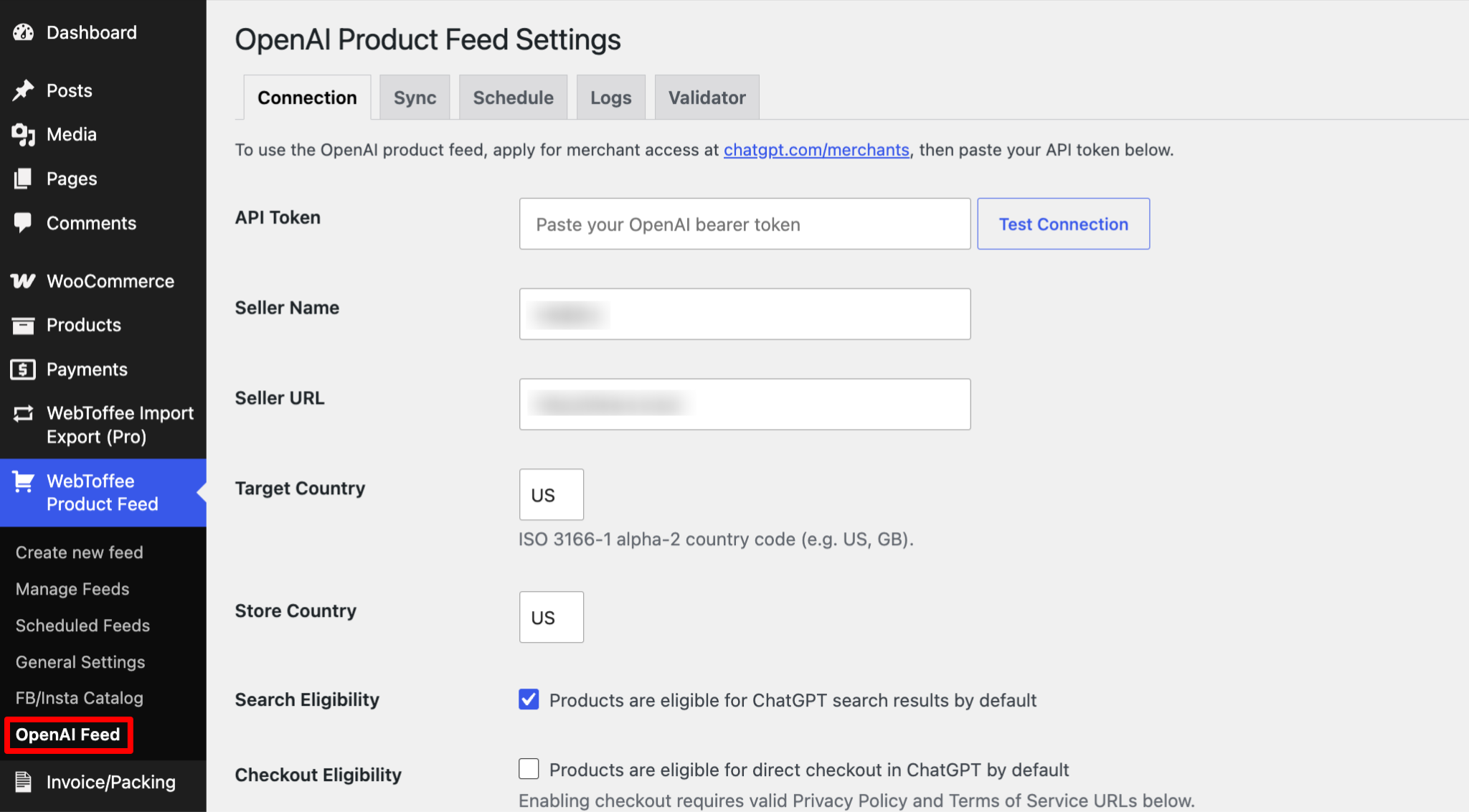
- Go to WebToffee Product Feed > OpenAI Feed.
- Apply for merchant access at chatgpt.com/merchants to get your API token, then paste it into the plugin, set your target country, and control ChatGPT search and checkout eligibility on a per-product basis.
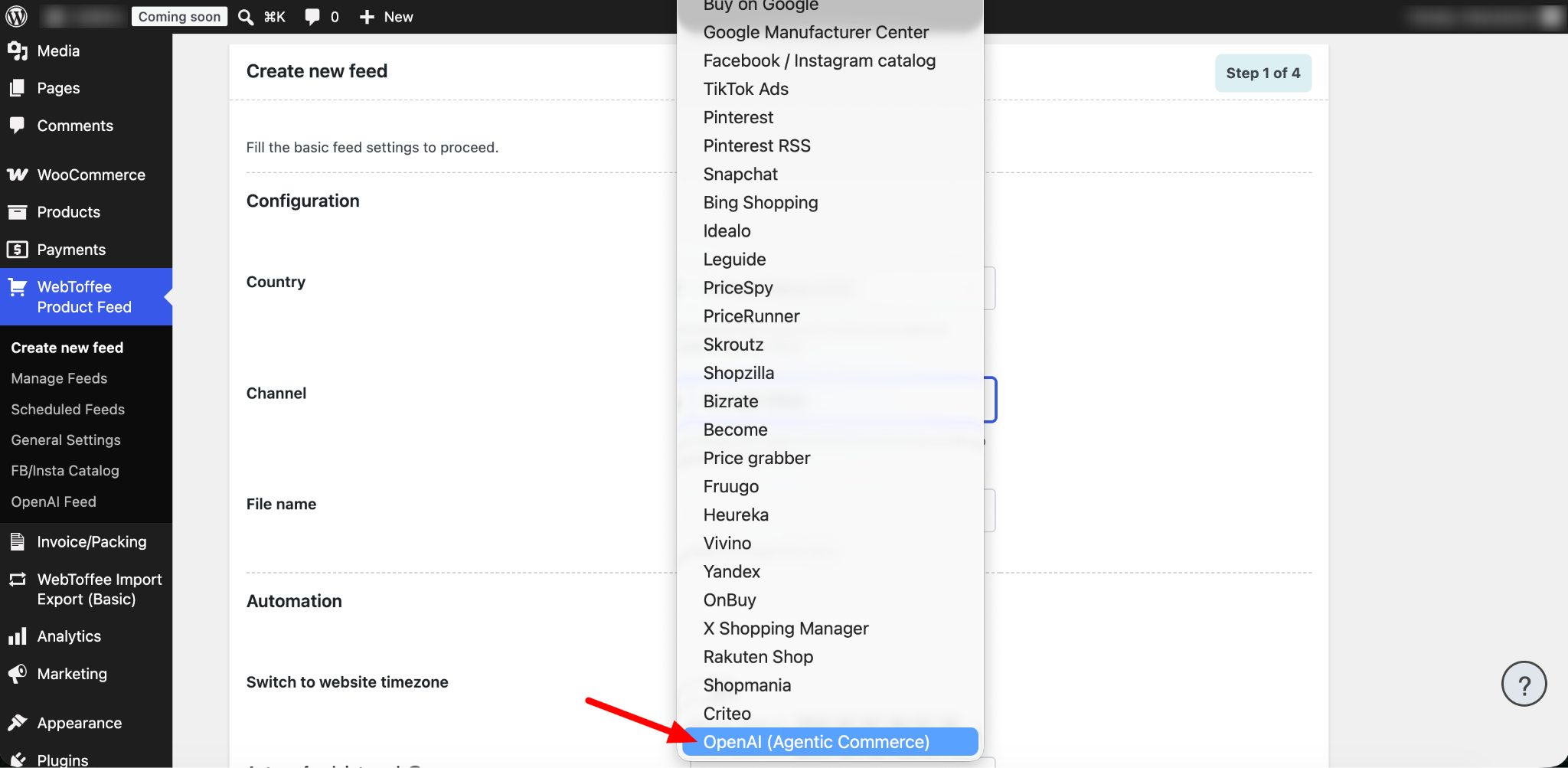
- Then, go to WebToffee Product Feed → Create New Feed and select OpenAI (Agentic Commerce) as the channel.
- Configure feed refresh settings, cron type and apply filters to include your full catalog or selected products.
- Map product attributes and categories to the OpenAI feed schema.
- Generate the feed.
Once configured, the plugin generates the structured feed automatically from your live WooCommerce data. Just submit the resulting feed URL to OpenAI’s merchant onboarding to finish making your catalog discoverable in ChatGPT shopping results.
Important note: The plugin generates a product discovery feed. It helps ChatGPT find, understand, and recommend your products. It does not support OpenAI’s Instant Checkout, which would let customers complete a purchase directly inside ChatGPT. For now, any purchase journey that starts in ChatGPT still ends on your WooCommerce store’s checkout page.
We’re working on a dedicated step-by-step guide covering the full feed creation and setup process in detail — stay tuned.
- No manual feed building. The plugin generates a structured, AI-ready feed from your existing WooCommerce catalog.
- One more discovery surface alongside your existing search and marketplace feeds, without replacing them.
- Future-facing. As AI shopping assistants grow, having your catalog already structured for them means less work later.
AI commerce is still growing, but the direction is clear. Customers want faster answers, smarter recommendations, and easier buying journeys.
For store owners, this means product visibility depends not only on SEO and marketplace listings but also on how well AI systems understand your product data.
A ChatGPT product feed is a structured file that contains your product information—such as titles, descriptions, images, prices, availability, and other key details—in a format that OpenAI can understand. It enables ChatGPT to discover, interpret, and surface your products in AI-powered shopping experiences.
Like product feeds for Google Shopping or Meta, it shares your product catalog with an external platform. However, a ChatGPT product feed is specifically formatted to meet OpenAI’s Agentic Commerce schema and requirements.
No. This feed supports product discovery — helping ChatGPT find and recommend your products — not OpenAI’s Instant Checkout. Customers still complete their purchase on your WooCommerce store.
No. Even though both are structured product exports, they follow different specifications. ChatGPT’s feed has its own required fields, category and attribute structure, and submission process — you can’t simply reuse a Google Shopping export as-is. The plugin builds a feed specifically for OpenAI’s schema, rather than repurposing another channel’s file.
Yes. The plugin generates the feed file and provides a feed URL, but you still need to register as a merchant with OpenAI and submit that URL (or complete whatever submission steps OpenAI’s onboarding process requires) before your products appear in ChatGPT results.
Not immediately. After submission, OpenAI needs to review and index your feed, and timelines can vary. Visibility after that also depends on how relevant and complete your product data is, not on paid placement.
If you’re already using the premium version of the WebToffee Product Feed Plugin, go to Product Feed → Add New Feed → OpenAI Agentic Commerce from the sales channel to generate your feed and make your WooCommerce catalog AI-ready.
If you run into any questions along the way or need a hand setting up your feed, our support team is available to help. Reach out anytime through the support page.


Subcribe to our newsletter


