


Share:


Table of Contents
To comply with EU Directive 2023/2673, online stores must provide a withdrawal option for EU consumers, which is typically implemented through a plugin in WooCommerce. However, for stores with a global customer base, it is crucial to restrict the visibility of the withdrawal button to only EU customers to avoid confusion and potential compliance issues.
- The EU Directive mandates that online stores must offer a withdrawal option to EU consumers starting June 2026.
- WooCommerce does not have a built-in withdrawal button, necessitating the use of plugins like WebToffee's EU Withdrawal Button.
- The plugin can be configured to show the withdrawal button only to EU customers using geo-targeting based on billing addresses and IP locations.
- Properly hiding the withdrawal button for non-EU customers prevents misleading impressions about return policies.
- The geo-targeting feature is exclusive to the Pro version of the plugin, which is essential for compliance if serving a global market.
- Implementing these settings enhances the customer experience by ensuring that only relevant options are presented to users based on their location.
Since June 2026, EU Directive 2023/2673 requires online stores selling to EU consumers to offer a working withdrawal option, and most WooCommerce stores handle this with a plugin like EU Withdrawal Button for WooCommerce.
The catch is that the directive only applies to EU consumers. If you sell worldwide, the default setup shows the “Request Withdrawal” button to every customer regardless of where they’re buying from, which means shoppers in the US, India, or anywhere else outside the EU end up seeing a button that has nothing to do with them.
In this blog post, we will show you how to display the withdrawal button only to EU shoppers.
Let’s get started.
WooCommerce doesn’t have a native withdrawal button, which is why most stores use a plugin like WebToffee Order Withdrawal Button for WooCommerce to add one.
But once it’s installed, the default behavior is to show the button to everyone who lands on an eligible order or page. That’s fine if your store only sells to EU countries. It’s not fine if a big chunk of your customer base is in the US, Australia, or anywhere else the directive doesn’t reach.
A withdrawal button that appears for a Canadian customer doesn’t just look out of place. It can create the impression that your store offers a return policy it doesn’t actually enforce for that region, which is its own kind of headache when a request comes in that you’re not obligated to honor.
To set up a geo-targeted withdrawal button to your WooCommerce store, follow the below steps:
Step 1: Install and Activate WebToffee EU Withdrawal Button
- From your WordPress dashboard, go to Plugins → Add New.
- Search for EU Withdrawal Button for WooCommerce by WebToffee. Install and activate the free version.
- Get the EU Withdrawal Button Pro from WebToffee, then upload it under Plugins → Add New → Upload Plugin.
- Activate the Pro plugin. It runs alongside the free version and unlocks the geo-targeting settings covered in the next step.
Step 2: Configure Withdrawal Settings
Before geo-targeting can restrict anything, you need to get the base withdrawal setup in place, since these are the exact buttons and placements geo-targeting later hides from non-EU shoppers.
Go to WooCommerce → Withdrawals → Settings → General.
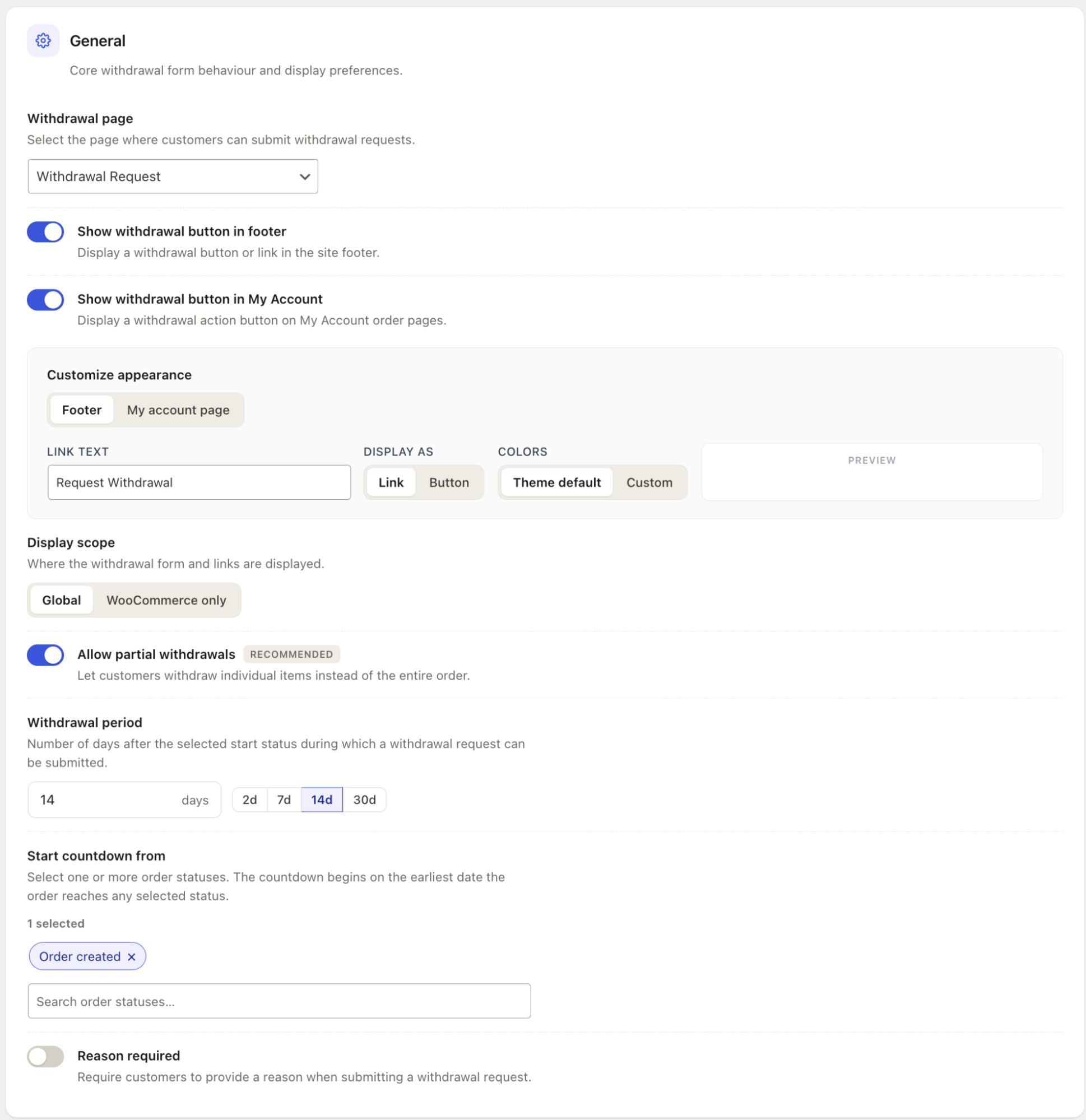
- Under Withdrawal page, select the page where customers submit withdrawal requests (e.g., Withdrawal Request).
- Toggle on Show withdrawal button in footer to display a withdrawal link or button in your site footer.
- Toggle on Show withdrawal button in My Account to display a withdrawal action button on My Account order pages.
- Open Customize appearance and switch between the Footer and My account page tabs to set each placement’s link text, whether it displays as a link or button, and its colors. The Preview panel shows how it’ll look before you save.
- Under Display scope, choose Global to show the withdrawal form and links site-wide, or WooCommerce only to limit them to WooCommerce pages.
- Leave Allow partial withdrawals on. It’s WebToffee’s recommended default and lets customers withdraw individual items instead of the whole order.
- Set the Withdrawal period, either by typing a custom number of days or using the quick-select buttons (2d, 7d, 14d, 30d). 14 days is the EU standard.
- Under Start countdown from, select which order status starts the withdrawal window. The default is Order created, and the countdown begins on the earliest date the order reaches any status you select.
- Turn on Reason required only if you want customers to explain why they’re withdrawing. It’s off by default since it adds friction to the form.
You can configure additional options like a withdrawal terms and conditions page, automatic order processing, and more.
Step 3: Turn On Geo-Targeting
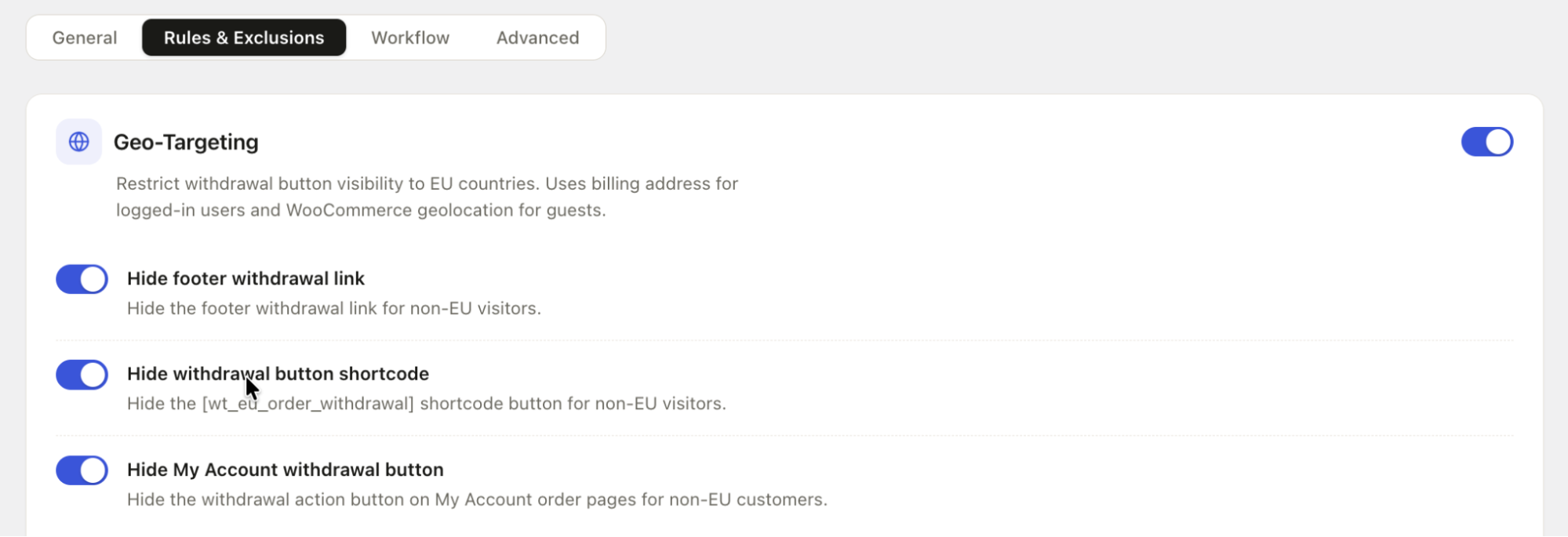
Go to WooCommerce → Withdrawals → Settings → Rules & Exclusions.
- Toggle on Geo-Targeting to restrict withdrawal button visibility to EU countries. This uses the billing address for logged-in users and WooCommerce geolocation for guests, so there’s nothing further to configure for detection itself.
- Toggle on Hide footer withdrawal link to hide the footer link for non-EU visitors.
- Toggle on Hide withdrawal button shortcode to hide the [wt_eu_order_withdrawal] shortcode button for non-EU visitors, if you’ve placed it anywhere on your site.
- Toggle on Hide My Account withdrawal button to hide the withdrawal action button on My Account order pages for non-EU customers.
- Click on Save settings.
And that’s it! The withdrawal button will be shown only to shoppers in the EU.
Does WooCommerce show a withdrawal button by default?
No. WooCommerce has no native withdrawal button or EU compliance workflow built in. You need a plugin like EU Withdrawal Button for WooCommerce to add the button, form, and admin dashboard, and Pro to restrict it by region.
Do I need the Pro version just to restrict the button to EU shoppers?
Yes. Geo-targeting, the feature that hides the withdrawal button from non-EU visitors, is a Pro-only feature. The free version adds the withdrawal button and request flow but shows it to every visitor regardless of location.
How does the plugin know if a customer is in the EU?
It checks the billing address on file for logged-in customers. For guests, it falls back to WooCommerce’s built-in geolocation, which estimates location from the visitor’s IP address.
Will UK customers see the withdrawal button?
No, unless you leave it visible for the UK deliberately. EU Directive 2023/2673 applies to EU member states, and the UK isn’t covered post-Brexit. Geo-targeting hides the button for the UK by default the same way it does for any non-EU country.
What if a customer uses a VPN to appear EU-based?
Guest detection relies on IP-based geolocation, so a VPN set to an EU country can technically make the button appear. This is a limitation of IP-based geolocation generally, not something specific to this plugin, and it’s a minor edge case rather than a compliance risk.
If your WooCommerce store serves customers both inside and outside the EU, showing the withdrawal button only where it is relevant keeps the customer experience clear while helping you meet EU withdrawal requirements.
With the geo-targeting feature in WebToffee’s EU Withdrawal Button Pro, you can automatically limit withdrawal options to EU shoppers based on their billing address or location. Once enabled, the plugin handles visibility across the footer, My Account pages, and shortcode placements without requiring any custom code.
This way, EU customers get easy access to the withdrawal process they’re entitled to, while shoppers outside the EU aren’t presented with withdrawal options that don’t apply to them.


Subcribe to our newsletter


