Share:


Table of Contents
A multilingual cookie banner allows website visitors from different regions to understand and interact with your privacy consent message in their preferred language. In WordPress, you can enable a multilingual cookie consent banner using a WordPress-native solution like the GDPR Cookie Consent plugin. Once installed, you simply activate the cookie banner and configure the required languages under Cookie Consent > Languages.
This guide walks you through the steps to set up a multilingual cookie banner in WordPress quickly and correctly.
Key Takeaways
- Displaying a cookie banner in preferred language helps users understand and manage consent.
- Under GDPR, consent must be informed. A multilingual cookie consent banner supports this with clearer communication.
- WordPress users can enable a multiple-language cookie banner by configuring language settings within the cookie banner generator.
- For custom languages, translations can be added manually or through multilingual plugins like WPML.
A cookie consent banner is the notice you see when you visit a website for the first time. It informs users that the site uses cookies and asks for permission before storing or accessing data on their device.
A multilingual cookie consent banner does the same job, but in more than one language. Instead of showing the default English message to everyone, the cookie consent banner can appear in French for users in France, Spanish for users in Spain and Latin America, German for users in Germany, and so on. Most setups depend on the user’s browser language to decide which version to display.
Global publishers, SaaS platforms, eCommerce stores, and media websites often use multiple-language cookie banners to make consent messages easier to understand for all users. You’ll notice this on many global brand websites, where the cookie banner automatically switches language the moment the page loads.
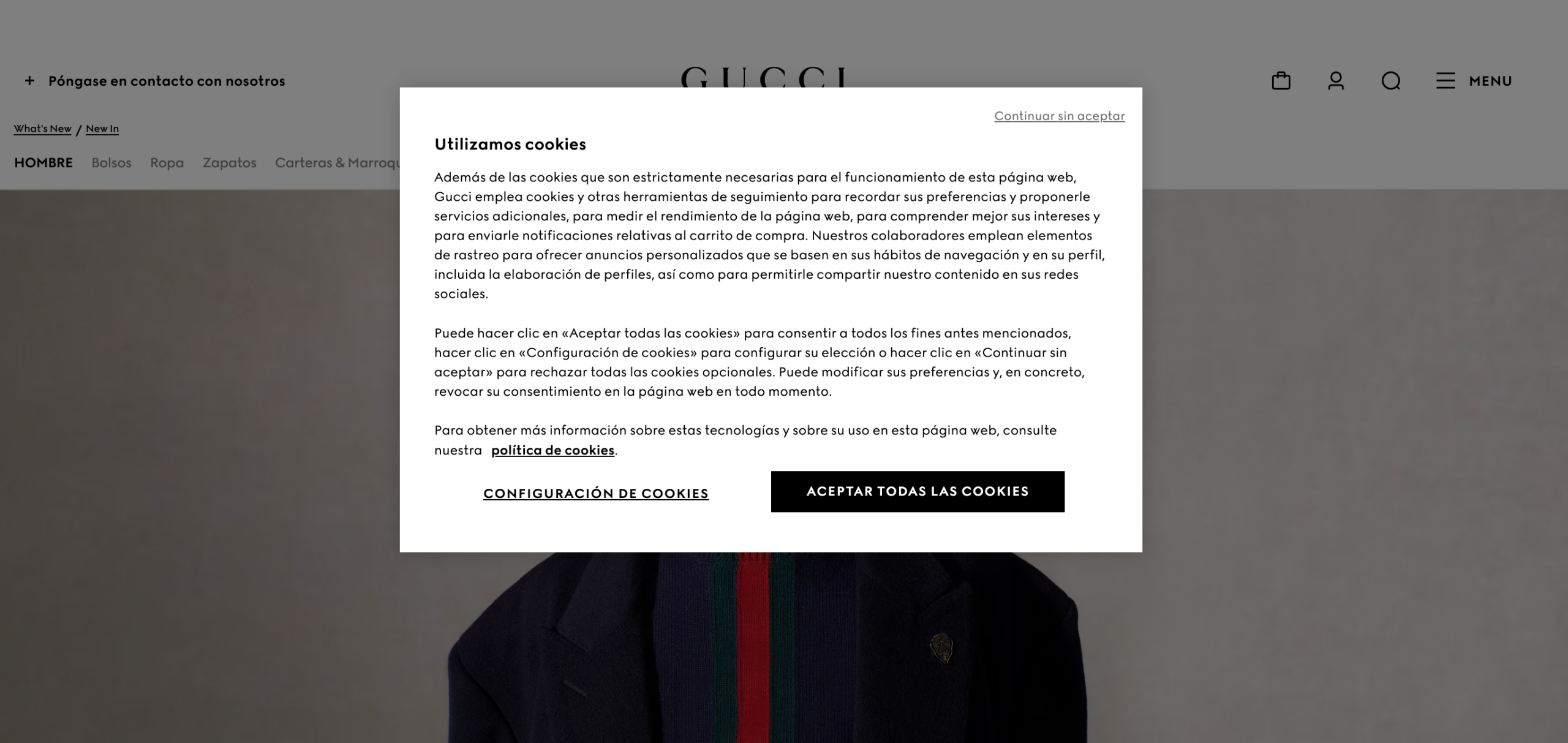
From a user’s point of view, the experience feels natural. They don’t need to search for a language toggle or guess what the banner means. From a compliance point of view, it helps make consent clearer and more informed, which matters under regulations like GDPR.
If your website attracts visitors from different regions, a single-language cookie banner can quickly become a barrier. A multilingual cookie consent banner helps remove that friction while supporting compliance goals.
Here are the key reasons to implement one:
- Better understanding for a wider audience: Users can read cookie information in their preferred language, which reduces confusion and improves decision-making.
- Stronger accessibility and inclusion: Language support makes consent messages easier for users across regions and backgrounds to engage with.
- Greater trust and transparency: Presenting cookie information in a user’s preferred language makes data practices easier to understand and shows respect for user choice.
- Better alignment with GDPR expectations: GDPR requires consent to be informed, which is easier to obtain when the banner is displayed in a language users understand.
- Support for international growth: As websites attract visitors from different countries, multiple-language cookie banners help maintain consistency without altering core site content.
While the need for multilingual cookie banners may feel obvious, implementing it correctly makes a measurable difference to both usability and compliance.
Under GDPR, websites must follow clear rules when using cookies that collect personal data. A cookie consent banner is not just a notification. It must allow users to make an informed and active choice.
A GDPR compliant cookie banner should meet the following requirements.
- Display a cookie consent banner that matches your website’s design
- Use a layout that works well across desktop, tablet, and mobile devices
- Explain cookie usage in plain, jargon-free language
- Show the cookie banner in the user’s preferred language
- Clearly list the different cookie categories used on the website
- Allow users to accept or reject cookies by category
- Provide clear accept and reject buttons
- Block third-party scripts until the user gives consent
- Link to a compliant and up-to-date cookie policy
- Allow users to revisit and change their consent at any time
- Store consent records as proof of compliance
Source: CookieYes
Why Language Matters for Cookie Compliance?
One requirement deserves special attention when building multilingual websites: displaying the banner in the user’s browser language.
GDPR stresses that consent must be informed. If a user cannot understand the cookie message, consent becomes questionable. Auto-translating the cookie banner based on browser language or location helps reduce this risk by presenting information in a language the user already uses online.
This does not mean every site must support every language. It means that if your website targets users across regions, the cookie banner should adapt accordingly. Implementing a multilingual cookie consent banner makes this practical without complicating the user experience.
Setting up a multilingual cookie consent banner in WordPress begins with choosing the right plugin. Not every cookie banner generator supports multiple languages, and even fewer work smoothly with third-party language plugins.
A common choice among WordPress users is WebToffee’s GDPR Cookie Consent plugin, a Google-certified Consent Management Platform. This WordPress-native solution integrates with Google Consent Mode, Microsoft Clarity v2, and UET consent modes and supports the latest IAB TCF v2.3 framework. Because it is built for WordPress, setup and configuration are straightforward.
It includes built-in support for multiple languages and integrates smoothly with multilingual plugins like WPML, Polylang, and qTranslate.
Step 1: Install and Activate the WebToffee CMP Plugin
After purchasing the WordPress Cookie Consent plugin, you will receive an email with a link to download the plugin zip file. You can also download the plugin file from the My Account page.
- Now, log in to your WordPress admin account.
- Navigate to Plugins > Add New.
- Upload the plugin zip file, then install and activate the plugin.
Step 2: Configure Cookie Banner in WordPress
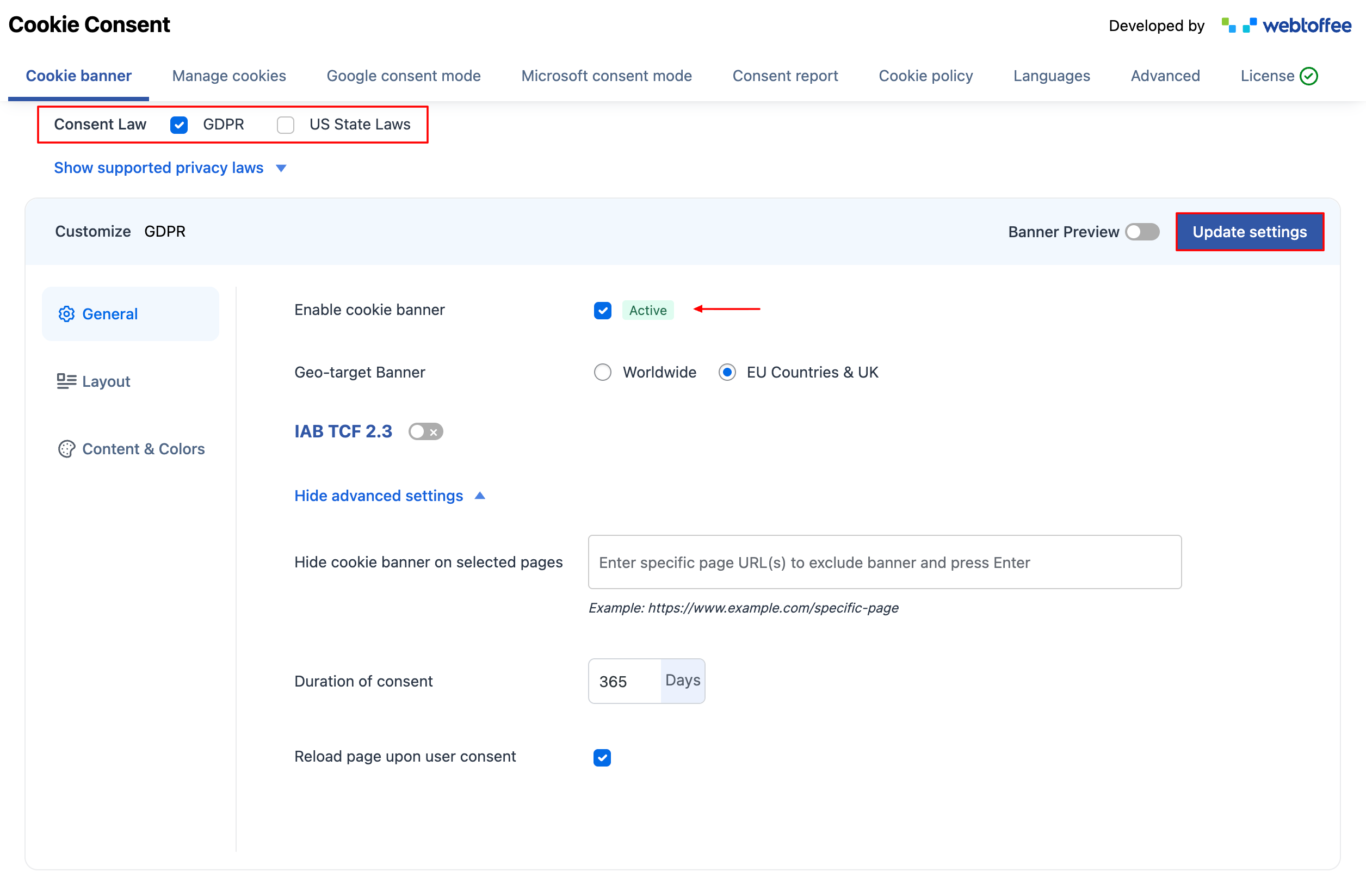
- Now, go to Cookie Consent settings from your WordPress sidebar menu.
- Under the Cookie Banner settings page, choose GDPR as the Consent Law.
- Select the Enable cookie banner checkbox.
- Set geo-targeting for EU Countries & UK. This will ensure that the cookie banner is displayed only to visitors from these regions.
- Enable IAB TCF 2.3 and configure the related settings if required. These settings can be ignored if you are not displaying third-party ads on your website.
- Expand the Show advanced settings dropdown, and enable the Reload page upon user consent checkbox. From here, you can also choose to hide the cookie banner on specific pages and set how long user consent should remain valid.
Step 3: Choose the Cookie Banner Layout
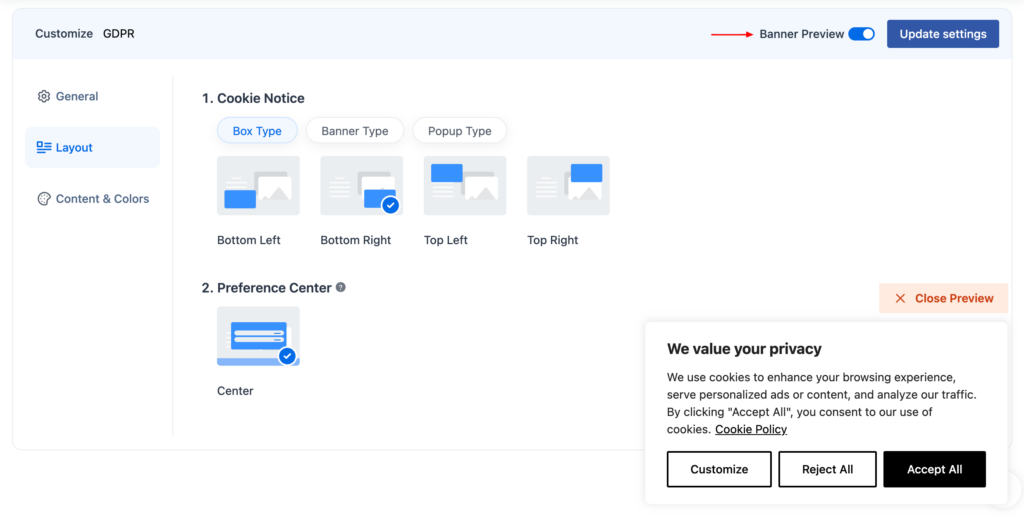
- From the Layout tab, choose Banner style for the cookie notice.
- You can also choose a style for the Preference Center.
- Click on Update settings to save the cookie banner settings.
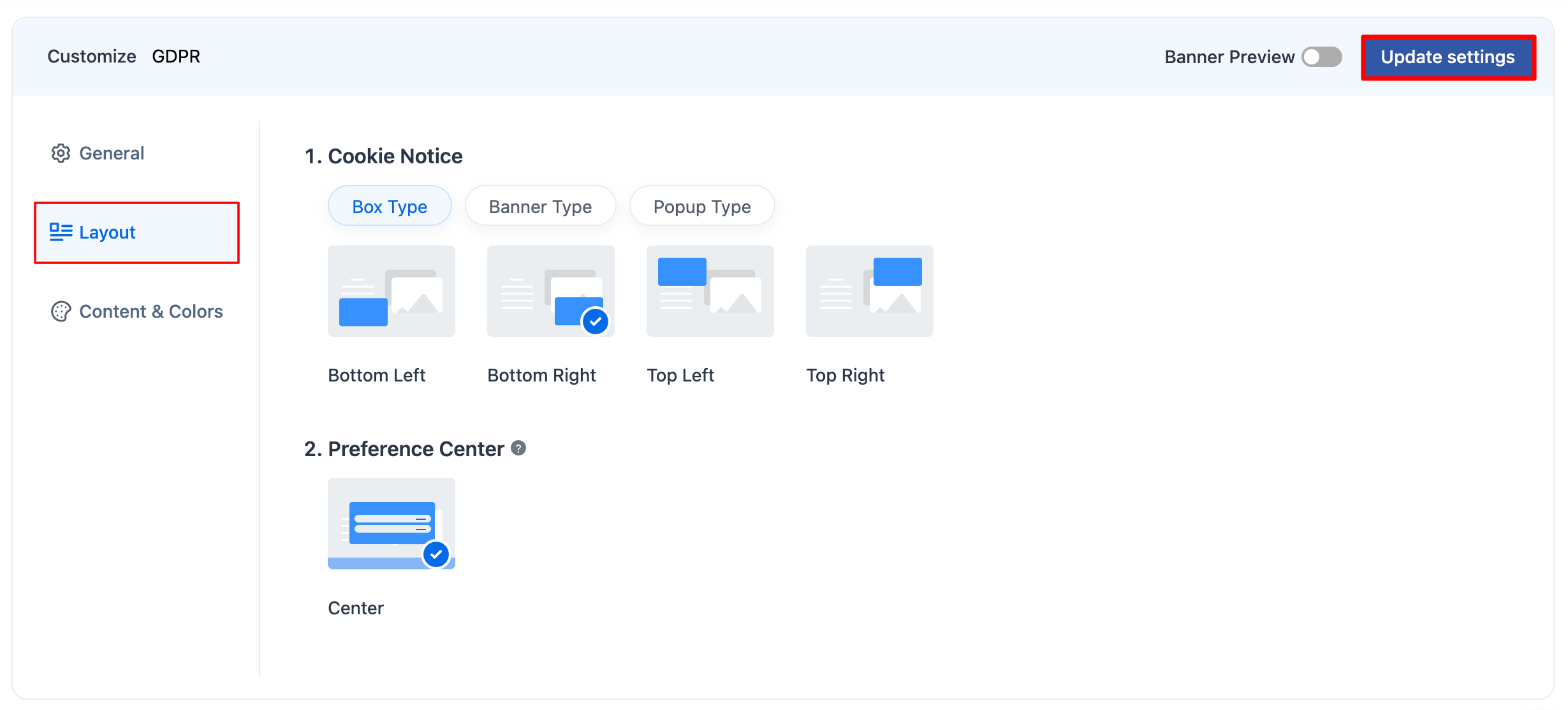
This will add the GDPR cookie banner to your WordPress website. To see how it looks, enable the Banner Preview option and review the configured banner. At this point, the cookie banner appears in English by default.
Step 4: Configure Cookie Banner for Multiple Languages
- To manage language settings, go to Cookie Consent > Languages tab from your dashboard. Here, you’ll see the default language currently applied to your cookie banner.
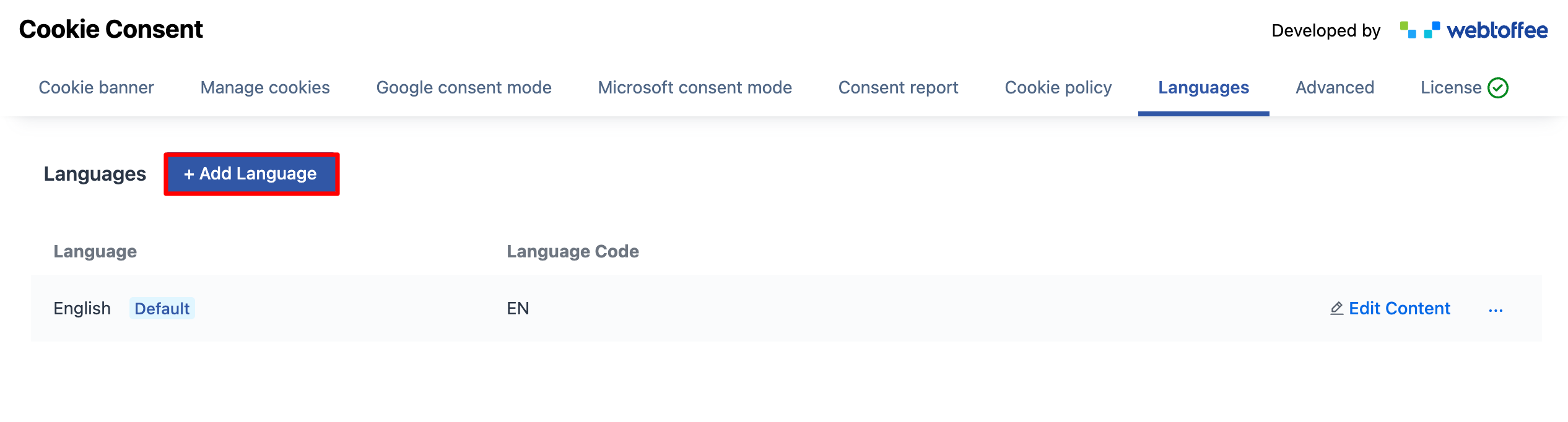
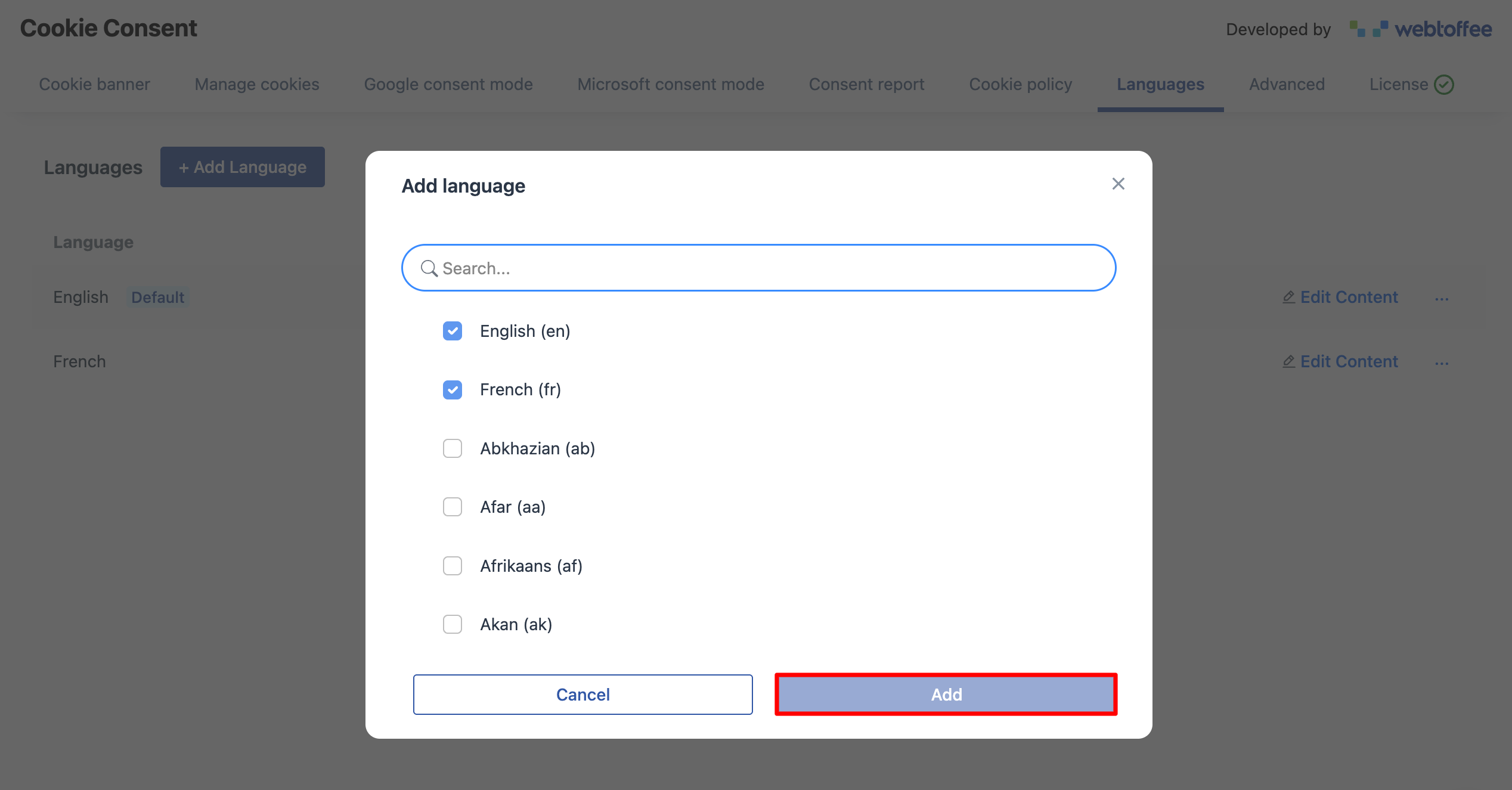
- To include multiple languages, click +Add Language, select the languages you want the banner to support, and click Add. Once added, these languages will appear in the list.
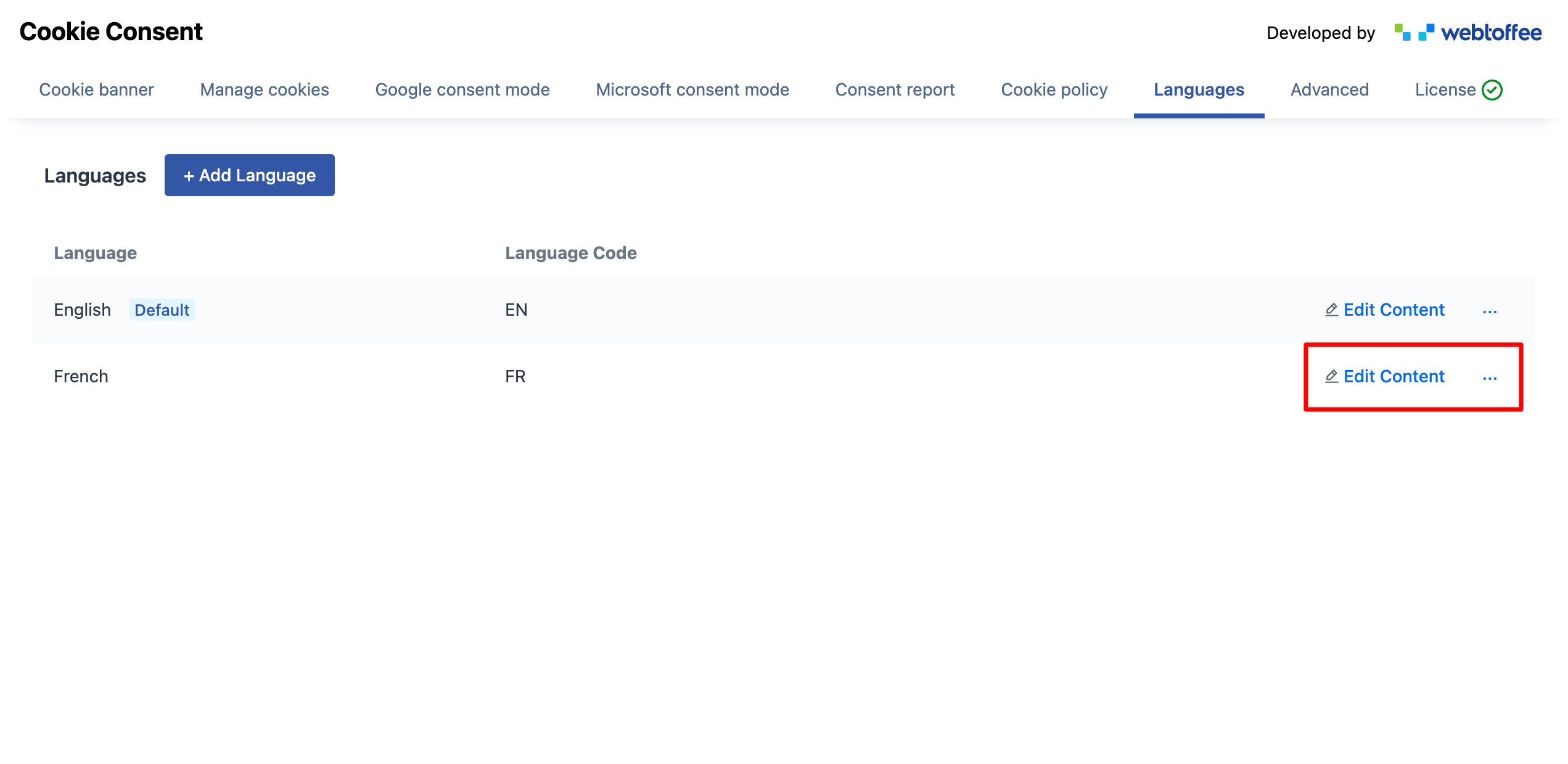
- Each language includes an Edit Content option. Selecting this allows you to modify the banner text for that specific language. For supported languages, the plugin automatically fills in translated cookie banner content.
- You can review and change text across different sections, including the cookie notice, preference center, cookie list, revisit consent button, and blocked content messages.
- Attach the translated cookie policy link in the corresponding field.
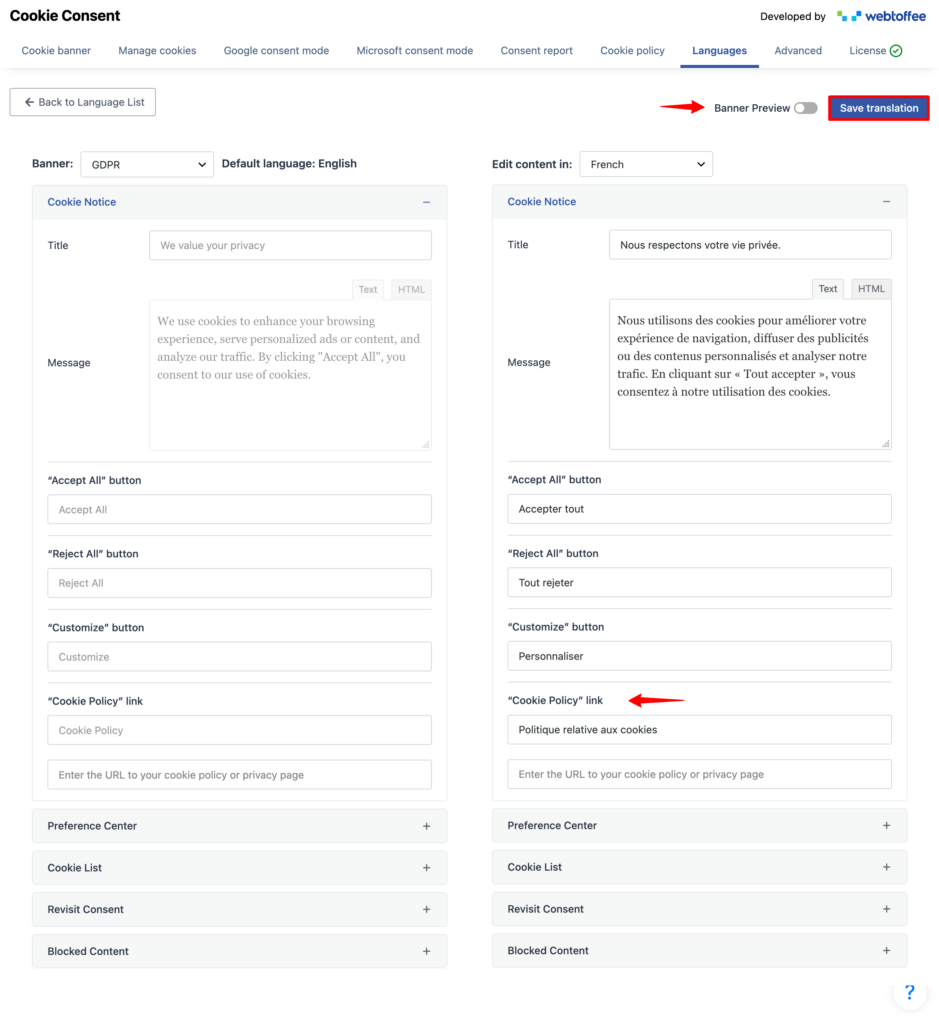
- After making changes, enable Banner Preview to see how the banner will appear on your site. Once you’re satisfied with the content, click Save translation to apply the updates.
- Next, test the banner by switching browser languages or using location-based testing tools. A well-configured multilingual cookie consent banner improves clarity while supporting compliance across regions.

How to Handle Non-Supported/Custom Languages for Cookie Banners?
Not every language comes with built-in translations. When a language is not supported, the cookie banner continues to display English text until translations are added manually.
Manually Translating Cookie Banner for Non-Supported Languages
For languages without preloaded translations, you can add and translate the content manually:
- Add the language from the available list
- Open the Edit Content option for that language
- Translate all banner elements, including headings, descriptions, and buttons
- Save the translation once complete.
Adding Custom Languages Using Third-Party Plugins (WPML)
If your site uses WPML, you can also apply custom languages to your cookie consent banner.
Custom languages created in WPML automatically become available in the cookie banner language list. To add translations for these languages:
- Go to Cookie Consent > Languages from your WordPress dashboard
- Click +Add Language and select the custom language added through WPML
- Open Edit Content for the selected language
- Manually enter the translated banner text
- Click Save translation to apply the changes
Once saved, the cookie banner will display the translated content whenever users browse your site in that language.
Frequently Asked Questions
GDPR does not explicitly mandate multiple languages, but it requires consent to be informed. Showing the banner in a language users understand helps meet this requirement.
Most cookie consent solutions detect the user’s language through browser settings, the page’s lang attribute, or integrations with WordPress multilingual plugins, and then display the appropriate cookie banner automatically.
Yes. If your site uses plugins like WPML, you can add custom languages and manually translate cookie banner content for those languages.
If a language is not supported, the banner content appears in the default language until translations are added manually.
Wrapping Up
A multilingual cookie consent banner plays an important role for websites that serve users across regions. By presenting consent information in a language users understand, you reduce confusion and support informed choices.
Beyond compliance, multiple-language cookie banners improve accessibility and create a more inclusive experience for international visitors. They also help build trust by showing transparency in how cookies and tracking technologies are used.
When setting up a multilingual cookie banner in WordPress, choosing a plugin that supports auto-translation, manual language control, and compatibility with tools like WPML makes the process far simpler. Regular testing, timely updates, and clear policy links help keep the setup effective over time.
With the right approach, a multilingual cookie consent banner becomes a practical part of both user experience and data protection efforts.
Thanks for reading!