Share:


Table of Contents
Shopify Fulfillment Network (SFN) is a service designed to streamline the order fulfillment process for Shopify merchants by connecting them with third-party logistics providers. This system allows businesses to outsource inventory storage, order processing, packing, and shipping, ultimately reducing operational burdens and enabling merchants to focus on growth.
- SFN integrates directly with Shopify, allowing seamless management of fulfillment activities from the Shopify admin.
- Merchants can choose from multiple fulfillment partners, making it easier to find a provider that meets their specific needs.
- The network enhances inventory visibility, enabling merchants to monitor stock levels and fulfillment statuses in real-time.
- SFN offers performance metrics that help businesses assess their fulfillment partner's efficiency and delivery timelines.
- While the SFN app is free to install, costs are incurred based on the selected logistics provider's services, including storage and shipping fees.
- The service primarily supports US-based fulfillment, requiring merchants to send inventory to the United States for processing.
As your Shopify store grows, so does the work that goes into fulfilling orders. What starts with packing a few orders yourself can quickly turn into managing warehouse space, tracking inventory, coordinating shipping, and making sure every order reaches customers on time.
Eventually, handling everything in-house can become expensive and difficult to manage. But what if you could leave the packing and shipping to someone else?
That’s where Shopify Fulfillment Network (SFN) comes in. It connects your Shopify store with third-party logistics providers that handle inventory storage, order processing, packing, and shipping on your behalf.
In this guide, we’ll explain how Shopify Fulfillment Network works, what it costs, its benefits and limitations, and how to get started.
Shopify Fulfillment Network (SFN) is a fulfillment service that connects Shopify merchants with third-party logistics (3PL) providers to store inventory, process orders, and ship products to customers.
Instead of managing your own warehouse or packing every order yourself, you can use a fulfillment partner to handle these activities.
Shopify Fulfillment Network originally operated under a different model, with Shopify investing directly in fulfillment infrastructure. However, in June 2023, Shopify sold the majority of its logistics business to Flexport.
Today, SFN primarily works as a network connecting Shopify merchants with logistics providers. Some of the fulfillment partners available through Shopify include:
- Flexport
- ShipBob
- Shipfusion
- DHL Fulfillment
- GoBolt
- Amazon Multi-Channel Fulfillment (MCF)
The available partners and their services may change over time.
You can compare fulfillment providers, connect your preferred partner, and monitor fulfillment activities through the Shopify Fulfillment Network app.
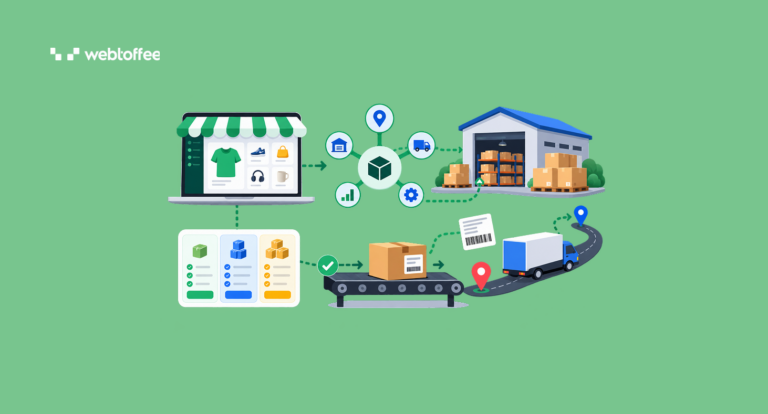
Shopify Fulfillment Network connects your online store with a logistics provider that handles the physical fulfillment process.
Once you’ve selected a provider and completed the setup, you send your products to its fulfillment center. The provider stores your inventory until customers place orders.
When a customer places an eligible order on your Shopify store, the order is sent to the connected fulfillment provider according to your integration and routing settings. The provider then picks the products from its warehouse, packs them, and arranges shipping.
Shipment and tracking information can then be synced back to Shopify, allowing you to monitor the order’s progress.
Here’s how the process works:
Connect a 3PL → Send inventory → Receive Shopify orders → Pick and pack products → Ship orders → Update fulfillment status
For example, suppose you run a Shopify store selling fitness accessories. You receive around 500 orders each month and currently pack and ship everything from a small warehouse.
Instead of hiring additional staff and renting more storage space, you could work with an SFN-connected fulfillment provider. You would send your products to the provider’s warehouse. When customers order resistance bands, yoga mats, or other accessories from your store, the provider would handle the packing and shipping.
You can continue managing your products, customers, and orders in Shopify without physically handling every shipment.
The exact order processing, inventory synchronization, and tracking workflows depend on your selected 3PL and its integration.
Shopify Fulfillment Network offers several advantages for stores looking to outsource order fulfillment.
1. Integration with Your Shopify Store
One of the main advantages of SFN is its integration with Shopify.
You can connect supported fulfillment providers through the Fulfillment Network app and monitor relevant fulfillment activities from your Shopify admin. This reduces the need to manually transfer order details between your store and a warehouse management system.
Depending on the provider, inventory quantities, order statuses, and tracking information can also be synchronized between systems.
2. Access to Multiple Fulfillment Providers
You don’t have to choose a fulfillment provider without knowing what services it offers.
Shopify Fulfillment Network includes a recommendation tool that helps you compare available 3PLs based on your store’s requirements. You can review estimated costs, delivery performance, warehouse availability, and supported shipping destinations.
This makes it easier to find a provider that matches your product types, order volume, and fulfillment requirements.
3. Better Inventory Visibility
When you outsource fulfillment, knowing how much inventory you have at your provider’s warehouse is important.
The Fulfillment Network app allows you to monitor inventory transfers and fulfillment activities from Shopify. For example, you can review inventory sent to your fulfillment partner and monitor orders that are waiting to be fulfilled.
This helps you identify potential stock shortages and plan inventory replenishment.
However, the accuracy of this information still depends on proper synchronization between Shopify and your fulfillment provider.
4. Fulfillment Performance Monitoring
SFN also provides information about your fulfillment partner’s performance.
Depending on the available data, you can review metrics such as orders fulfilled, fulfillment time, order-to-delivery time, and transit time. These insights can help you understand whether orders are reaching customers as expected.
For example, if delivery times consistently increase, you can investigate whether the delay occurs during order processing or shipping.
5. Less Time Spent Managing Warehouses and Shipping
Managing fulfillment internally requires storage space, warehouse staff, packing materials, shipping arrangements, and ongoing inventory handling.
Outsourcing fulfillment reduces the amount of time you need to spend on these activities. This can be particularly useful when your store experiences seasonal sales increases or starts receiving more orders than your existing operations can handle.
Some fulfillment partners also offer additional services such as returns processing, specialized packaging, or international shipping. The availability and cost of these services depend on the provider.
Getting started with Shopify Fulfillment Network involves installing the app, choosing a logistics partner, preparing your products, and configuring fulfillment settings.
Here’s how to set it up.
Step 1: Install the Shopify Fulfillment Network App
Start by installing the official Shopify Fulfillment Network app from the Shopify App Store.
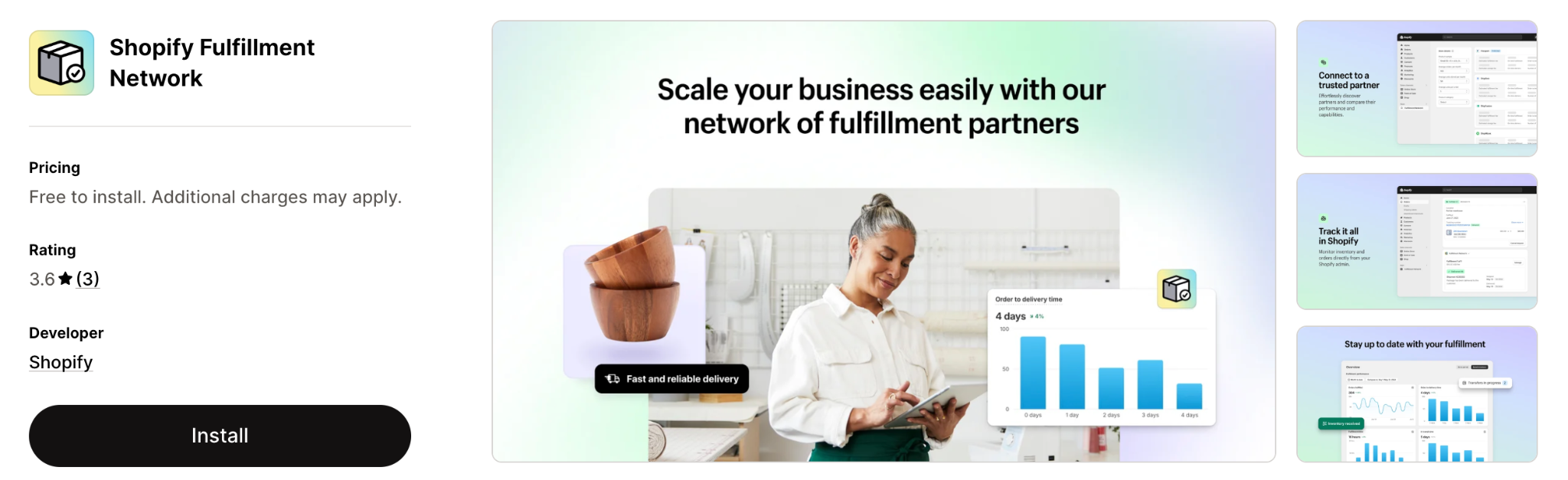
Once installed, you can access it from Apps > Fulfillment Network in your Shopify admin.
The app is free to install. However, you’ll need to pay your selected fulfillment provider for the services it offers.
Step 2: Compare Available 3PL Providers
Before choosing a fulfillment partner, compare the available providers using Shopify’s recommendation tool.
Go to Apps > Fulfillment Network and find the Store details section.
Enter information about your business, including:
- Product size and weight
- Average monthly order volume
- Average number of units stored
- Average number of products per order
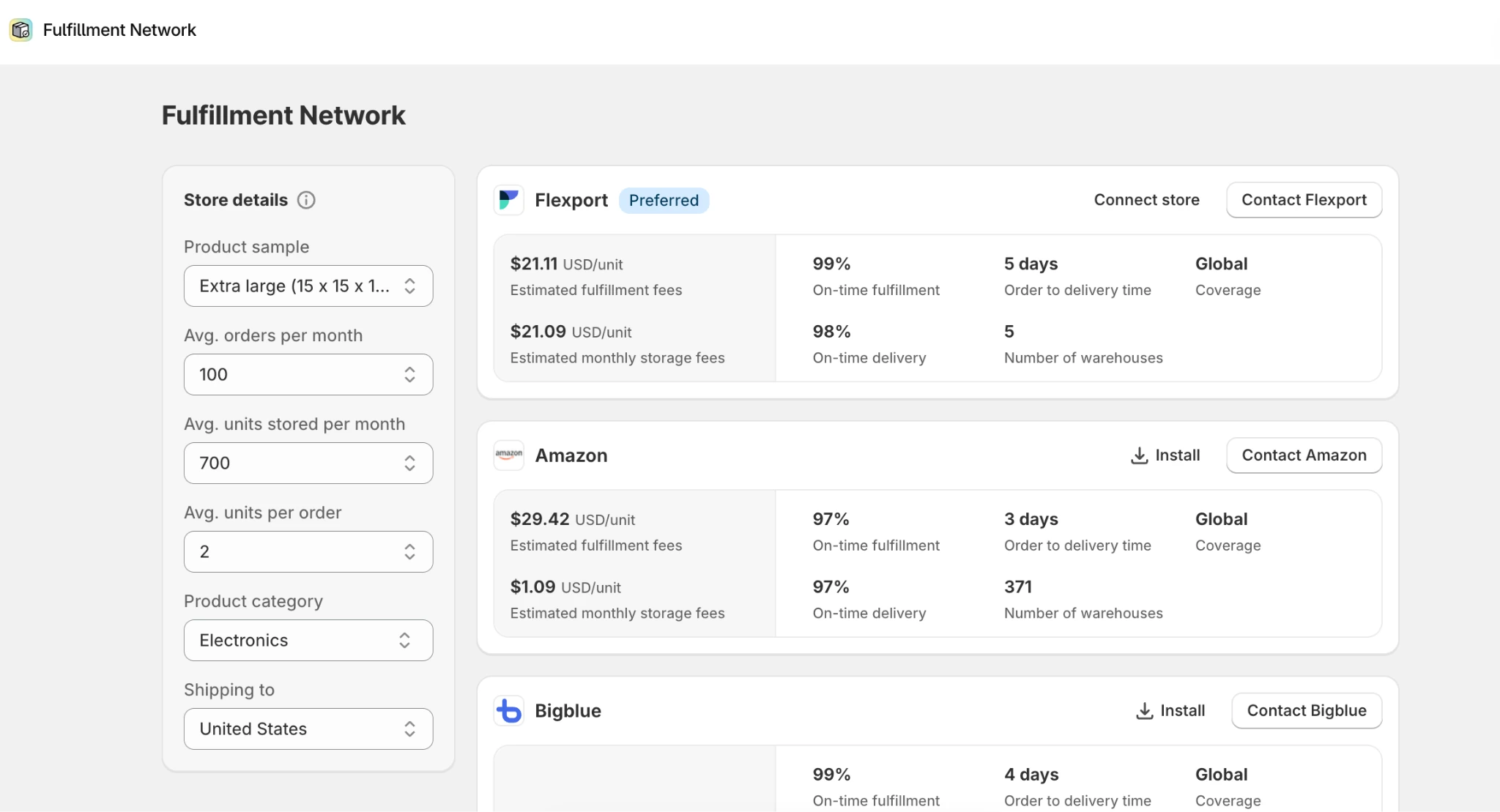
You can also filter providers based on product category. Shopify uses this information to recommend suitable fulfillment providers and display estimated fulfillment and storage costs.
You can compare providers based on delivery times, on-time fulfillment performance, warehouse locations, and shipping destinations.
Don’t base your decision on shipping costs alone. Check whether the provider supports your products, handles returns, and offers the services your business needs.
Step 3: Connect Your Preferred Fulfillment Partner
Once you’ve selected a provider, you need to establish an account and connect it to Shopify.
From the Fulfillment Network app, select your preferred 3PL and contact the provider to discuss its services, pricing, and requirements. The connection process depends on the partner.
For example, if you’re using Flexport, you can select Connect store and sign in to your Flexport account or create a new one.
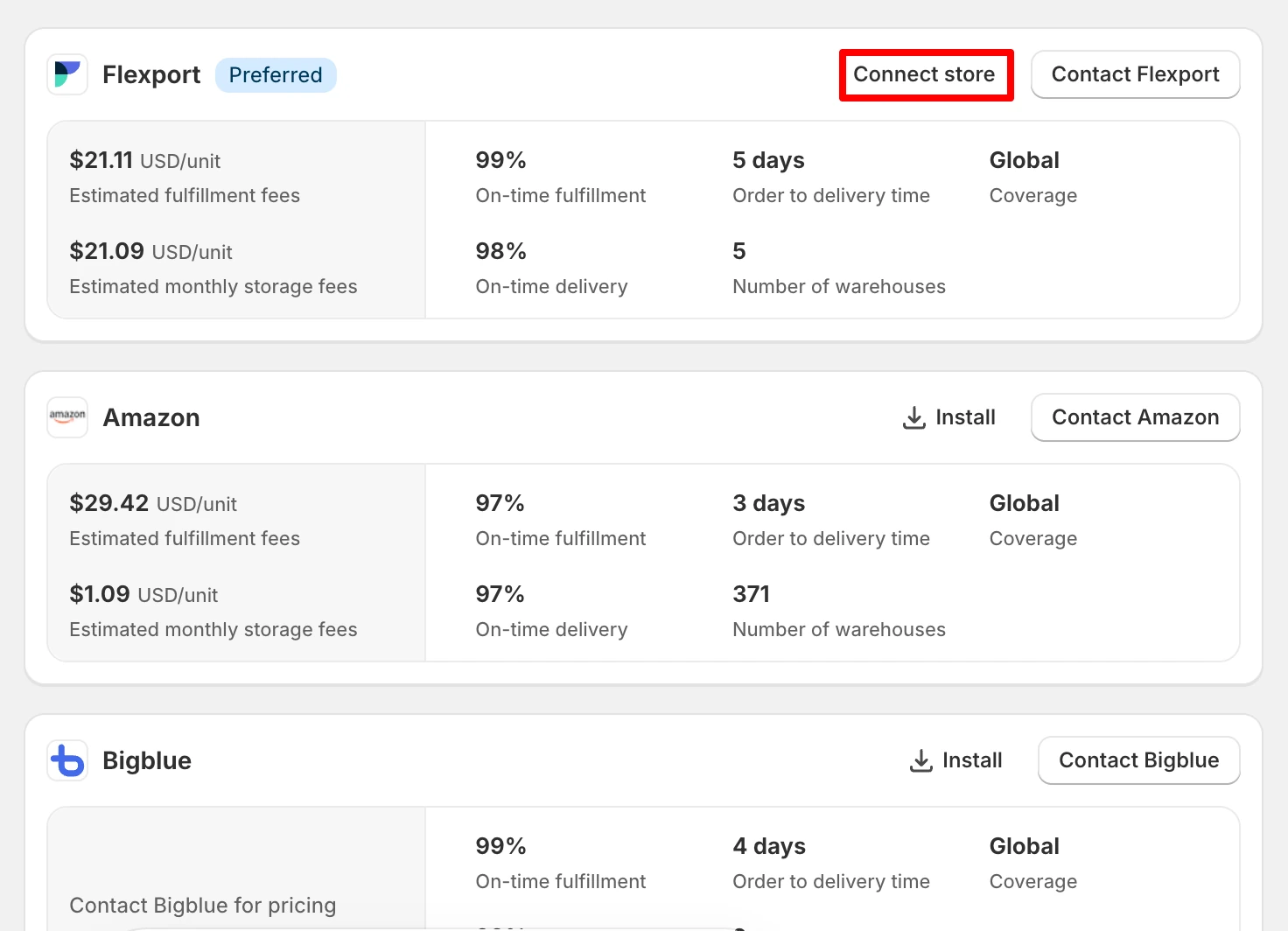
For other supported providers, Shopify generally directs you to install the provider’s integration app.
Follow the setup instructions provided by your selected 3PL. After connecting, verify that your products and fulfillment locations are correctly linked to the provider.
Step 4: Prepare Your Product SKUs and Barcodes
Before sending inventory to your fulfillment provider, make sure your Shopify product information is accurate. This is particularly important for stores with hundreds or thousands of products and variants.
According to Shopify’s product requirements for SFN, each product variant must have a unique SKU and barcode. For example, if you sell a T-shirt in three sizes, each variant should have a different SKU.
| Product variant | Example SKU |
|---|---|
| Black T-shirt – Small | TSH-BLK-S |
| Black T-shirt – Medium | TSH-BLK-M |
| Black T-shirt – Large | TSH-BLK-L |
Unique product identifiers help fulfillment providers recognize the correct items during receiving, storage, and order picking. Also verify that your products have the appropriate barcodes, titles, and other required information.
If you manage a large catalog, manually checking every product can take considerable time. You can export your Shopify product data, review it in a spreadsheet, correct missing or duplicate SKUs, and import the updated information.
An app like StoreRobo Import Export can help with bulk exporting and updating Shopify product data, including SKUs and variant information.
You can also refer to our Shopify import and export guide for detailed instructions.
Important: Avoid changing product SKUs after submitting them to your fulfillment provider, as this can create inventory matching problems. Check your provider’s specific barcode and labeling requirements before preparing shipments.
Step 5: Transfer Inventory to Your Fulfillment Provider
Once your products are ready, you need to send inventory to the fulfillment provider’s warehouse. The exact process depends on the provider you’ve selected. For example, if you’re using Flexport, you can open Apps > Fulfillment Network and select Send inventory to begin creating an inbound shipment in Flexport.
You’ll need to specify the products and quantities you’re sending and follow the provider’s packaging and labeling requirements. After preparing the shipment, arrange transportation to the designated warehouse.
When the fulfillment provider receives your inventory, it will inspect and process the products before making them available for fulfillment. You can monitor relevant inventory transfer statuses through Shopify.
Step 6: Configure Shipping and Order Routing
The final step is configuring how orders are assigned to your fulfillment provider.
Depending on the provider, you may need to update shipping rates, assign customer-facing names to shipping options, and configure order routing rules.
For example, Shopify allows Flexport merchants to configure shipping rates for the SFN – Flexport location.
Order routing rules help determine which fulfillment location should handle an order when you have inventory stored across multiple locations.
Review your shipping zones and rates to make sure customers see the correct delivery options at checkout. Before relying on the integration for live orders, place a test order and verify that it reaches the appropriate fulfillment provider.
Also confirm that fulfillment and tracking updates are reflected correctly in Shopify. Once everything is configured, your connected provider can begin handling eligible customer orders.
Shopify Fulfillment Network is free to install, but using a fulfillment provider is not free.
Shopify does not apply one universal fulfillment rate across every provider in its network. Instead, the costs depend on the third-party logistics partner you choose.
Fulfillment expenses may include several components.
1. Inventory receiving: Some providers charge for receiving, inspecting, and processing inventory when it arrives at their warehouses.
2. Storage fees: You may pay for the warehouse space used to store your products. Charges can depend on the amount of space occupied, storage duration, and product characteristics.
3. Picking and packing: The provider may charge for retrieving products from storage, preparing packages, and handling orders.
4. Shipping fees: Delivery costs depend on factors such as package dimensions, weight, destination, and shipping speed.
5. Additional services: Returns processing, special packaging, product labeling, and other optional services may involve additional charges.
For example, a business storing 2,000 units and shipping 500 orders each month will have different fulfillment requirements from a store handling 50 orders and maintaining a smaller inventory.
You can use Shopify’s Fulfillment Network recommendation tool to estimate storage and fulfillment costs based on your expected order volume and product details.
Shopify Fulfillment Network can simplify order processing, but it may not be suitable for every store. Here are some important considerations before using it.
US-Based Fulfillment Requirement
Shopify currently states that the Fulfillment Network app is available to businesses fulfilling orders out of the United States.
Your business does not necessarily need to be registered in the US. However, you must arrange to send your inventory to the United States for fulfillment. International shipping availability depends on your selected logistics provider.
If you’re primarily shipping from warehouses outside the US, you may need to consider other fulfillment solutions or direct 3PL integrations.
Product Eligibility and Restrictions
Not every fulfillment provider accepts every product.
Restrictions may apply to hazardous materials, temperature-sensitive items, oversized products, or products requiring special storage and handling. Some providers also have specific packaging, labeling, and inbound shipment requirements.
Verify that your products meet the provider’s requirements before signing a contract or sending inventory.
SKU and Barcode Requirements
Accurate product information is important for third-party fulfillment.
Shopify requires unique SKUs and barcodes for product variants sent through SFN. Duplicate identifiers or incorrect product data can cause problems when receiving inventory or matching orders to warehouse products.
If you’re working across multiple sales channels, consistent SKU mapping can also help keep product information aligned between systems.
Provider-Specific Costs and Requirements
Although Shopify doesn’t impose one universal order minimum across all SFN partners, individual providers may have minimum monthly volumes, storage charges, or contractual requirements.
These conditions can make third-party fulfillment less economical for smaller stores.
You should also consider the cost of sending inventory to fulfillment centers, including replenishment shipments.
Less Direct Control Over Fulfillment
Outsourcing fulfillment means another company handles your products after receiving them.
While this saves time, you may have less direct control over packaging, order handling, and shipping operations. If something goes wrong, resolving the issue may require coordination with your fulfillment provider.
Before choosing a 3PL, check its support process, order accuracy standards, return handling policies, and service agreements.
The Shopify Fulfillment Network app is free to install. However, you must pay your selected logistics provider for services such as inventory storage, order processing, packing, and shipping.
The actual costs depend on your fulfillment partner and business requirements.
Shopify previously invested directly in fulfillment infrastructure. However, in June 2023, Shopify sold the majority of its logistics business to Flexport.
Today, Shopify Fulfillment Network connects merchants with third-party logistics providers rather than operating as a proprietary Shopify warehouse network.
Shopify Fulfillment Network currently requires fulfillment operations based in the United States. Your business can be located in another country, but you must send inventory to the US for fulfillment.
Whether your provider can ship orders internationally depends on its services and supported destinations.
Shopify Fulfillment Network connects Shopify merchants with third-party logistics providers that store and ship products.
Amazon Fulfillment by Amazon (FBA) primarily helps sellers fulfill orders placed through Amazon.
Amazon Multi-Channel Fulfillment (MCF), on the other hand, allows merchants to use Amazon’s warehouses to fulfill orders from other channels, including Shopify. Amazon MCF can also be connected through Shopify Fulfillment Network.
Yes. Shopify supports multiple fulfillment locations and integrations, including different third-party logistics providers. The Fulfillment Network app can display performance information for different connected 3PLs.
However, you need to configure inventory locations and order routing correctly to ensure that the appropriate provider receives each order.
Conclusion
Managing inventory, packing orders, and arranging shipments can become more challenging as your Shopify store grows. Outsourcing these tasks can help you save time and focus on other areas of your business.
Shopify Fulfillment Network makes this possible by connecting your store with third-party logistics providers that handle storage, packing, and shipping on your behalf. You can compare available partners, connect a suitable provider, and monitor fulfillment activities through Shopify.
However, the right fulfillment solution depends on your order volume, product requirements, shipping destinations, and budget. Before getting started, compare provider costs, review product eligibility, and make sure your inventory data is accurate.
With the right fulfillment partner and proper setup, you can spend less time managing shipping operations and more time growing your Shopify store.


Subcribe to our newsletter