Share:


Table of Contents
SKU mapping is a critical process in eCommerce that connects internal product identifiers with those used by various sales platforms, ensuring consistency and accuracy in inventory management. By aligning these identifiers, businesses can prevent overselling, streamline order processing, and enhance the overall customer experience, making it essential for successful multi-channel selling.
- SKU mapping creates a cohesive language for products across different sales platforms, preventing confusion and errors.
- Accurate inventory management is achieved by synchronizing stock levels in real-time, reducing the risk of overselling.
- Streamlined order management is facilitated as each order is correctly linked to the appropriate product, minimizing processing errors.
- Consistent product identification across channels enhances customer trust and satisfaction by providing accurate availability information.
- Implementing SKU mapping involves standardizing internal SKUs, utilizing integration tools, and automating processes for efficiency and scalability.
- Regular audits and centralized product databases are best practices that help maintain SKU integrity and prevent data inconsistencies.
Selling on multiple platforms can definitely help ramp up your sales, but it’s not without its own set of challenges. One of the main headaches? Keeping your product data and inventory in sync across all those channels is one of several common product data management challenges online sellers face. That’s where smart strategies like SKU mapping come into play, making a world of difference behind the scenes.
Imagine this scenario: You’re running an online store selling phone cases. A customer decides to buy the same red phone case from both your Shopify site and your Amazon listing on the same day. The catch? Your system doesn’t recognize that these two orders are for the same item, because Amazon uses one identifier while your store uses another. By the time you catch the mistake, you’ve oversold the product.
Now you’re left either rushing to restock or sending out that dreaded “sorry, your order is delayed” email.
These kinds of mix-ups happen more frequently than you might expect, and the culprit is often a tiny but essential thing: the SKU. SKU stands for Stock Keeping Unit, and it’s a unique code that retailers assign to each product.
The challenge arises when you’re selling on multiple platforms like Amazon, eBay, Google Shopping, etc. Each of these channels may use different identifiers, and without a way to connect them, you end up juggling mismatched product data, inaccurate inventory, and frustrated customers.
That’s where SKU mapping comes to the rescue. By aligning your internal SKUs with the identifiers used by external marketplaces, you create a single, cohesive language for your products. No more second-guessing, no more overselling. Just seamless, accurate multi-channel selling.
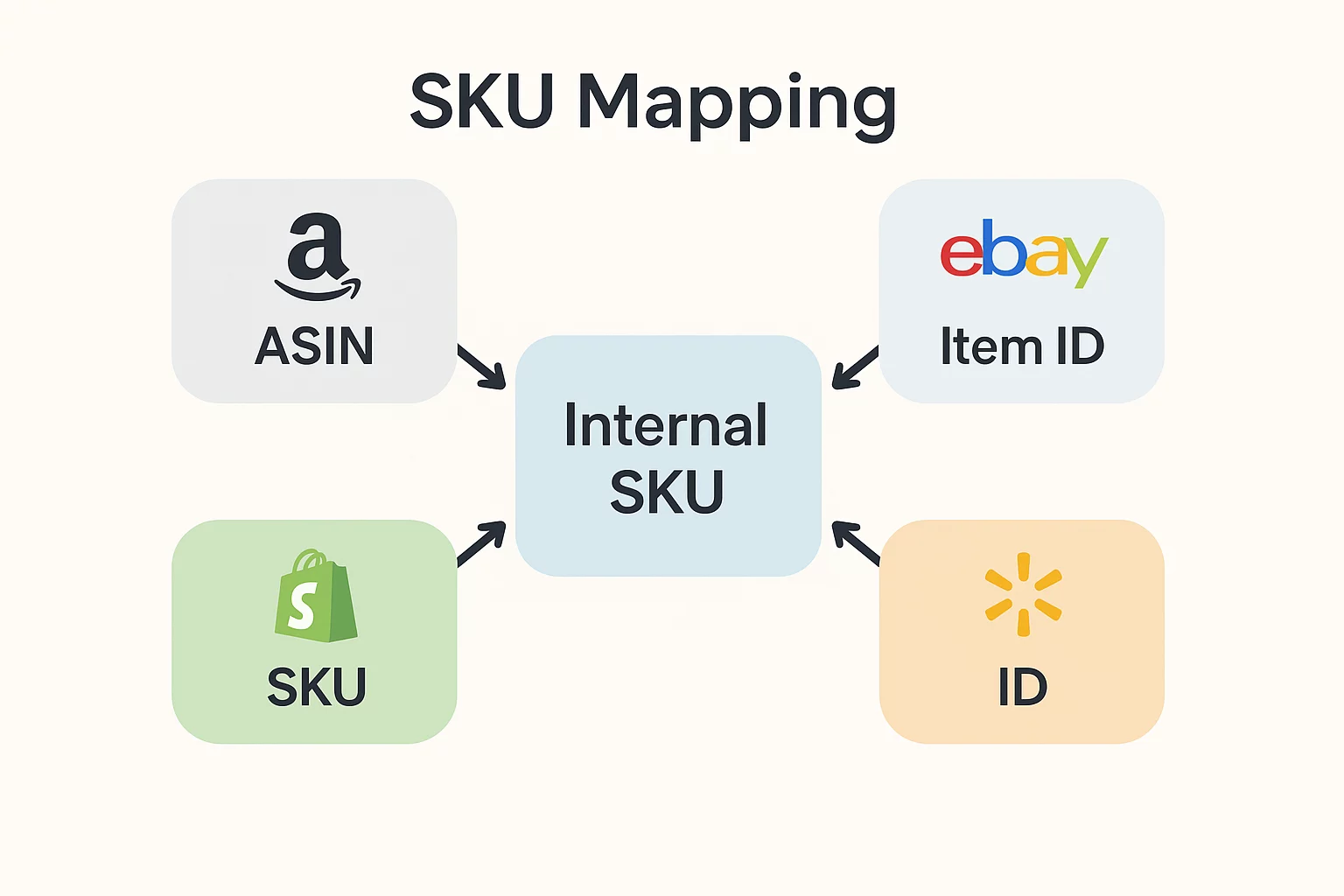
At its core, SKU mapping is all about connecting your internal product SKUs with the various identifiers that sales channels like Amazon, eBay, Walmart, or Shopify use. You can think of it as crafting a universal translator for your products, ensuring that no matter where you’re selling, every system recognizes they’re referring to the same item.
How It Works
Inside your store, you might assign a product the SKU: IPH-RED-13 (for a red iPhone 13 case).
- On Amazon, that same product might be tracked under an ASIN (Amazon Standard Identification Number).
- On eBay, it could have a completely different Item ID.
- On Shopify, it might use yet another SKU structure you created for inventory.
Without a way to connect these identifiers, your systems can’t automatically tell that they all represent the same product. SKU mapping bridges this gap. It matches IPH-RED-13 with the Amazon ASIN, the eBay Item ID, and the Shopify SKU so that everything syncs correctly across platforms.
Real Examples of Mismatches
Let’s say you’re selling sneakers:
- In your warehouse system: SNK-BLK-10 (Black Sneakers, Size 10).
- On Amazon: ASIN: B09XYZ123.
- On eBay: Item ID: 2018473629.
- On Shopify: BLK-SHOE-10.
If you don’t map them, your system may treat these as four separate products. That’s where the chaos begins. Inventory counts go off, sales data becomes messy, and you risk overselling.
With SKU mapping, all those codes get tied together, so every sale, stock adjustment, and report reflects the same product.
Why SKU Mapping Matters in eCommerce
SKU mapping isn’t just some technical detail; it’s the essential link that keeps multi-channel selling running smoothly. Without it, managing your business can feel like trying to piece together a jigsaw puzzle with all the wrong pieces.
Let’s dive into why it’s so crucial:
a. Inventory Accuracy
One of the biggest headaches in eCommerce is keeping inventory accurate across multiple platforms. Without SKU mapping, your system may treat the same product as multiple different items, causing chaos.
- Avoid overselling and stockouts: Imagine having 20 units of a product in your warehouse, but your systems think Amazon has 10 and Shopify has 10 separate units. When both sell out, you’ve suddenly oversold, leaving customers disappointed and your reputation at risk.
- Real-time synchronization: With SKU mapping, every sale, whether it’s on Amazon, eBay, or your store, automatically updates one central inventory count. No more scrambling to reconcile stock at the end of the day.
b. Streamlined Order Management
When products are misaligned across platforms, order management becomes a manual nightmare.
- Faster processing with fewer errors: SKU mapping makes sure each incoming order points back to the right product in your system. No more guessing whether “Red Case – ID#123” is the same as “Case_Red_2023.”
- Easier tracking of performance: Since every order is correctly tied to the correct SKU, you can quickly see which products are selling well across different platforms without messy duplication in your reports.
c. Multi-Channel Selling Success
Selling on multiple platforms is almost mandatory for growth, but it also multiplies complexity.
- Seamless expansion: With SKU mapping in place, you can confidently sell on Amazon, eBay, Walmart, Shopify, WooCommerce, and more without worrying about product mix-ups.
- Consistent product identification: Every channel knows exactly which product is being sold, making your catalog consistent everywhere and preventing customer confusion.
d. Data & Analytics Clarity
Numbers tell the story of your business, but only if they’re clean and accurate.
- Better sales reports: SKU mapping ensures your analytics aren’t split across multiple identifiers. Instead of seeing three different “products” in reports, you’ll see one clear line of data.
- Simplified forecasting: With a single source of truth for each product, you can predict demand more reliably and plan restocks with confidence.
e. Customer Experience
At the end of the day, customers don’t care about SKUs—they just want what they ordered, on time. SKU mapping makes that possible.
- Accurate availability: Shoppers see correct stock levels, reducing frustration from “out-of-stock after checkout” errors.
- Correct shipments: Orders are tied to the right items, lowering the chances of a customer receiving the wrong product.
How to Implement SKU Mapping
So, we know SKU mapping is essential, but how do you get it up and running in your business? Here are three practical steps to make it happen:
a. Standardize Internal SKUs
Before you can map anything, you need a clean internal SKU system. Think of this as setting the foundation for your entire catalog.
- No two products should share the same SKU, no matter how similar they are.
- A good SKU often contains hints about the product (e.g., TSH-BLK-M for a black t-shirt, size medium).
Choose a format and stick with it, whether it’s hyphenated codes, alphanumeric combinations, or category-based patterns.
The goal here is to avoid confusion later. If your internal SKUs are neat and logical, mapping them to external identifiers becomes much easier.
b. Use Integration Tools or Plugins
Here’s where things get practical. Manually mapping products across Amazon, eBay, Google Shopping, and other platforms is a recipe for errors and wasted time. Instead, use integration tools that do the heavy lifting for you.
One of the best solutions for WooCommerce users is the WebToffee WooCommerce Product Feed Plugin. This plugin allows you to:
- Generate product feeds for marketplaces like Google Shopping, Facebook, Bing, and more.
- Map your internal SKUs directly to each platform’s required identifiers.
- Keep your product data updated automatically, ensuring smooth synchronization.
By using a plugin like this, you don’t just map SKUs, you also create feeds that make your products visible and consistent across all the channels where your customers shop.
c. Automate Where Possible
Manual mapping might work if you only sell a handful of products, but once your catalog grows, it quickly becomes unmanageable. That’s why automation is your best friend.
- Time-saving: Tools like the WebToffee plugin automatically update inventory, pricing, and product information in your feeds.
- Error reduction: Automation removes the risk of human error that comes with spreadsheets and manual data entry.
- Scalability: Whether you have 50 SKUs or 5,000, automated WooCommerce product attribute mapping ensures your systems can keep up as your business grows.
Best Practices for SKU Mapping
Getting SKU mapping right isn’t a matter of luck; it demands a clear strategy. Check out these simple but effective practices that can save you a lot of trouble in the future
1. Keep SKUs Unique and Descriptive
Every product should have a unique SKU. It seems obvious, but you’d be shocked at how often businesses end up using the same codes for similar items. That’s a surefire way to create confusion.
- Example: Instead of assigning TSH001 to multiple t-shirts in different colors, use something descriptive like TSH-BLK-M (T-shirt, Black, Medium).
2. Document Your SKU Structure for Scalability
Imagine SKUs as a language. Without clear rules, it can all become a bit chaotic in no time.
- Decide upfront how you’ll format them. Will you use hyphens, numbers, letters, or categories?
- Write down the structure and share it with your team, so everyone creates SKUs the same way.
Pro Tip: Treat your SKU system like a brand guideline. It should be standardized, documented, and followed consistently.
3. Regularly Audit SKUs for Consistency
As time goes on, it’s not uncommon for little errors to slip in, like duplicate SKUs, typos, or products that are missing their identifiers.
- Schedule regular audits (quarterly or biannually) to clean things up.
- Use reporting tools to flag duplicate or inactive SKUs.
- A quick review can save you from inventory errors or reporting issues later.
4. Use Centralized Product Databases
If you’re selling across multiple platforms, don’t manage product data separately for each one.
- Keep one central product database using your WooCommerce catalog, ERP, or a WooCommerce import export plugin that helps manage product data.
- From there, map your SKUs outward to Amazon, eBay, Shopify, or wherever you sell.
- This ensures that every platform pulls from the same source of truth, reducing errors and keeping inventory in sync.
Here’s a quick summary of SKU best practices, broken down into clear do’s and don’ts.
SKU Mapping Do’s & Don’ts
| Do’s | Don’ts |
|---|---|
| Keep SKUs unique & descriptive | Reuse the same SKU for multiple products |
| Document your SKU structure | Make SKUs random or meaningless |
| Audit regularly for duplicates or errors | Ignore inconsistencies over time |
| Use one central product database | Manage product data separately on each channel |
Conclusion
If you take a step back and consider it, SKU mapping is way more than just a technical detail; it’s the backbone of efficient and scalable eCommerce operations. It helps keep your inventory accurate, ensures your orders flow smoothly, makes your data understandable, and guarantees that your customers get exactly what they ordered. Without it, selling across multiple channels can quickly turn into overselling, confusing reports, and disappointed customers.
The silver lining? SKU mapping doesn’t have to be overly complicated. With a tidy SKU system and the right tools in place, you can bring some order to the chaos. Whether you’re handling a small selection of products or thousands, mapping your SKUs gives you a reliable source of truth that keeps every channel communicating in the same product language.
Hope this article helped you. Feel free to share your thoughts or questions as comments below.
Thanks for reading!


Subcribe to our newsletter