Share:


Table of Contents
A WordPress booking solution not only streamlines and automates all your bookings but also helps you eliminate administrative overheads, minimise errors such as double bookings, and improve proper resource allocation.
An efficient booking system is no longer a luxury, but a necessity for online booking hubs. These systems are not just for filling up your booking calendars; they ensure a smoother experience for both businesses and customers. Whether you run a spa or salon, manage a healthcare clinic, teach classes online, or offer professional freelance services.
With an effective and efficient WordPress booking system, you can –
- Eliminate missed appointments by sending reminder emails to customers
- Showcase real-time availability to avoid double bookings, which cause scheduling conflicts
- Allow customers to book anytime, anywhere, without phone calls or any waiting
- Send instant updates regarding confirmations, cancellations, and reminders for the bookings
- Conveniently, add more bookable products or multiple locations for the same service
- Manage payments, bookings, and customer information all in one place
- Boost your brand’s image as your customers view your business as reliable and organized

Bookings for WooCommerce is a WordPress plugin that helps WooCommerce store owners transform their ordinary store into a user-friendly booking hub. This booking tool utilises the extensive functionalities, ensuring that it meets and exceeds all your customers’ expectations.
Start your online booking store with functionalities such as Global calendar booking, early bird discounts, Facebook sharing, email/SMS reminders, and syncing booking calendars with Google Calendar.
Merchants can initially think that our bookings plugin is a simple calendar with a form, but it is dynamic and fully customizable.
Let us take a real-world user case – a gym might have multiple personal trainers. Each of these gym trainers needs their schedules listed on the website. On the other hand, a dental office may need to showcase specific time slots and reveal the different types of services offered.
At its core, Bookings for WooCommerce can –
- A precise number of booking cancellation and processing days can easily be defined.
- Effortlessly show/hide the additional booking form details.
- Provide booking service location navigation through the booking location feature.
- Early Bird Discount coupons can easily be offered.
- Before the service is available, you will receive email and SMS reminders.
- Fully customised email/SMS templates for different business types.
- Create a simple list of upcoming WooCommerce bookings using the Booking Calendar.
- Set the start and finish times for booking WooCommerce appointments for the day with simplicity.
- You can establish the maximum number of WooCommerce appointments per day using the HMS unit.
- Make it simple for your clients to cancel their booking appointment requests using the WooCommerce Appointments plugin.
- Global Calendar integration with third-party booking platforms like Booking.com, Airbnb, and Outlook.
Yes, we understand there are countless booking plugins available, and it can be confusing to choose the correct one. This section is dedicated entirely to showcasing how Booking for WooCommerce differs from other plugins. We have divided this section into three subsections: Key Features, Ease of Use, and Pricing & Plans.
Let’s Dive Right In…
Key Features
- Google Calendar Sync: Merchants can utilise this feature to synchronise completed bookings with their respective Google Calendar.
- Projected Availability Timeline: By utilising this functionality, merchants can mention the availability window or set day availability up to a particular date or time. They can add more than 10 slots to showcase the availability.
- Single & Dual Calendars: Through the functionality of this Bookings for WooCommerce, merchants have full flexibility to switch between a Single or Dual Calendar based on their booking needs. It’s important to note that opting for the dual calendar is suitable when there are more unavailable dates, while choosing the single calendar is recommended when there are more available dates.
- Easy Facebook Sharing: As merchants, it is essential to promote your booking products on social media platforms. They can effortlessly do so with this functionality.
- Twilio SMS Reminder Service: The integration with the Twilio SMS Reminder Service allows merchants to connect their Twilio credentials in the Integrations Settings tab and send SMS reminders using the service. For businesses seeking to enhance customer engagement, incorporating AI voice solutions can complement SMS reminders with interactive voice experiences.
- Choose Your Week’s Starting Day: The Bookings for WooCommerce plugin allows merchants to select the starting day of the week to match your website’s preferences.
- Global Calendar Integration With Third-Party Platforms: Integrating the Global Calendar with third-party booking websites allows seamless management of bookings across platforms by automatically syncing your WooCommerce global booking calendar with other booking sites. Merchants can integrate their booking hub with platforms like Booking.com, Airbnb, and Outlook.
- Multi-Language Support for Booking Calendars: The Bookings for WooCommerce plugin allows merchants to connect with their audience in their preferred language. This functionality helps your booking website feel more familiar and welcoming.
- Centralised View For Bookings: Customers can view their bookings in a centralised manner. They can see the name of their booking product (which is clickable), the payment method they used, the option to add the booking to their Google Calendar, the booking status, and the cancellation option (if the merchant has enabled this functionality). Furthermore, customers can also select whether they want to view the bookings in a list or grid format.
- Modification in Booking Slots: Merchants can easily change booking slots through the backend settings. For example, if a customer wants to modify a booking slot, they can easily connect with the admin and get it modified within minutes.
Ease Of Use
Despite the different forms of customisation and flexibility, Booking for WooCommerce is very simple and easy to set up and use.
It is important to note that before activating the plugin – Bookings For WooCommerce Pro, you should have the Bookings for WooCommerce – WordPress plugin installed, as the plugin will not function without it.
So, if you don’t already have it, you can download it directly from here: Download Zip
Automatic Installation
Automatic installation is the easiest option handled by WordPress.
- Download the Bookings For WooCommerce Pro plugin.
- Log in to your WordPress Dashboard.
- Navigate to the sidebar, and click on Plugins.
- Click on Add New and then click on Upload Plugins.
- Hit the Browse button, choose your downloaded plugin’s .zip file, and click on Install Now.
- Once installed, activate the Bookings plugin.
Manual Installation
- Download the Bookings for WooCommerce PRO plugin from the respective website product page.
- Log in to your WordPress dashboard.
- Navigate to the Plugins > Add New page and hit the Upload Plugin button.

- Upload the .zip file of the plugin and hit the Install button.
- Finally, activate this plugin from the Plugins > Installed Plugins page and hit the Activate button to continue.
Pricing & Plans
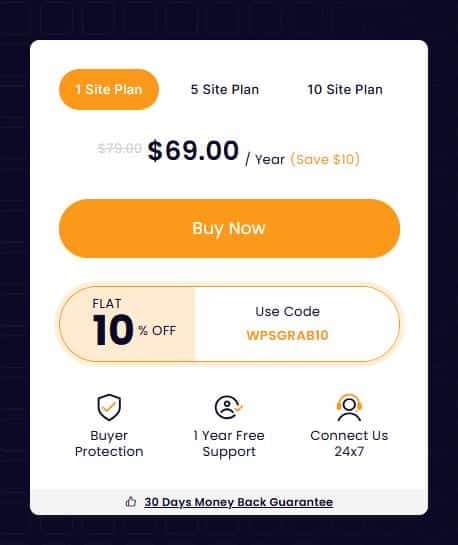
The pricing model for Booking for WooCommerce has a lot of varieties to offer:
Let’s elaborate on the pricing –
- Free on WordPress ORG: WooCommerce Booking Plugin
- 1 Site Plan: $69/ Year
- 5 Site Plan: $169 / Year
- 10 Site Plan: $349/ Year
- Saloons & Spas: With Bookings for WooC0mmerce, salon & spa owners can turn a slow weekday into a fully-booked schedule. Incorporate the “early-bird discount” functionality to offer special discounts to customers visiting on an off-day. Owners can also create tiered pricing for packages for customers.
- Healthcare Providers: Bookings for WooCommerce’s “ booking unavailability” feature allows healthcare providers to block off days when practitioners are unavailable, which eliminates accidental bookings. The “Custom Booking Fields” help capture important patient details such as name or age. While Google Calendar sync keeps both staff and patients updated in real-time, this approach is commonly used in modern healthcare management systems to reduce administrative friction and improve care coordination.
- Hotels: By utilising the functionality of availability settings, you can –
- Select the Unavailable Dates ( List of Holidays )
- Block Certain Months, and make them Unavailable for Booking
- Offer day-based discounts, both fixed and variable, to encourage their customers to make bookings for longer time frames
- Choose Multiple Dates To Disable Booking On That Day
- Choose a Day To Make Booking Unavailable On That Day every week
- Create extra slots for a particular date
There might be many other booking solutions but Booking for WooCommerce is like that extra-organized friend who is just not responsible for bringing the snacks for the roads, but someone who willingly labels the calendar, adds an extra dash of color-coded booking slots, sends you timely reminder text/messages, and makes sure you are paid on time, all thanks to features like single & dual calendars, slot-based calendars, early bird discounts, integrated wallet payments, Twilio SMS updates, and Airbnb-style flexibility for good measure.


Subcribe to our newsletter