Share:


Table of Contents
Upselling is one of the simplest ways to increase the value of every order in your WooCommerce store. Instead of spending extra on ads to acquire new customers, you can encourage the ones already shopping with you to add more to their cart. That is where upsell popups come in.
According to industry research, well-crafted eCommerce popups can achieve an average conversion rate of 11 percent. For a store owner, that means a small, well-timed suggestion has the potential to turn browsers into buyers and significantly boost revenue.
In this blog, we will explore how to create WooCommerce upsell popups, why they are effective, and how the WooCommerce Marketing Automation plugin from WebToffee makes it simple to set them up. By the end, you will have a clear path to increasing your average order value with a tool that is easy to use and designed for store owners like you.
Key Takeaways:
- Upsell popups help WooCommerce store owners boost average order value by showing timely, relevant product suggestions to engaged shoppers.
- They improve the customer experience by making it easier to find complementary items, which increases satisfaction and encourages repeat purchases.
- With the WebToffee WooCommerce Marketing Automation plugin, creating and customizing upsell popups is quick, automated, and designed to drive more revenue with minimal effort.
An upsell popup is a small window that appears on your WooCommerce store to suggest additional or upgraded products while a customer is browsing, adding items to their cart, or heading to checkout. The goal is simple: encourage shoppers to buy more by presenting relevant offers at just the right moment.
Unlike generic promotional popups, upsell popups are personalized. They are triggered by a shopper’s actions, such as viewing a product, adding something to the cart, or beginning the checkout process. For example, if someone buys a laptop, the popup might recommend a laptop bag or an extended warranty. These suggestions feel helpful rather than pushy, which is why they often lead to higher conversions.
The biggest advantage of upsell popups is their ability to increase average order value without adding extra friction to the shopping experience. Instead of relying on customers to search for complementary products, the store proactively shows them what they are likely to need. This not only drives revenue but also improves customer satisfaction by making their shopping journey smoother and more complete.
Upsell popups are one of the easiest ways to increase revenue in your WooCommerce store without investing in more traffic. Instead of spending on ads or running endless promotions, you maximize the value of every customer who already visits your site. By showing a relevant product suggestion at the right moment, you tap into buying intent that is already strong.
One of the main reasons upsell popups work so well is timing. A customer who just added an item to their cart or is about to check out is far more likely to consider a related product than someone casually browsing. By presenting these offers when the shopper is already engaged, you naturally increase the chances of a successful upsell.
The benefits go beyond boosting sales. Upsell popups also enhance the shopping experience by saving customers time. Instead of searching for accessories or complementary items, the store recommends them automatically. This can lead to better customer satisfaction and even repeat purchases, as shoppers feel guided and cared for throughout their journey.
From a numbers perspective, even a small lift in average order value adds up quickly. If your store processes hundreds of orders per month, converting just a fraction of those with upsell popups can translate into a noticeable jump in monthly revenue. That is why so many WooCommerce store owners see upsell popups as a must-have in their marketing toolkit.
By default, WooCommerce does not include built-in tools for creating marketing popups. The good news is that you can easily add this functionality using third-party popup plugins designed to handle popups, forms, and customer engagement features.
One of the most effective options is the WooCommerce Marketing Automation plugin from WebToffee. It gives you everything you need to design upsell popups, build sign-up forms, and even automate follow-up emails, all in one place.
Here’s how you can get started:
Step 1: Install the WebToffee Marketing App
Sign up for the WebToffee Marketing App and follow the guided setup to connect it with your WooCommerce store. The process is straightforward, and within minutes, your store will be ready to start creating upsell campaigns.

- After connecting, click on the Go to Web app button. This will take you to the WebToffee Marketing app dashboard.
Step 2: Choose Upsell Popups
- From the dashboard, select Recommendations from the sidebar menu and click on Start recommending products.
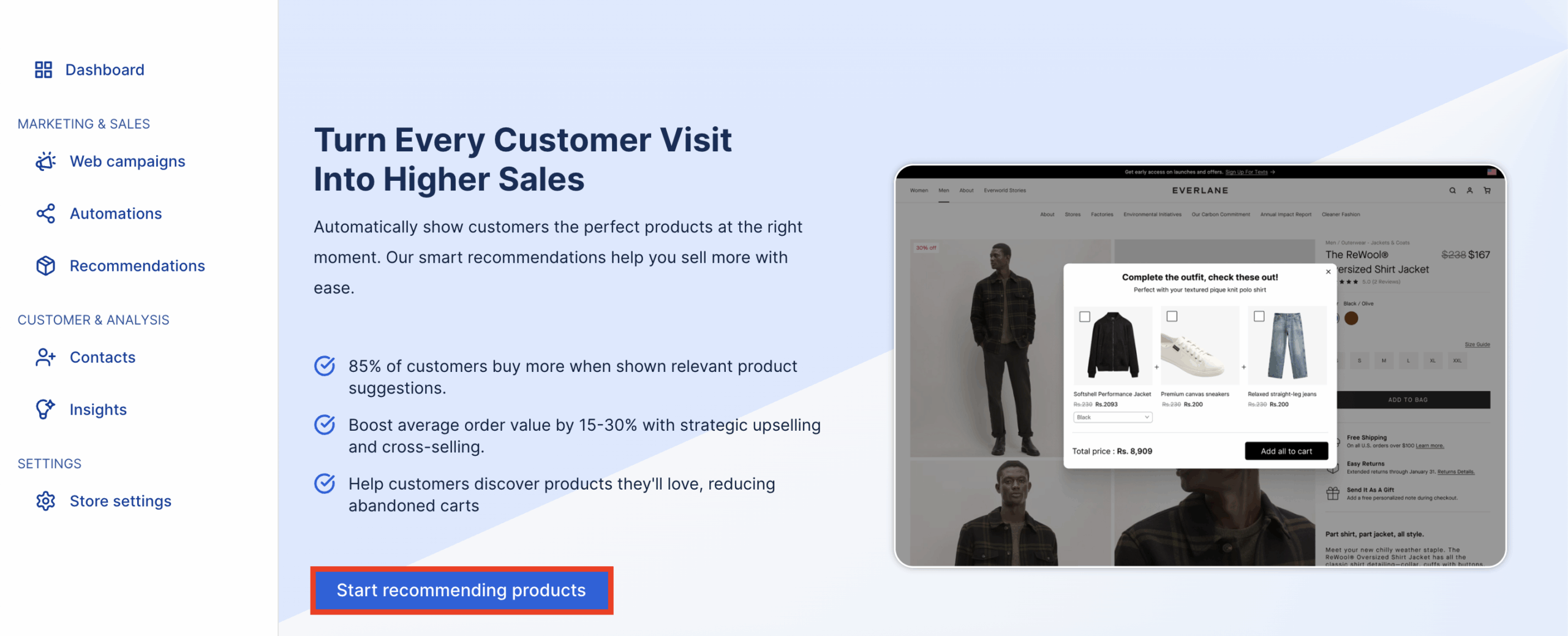
Then, choose Upsell template for the recommendation campaign.

Step 3: Configure Upsell Bundles
- Click on the Add upsell bundles button to add products to the upsell bundle.

- Enter a title for the upsell bundle and choose a recommendation mode.
- You can either choose to add products manually or use the advanced algorithm of the WebToffee marketing app to automatically recommend the upsell products.
- Click Next to continue.

Step 4: Choose The Trigger Products
- In this step, choose the products you want to show the upsell bundle popup.
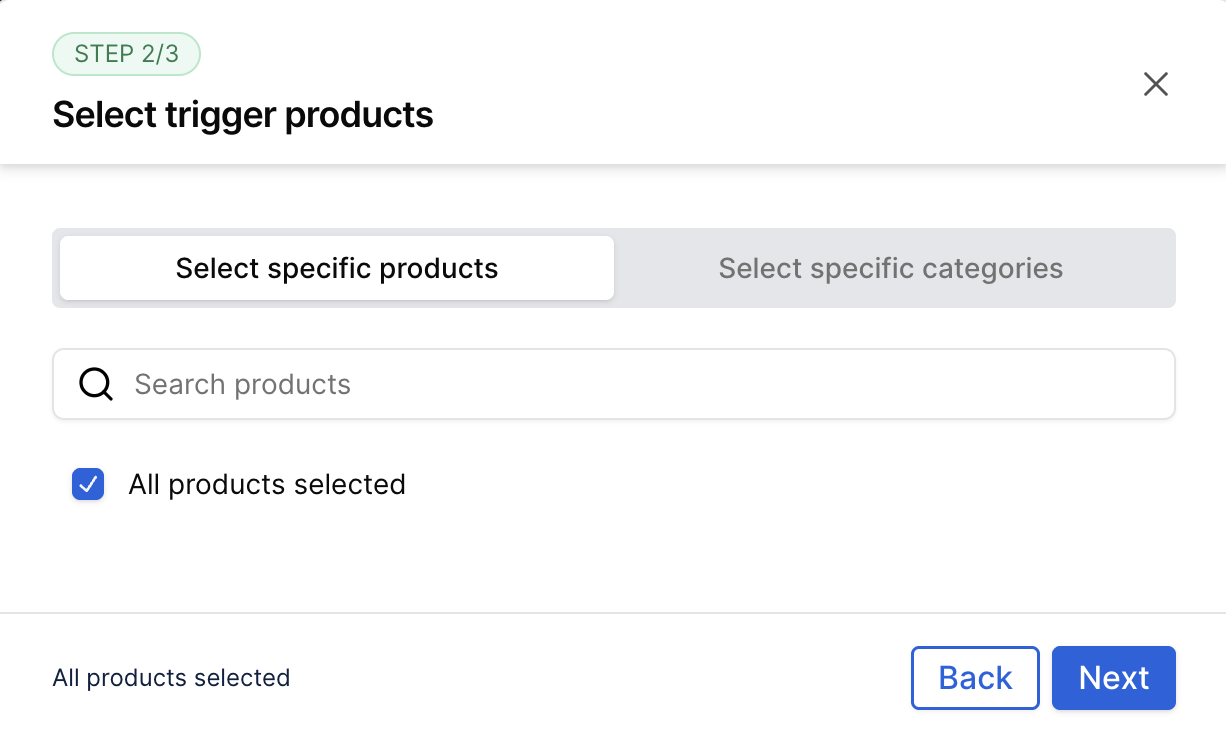
- You can select all products, or specific products, or products from specific categories.
- After making your selection, click on Next to continue.

- Choose when the upsell popup should appear by selecting customer triggers such as:
- Add to cart action
- Proceed to checkout action
- Post-purchase page
- Optionally, display the same product recommendations inside emails by inserting the Product Recommendation block in the email editor.
- Customize the popup content by adding a title (e.g., Level up your product and savings) and button text (e.g., Upgrade now).
- Preview the popup modal or email block to check how it looks.
- Click Create bundle to finalize and activate the upsell popup.

Here’s how it appears on your store page.
Upsell popups are a proven way to increase sales in WooCommerce without complicating the buying process. By showing customers relevant product suggestions at the right time, you not only raise the average order value but also create a smoother and more personalized shopping experience.
With the WooCommerce Marketing Automation plugin, setting up these popups is quick and effortless. From choosing the right products to configuring triggers and customizing the design, the plugin gives you everything you need to launch high-converting upsell campaigns in just a few clicks.
If you are looking to maximize revenue from every customer who visits your store, upsell popups are a strategy worth implementing today. Try them out with the WebToffee Marketing App and start turning more of your shoppers into happy, high-value buyers.


Subcribe to our newsletter