


Share:


Table of Contents
Want to increase conversions on your WooCommerce store without adding complexity? Highlighting your popular or best-selling products is one of the easiest ways to do that.
These are the products already proven to perform well, so showcasing them in the right spots (like product pages, category pages, or the homepage) helps build trust, drives engagement, and boosts sales.
In this guide, we’ll show you how to effortlessly display popular products in WooCommerce using a powerful plugin: WebToffee’s WooCommerce Product Recommendations. With just a few clicks, you can create smart recommendations like “Best Sellers,” “Trending Now,” or “Top Picks”, all based on sales performance.
Let’s walk you through exactly how to set this up.
Key Takeaways:
- Popular products are the top selling products on your WooCommerce store.
- Showcasing best selling products gives social proof to your customers and thereby increases sales.
- Learn how to display popular products in a WooCommerce using a recommendation plugin.
Let’s explore why featuring your most popular products can be a simple yet powerful way to boost sales.
- They already sell well: If something’s flying off the shelves, it just makes sense to show it off more. Give those bestsellers more visibility, and you’ll likely see a bump in sales.
- Shoppers trust what others buy: People tend to follow the crowd. Highlighting popular items adds a bit of social proof that nudges others to buy.
It helps customers decide faster: Not everyone knows what they want. Showing top products can point them in the right direction without overwhelming them. - Good for upsells and bundles: Popular items pair well with related products. Use that to your advantage and increase average order value.
- Keeps people browsing longer: Displaying trending or top-rated products in the right spots can keep shoppers engaged and clicking around.
- Creates a sense of urgency: When customers see others are buying something, it sparks that “I don’t want to miss out” feeling.
- It’s what the big guys do: Look at Amazon, Walmart, or Etsy—they all highlight bestsellers for a reason. Now you can do the same on your WooCommerce store.
As there are no default options available in WooCommerce to display popular products, you will need a third-party plugin to do the same. Here is where the WebToffee WooCommerce Product Recommendations plugin comes to the rescue.
Now let’s see how to display popular products on your WooCommerce store using the product recommendation plugin.
Before we get into the plugin configuration, make sure you have purchased the recommended plugin from the WebToffee website. After purchasing the plugin, download the plugin file from the My Account page.
Step 1: Install WebToffee WooCommerce Product Recommendations Plugin
- Install and activate the WooCommerce Product Recommendations Plugin.
- Head over to the WooCommerce tab and select Product Recommendations.
- Click on Create Recommendations.

Step 2: Choose Best Seller Recommendation Widgets
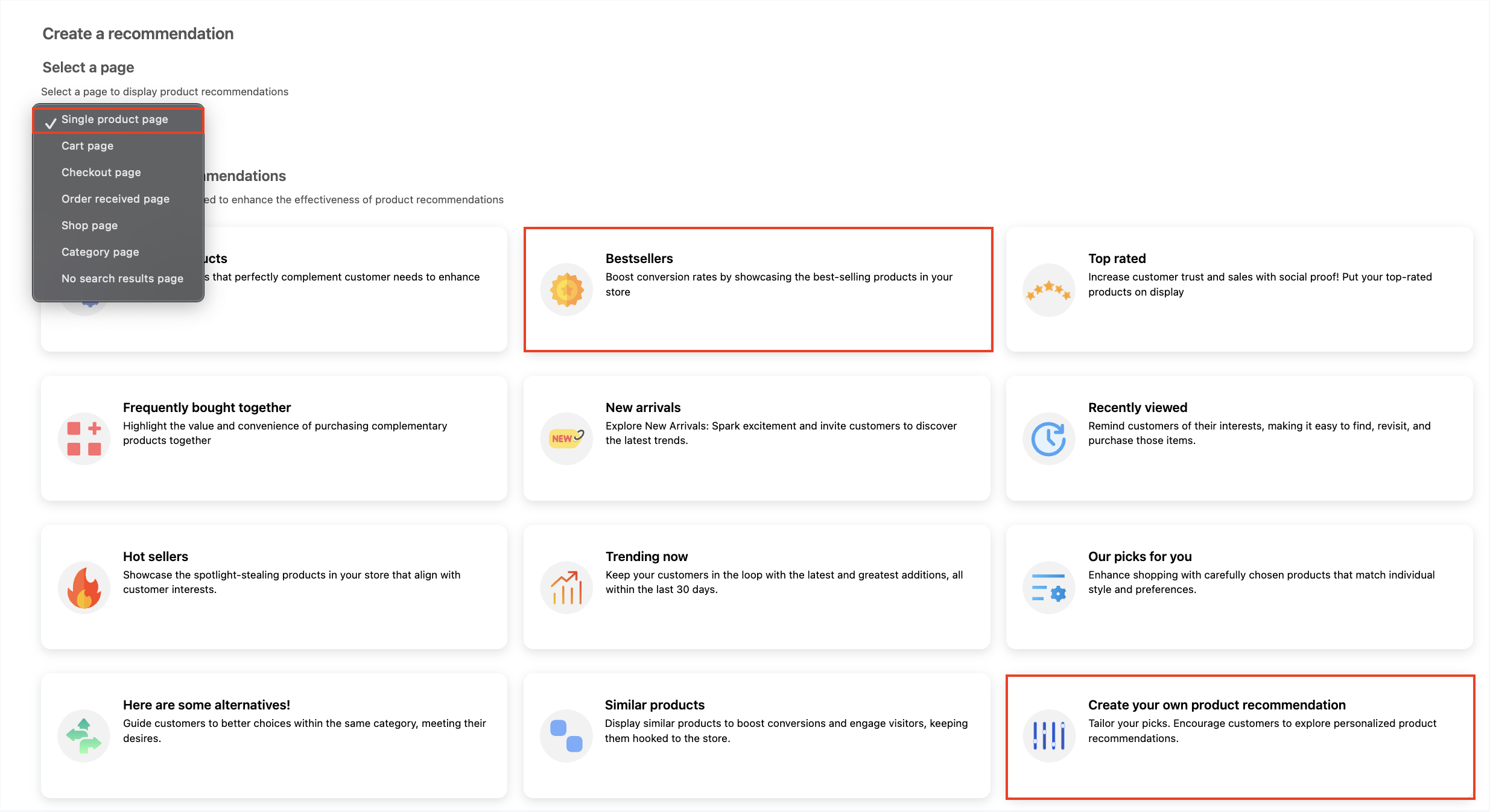
- First, select the page on which you want the recommendation to appear. Here, you will have access to all the available built-in recommendation campaigns.

- You can opt for the pre-defined ‘Best seller’ campaign or create your own one with the create custom recommendations feature. Here, we will be going with the template. Click on the Best sellers template.
Step 3: Customize the Product Recommendations Widget
Configure the recommendation settings according to your preference. The Manage Recommendations page serve as the plugin’s home page providing easy access to its key functions and settings. The four recommended settings are:
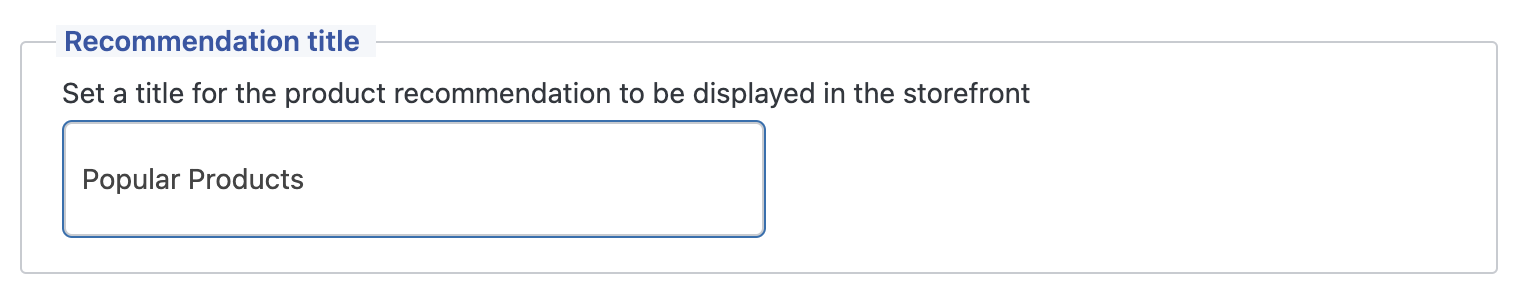
- Recommendation Title: You can set the title of the product recommendation to your preference. Try experimenting with creative titles to attract and engage store visitors.
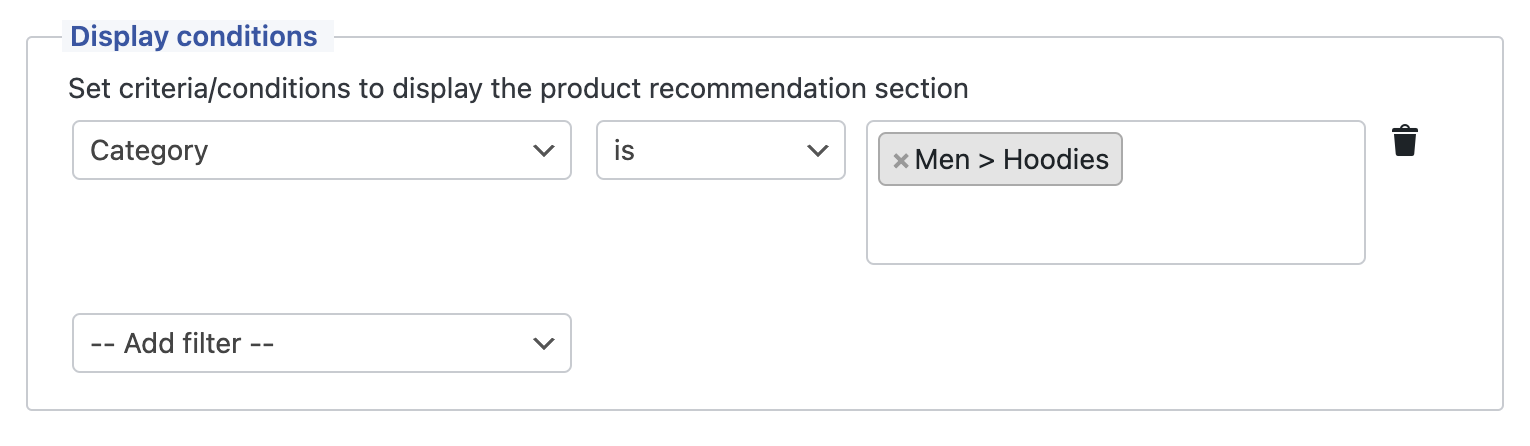
- Display Conditions: You can add any number of conditions or criteria that need to be met for the product recommendation to be displayed.
For instance, if you want to display best sellers when a customer browses a hoodie from the “Men” category, the display conditions will be as shown below.
- Sort products by: By default, the campaign highlights the most popular products. There are various sorting options available, including ‘Latest,’ ‘Rating,’ ‘Price,’ and more. You can edit these to your preference.

- In the Visual Preferences setting, you can decide on the positioning and the number of products to be displayed. The Visual Guides link shows a preview of all the possibilities you can choose from.

- Click on Create Recommendations.
These are the recommendation settings for creating best sellers using the WooCommerce Product Recommendations plugin. For a more detailed understanding of the plugin features and settings, refer to the documentation guide.
Step 4: Configure General Settings of the Recommendation Widget
Now we have some customization options in the ‘General Settings‘ tab of the plugin. You can choose to showcase your product recommendations in either a slider or grid format. Additionally, you can customize the title color and alignment. By default, out-of-stock items will be hidden, but you can disable this option by unchecking the box.

Step 5: Preview Popular Products in WooCommerce
Now, let’s go to the front end of our website and take a look at the popular products.

Related Articles: Display WooCommerce Related Products: Upsells, Cross-sells, & More
The WooCommerce Product Recommendations plugin by WebToffee is a simple but powerful tool that allows you to display diverse product recommendations in WooCommerce.
This plugin helps you to showcase not just popular products on your store site but also other recommendations such as, ‘Recently Viewed’, ‘Frequently Bought Together’, ‘Top-rated’ and more. You can display best selling popular products on a slider or as a grid on your shop page, category page, and product pages.
Key features of this product recommendation plugin are:
- Automatically generates upsell, cross-sells, frequently bought together and more
- Create recommendations using predefined templates or build custom recommendations
- Advanced conditional filters to configure recommendations by attributes
- Display trending products in slider or grid format
- Multiple options available to sort popular trending products
- Hide out-of-stock products
Related Articles: 10+ Product Recommendation Strategies to Boost Conversions
5 Different Ways to Recommend Popular Products in WooCommerce
The WebToffee WooCommerce Product Recommendations plugin offers several powerful widgets that let you highlight your store’s most popular products in different ways. These smart display options help you showcase bestsellers, trending items, and highly rated products—based on real sales and customer engagement data.
Here’s a breakdown of the most effective widgets for recommending popular products:
1. Bestsellers
This widget displays the top-selling products from the same category on category pages. Products are automatically sorted based on overall sales performance, making it a great way to promote items that already convert well.
Use case: Show “Most Popular in [Category]” sections to guide new visitors toward what’s already working.
2. Top Rated
Highlight the highest-rated products from a given category based on customer reviews. Displaying top-rated items on category pages builds social proof and helps earn trust with potential buyers.
Use case: Feature highly reviewed products as trusted options for first-time shoppers.
3. Hot Sellers
Hot Sellers showcases on-sale products that are also popular within the same category as the product being viewed. Popularity is measured over the last 30 days, which helps you highlight both demand and urgency.
Use case: Promote discounted products with strong recent sales to drive fast-moving inventory.
4. Trending Now
This widget displays products added to your store in the last 30 days, sorted by popularity over the past 7 days. These are your freshest, fastest-moving items.
Use case: Keep your store feeling current by surfacing what’s trending right now on your shop page.
5. Custom Recommendations
In addition to the automated widgets, you can also create handpicked recommendations using the custom product recommendation option. Select exactly which products you want to feature and where they should appear—ideal for manual merchandising strategies or seasonal campaigns.Use case: Highlight product bundles, or push slow-moving inventory with custom recommendations.
To show popular products on WooCommerce product pages, you can use the shortcode or the recommendation widget provided by the WooCommerce Recommendation plugin. Simply copy and paste the shortcode to a page or use the widget to feature popular items on your store pages.
To find your most popular or top-selling products in WooCommerce, go to Analytics in your dashboard. There, you’ll see the option for Top Products which will display a list of your best-selling products based on sales data.
Add top-rated products in WooCommerce using the Top Rated template available in the product recommendation plugin. You can place the recommendations on any page using the shortcode or display them using the widget.
You can easily sort the product by popularity when recommending products by using the product recommendations plugin. In the Sort Products by option within the plugin, choose Popularity.
Displaying your most popular products in WooCommerce is a simple and effective way to increase conversions and build customer trust. These best-selling items have already proven their value, so putting them in the spotlight can help you drive more attention and sales.
Since WooCommerce doesn’t offer a built-in option to showcase trending or top-selling products, using a powerful product recommendation plugin like WebToffee WooCommerce Product Recommendations is the easiest solution. You can create dynamic “Best Sellers” sections, show popular products on product pages, or build custom recommendations based on real-time store data.
By using the steps outlined in this guide, you can start featuring popular products across your WooCommerce store, improve the shopping experience, and grow your revenue without touching any code.


Subcribe to our newsletter


