Share:


Table of Contents
Looking for cookie banner examples that are both visually appealing and legally sound? In this post, we’ve curated the best GDPR cookie banner examples from real websites that balance user experience and cookie banner compliance. Whether you’re building a GDPR-compliant website or just need inspiration for your cookie banner design, you’ll find actionable ideas here.
A cookie banner helps websites communicate the use of cookies and obtain consent from site visitors for loading cookies on their browsers. If you are using cookies on your website, you must display a cookie banner.
In this article, we have handpicked the 15 best GDPR cookie consent banner examples on popular websites. We will also cover the checklist for creating an effective cookie banner for GDPR compliance.
Let’s get started.
Key Takeaways:
- The cookie consent banner informs users about the use of cookies on a website.
- Cookie consent banners allow users to accept and reject cookies using buttons and links.
- EU’s GDPR requires websites to obtain prior consent from visitors for loading cookies on their browsers.
A cookie banner is a visible notification on websites that informs users about cookie usage and gives them a choice to accept, reject, or manage them. It is also sometimes referred to as a cookie consent popup.
Many data protection laws, like GDPR and CCPA require websites to show a cookie banner on their website.
The cookie banner should give users the option to accept or reject cookies. It should be noticeable and easily accessible on the website. The text in the banner should also be written in layman’s terms so that an average person can understand it.
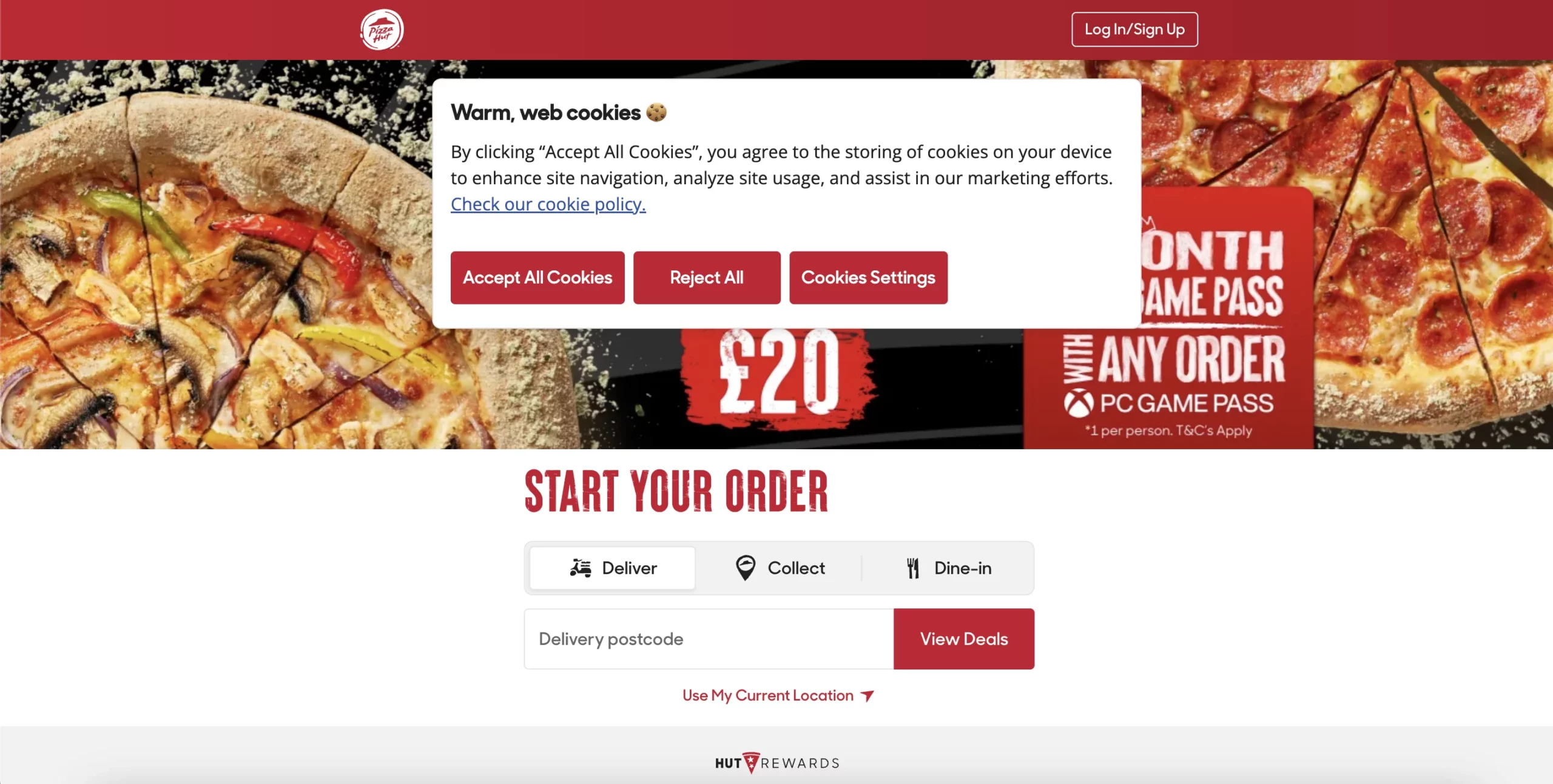
Following are the major components of a cookie banner:

- Title: Provide a title for the cookie banner. Commonly used titles are “We use cookies,” “Cookie Consent,” “Consent Preferences”, etc.
- Message: The banner copy is the main content of the cookie banner. It provides information on cookies used by the website, such as what cookies are used, why they are used, and how to provide consent or reject cookies. The banner copy should be clear and specific and written in layman’s terms.
Plus, you should provide auto-translation for the banner copy based on users’ preferred language.
- Link to Privacy/Cookie policy: Add links to the cookie policy or privacy policy to provide further information on how the website uses cookies and how their data is processed and stored.
- Accept, Reject, and Manage cookies buttons: The “Accept” button is the main action button on a cookie banner, which enables users to consent to the use of cookies. The wording across this button may vary, but the purpose is always the same. Some sites have multiple buttons on their cookie banners.

- Close Button: Provide a close button on the cookie consent banner to allow users to browse the website without providing consent. This gives users some time with the website before giving consent and provide them with the choice to dismiss the banner if they do not want to share the consent immediately.
There are three types of cookie banners and they are Notice-only, Implied consent, and Explicit consent. These classifications of cookie banners are based on the consent mechanism they employ. You may find other types based on law, design, etc.
We’ll give examples of different cookie banners in the later part of this article, but for now, let’s see the three major types of cookie banners.
1. Notice-Only Cookie Banner

A notice-only cookie banner is an informative notice that is used to inform site visitors about the use of cookies. It does not contain any accept or reject buttons and doesn’t ask for users’ consent either. These kinds of banners typically display a message informing users about the use of cookies and provide a link to the privacy policy or cookie policy.
These types of banners do not comply with GDPR guidelines, as it does not provide users with the option to reject cookies and load cookies without the consent of the users.
2. Implied Consent (Opt-Out Cookie Banner)
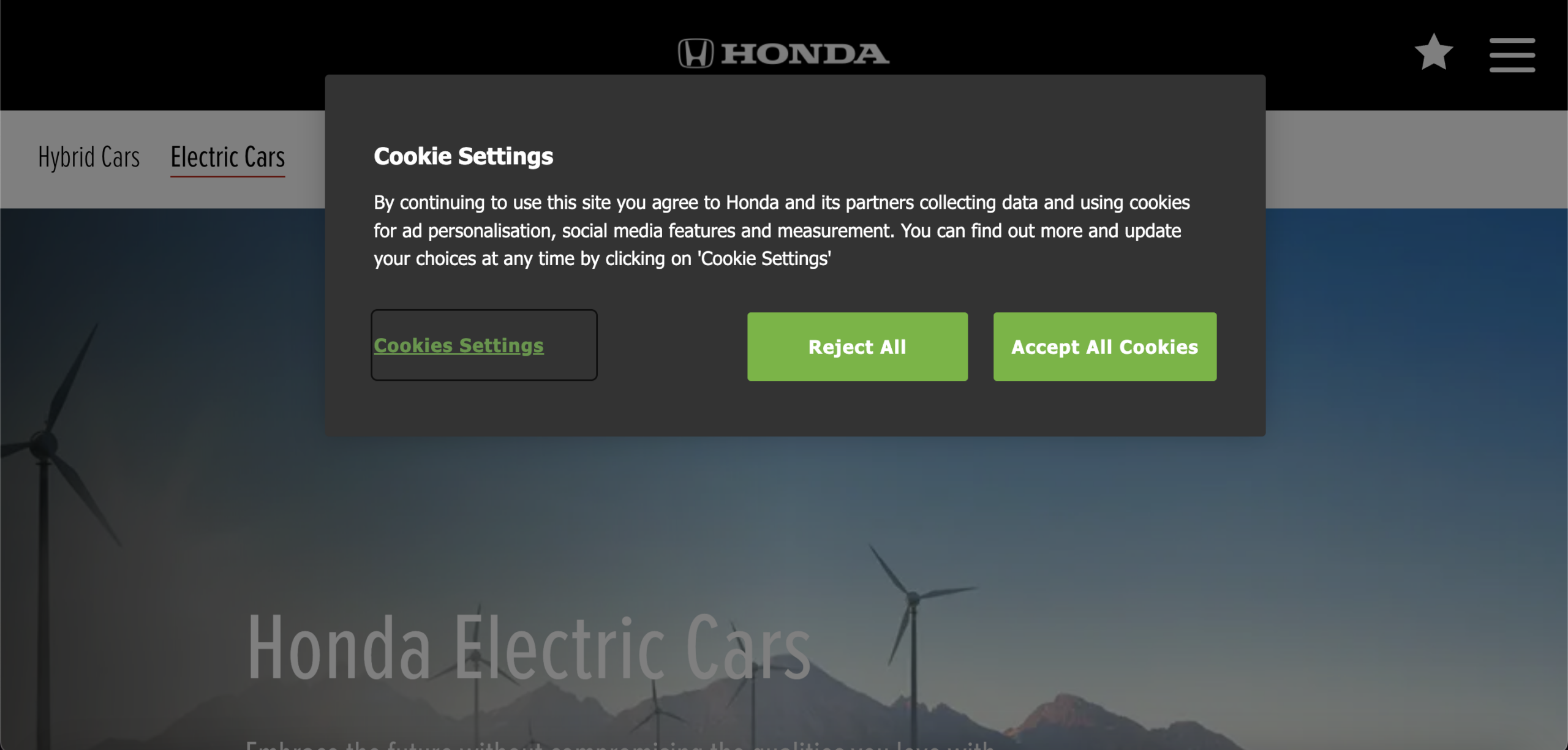
Implied consent or opt-out cookie banners operate under the assumption that users have granted their consent unless they explicitly choose to opt out. It displays a message that informs users about the use of cookies and provides them with the option to manage or decline cookies.
These types of cookie banners do not comply with GDPR as they load cookies without explicit consent. However, these banners comply with US privacy laws like CCPA.
3. Explicit Consent (Opt-In Cookie Banner)

Explicit or opt-in cookie banners ask for consent before loading cookies to users’ browsers. Prior to obtaining user consent, only strictly necessary cookies are permitted to be loaded. These banners display a clear message that explains the use of cookies and why it is used. Users are given the option to either accept, reject, or manage cookie preferences.
These types of cookie banners are imperative for ensuring compliance with GDPR. By explicitly asking for consent before loading cookies and offering users granular control over cookie consent, these banners align with GDPR requirements.
Cookie Consent Banner Checklist
To create a cookie banner that complies with GDPR and EU Cookie law, you should consider the following checklist.
- Make the banner visually noticeable on the website
- Use simple langauge for the cookie banner message and clearly inform about the use of cookies.
- Categorize the cookies based on their purposes and allow users to provide granular consent.
- If you are using cookies/scripts from third-parties, explicitly mention about them, why it is used and how long the data will be retained.
- The default setting should block the cookies/scripts until the user choose to opt-in.
- Display both accept and reject/manage buttons in the cookie banner.
- Allow users to dismiss the banner without giving consent.
- Add a cookie policy link to the banner.
- Allow users to revisit the consent anytime.
- Ensure responsiveness and accessibility for the cookie banner.
1. Rēvo

Rēvo’s cookie banner appears at the bottom of the page with a clean, minimal design that fits seamlessly with the website’s modern look. The banner includes a clear “Cookie Policy” heading and a short, simple explanation of how cookies are used for site experience, performance, and marketing.
Users are given three distinct choices: Accept, Decline, or Manage Preferences, ensuring transparency and compliance with GDPR. A direct link to the privacy policy provides easy access to more details. The neutral black-and-white color theme makes the buttons stand out clearly without distracting from the site’s content, creating a banner that is straightforward, user-friendly, and legally sound.
2. Post Office UK

Post Office UK uses a cookie consent popup with a detailed message about the use of cookies. It explains why they are using cookies and what each button in the pop-up does when someone clicks on it. This helps users to make an informed decision.
The pop-up keeps things simple with a black and white color scheme for the text and background. The text on the buttons is clear, making it easy to understand. Users also have control over their cookie preferences, as they can choose specific cookies based on their category.
3. King’s College London

King’s College London uses a floating cookie popup similar to the cookie popup used by Post Office UK, but the background is more visible here. The popup is sticky on the webpage, and users can actually scroll through the website without making an action in the cookie banner.
This cookie popup displays a short message with three buttons allowing users to accept all cookies, reject all cookies, and view the cookie policy.
4. The Telegraph

The Telegraph displays an IAB-compliant cookie popup on its website as it shows ads from third-party vendors. It explains the use of cookies, why it is used and asks consent to load cookies to users.
They use a simple black and white color combination for the text and the background. The Accept button is intended to be the primary action button, as it is highlighted in a contrasting color. On clicking the Manage or Reject button, a detailed cookie popup displays that lists the purposes and features of the cookies and third-party vendors from which the ads are shown.

Users can choose the specific vendors to accept ads from them.
5. UEFA

UEFA cookie banner sits prominently at the bottom of the screen with a white background and bold blue action buttons, making it visually clear and easy to interact with. The message, “We Care About Your Privacy,” sets a transparent and reassuring tone while explaining how personal data and cookies are used for advertising, personalization, and analytics.
The banner provides users with three strong options: Accept All, Reject All, and Cookie Settings, which enable granular control over consent. A link to a detailed vendor list ensures further transparency. The clean layout, balanced spacing, and emphasis on clear choices make this a textbook example of GDPR compliance combined with a user-friendly design.
6. Sony

Sony displays a full-width cookie banner in the footer section of the website. The website background is overlayed by a black tint, prompting users to take action in the cookie banner. The banner contains a clear message about the use of cookies.
Users can accept or reject optional cookies and manage cookie preferences individually. The banner also adds a link to the cookie policy so that users can easily access and go through the cookie policy anytime.
Sony also uses an active cookie consent widget in the cookie banner. Users can easily modify their consent anytime by clicking on the cookie widget.
7. Amazon

Amazon displays a detailed cookie banner that covers almost half of the webpage view. It explains in detail about the use of cookies, why it used, and how to manage them. This banner is also compliant with IAB and lists out the third-party vendors.
8. Parker Pen

Parker Pen displays a cookie banner that lists out the purpose of using cookies in bullet points. Apart from the usual accept and manage buttons, this banner has a Continue Without Accepting button that allows users to continue using the website without accepting or managing cookie preferences. It doesn’t require users to immediately take action when they visit the website.
9. Get Clever About VO

Get Clever About VO is a voice coaching website. They use our cookie consent plugin to create a cookie banner that complies with GDPR and CCPA requirements. The banner has Accept and Reject buttons, along with a link to the cookie policy page as required by GDPR.
It also has a “Do not sell my personal information” link for CCPA compliance. If you have clients or customers in both the EU and California, you may need a cookie consent banner like this that complies with both laws.
10. Matthew Robbins Kerby

Matthew Robbins Kerby has a simple cookie banner that gives granular control of cookies to users. Apart from the Accept All and Reject All buttons, it also has a Cookie Settings button that navigates users to granular cookie preference settings.

Users can enable or disable cookies based on their categories rather than accepting or rejecting them completely. This provides users with greater control over their cookie preferences.
11. IAB Europe

IAB Europe displays a cookie banner in the header section. It does not interfere with the webpage content and stays sticky on top. They also allow users to close the cookie banner without accepting or rejecting cookies.
12. Coventry University

Coventry University’s cookie banner is placed at the bottom of the site with a white background and teal-colored buttons that stand out clearly against the page. The message is written in plain, user-friendly language, explaining the use of necessary cookies while giving users the choice to allow or reject additional ones.
Three options are provided: Manage my choices, Reject additional cookies, and Accept additional cookies. This setup gives users full control over their preferences while ensuring transparency.
The banner avoids technical jargon and emphasizes accessibility, making it simple for visitors to understand and act. Its clear layout and strong contrast make it both visually effective and fully GDPR-compliant.
13. Uber

Uber’s cookie banner appears at the bottom-right of the screen with a white box overlay that contrasts against the site’s bold black background, making it impossible to miss. The heading, “We use cookies,” is direct and clear, while the message explains how cookies personalize services, measure effectiveness, and support advertising.
Users are given three straightforward options: Accept, Reject, or Cookie Settings for granular control. A link to the Cookie Notice is also included for further transparency. The design balances clarity and compliance, with bold black buttons on a white background ensuring accessibility and ease of use. This makes Uber’s banner both highly functional and GDPR-compliant.
14. FIFA

FIFA uses a centered pop-up overlay, immediately drawing the user’s attention before they continue browsing. The banner uses a dark background with white text, ensuring high contrast and readability. Its message is straightforward, explaining that cookies are used to personalize content, analyze traffic, and improve services, while offering clear links for more details.
Users are provided with three options: Accept All, Reject All, and Manage Settings, enabling both full consent and granular control. The design forces a decision without being overwhelming, ensuring compliance with GDPR while maintaining a professional look consistent with FIFA’s global brand.
15. Schwarzkopf

Schwarzkopf uses a sticky cookie popup that occupies the center position of the website. It displays a short and clear banner message with accept and reject buttons. The banner also displays a link to the cookie settings page.
The above-mentioned are some of the best GDPR cookie consent banners. Now, you may wonder how to create one for your website. So, let’s explore further.
Disclaimer
You may refer to these examples for guidance, but we strongly advise against using them as a template for GDPR cookie compliance. It is important to consult with an attorney or legal professional to ensure that all aspects, including cookies, privacy policy, and terms and conditions, fully comply with GDPR and other legal requirements.
To add a cookie banner on your website, follow the below steps:
Step 1: Install and Activate WebToffee Cookie Banner Plugin
Our GDPR Cookie Consent Plugin is designed to help WordPress websites manage cookie consent and comply with privacy laws like GDPR and CPRA.
Step 2: Enable Cookie Banner in WordPress
- After installing the plugin, go to Consent Settings > Cookie Banner from your WordPress dashboard.
- Choose GDPR as the Consent Law, then enable the cookie banner checkbox.
- Select Geo-targetting if required.
- Click on Update settings to save the settings.

You can explore other options such as Google Consent Mode, IAB TCF compliance and Google’s additional consent specifications. The plugin also allows you to customize the banner by changing the text, font color, background, etc.

Frequently Asked Questions on Cookie Consent Banners
Cookie consent is the permission given by website visitors to load cookies on their browsers when they interact with a website.
A compliant cookie banner follows data protection laws like GDPR, allowing users to opt in or out of non-essential cookies. It must be clearly visible, explain cookie usage, and provide actionable buttons for acceptance or rejection.
The best cookie banners are clear, accessible, easy to interact with and allow granular cookie preferences. A cookie banner aligns with your brand while still prioritizing legal compliance.
A cookie banner should tell users about the use of cookies on a website and its purposes and how they can accept and reject cookies based on their purposes. A cookie banner copy should be written in simple language and should provide automatic translation for the content based on the users’ preferred language.
If your website uses Google Analytics or any third-party services to track and monitor users’ activity on your website that collects and processes visitors’ personal data, obtaining consent is required.
As per Google’s EU user consent policy, you must obtain explicit consent for using Google’s ads and analytical products.
A cookie popup is a form of cookie consent banner that appears as a popup or notification prompting users to accept (give consent), reject, or modify cookie preferences.
Conclusion
A cookie banner helps you inform your site visitors about the use of cookies and obtain consent from them. Many data protection laws like GDPR require you to display a cookie banner and give users more control over their cookie preferences.
Using a consent management platform, you can create a cookie banner and manage cookie compliance for your website. Our GDPR cookie consent plugin is a consent management tool that works within the WordPress ecosystem and enables you to easily manage cookie consent.
It lets you create an effective cookie banner for your website. The plugin complies with IAB TCF guidelines and is listed as a certified CMP by Google. It lets you customize the banner as per your preference and supports different privacy laws like GDPR, CCPA, LGPD, POPIA, etc.