


Share:


Table of Contents
Wondering what address labels are? An address label is a sticker or digital tag that displays the sender’s or recipient’s address on packages, letters, or parcels. Its primary function is to ensure that postal services can accurately route and deliver the item to its destination.
Address labels are often simpler than shipping labels and contain only the essential delivery information and can be customized using plugins like WooCommerce Address Labels by WebToffee. Whether you’re sending a letter or fulfilling eCommerce orders, address stickers help ensure packages reach the correct destination without confusion.
Key Takeaways
- Address labels are adhesive tags that display the recipient’s and sometimes the sender’s address on mail or packages.
- Attaching address stickers help ensure accurate and timely delivery, reducing the chances of lost or misdelivered items.
- Address labels are widely used in eCommerce, personal mail, business correspondence, and package returns.
- You can create, customize, and print address labels using label printers or address label generators.
- WebToffee WooCommerce Address Labels plugin enables you to not only generate professional address labels but also customize address label templates for your WooCommerce orders.
Here, we’ll break down the address label meaning, why they matter, and how address stickers streamline the sending and receiving of packages. You’ll also examine the key components of an address label, explore different label printing methods, and learn about emerging trends in label design and technology.
An address label is a physical sticker or digital tag that displays the recipient’s and often the sender’s address on a package, letter, or parcel. It helps postal and courier services accurately sort, route, and deliver shipments, minimizing delays and misdeliveries.
Address labels are essential for organized and efficient order fulfillment, whether in personal mail or eCommerce operations.
Address labels might seem like a small detail, but they play a huge role in getting packages to the right place — on time and without confusion. Here’s why address labels matter:
- Ensure accurate delivery: Clearly formatted address labels help couriers deliver shipments to the correct address, reducing the risk of delays or failed deliveries.
- Reduce human error: Automatically generated labels minimize the chance of mixing up orders or entering incorrect address details.
- Improve efficiency: For stores handling multiple orders, bulk address label printing saves time and streamlines the entire fulfillment process.
- Create a professional impression: Using an address label template allows you to print neatly formatted, branded labels that make your packages look more polished, reliable, and business-ready.
- Support better logistics: Address labels are crucial for tracking, sorting, and managing shipments, especially in high-volume operations.
Now that we understand what address labels are and why they’re essential for eCommerce, let’s explore some of the most common use cases for address stickers.
Address labels are used in all scenarios, not just by big companies. Here are a few common ways people and businesses use them:
- eCommerce Businesses: Online stores built on platforms like WooCommerce, Shopify, or BigCommerce use address labels daily to ship products to customers. It’s a quick and reliable way to ensure every order is sent to the right place, especially when handling large shipments.
- Small Businesses Shipping Products: Whether it’s a handmade candle shop or a boutique clothing brand, small businesses use address labels to streamline packaging and improve their overall fulfillment process.
- Personal Use: Address labels aren’t just for businesses! Many people use them to mail out holiday cards, wedding invitations, thank-you notes, or party invites. It saves time and adds a nice personal touch.
- Warehousing and Inventory Management: In more extensive operations, address labels (often combined with barcodes) are used to organize storage, track stock, and manage outgoing shipments. They help warehouses run smoothly and reduce errors during picking and shipping.
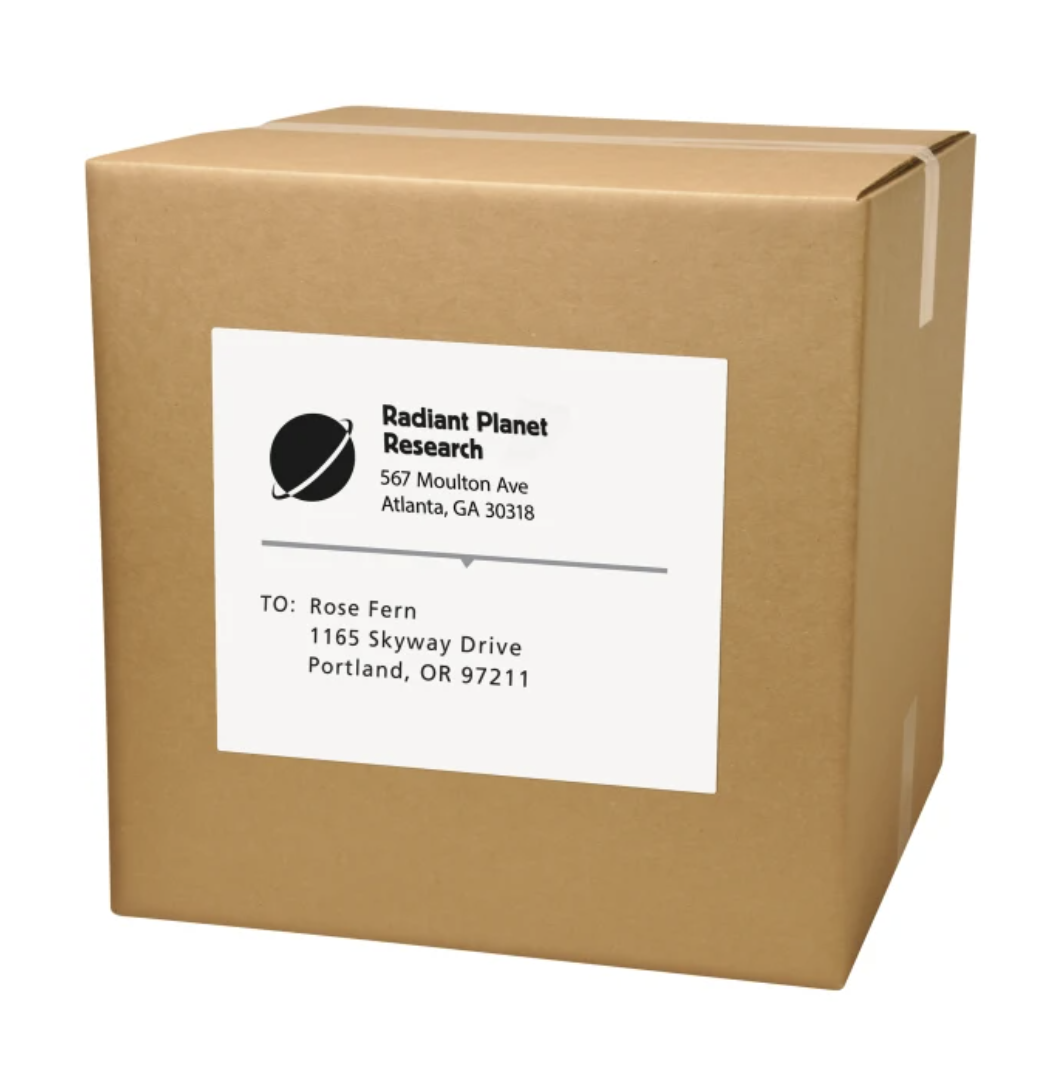
A good address label template should be more than just a name and street address. It needs to provide all the key details to make sure your package reaches the right person quickly and without confusion. Here’s what needs to be present in an address label template:
1- Recipient Name
This might seem obvious, but it’s crucial! The name mentioned in the address label helps the courier verify that the package goes to the correct person. The courier uses the recipient’s name to double-check that the package is handed over to the right person, especially when multiple deliveries occur at the same address, such as in offices, apartments, or shared buildings.
Quick Tip: Always double-check the spelling and format of the recipient’s name before printing or sending address labels. Even small mistakes can cause delivery issues!
2- Full Shipping Address
The shipping address is one of the most important parts of an address label. It tells the courier exactly where the package should be delivered. A complete and correctly formatted address ensures that deliveries are fast, accurate, and hassle-free.
What to Include:
- Street Name and Number: Clearly state the street name along with the building or house number. Example: 123 Main Street.
- Apartment, Suite, or Unit Number (if applicable): If the recipient lives in an apartment, condo, or multi-office building, always include the specific unit number. Example: Apt 204 or Suite 3 B.
- City: Ensure the city name is spelled out correctly to avoid misrouting.
- State or Province: For domestic deliveries, include the correct state abbreviation or full name. For international shipping, including the province or region is crucial.
- ZIP Code or Postal Code: A complete and accurate postal code speeds up the sorting process and ensures more accurate delivery.
- Country (especially for international shipments): Always list the destination country, even if you think it’s obvious. Different postal systems use different formatting rules.
Example of a properly formatted shipping address:
John Smith
123 Main Street, Apt 204
Springfield, IL 62704
United States
3- Contact Info (Optional but Helpful)
Including a phone number or email info in address labels can be helpful, especially for international deliveries or in case of delivery issues.
What Contact Details to Include:
- Recipient’s Phone Number: A mobile number is preferred, so couriers can easily reach the recipient during delivery.
- Recipient’s Email Address: Useful for delivery updates, notifications, or quick problem resolution.
- Supplier’s or Sender’s Contact Information (for businesses):
- Customer Service Phone Number
- Support Email Address
- Company Website (optional but helpful for additional support)
Quick Tip: Always double-check local shipping regulations. Some countries require a contact number for customs clearance!
4- Order Number or Barcode
If you’re managing multiple orders, adding an order ID or a scannable barcode can speed up your packing and tracking process, which is particularly useful in warehouses or fulfillment centers.
What You Can Include:
- Order ID or Invoice Number: A unique identifier that helps connect the shipment to the customer’s order in your system.
- Scannable Barcode or QR Code: Encodes order information digitally for faster processing using barcode scanners or mobile apps.
- (Optional) Batch Codes or Fulfillment Notes: For very large operations, you can also include batch numbers or special handling notes linked through scannable codes.
5- Return Address
Including a return address on your package or envelope is not just a formality — it’s a critical part of the shipping process. The return address tells the postal service or courier where to send the mail or package if it cannot be delivered to the intended recipient.
What a Return Address Should Include:
- Sender’s Full Name or Company Name
- Street Address and Number
- City, State, and Postal/ZIP Code
- Country (for international shipments)
Quick Tip: Place the return address either on the top-left corner of the package or envelope or on the back side, depending on the mailing service’s guidelines.
6- Marketing Messages
While the main purpose of address labels are to guide the delivery, it can also double as a smart marketing tool. Adding promotional messages to your address labels helps you engage recipients and encourage future purchases.
Examples of Marketing Messages You Could Use:
- Promotional Offers: “Use code WELCOME10 for 10% off your next order.”
- Customer Appreciation: “Thanks for supporting our small business!”
- Brand Tagline: “Eco-friendly products for a better tomorrow.”
- Social Media Call-to-Action: “Follow us @YourBrand for exclusive deals!”
7- Additional Greeting or Messages
Adding a personalized greeting or message to an address label is a simple but powerful way to make your mail stand out. A thoughtful note creates a positive emotional connection and leaves a lasting impression on the recipient.
Examples of Greeting Messages You Could Use in an Address Label:
- Holiday Wishes: “Season’s Greetings and Best Wishes!”
- Birthday Wishes: “Happy Birthday! Enjoy your special day!”
- Thank You Notes: “Thanks for shopping with us!”
- Celebratory Messages: “Congratulations on your achievement!”
- Seasonal Messages: “Spring Surprises Are Here!”
Pro Tip: Keep your address labels clear and purposeful. While it’s tempting to add extra details, too much information can clutter the label and make it less readable. Focus on what’s most relevant for the type of shipment and the needs of your audience, striking the right balance between function and design.
Using address labels instead of handwritten addresses offers several practical and professional benefits
- Accuracy: Printed address labels ensure clear and legible text. Handwriting can sometimes be difficult to read, leading to errors in delivery or delays.
- Time Efficiency: Using address labels is much quicker than handwriting addresses on each item. This is especially important when sending large volumes of mail or packages.
- Consistency: Address labels ensure consistency in the format and placement of addresses. Handwriting may vary in style and size, which could lead to confusion or misdelivery.
- Branding and Customization: Address labels can incorporate branding elements, logos, and customized designs, helping to reinforce brand identity and create a lasting impression.
- Marketing Opportunities: Address labels can include promotional messages, special offers, or greetings, allowing for subtle marketing efforts with each mailing.
- Neatness: Address labels offer a neat appearance, enhancing the overall presentation of your mail and packages.
- Reduced Errors: Address labels reduce the risk of errors, both in terms of legibility and the accuracy of the address details. This helps minimize the likelihood of delivery mishaps.
- Versatility: Address labels can be used on a variety of items, from envelopes to packages and even products. Handwritten addresses might not be suitable for all types of mailings.

There are several ways to create address labels, ranging from entirely manual to fully automated using an address label template. Here’s a quick look at your options:
– Manually (e.g., in Word or Google Docs)
This is the old-school method. You can type out addresses in a document, format them into label-sized sections, and print them using adhesive label paper. It works fine for small batches, like personal mail or holiday cards, but it can be time-consuming if you’re handling multiple orders.
– Using Spreadsheets + Mail Merge
If you have a list of addresses in Excel or Google Sheets, you can use a mail merge tool (like in Microsoft Word) to auto-fill each address into a address label template. It’s a step up from doing it by hand, but it still requires some setup and coordination, especially if your data changes frequently.
– Automatically With Plugins or Software
If you’re running an online store (especially on WooCommerce), this is where things get way more manageable. Instead of manually typing or copying addresses, you can use a address label generator plugin that pulls shipping info directly from your orders and generates printable address labels with just a few clicks.
One excellent option is the WebToffee WooCommerce Address Label plugin. It lets you:
- Print professional address labels right from your WooCommerce dashboard
- Customize the label layout to match your branding
- Generate labels in bulk for multiple orders
- Add extras like order details, barcodes, or return addresses.
It’s perfect for store owners who want to save time, reduce errors, and speed up their fulfillment process without dealing with spreadsheets or manual formatting.
When printing address labels, a few smart practices can save you time, prevent mistakes, and keep things running smoothly. Here’s what we recommend:
1. Use High-Quality Printers for Label Printing
Investing in good printing materials pays off. Address labels can be printed using various techniques, depending on your printing equipment and design preferences. Crisp, clear labels are easier to read and scan — and they stick better, too. Smudged or peeling labels can cause delivery issues or look unprofessional.
2. Verify Addresses Using Address Validation Tools
Before printing, double-check that the addresses are correct. Tools like address validators can catch typos, missing zip codes, or incorrect formatting — especially helpful for international orders.
3. Bulk-Print for Large Order Volumes
If you’re fulfilling multiple orders, printing labels one at a time is a huge time-waster. Use a plugin or software that supports bulk label printing so you can generate everything in one go.
4. Keep a Consistent Address Label Template
Using a consistent address label template, with uniform font, spacing, and alignment, gives your packages a clean, professional appearance. It also helps postal and courier systems scan and process shipments more efficiently, reducing the risk of misdelivery.
Even though both address labels and shipping labels look alike, they both serve different purposes. Here are the main differences between address labels and shipping labels:
| ADDRESS LABELS | SHIPPING LABELS |
| They are used for casual use | They are used for business use |
| Commonly used in eCommerce and retail environments for sending products to customers. | Commonly used in eCommerce and retail environments for sending products to customers |
| Doesn’t provide any information that would help track the product | Plays a crucial role in the logistics and tracking of the product |
| Mainly used locally | Mostly used for international purposes |
| Primarily display the recipient’s and sender’s addresses | Contains detailed information required for the transportation and delivery of packages |

Even minor slip-ups with address labels can lead to significant problems, such as delayed deliveries or returned packages. Here are a few common mistakes to watch out for when generating address labels:
1- Incorrect or Incomplete Addresses
One wrong digit in a zip code or a missing apartment number can send your package to the wrong place (or back to you). Always double-check addresses before printing, especially for new customers or international orders.
2- Poor Label Adhesion or Print Quality
If your labels are smudged, faded, or don’t stick well, they can fall off or become unreadable during shipping. Use high-quality label paper and ensure your printer settings are optimized for clear, crisp prints.
3- Using Outdated Customer Info
Customers move or update their details more often than you think. If you’re working from an old list, make sure it’s up to date before printing address labels, especially for recurring orders or subscription-based deliveries.
4- Not Aligning Labels With Envelope or Package Size
A label that’s too big or misaligned can look messy — or worse, be cut off or unreadable. Use templates that match your label sheets or packaging layout to avoid misprints and wasted materials.
Trends and innovations have evolved over time to incorporate technology, sustainability, and creative design. Here are some notable trends and innovations that can be applied to address labels:
1. Sustainability and Eco-Friendly Labels
As environmental concerns grow, there’s an increasing demand for sustainable label materials and printing methods. Recycled paper, biodegradable materials, and eco-friendly inks are used to create more environmentally conscious address labels.
2. Personalization and Customization
Address labels are becoming more personalized and unique. Custom designs, color choices, fonts, and even photos are being incorporated to reflect individuality and brand identity.
3. Minimalist and Modern Designs
Minimalism and clean design aesthetics are gaining popularity. Simple, elegant labels with limited text and sophisticated typography are in demand.
4. QR Codes and Smart Labels
QR codes are being added to address labels, allowing recipients to easily scan and access digital content, websites, or special promotions related to the mailing.
5. Artistic and Handcrafted Labels:
Artistic and handcrafted label designs, including hand-lettering, calligraphy, watercolor elements, and illustrations, are becoming more popular for special occasions and events.
Address labels are adhesive labels that ensure the accurate delivery of mail and packages. From the practicality of efficient mailing to the elegance of custom designs, address labels offer a bridge between senders and recipients, embodying professionalism, convenience, and thoughtfulness.
So whether you’re a business looking to reinforce your brand, an individual adding a personal touch to your correspondence, or a sender seeking the efficiency of modern logistics, address labels remain an essential tool, connecting us in a world where communication and connection continue to thrive.
Moreover, tools like the WebToffee WooCommerce PDF Invoices & Packing Slips Plugin can further simplify order processing by helping businesses generate professional invoices, packing slips, and shipping labels seamlessly within WooCommerce.
An address label is an adhesive label that displays the delivery address of the recipient or sender. It is typically used for mailing and shipping packages.
The standard address label size is typically 1″ x 2.5″ (inches), often formatted to fit 30 labels per sheet on an 8.5″ x 11″ page, commonly used with Avery label template 5160 or similar templates. However, sizes can vary depending on the use case, with larger labels like 4″ x 6″ used for shipping packages and smaller return address labels measuring around 0.5″ x 1.75″.
Yes, you can handwrite addresses on self-adhesive labels; however, for clarity, it is recommended that you use printed address labels.
The WebToffee WooCommerce Address Labels plugin will automatically generate address labels for WooCommerce orders. Using this plugin, you can bulk print address labels from the WooCommerce Orders page.
There are several types of address labels, each designed for specific mailing and shipping needs:
– Return Address Labels: Small labels placed on envelopes or packages to show the sender’s address.
– Shipping Address Labels: Larger labels that display the recipient’s address, often used on parcels and boxes.
– Custom Address Labels: Personalized with logos, brand colors, or unique fonts to match a business or event theme.
– Clear Address Labels: Transparent labels that blend with envelopes for a professional look.


Subcribe to our newsletter


