


Share:


Table of Contents
A shipping label is a scannable document attached to a package that tells carriers where the shipment needs to go and how it should be processed. It includes key details such as the sender and recipient addresses, a tracking barcode, shipping service, package weight, and size. This information allows carriers to route packages correctly, update tracking in real time, and complete deliveries on schedule.
For eCommerce businesses, knowing what a shipping label is, how to create a shipping label, and how to print shipping labels accurately has a direct impact on fulfillment speed and delivery accuracy. That’s why WooCommerce stores use shipping label tools to generate print-ready shipping label PDFs using customizable templates directly from order data. A WooCommerce shipping labels plugin helps automate this process and reduce label errors.
This guide explains how shipping labels work, what they include, how to create and print them, and why they matter for online stores.
Key Takeaways:
- A shipping label contains scannable information that helps carriers route, track, and deliver packages accurately.
- Knowing how to automate, create and print shipping labels reduces fulfillment errors, delivery delays, and order returns.
- Standard sizes like 4×6 shipping labels are widely supported by carriers and thermal printers for efficient scanning.
A shipping label is a document attached to a package that displays important information about a package’s destination to a carrier during transportation. It ensures accurate delivery by guiding carriers on where to send the package and providing essential information for customs when necessary.
Shipping labels contain important information such as the postal code, country, tracking number, weight, destination address, return address, shipping method (expedited, standard, etc.), and more.

These details should be entered correctly to ensure efficient and reliable transportation during the shipping process. A small mistake in the package might delay it from getting to the right place or on time.
A shipping label might seem like just a sticker on a package, but it plays a huge role in getting your order from point A to point B quickly and accurately. Here’s a breakdown of how it works and why it’s so important.
Step 1: Creating the Label
When you place an order online, the seller (or their shipping provider) generates a shipping label with important details like the sender’s and recipient’s addresses, a barcode and tracking number and the shipping method.
Step 2: Scanning and Sorting
Once the package is ready for shipment, the first scan happens. This could be at a store, warehouse, or pickup center. This scan logs the package into the carrier’s system, marking the beginning of its journey.
As the package moves through various transit points, like sorting centers or distribution hubs, it gets scanned multiple times. Each scan updates its tracking information, so both the sender and recipient can follow its journey in real-time.
For example, let’s say you order a book from an online store based in New York, and it’s being shipped to your home in California. Here’s what happens:
Step 1: The Shipping Label Is Created
The sender creates a shipping label by entering shipment details into a carrier website, an eCommerce platform, shipping software, or an order management system.
The label includes key information such as the sender’s address, recipient’s address, package weight, selected shipping service, tracking number, and barcode.
Step 2: The Label Is Attached to the Package
Once the label is generated, it is printed and attached to the package. The label should be placed on a flat, visible surface so the barcode and address can be scanned and read easily.
Step 3: The Carrier Scans the Label
When the carrier receives or picks up the package, the shipping label is scanned. This first scan enters the shipment into the carrier’s tracking system.
Step 4: The Package Moves Through Sorting Facilities
As the package travels through sorting centers, distribution hubs, and delivery facilities, the barcode is scanned at different points. Each scan updates the tracking status and helps route the package toward its destination.
Step 5: The Package Is Delivered
At the final delivery stage, the carrier uses the shipping label to confirm the recipient’s address and complete the delivery. The package may receive a final scan when it is delivered.
Did you know? A shipping label is more than just a sticker. It’s a roadmap that guides your package safely to its destination on time! At a minimum, it tells the carrier where the package originates, where it needs to be delivered or returned, and how it should be shipped and tracked.
Shipping labels may look different depending on the carrier, but most labels contain the same essential information. Here are the key components:
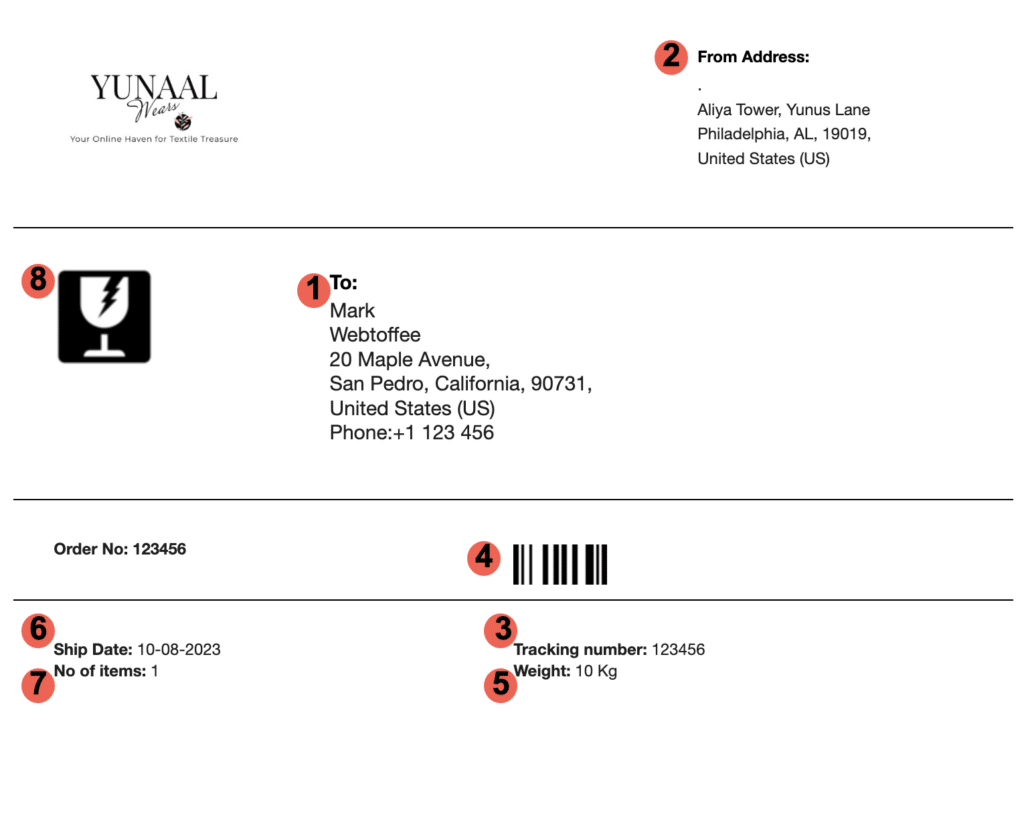
Recipient Address
This is the delivery address where the package should be sent. It should include the recipient’s name, street address, city, state or region, postal code, and country if shipping internationally.
Return Address
The return address shows where the package came from. If the package cannot be delivered, the carrier can return it to the sender.
Tracking Number
The tracking number is a unique code assigned to the shipment. It allows the sender, recipient, and carrier to monitor the package’s progress from dispatch to delivery.
Barcode or QR Code
Barcodes and QR codes allow carriers to scan the package quickly. These codes connect the physical package to the carrier’s digital tracking and routing systems.
Shipping Service
This shows the selected delivery method, such as standard shipping, express shipping, overnight delivery, or international shipping.
Package Weight and Dimensions
Carriers use package weight and dimensions to calculate shipping costs and determine how the package should be handled during transit.
Shipping Date
The shipping date indicates when the label was created or when the package is expected to enter the carrier’s system.
Special Handling Instructions
Some labels may include handling instructions such as “Fragile,” “Handle with Care,” “This Side Up,” or hazardous material indicators.
Customs Information
Each of these shipping label components contributes to a successful and smooth shipping process, ensuring packages reach their intended destinations accurately and efficiently.
Did You Know: Different carriers like USPS, FedEx, UPS, and DHL each have their own unique shipping label formats. However, they all serve the same purpose – guiding the package to its destination.
How to Fill Out a Shipping Label
Filling out a shipping label correctly is one of the most important steps in preparing a package for delivery. Missing or incorrect information can result in delays, failed delivery attempts, returns, or additional shipping charges.
Here’s a field-by-field guide to filling out a shipping label.
1. Sender Name and Return Address
Enter the sender’s full name, business name if applicable, and complete return address.
This should include:
- Name or company name
- Street address
- Apartment, suite, or unit number if applicable
- City
- State or province
- Postal or ZIP code
- Country
The return address is important because it enables the carrier to return the package if delivery is not possible.
2. Recipient Name and Delivery Address
Enter the recipient’s full name and complete delivery address.
Make sure the address includes:
- Recipient name
- Street address
- Apartment, suite, or unit number
- City
- State or province
- Postal or ZIP code
- Country for international shipments
Always double-check spelling, postal codes, and apartment or building numbers before creating the label.
3. Contact Information
Some shipping labels include a phone number or email address for the sender or recipient. This information can help the carrier contact the recipient if there is a delivery issue.
4. Package Weight
Enter the accurate weight of the package after it has been packed. This includes the product, box, packing material, and any inserts.
Incorrect package weight can lead to extra fees, delivery delays, or returned shipments.
5. Package Dimensions
Enter the length, width, and height of the package if required by the carrier. Dimensions are especially important for larger parcels and shipments priced by dimensional weight.
6. Shipping Method
Choose the shipping service you want to use, such as standard, priority, express, overnight, or international shipping.
The selected shipping method determines delivery speed, cost, and carrier handling.
7. Tracking and Barcode Details
If you generate the label through a carrier or shipping platform, the tracking number and barcode are usually created automatically.
Make sure the barcode prints clearly and is not cut off, blurred, folded, or covered by tape.
8. Special Instructions
Add special handling instructions if needed. For example, use labels such as “Fragile,” “Perishable,” or “Handle with Care” when the package requires extra attention.
9. Customs Details for International Shipments
For international shipping, fill in customs-related details such as:
- Item description
- Quantity
- Declared value
- Country of origin
- Harmonized tariff code if required
- Sender and recipient details
- Reason for export, such as sale, gift, or return
Incomplete customs information can delay international deliveries.
How to Label a Package
Knowing how to label a package correctly is just as important as creating the shipping label. A properly placed label helps carriers scan and handle the package without difficulty.
Place the Label on the Largest Flat Surface
Attach the shipping label to the largest flat surface of the package, usually the top of the box. This makes the label easy to see, scan, and read.
Avoid placing the label on edges, corners, seams, folds, or curved surfaces.
Keep the Barcode Flat and Visible
The barcode should lie flat against the package. Do not wrap it around the side of the box or place it over a seam.
If the barcode is bent, wrinkled, or distorted, scanning may fail.
Avoid Covering Important Information
Do not cover the barcode, tracking number, address, or carrier information with tape, stickers, straps, or packaging material.
If you use clear tape to protect the label, make sure it does not create glare over the barcode.
Remove or Cover Old Labels
If you are reusing a box, remove old shipping labels, barcodes, and carrier markings. Multiple labels can confuse scanners and cause routing errors.
If the old label cannot be removed, cover it completely with a blank label or opaque tape.
Secure All Edges
Make sure the label is fully attached to the package. Loose corners can peel off during transit, especially when packages move through conveyor belts and sorting machines.
Use adhesive labels, a shipping pouch, or clear packing tape to secure the label.
Protect the Label from Moisture
If the package may be exposed to rain, snow, or moisture, protect the label with a clear adhesive pouch or waterproof covering.
The label should remain readable and scannable throughout transit.
How to Write a Shipping Label
You can write a shipping label by hand or create and print one digitally. The best option depends on the shipping method, carrier requirements, and shipment volume.
Handwritten Shipping Labels
A handwritten shipping label can be used for some basic shipments, especially when sending a package through a postal service or local carrier.
When writing a shipping label by hand:
- Use clear, block letters
- Write the recipient’s address in the center of the package
- Write the return address in the top-left corner
- Use permanent ink that will not smudge
- Include the full postal code and country if needed
- Keep the writing large enough to read easily
- Avoid cursive or decorative handwriting
A handwritten label should be neat, complete, and easy for both people and machines to read.
However, handwritten labels may not include tracking barcodes unless the carrier adds one at the drop-off location. For eCommerce orders or tracked shipments, printed labels are usually a better option.
Printed Shipping Labels
Printed shipping labels are created using a carrier website, shipping software, marketplace, or eCommerce platform. They typically include a barcode, tracking number, shipping service, and complete shipment details.
Printed labels are ideal for:
- Online store orders
- High-volume shipping
- Carrier pickup
- Tracked shipments
- International shipments
- Returns
- Warehouse fulfillment
Printed labels are usually more accurate and easier to scan than handwritten labels.
Handwritten vs Printed Shipping Labels
Handwritten shipping labels may work for simple one-off shipments, but printed labels are better for businesses and frequent shippers.
Printed labels reduce manual errors, support tracking, improve barcode scanning, and help automate order fulfillment.
Shipping labels play a central role in how orders move through the logistics network. They provide carriers with the data needed to route, scan, track, and deliver packages accurately. Without a properly created shipping label, even a well-packed order can face delays or delivery failures.
- Accurate Delivery: Shipping labels provide the necessary information for carriers to accurately route and deliver packages to the correct destinations, ensuring that customers receive their orders on time.
- Efficient Handling: The information on shipping labels, including barcodes and QR codes, allows automated systems and workers to quickly sort, process quickly, and track packages throughout the shipping journey.
- Tracking and Visibility: Shipping labels with tracking numbers enable both senders and recipients to monitor the package’s progress in real-time, providing transparency about its status.
- Customer Communication: Shipping labels may include special instructions or delivery preferences, facilitating smoother communication between customers and carriers.
- Returns and Issue Resolution: In cases of delivery problems or returns, shipping labels play an important role by providing return addresses and tracking information, making it easier to resolve issues.
- Brand Image: Well-designed shipping labels contribute to a professional brand image, indicating reliability and attention to detail.
- Customer Satisfaction: Informative shipping labels contribute to a positive customer experience by minimizing delivery errors, delays, and miscommunication.
Using Online Shipping Platforms: You can utilize online shipping platforms provided by carriers like USPS, FedEx, UPS, or DHL. You will have to sign in, enter shipment details, select a template, and generate/print the label.
Using eCommerce Platforms: If you’re selling products online, many e-commerce platforms (like Shopify, WooCommerce) offer integrated shipping label creation. You can generate labels directly from your order management system.
Using Software and Tools: You can also design and create labels using word processing software or specialized shipping label software. You will have to input recipient and sender details, package information, and carrier specifications, and then print the label. Additionally, various eCommerce platforms offer a range of add-ons for creating shipping labels.
Each method has its advantages and may vary based on your needs, the volume of shipments, and the level of integration you require.
After creating the label, you need to print it clearly so the carrier can scan and read it.
Use the Right Label Size
The most common shipping label size is 4×6 inches. This size is widely used by carriers and works well with thermal label printers.
Some shipments may use other sizes, such as 8.5×11-inch label sheets or smaller labels, depending on the carrier and printer.
Choose the Right Printer
The two most common printer types for shipping labels are thermal printers and laser printers.
Thermal Printers
Thermal printers use heat to print on special label paper. They do not require ink or toner.
They are ideal for:
- High-volume shipping
- 4×6 shipping labels
- Fast printing
- Warehouse and fulfillment workflows
Laser Printers
Laser printers use toner and can print labels on standard label sheets. They are flexible and produce sharp prints.
They are useful for:
- Occasional label printing
- Full-page label sheets
- Businesses that already use office printers
- Labels with additional branding or document inserts
Check Print Quality
Before attaching the label, make sure:
- The barcode is clear
- The text is readable
- The label is not cut off
- The print is not faded
- The label is printed at the correct size
- The barcode is not stretched or compressed
Poor print quality can make the label difficult to scan.
Best practices for shipping labels are important to ensure the smooth and accurate transit of packages. Here are some key guidelines to follow:
Clear and Legible Information
Make sure all information on the label is clear, legible, and accurate. This includes the recipient’s name, address, contact number, and any special instructions.
Use Standard Shipping Label Sizes
Choose commonly accepted sizes, such as 4×6 shipping labels, to ensure barcodes, addresses, and tracking details fit clearly and scan reliably across carrier systems.
Standardized Address Format
Use a standardized address format with accurate abbreviations, spacing, and punctuation to avoid confusion and delays.
Barcode Quality
If using a barcode, ensure it is of high quality and properly printed to ensure accurate scanning and tracking.
Orientation
Ensure the label is right-side up and easy to read, minimizing the chances of mishandling due to label orientation.
Protection from Elements
Use a transparent adhesive pouch or clear packing tape to protect the label from moisture, smudging, and wear.
Consistency with Packaging
Ensure that the label matches the information on the packaging manifest, packing slip, and any other accompanying documents.
Tracking and Confirmation
Utilize tracking numbers and shipping confirmation to monitor the progress of your package and address any potential delays promptly.
Select the Right Shipping Label Paper
Use label paper that matches your printer type. Thermal printers require direct thermal labels, while laser printers work best with adhesive label sheets designed for heat printing.
By following these shipping label best practices, you can enhance the efficiency and reliability of your shipping process, reduce errors, and provide a better experience for both senders and recipients.
A shipping label is a label attached to a package that contains delivery, tracking, and carrier information. It tells the carrier where the package should go and how it should be handled.
A shipping label works by providing carriers with scannable and readable shipment information. The barcode is scanned at different points during transit to route the package and update tracking details.
The most commonly used shipping label size is 4×6 inches. This size provides enough space for carrier barcodes, recipient and return addresses, tracking details, and service information. Smaller ones, such as 2×4 shipping labels, are sometimes used for internal labeling or lightweight packages, but they may not fit all required carrier information.
You can generate shipping labels using eCommerce platforms (Shopify, WooCommerce, etc.), carrier websites, or third-party shipping software. Many services allow automatic label generation based on customer orders.
A damaged or missing label can cause shipping delays or lost packages. To prevent this, securely attach and protect the label from moisture, tearing, or fading. Some businesses also include a secondary label inside the package as a backup.
Yes. International shipping labels typically include customs declarations, harmonized tariff codes, and additional paperwork required by customs authorities.
Yes, most shipping labels have a validity period based on the carrier’s policies. If the package isn’t shipped within the specified timeframe, the system may invalidate the label, requiring a new one
A tracking number accompanies every shipping label, allowing recipients to enter it on the carrier’s website or app to monitor the package’s journey from dispatch to delivery.
To fill out a shipping label, enter the sender’s return address, recipient’s delivery address, package weight, dimensions, shipping method, and any required contact or customs details.
Yes, you can write a shipping label by hand for some shipments. However, printed labels are recommended for tracked shipments, eCommerce orders, and business shipping because they include barcodes and reduce errors.
Wrapping Up
Shipping labels play an important role in the world of logistics, ensuring that packages reach their intended destinations swiftly and accurately. By adhering to best practices such as clear and legible information, proper label placement, and barcode quality, businesses can streamline their shipping processes and minimize the risk of errors or delays.
As a crucial bridge between senders and recipients, shipping labels not only facilitate the physical journey of a package but also represent a commitment to professionalism and customer satisfaction. Businesses can further improve their order management workflow by using tools like a WooCommerce PDF invoices plugin to generate organized invoices, packing slips, and shipping documents alongside labels. Embracing these practices empowers businesses and can make a remarkable difference in efficiency at every step of the way.


Subcribe to our newsletter


