


Share:


Table of Contents
Product recommendation emails are one of the most effective ways to turn one-time shoppers into loyal customers. They showcase items your audience is most likely to buy based on their interests, browsing history, or previous purchases. Instead of sending the same message to everyone, these emails create a personalized shopping experience that feels thoughtful and relevant.
For eCommerce stores, this type of personalization can make a huge difference. Studies show that recommendation emails can significantly increase engagement and boost average order value. The good news is that creating these emails doesn’t have to be complicated.
With the WebToffee Ecommerce Marketing Automation app, you can easily design and automate personalized product recommendation emails that work for your store while you focus on other parts of your business.
In this guide, we’ll walk you through how to create effective product recommendation emails, the different types you can send, and how to use automation to make the process effortless.
Key Takeaways:
- Product recommendation emails help turn one-time shoppers into repeat customers by showing products based on their interests or past purchases.
- They can include cross-sells, upsells, or recently viewed items to boost engagement and sales.
- With the WebToffee eCommerce Marketing Automation App, WooCommerce store owners can easily create and automate these personalized emails without any technical hassle.
Product recommendation emails work because they tap into personalization — something every shopper values. Instead of sending generic promotions, these emails are tailored to each customer’s behavior, preferences, and purchase history. This makes every message feel more relevant and engaging, increasing the chances of a click or conversion.
When a shopper receives an email showcasing products that genuinely match their interests, it feels less like marketing and more like helpful advice. For instance, if someone recently bought a laptop, recommending a laptop sleeve or wireless mouse feels natural and useful. This kind of contextual relevance helps build trust and encourages repeat purchases.
Another reason they’re so effective is timing. Product recommendation emails can be triggered automatically after specific customer actions, such as completing a purchase, abandoning a cart, or browsing a category. This means you’re reaching customers when they’re already thinking about your products, making them more likely to buy.
Finally, these emails help boost key metrics like average order value (AOV) and customer lifetime value (CLV). They keep your brand top-of-mind, nurture long-term relationships, and turn ordinary emails into meaningful, revenue-driving touchpoints.
1. Personalized Product Recommendations
These emails are tailored to each customer’s unique behavior — such as their browsing history, wish list, or previous purchases. For instance, if a shopper frequently browses running gear, you can send an email featuring related shoes, apparel, or fitness accessories. Personalized recommendations make customers feel understood and increase the likelihood of repeat purchases.
2. Cross-Sell Emails
Cross-sell emails suggest complementary items to what a customer has already bought. For example, if someone purchases a camera, you could recommend a tripod, memory card, or carrying case. These emails work especially well when sent shortly after a purchase, helping increase the average order value while enhancing the customer’s overall experience.
3. Upsell Emails
Upsell emails encourage customers to upgrade to a higher-end version of a product they’ve already shown interest in. If a shopper buys a basic coffee machine, you could recommend a premium model with additional features. The goal is to highlight added value, not just push a more expensive option.
4. Best-Seller or Trending Product Emails
Showcasing best-selling or trending items is a great way to inspire purchases. These emails tap into social proof by highlighting what other customers are buying or loving. They work particularly well during seasonal campaigns or sales events, driving curiosity and quick decisions.
5. Recently Viewed Product Emails
Sometimes, customers browse products without making a purchase. Recently viewed product emails gently remind them of those items and bring them back to your store. They act as a subtle nudge for indecisive shoppers and often recover lost sales opportunities.
6. Post-Purchase Recommendation Emails
After a successful purchase, you can send follow-up emails suggesting related products. For instance, if a customer buys a smartphone, you can recommend a protective case, earbuds, or a wireless charger. These emails keep engagement alive after checkout and help turn one-time buyers into returning customers.
7. New Arrival or Back-in-Stock Emails
These emails highlight new or restocked items that align with the customer’s previous interests or purchases. They create a sense of exclusivity and anticipation — especially effective for loyal customers who want to be the first to know about fresh inventory.
To add product recommendations to your marketing emails, we will be using the WebToffee eCommerce Marketing Automation App. It is a powerful, user-friendly tool designed to help WooCommerce store owners create personalized and automated email campaigns that boost customer engagement and sales.
The app allows you to create automation workflows for your marketing campaigns and dynamically insert product recommendations into your emails.
Follow the steps below to create product recommendation emails for your WooCommerce store.
Step 1: Install and Activate the WebToffee Marketing Plugin
- From your WordPress dashboard, go to Plugins, and click on Add New.
- Search for the WebToffee WooCommerce Marketing Automation plugin in the search bar.
- Install and activate the plugin on your WordPress website.
Step 2: Connect WebToffee Marketing App to WooCommerce
After installing the plugin, go to WebToffee Marketing > Connector.
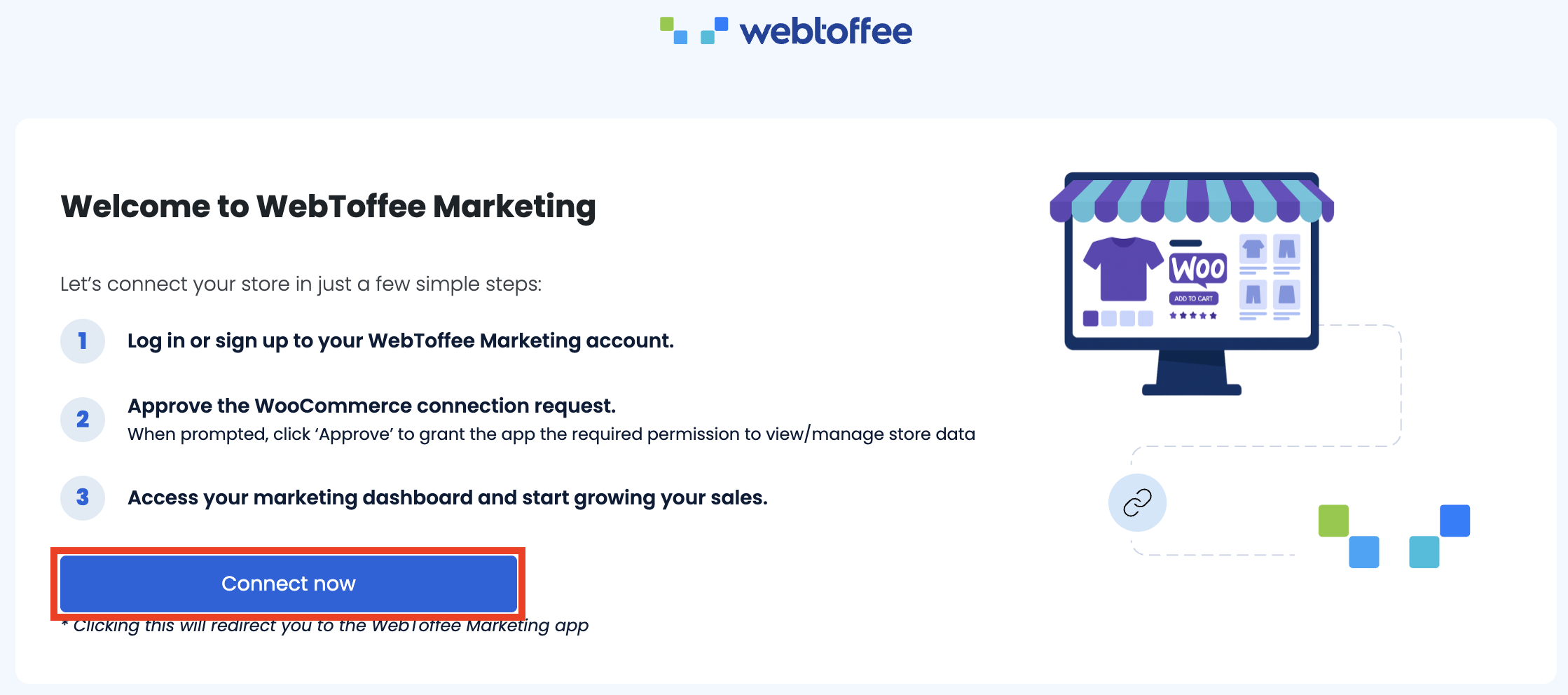
Click Connect now and follow the on-screen instructions to complete the connection process.
Step 3: Create Recommendations for Your Email Campaign
- After signing up for the WebToffee Marketing App, log in to your app dashboard.
- Go to the Recommendations tab, from the sidebar menu, and click on Start recommending products.
Here, you have three types of recommendations available – Upsell, Cross-sell, and Frequently Bought Together. For this guide, we’ll choose the Frequently Bought Together recommendations.

- Click on the Add bundles button.
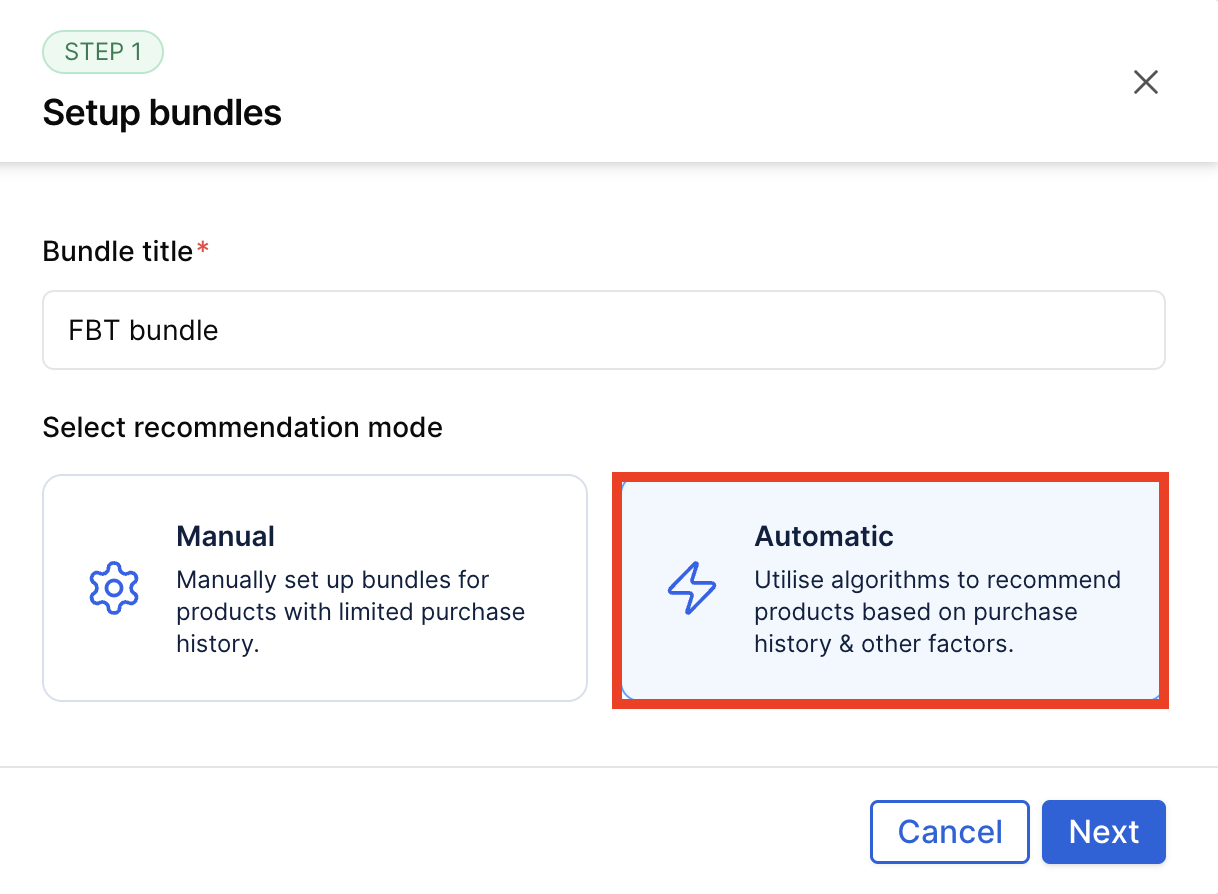
- In the Setup Bundles step, enter a name for your bundle in the Bundle title field, such as FBT bundle.
- Next, choose the Automatic recommendation mode to let the app use algorithms to suggest products based on purchase history and other factors.
- Once selected, click Next to proceed with setting up your product recommendations.
Now, choose the trigger products to show the recommendation. We’ll choose All products.

- Click Next to continue to the next step.

- In the Configure Display Settings step, choose when to show product recommendations by selecting the triggers, such as Add to cart, Proceed to checkout, and Post-purchase page.
- Next, go to the Display on email editor section and insert the Product Recommendation block into your email template to include these bundles in your marketing emails.
- Finally, customize your popup content by adding a Title (e.g., Frequently bought together) and Button text (e.g., Add to cart), then click Create bundle to complete the setup.
That’s it, the frequently bought together recommendation bundle has been created.
Step 4: Enable Email Automation Workflow
- Now, go to the Automations tab. Choose Thank you email automation.

- In the email automation workflow chart, click the + icon and add a short time delay after the “Thank You” email. Then, add another email block.

- Click on the new email block created.
- Edit the text of the email.
- Add a product recommendation block from the sidebar.

- You can also customize the color, text, and other elements of the email.
- After making the necessary changes, click Finish Editing, then click Save and Publish the automation workflow.
That’s it! 🎉 You have successfully created product recommendation emails for your WooCommerce store.
A product recommendation email is a personalized message that suggests products to customers based on their browsing history, purchase behavior, or preferences. It helps boost sales by showing customers items they’re most likely to be interested in.
These emails drive higher engagement, improve customer retention, and increase average order value (AOV). Personalized recommendations make customers feel understood, which builds trust and encourages repeat purchases.
It depends on your store’s strategy. You can send them after a purchase (post-purchase emails), when a customer abandons their cart, or as part of regular promotional campaigns. The key is to ensure your recommendations feel relevant and timely, not repetitive.
Cross-sell emails suggest related or complementary products (e.g., a phone case for a new phone), while upsell emails recommend upgraded or premium versions of a product a customer already bought or viewed.
Yes. Using the WebToffee eCommerce Marketing Automation App, you can automatically send personalized product recommendations based on customer behavior and purchase history without manual effort.
Creating product recommendation emails is one of the simplest yet most effective ways to increase customer engagement and drive more sales for your eCommerce store. By sending personalized suggestions that match each shopper’s interests and buying behavior, you turn ordinary follow-up emails into meaningful interactions that encourage repeat purchases.
With the WebToffee eCommerce Marketing Automation App, you don’t need to worry about complex setups or manual targeting. The app makes it easy to automate recommendations, design visually appealing emails, and deliver them at the perfect time — all from a single dashboard.
Start using personalized product recommendation emails today and see how effortless automation can transform your store’s sales and customer relationships.


Subcribe to our newsletter


