


Share:


Table of Contents
A critical PHP security update released on October 21, 2026, addresses two serious vulnerabilities that pose significant risks to WooCommerce stores. Ensuring that hosting servers are updated to patched PHP versions is essential for safeguarding customer data and maintaining the integrity of online transactions.
- The PHP update fixes two critical vulnerabilities, allowing remote code execution on affected servers.
- WooCommerce stores using outdated PHP versions are at high risk until they are patched.
- Store owners must verify their PHP version and confirm updates with their hosting providers, as WordPress and WooCommerce updates alone won't resolve these issues.
- PHP 8.2 reaches end of life on December 31, 2026, necessitating an upgrade to PHP 8.3 or newer to maintain security and compatibility.
- Regularly updating server software is crucial for protecting sensitive customer information and ensuring smooth store operations.
- Failure to address these vulnerabilities could result in compromised customer databases and significant operational disruptions.
A critical PHP security update was released on October 21, 2026, addressing two serious vulnerabilities that could put WooCommerce stores at risk. Since WordPress and WooCommerce run on PHP, stores using affected versions may be vulnerable to attacks that compromise customer data, orders, and other sensitive information.
The good news is that the vulnerabilities have been fixed in the latest PHP security releases. However, WooCommerce store owners need to ensure their hosting servers are running a patched version.
In this article, we’ll explain what the latest PHP security update fixes, how to check your store’s PHP version, and what steps you should take to keep your WooCommerce store secure.
Let’s get started.
PHP is the server-side language that WordPress, WooCommerce, and nearly every plugin you use run on. When PHP has a security flaw, every site running on it is exposed. This release fixes two serious flaws.
According to the PHP project’s security advisory, both flaws can let an attacker run their own code on your server without logging in. Both carry a CVSS v4.0 score of 9.2, which sits firmly in the critical range. The PHP team flagged them a day early, on October 20, so hosts and Linux vendors could get ready.
The fixed versions are PHP 8.5.12, 8.4.27, 8.3.36, and 8.2.35. For reference, the two issues are tracked as CVE-2026-109618 and CVE-2026-109619.
Here’s why it matters for a store specifically. Remote code execution means someone else can act as your server. On a WooCommerce site, that server holds your orders, customer addresses, admin accounts, and payment settings.
If your store runs on a server that uses PHP to handle web requests, the short answer is yes, until that server is patched. That covers every common setup: PHP-FPM, Apache with mod_php, php-cgi, FrankenPHP, and LiteSpeed. The PHP team considers mod_php setups the most exposed.
The part that trips people up: updating WordPress or WooCommerce won’t fix this. Both WooCommerce and WordPress.org have confirmed the flaws aren’t in their code and that no release is coming for them. The fix lives one layer down, on your server.
Who you are decides who does the work:
- Stores on WordPress.com, WordPress VIP, Pressable, or WP Cloud: Automattic has already protected these sites. You don’t need to do anything for this issue.
- Stores on managed WordPress hosting: Your host is very likely patching PHP and adding firewall rules right now. Your job is to confirm it’s done, not assume it.
- Stores on a VPS or self-managed server: You’re the host. The update is on you, and it’s urgent. Jump to the self-managed section below.
You don’t need server access or a developer for this. WordPress shows your PHP version right in the dashboard.
- Log in to your WordPress admin.
- Go to Tools → Site Health.
- Click the Info tab.
- Expand the Server section.
- Look for the line labeled PHP version.
Write down the full number, including everything after the second dot. “8.3” isn’t enough here. You need to know whether it says 8.3.36 or something older, like 8.3.35.
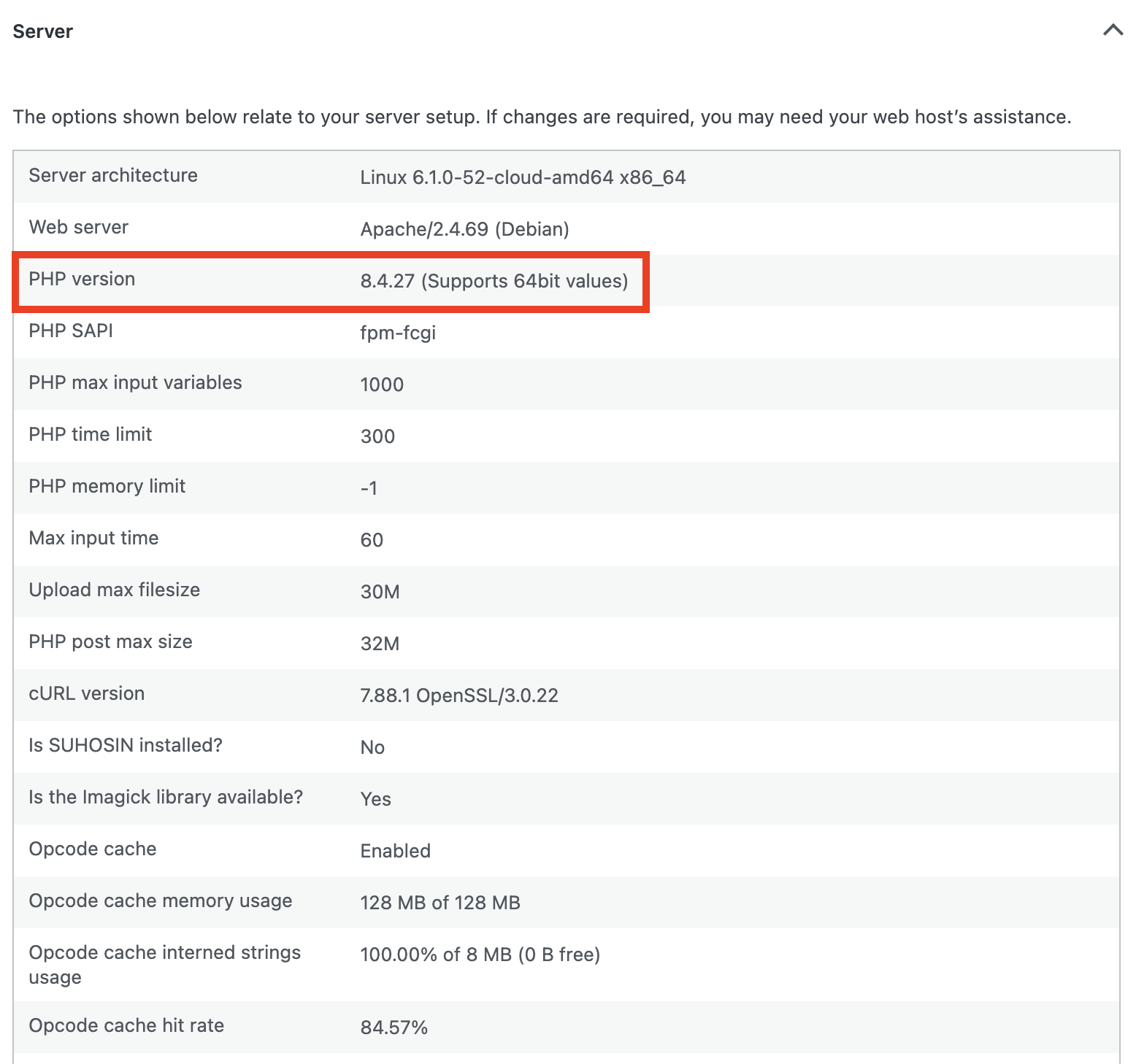
Your store is protected once your server runs PHP 8.5.12, 8.4.27, 8.3.36 or 8.2.35, or a later release in the same branch. Anything below those, or any version from 8.1 down, still needs action.
- Check with your host: Make sure your server is already running one of the patched versions listed above, not just scheduled for an update.
- Back up before anything changes: Take a full backup of files and database. Our guide on how to back up your WooCommerce store and database walks through it. For an extra safety net, you can also export products, orders, and customers to CSV with our WooCommerce Import Export Suite Plugin.
- Upgrade if you’re on PHP 8.1 or older: The PHP project no longer patches these versions, so a minor update won’t save you. Move to PHP 8.3 or newer, which is what WooCommerce recommends.
- Test on staging first for big jumps: Going from 8.3.35 to 8.3.36 is low risk. Going from 7.4 to 8.3 is not. Clone the store to staging, switch PHP there, and run a test order, a coupon, and a checkout.
- Update plugins and themes: Older plugin versions are the usual reason a PHP upgrade breaks something. Bring everything current before or right after the switch.
- Recheck Site Health: Confirm the new version number shows up. Don’t take “done” on faith.
If you manage your own VPS or dedicated server, there’s no host to lean on. Pull the updated PHP packages from your Linux distribution or LTS vendor, which received the fixes ahead of the public release, and restart PHP-FPM or your web server so the new build actually loads.
You may come across configuration tweaks that reduce exposure, and the PHP advisory lists them. Treat those as a stopgap for the hours before you can patch, not a substitute. The PHP team is clear that only an update fully fixes the problem.
Still on PHP 8.1 or older with no vendor backport available? Take the risk seriously. The UK’s National Cyber Security Center advises that where an immediate fix isn’t possible, organizations should consider taking the system offline until it’s resolved. For a store, a few hours of maintenance mode costs far less than a compromised customer database.
This week’s patch fixes today’s problem. It doesn’t fix the calendar.
PHP 8.2 reaches end of life on December 31, 2026. After that date, the next critical flaw like this one won’t get an 8.2 fix at all. Stores still on 8.2 in January will be in the same spot as 8.1 stores are in right now.
WooCommerce recommends PHP 8.3 or newer, and from WooCommerce 11.6, planned for February 2027, the minimum PHP requirement moves to 8.1. Stores on PHP 7.4 or 8.0 can keep updating only up to WooCommerce 11.5. Staying on an old PHP branch eventually means you can’t update WooCommerce either. That matters, because WooCommerce’s own security patch policy only backports critical fixes (CVSS 9 or higher) to a rolling window of the last 21 major releases.
If you’re on 8.2, book the move to 8.3 or 8.4 now, before the holiday rush. Doing it in the middle of Black Friday traffic is the version of this you want to avoid. Our WooCommerce minimum requirements post covers what WooCommerce needs from your server.
The latest PHP security update is an important reminder that keeping your WooCommerce store secure goes beyond updating WordPress, plugins, and themes. Your server’s PHP version matters just as much.
Start by checking your current PHP version and confirming with your hosting provider that the necessary security patches have been applied. If you’re running an outdated version, back up your store and plan an upgrade as soon as possible.
With PHP 8.2 reaching end of life in December 2026, now is also a good time to move to PHP 8.3 or newer. Keeping your server software up to date helps protect customer data, prevent security vulnerabilities, and ensure your WooCommerce store continues running smoothly.


Subcribe to our newsletter


