



Share:


Table of Contents
WooCommerce requires specific minimum versions of PHP, WordPress, and MySQL to operate effectively, with outdated software posing risks to security and performance. Meeting the recommended versions not only enhances speed and reliability but also mitigates vulnerabilities that could jeopardize customer data and transactions.
- The minimum PHP version for WooCommerce is 7.4, but 8.3 or later is recommended for optimal performance.
- Minimum WordPress and MySQL versions vary by WooCommerce release, necessitating regular updates for compatibility.
- Running outdated software can expose your store to security vulnerabilities, as older versions no longer receive security patches.
- It is crucial to back up your site before making updates to prevent data loss or functionality issues.
- Testing core functionalities after updates ensures that your store operates smoothly and identifies any potential conflicts.
- Regularly checking and updating your hosting environment is essential to maintain compliance with WooCommerce's requirements.
WooCommerce minimum requirements come up the moment something on your store starts acting weird: a plugin throws an error, checkout slows down, or your host sends a notice about “unsupported software.”
Nine times out of ten, the root cause is an outdated PHP, WordPress, or MySQL version running underneath your store.
Here’s what WooCommerce actually needs to run properly, why the gap between “minimum” and “recommended” matters more than it sounds, and how to check and fix your setup without breaking anything.
WooCommerce sets a baseline for three things: PHP, WordPress, and MySQL (or MariaDB, if that’s what your host runs).
As of the current WooCommerce release:
- Minimum PHP version: 7.4 (technically still supported, but you shouldn’t be on it)
- Recommended PHP version: 8.3 or later
- Minimum WordPress version: varies by WooCommerce version (see table below)
- Minimum MySQL version: 5.6, or MariaDB 10.1
- Recommended MySQL version: 8.0, or MariaDB 10.6
Here’s the part that trips people up: “minimum” doesn’t mean “safe.” PHP versions below 8.1 and MySQL versions below 5.6 have reached End of Life, meaning they no longer get security patches. Your store can technically run on them. It just shouldn’t.
Running the minimum version of PHP or MySQL is a bit like driving on a spare tire because the car still moves. WooCommerce will function, but you’re carrying risk you don’t need to carry.
Two things change when you move from minimum to recommended:
- Performance: Newer PHP versions process requests faster. Going from PHP 7.4 to 8.3 can make your store’s backend noticeably quicker, especially on pages doing heavy lifting like checkout, cart calculations, or product filtering.
- Security: Older PHP and MySQL versions stop receiving security patches once they hit End of Life. That means any vulnerability discovered after that point stays open on your server indefinitely. For a store handling customer data and payments, that’s not a small risk.
Heads-Up: PHP 7.4 Support Is on Its Way Out
Here’s something that just changed the picture a bit. WooCommerce’s engineering team put out a proposal on September 8, 2026, to raise the minimum PHP requirement to PHP 8.1, starting with WooCommerce version 11.5. That release is currently targeted for January 2027.
If it goes through as planned, PHP 7.4 and PHP 8.0 would stop being supported by WooCommerce entirely. That doesn’t mean your store breaks overnight if you’re still on 7.4. WordPress simply won’t offer you the WooCommerce 11.5 update until your PHP version meets the new minimum. You’d stay on your current WooCommerce version and keep getting dot-release patches for it, but you’d be frozen out of new features and fixes until you upgrade PHP.
Worth knowing: this is still a proposal, not a locked-in change, and WooCommerce is actively collecting feedback on the timeline. A few folks in the comments have pointed out that PHP 8.1 itself already reached end of life at the end of 2025, so it’s not exactly future-proof either. WooCommerce’s own team has said they’re watching adoption numbers and would consider bumping the requirement again toward 8.2 or higher once older-version usage drops further, similar to how they’ve raised the bar gradually in the past.
The bigger point stands regardless of the exact version number: if your store is still running PHP 7.4, this is a good time to actually schedule that upgrade instead of leaving it as a someday task. According to WooCommerce’s own usage data, PHP 7.4 currently makes up around 7% of tracked stores, and that share keeps shrinking every month. You don’t want to be the last 5% scrambling when the update actually lands.
Source: WooCommerce Developer Document
Each WooCommerce release has its own minimum WordPress and PHP requirement. If you’re running an older WooCommerce version, checking this table tells you exactly what you need to update first.
| WooCommerce version | Minimum WordPress version | Minimum PHP version |
| 10.8 | 6.9 | 7.4 |
| 10.5 – 10.7 | 6.7 – 6.8 | 7.4 |
| 10.0 – 10.4 | 6.7 | 7.4 |
| 9.5 – 9.9 | 6.6 | 7.4 |
| 9.0 – 9.4 | 6.4 – 6.5 | 7.4 |
| 8.3 – 8.9 | 6.3 – 6.4 | 7.4 |
| 8.1 – 8.2 | 6.2 | 7.3 |
| 7.6 – 7.9 | 6.0 – 6.1 | 7.2 – 7.3 |
| 7.0 – 7.5 | 5.8 – 5.9 | 7.2 |
| 6.0 – 6.9 | 5.6 – 5.8 | 7.0 – 7.2 |
| 5.0 – 5.9 | 5.4 – 5.6 | 7 |
As you can see, every WooCommerce release nudges the minimum WordPress and PHP requirement forward. If you’re several versions behind on WooCommerce, you’re almost certainly behind on WordPress and PHP too.
Before updating anything, confirm what you’re actually running.
WooCommerce keeps all three numbers in one place.
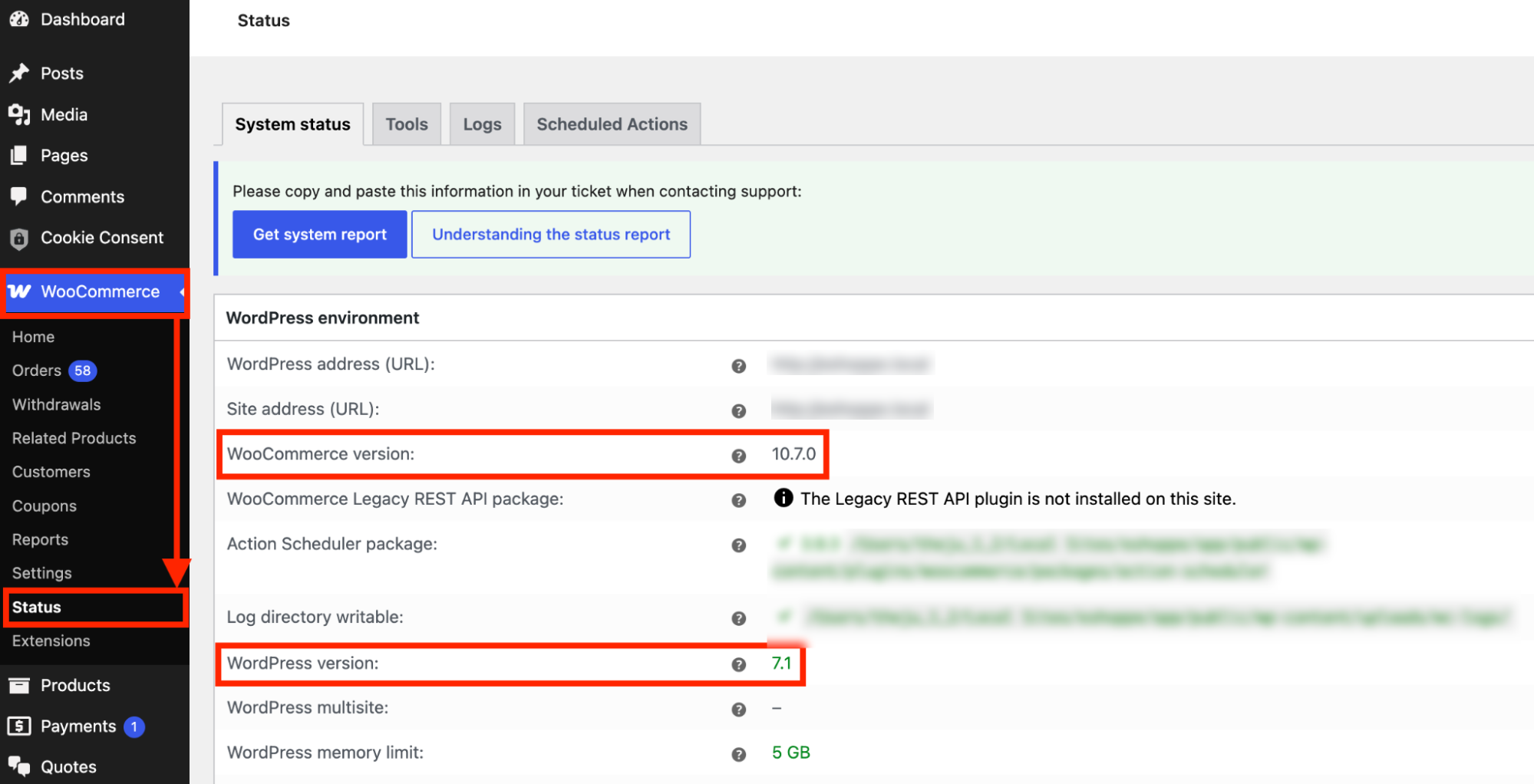
Go to WooCommerce → Status → WordPress environment. This section shows:
- WooCommerce version – listed directly under WordPress environment
- WordPress version – listed in the same section
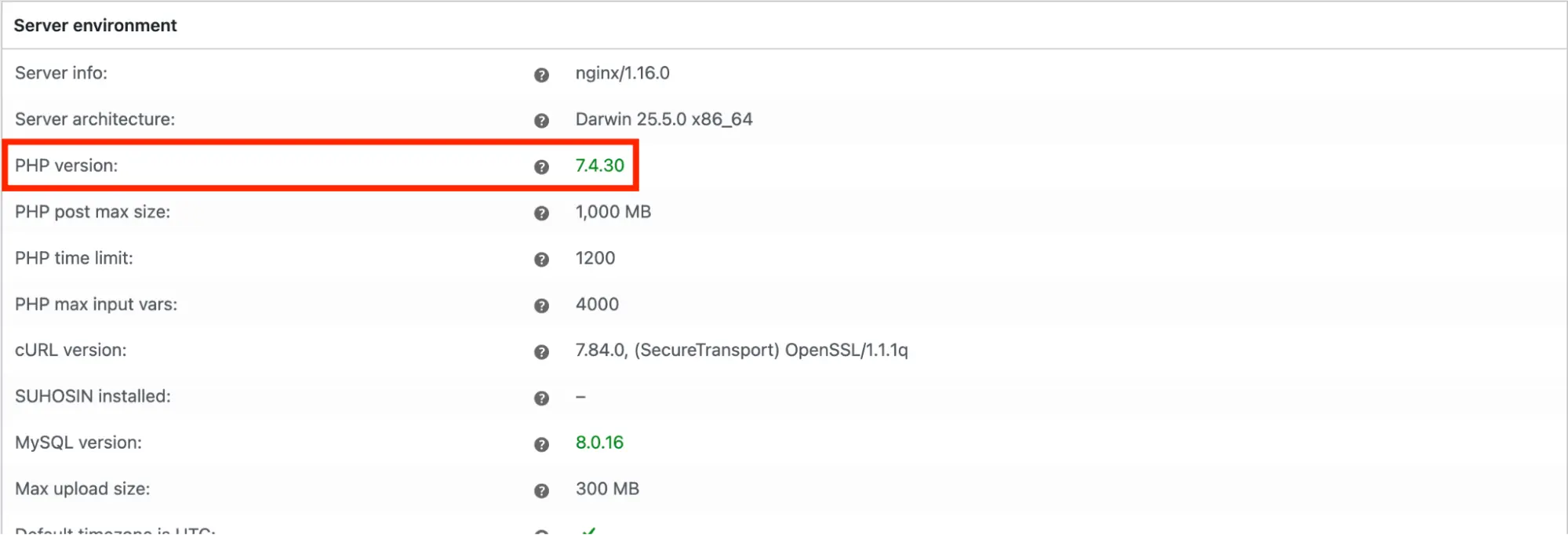
For your PHP version, scroll further down to Server environment on the same Status page. The PHP version is listed there.
You can also confirm your WordPress version separately under Tools → Site Health → Info → WordPress.
Once you have all three numbers, cross-check them against the compatibility table above. If any of them fall short, update in this order: WordPress first, then PHP.
WordPress updates are usually safe, but “usually” isn’t “always,” so don’t skip the backup step.
- Back up your site first: A full backup (files and database) before any update is non-negotiable. If something goes wrong, this is your undo button.
- Go to Dashboard → Updates → WordPress Updates in your admin panel and run the update from there.
- Check your store afterward: Load the homepage, a product page, and the checkout page to confirm nothing broke.
Pro Tip: If you’re several major versions behind, update WordPress incrementally rather than jumping straight to the latest release. This gives you smaller, easier-to-diagnose problems if a theme or plugin conflict shows up.
PHP is different from WordPress in one key way: you don’t control it directly. Your hosting provider does. Updating PHP means asking them to change it at the server level, which most hosts let you do through your hosting panel.
- Back up your site first: Same rule as above. A PHP version bump can occasionally expose a plugin or theme that was quietly relying on deprecated PHP functions.
- Check your hosting panel for a PHP version selector: Most hosts (cPanel, Plesk, or a custom dashboard) have this under a section labeled “PHP Version” or “Select PHP Version.”
- If you don’t see an option, contact your host directly: Ask them to update your PHP version to 8.3 or later. Hosts are used to this request and typically process it within a day.
- Test immediately after the change: Check core store functions: adding to cart, applying a coupon, and completing a test checkout. If a plugin breaks, you’ll usually see a clear PHP error rather than a silent failure, which makes it easy to flag to the plugin developer.
Once PHP and WordPress are both current, revisit your MySQL or MariaDB version. It’s the one piece hosts update least often, and it’s worth confirming directly with support rather than assuming it’s been handled alongside the others.
Keeping your WooCommerce store within the minimum system requirements is important, but meeting the recommended versions is the better target. An up-to-date WordPress installation, PHP version, and database give your store a stronger foundation for security, performance, and plugin compatibility.
Check your current versions regularly, back up your store before making changes, and test key functions after every update. If your hosting environment is holding you back, contact your provider to upgrade PHP, MySQL, or MariaDB rather than running your store on outdated software.


Subcribe to our newsletter


