Share:


Table of Contents
A gift receipt is a specialized sales document that allows gift recipients to return or exchange items without revealing the purchase price. This feature is increasingly expected by consumers, especially during holiday seasons, as it enhances the gifting experience and simplifies returns for both buyers and recipients.
- A gift receipt includes essential purchase details like the store name, order number, and product information but excludes prices and payment methods.
- It facilitates easier exchanges and returns, promoting customer satisfaction and loyalty.
- WooCommerce does not offer gift receipts by default; however, a customized packing slip can serve this purpose when set up correctly.
- Retailers can enhance their offerings by allowing customers to request gift receipts during checkout and by clearly stating return policies on the receipts.
- Implementing gift receipts can help maintain revenue by encouraging exchanges instead of refunds.
- Automating the sending of gift receipts during peak seasons can streamline operations and improve customer service.
Every holiday season, searches for “gift receipt” more than triple as shoppers look for ways to make gifting easier. After all, someone receiving a sweater as a gift should be able to exchange it for the right size without knowing how much it costs.
Major retailers like Amazon and Target make it easy to include gift receipts with purchases, so customers naturally expect the same from smaller online stores.
In this guide, we’ll explain what a gift receipt is, how it works, and how to set up gift receipts in WooCommerce using the WooCommerce PDF Invoices, Packing Slips and Credit Notes plugin.
A gift receipt is a sales receipt that lists the items purchased but leaves out the prices. The buyer includes it with the gift so the recipient can return or exchange an item without learning how much it costs.
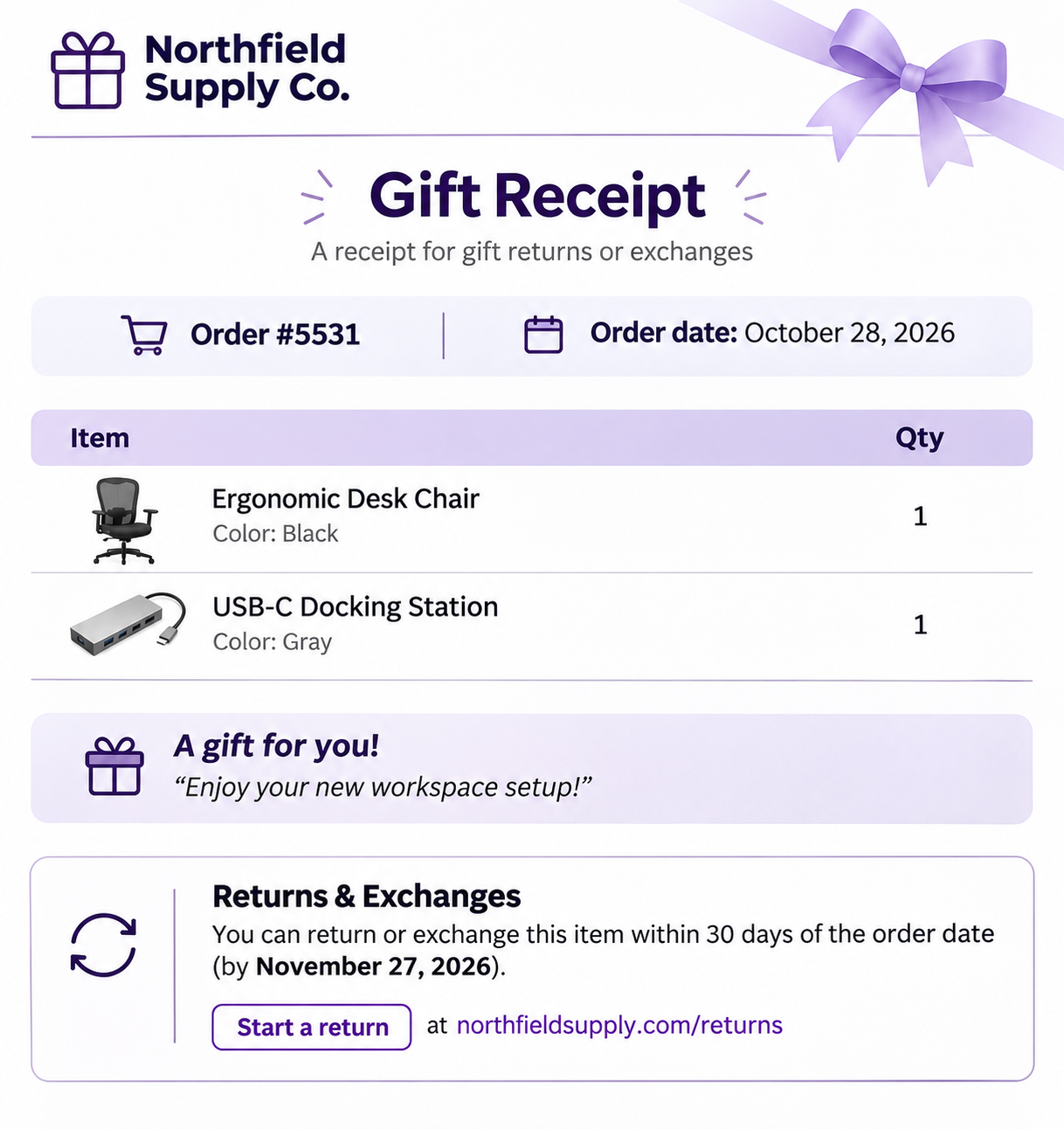
It carries enough detail for the store to find the original order, usually an order or transaction number, the purchase date, and the products. However, it excludes item prices, discounts, payment details, and other information that could reveal how much the buyer spent.
Gift Receipt vs Regular Receipt
A regular itemized receipt shows every amount: item prices, tax, shipping, the total, and how the customer paid. It’s the buyer’s proof of purchase. A gift receipt does a different job.
A gift receipt is meant for the recipient, and its only purpose is to make a return or exchange possible while keeping the price hidden.
Without a gift receipt, the buyer is left with two inconvenient options: share the full invoice with prices, or send nothing and make returns harder for the person receiving the gift.
A useful gift receipt has these details:
| A Gift Receipt Includes | A Gift Receipt Excludes |
| Store name and logo so the recipient knows where to go for returns | Item prices, subtotal, tax, shipping, and total |
| Order number to link the receipt to the original purchase | Discounts and coupon codes |
| Order date to check against the return window | Payment method |
| Products and quantities, including variants such as size or color | The buyer’s billing address, email, and phone number |
| A gift message, if the buyer added one | |
| Return or exchange instructions, including the deadline and how to start a return |
The buyer usually asks for a gift receipt at checkout or after the purchase. The store issues a document tied to the original order, without the prices. The buyer tucks it into the gift, or the store ships it in the package (packing slip).
If the recipient wants a different size, color, or product, they bring or send the item back with the gift receipt. The store looks up the order, confirms the item and the price paid, and processes the exchange or return.
Can You Get a Refund With a Gift Receipt?
Usually not as cash. Most stores give the recipient an exchange or store credit, such as a gift card. Refunding the original payment method would send the money to the buyer. Some stores allow a refund to the buyer if they request it. The exact rule depends on each store’s return policy.
Do Gift Receipts Expire?
A gift receipt follows the store’s return window. If returns are accepted for 30 days, the gift receipt is valid for 30 days from the purchase date. Many retailers extend that window for orders placed during the holiday season, so gifts bought in November can still be exchanged in January. Printing the return policy/deadline on the gift receipt would be helpful.
No. WooCommerce doesn’t include a gift receipt option out of the box, and its default order emails always show prices.
The WooCommerce PDF Invoices, Packing Slips and Credit Notes plugin is built for invoices, packing slips, and credit notes. It doesn’t have a dedicated gift receipt document. However, a packing slip already contains what a gift receipt needs (the order number, date, and products, with no prices), so a customized packing slip template works well as a gift receipt.
Why Your Online Store Should Offer Gift Receipts
- They remove a reason to hesitate. Shoppers buying for someone else worry about getting the size or style wrong. Knowing the recipient can exchange the item makes the purchase easier.
- They match what big retailers offer. Amazon and Target both let shoppers add gift receipts to online orders. Customers bring that expectation to every store they buy from.
- They turn returns into exchanges. A recipient with a gift receipt usually leaves with store credit or another product instead of a refund, so the revenue stays in your store.
Before we start, make sure you have installed the premium version of WooCommerce PDF Invoices, Packing Slips and Credit Notes. The free version generates packing slips but you’ll need the premium version to customize them.
Since not every order requires a gift receipt, we’ll create a separate gift receipt template that you can use whenever a customer requests one.
Step 1: Create a Gift Receipt Template
Start by creating a packing slip template that you can use as a gift receipt.
- Go to Invoice/Packing > Packing slip
- Open the Customize tab, click Change template and select a premium template.
- Rename the template to Gift Receipt so you can easily identify it later.
- Expand Document title and change the Title field to Gift Receipt. This is the heading that will appear on the generated PDF.
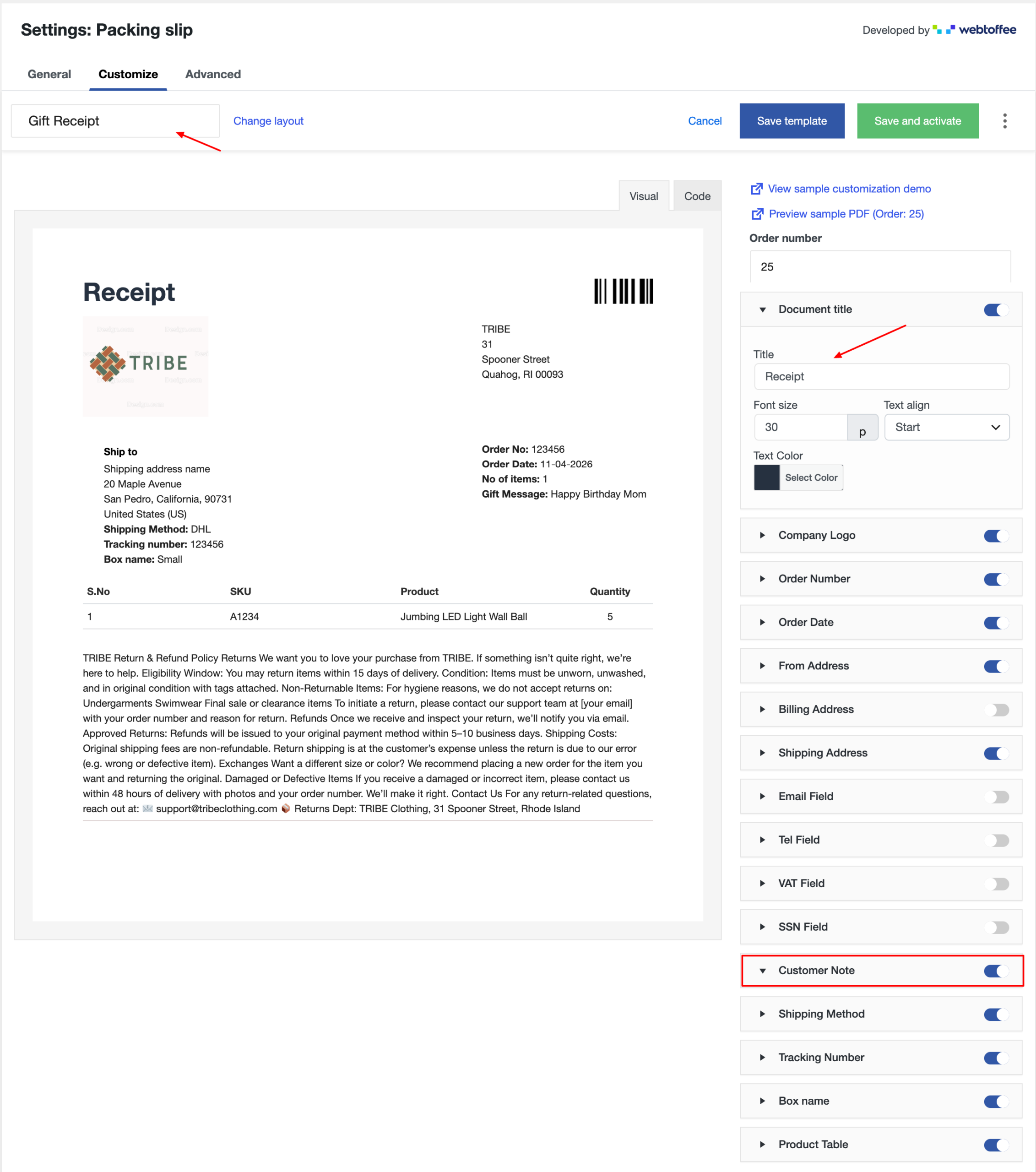
- Click Save template to save your changes. Do not select Save and activate, as this would replace your currently active packing slip template.
Step 2: Customize Gift Receipt Template
Next, use the toggles on the right-hand side of the customizer to choose which details appear on the gift receipt.
- Enable Company Logo, Order Number, and Order Date. These details help the recipient identify the order if they need to request a return.
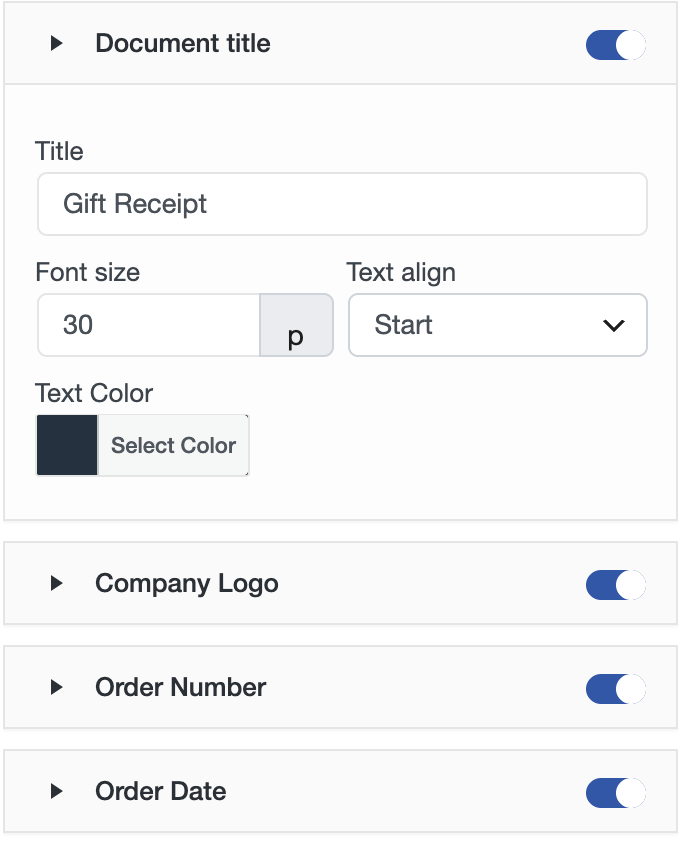
- Turn on the Product Table toggle. By default, the packing slip displays product names and quantities without showing prices.
- Enable the Customer Note toggle so customers can use the order notes field at checkout to add gift messages. These notes will appear on the gift receipt. You can also rename the section heading to Gift Message.
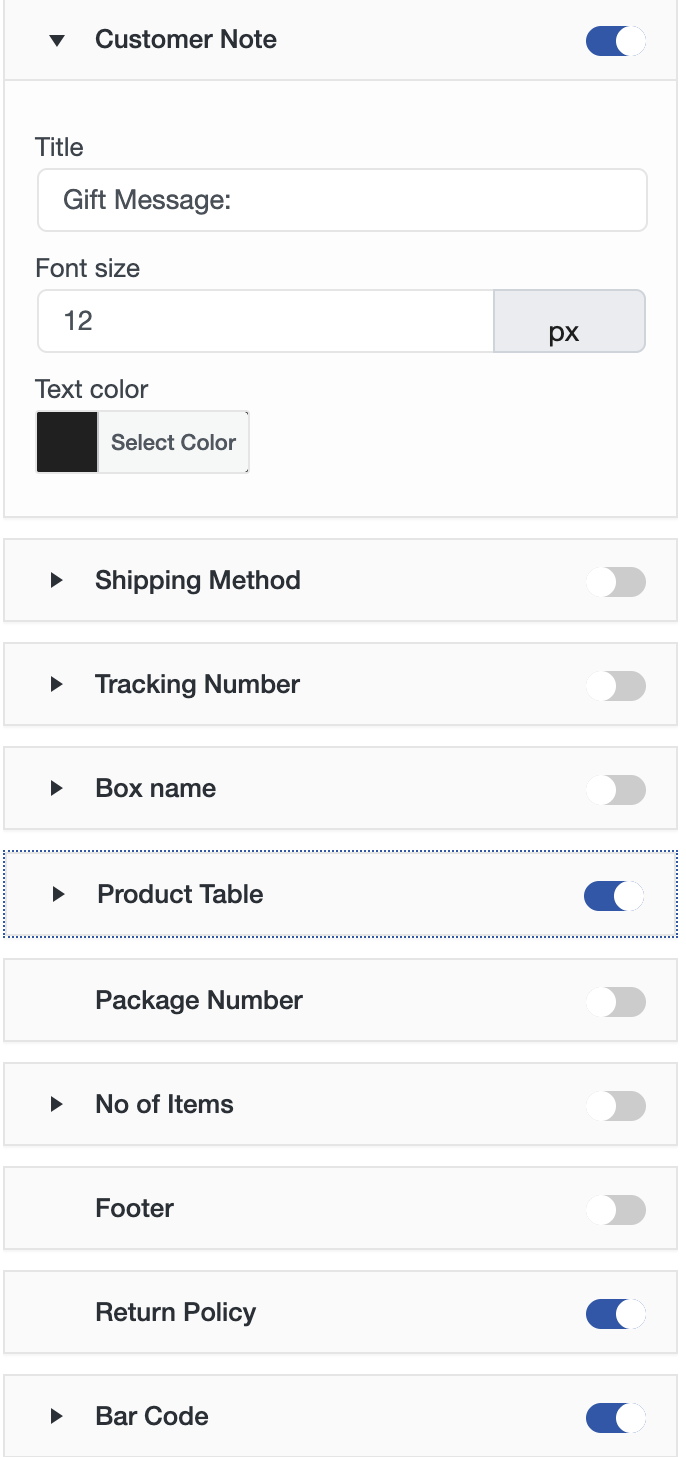
- Turn off Billing Address, Email Field, Tel Field, VAT Field, and SSN Field. These contain the buyer’s information, which the gift recipient doesn’t need.
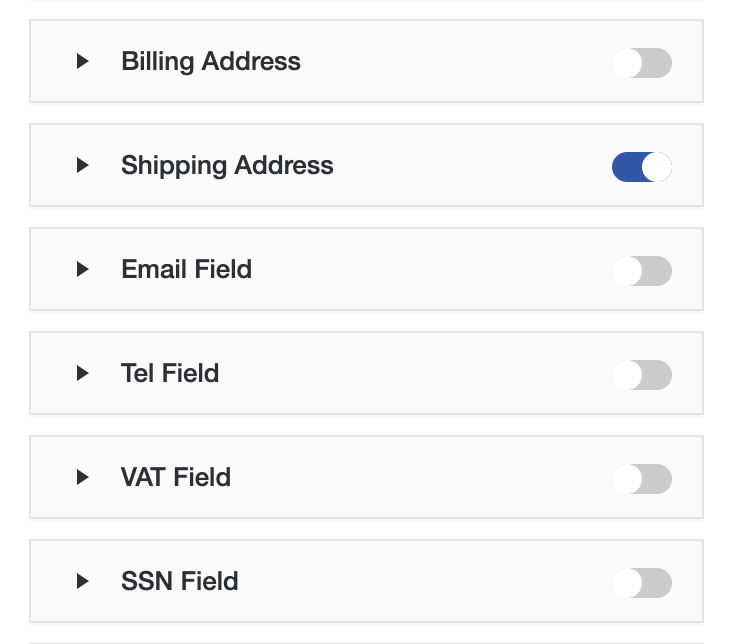
- Enable the Shipping Address option if the receipt goes inside the package. If the buyer plans to hand over the gift receipt separately, you can turn it off.
- Click Save template to save your changes.
Step 3: Activate the Template When a Customer Requests a Gift Receipt
When a buyer requests a gift receipt, you can temporarily activate your saved Gift Receipt template.
- Click the three-dot menu “⋮” next to the template buttons and select My templates.
- Find the Gift Receipt template and activate it.
Note: Remember to switch back to your default template. Otherwise, all subsequent packing slips will use the Gift Receipt template.
Step 4: Generate and Send the Gift Receipt
Once you’ve activated the gift receipt template, you can generate it directly from a WooCommerce order.
- Go to WooCommerce > Orders and open the order.
- Print or download the packing slip. It will now use your customized gift receipt template.
- Email the PDF to the customer so they can share it with the gift recipient.
Step 5: Automatically Send Gift Receipts (Optional)
If your warehouse team uses packing slips to prepare orders, you can automate the delivery of gift receipts.
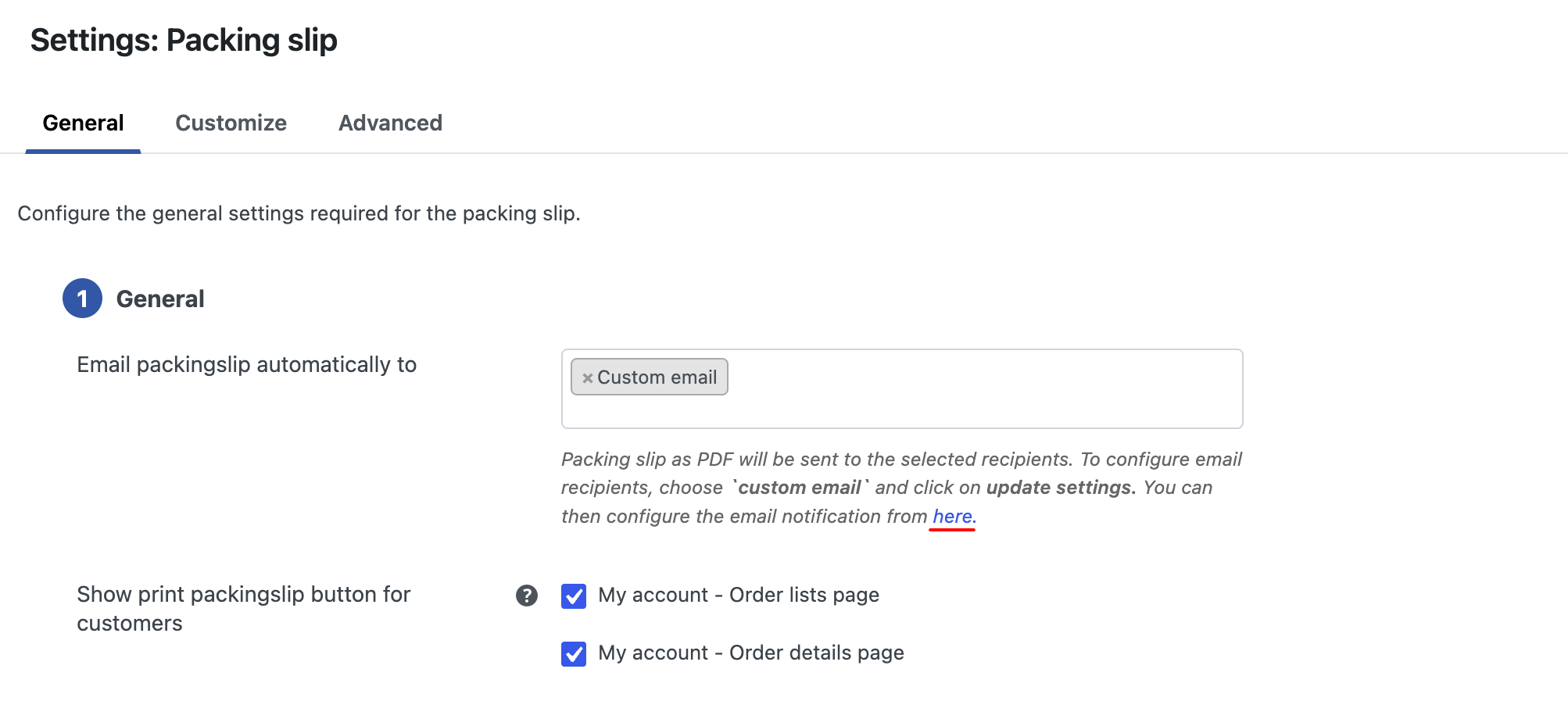
- Go to Invoice/Packing > Packing slip > General.
- Under Email packingslip automatically to, select Custom email and click Update Settings.
- Click the “here” link below the field to open the WooCommerce email settings.
- Enter your warehouse addresses in Recipient(s), separated by commas.
- Customize the Subject and Email heading if needed. For example, you can use “Gift Receipt for order #{order_number}” as the subject.
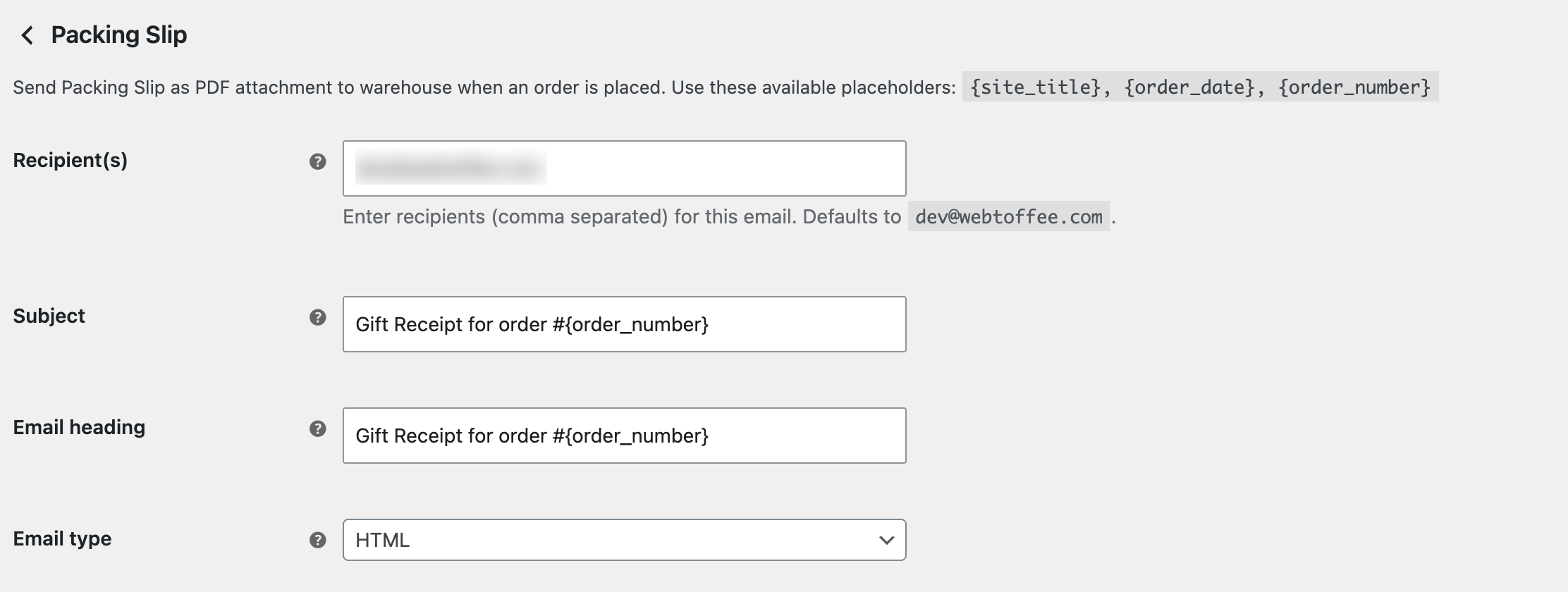
- Click Send a test email to check the PDF, then Save changes.
Once enabled, the plugin automatically emails the packing slip PDF to your warehouse when an order is placed. If your gift receipt template is active, the attached PDF will use that design.
This makes it handy during busy gifting periods, such as the weeks before the holidays, when most orders need a gift receipt. For individual requests, use Step 4 instead.
- Let shoppers ask at the checkout. Add a line to your checkout page asking buyers to write “gift receipt” in the order notes if they want one. The same note can hold the gift message, which then prints on the receipt.
- Print your return window. Add the return deadline and how to start an exchange to the template’s footer text, so recipients know what to do without contacting you.
- Extend returns for holiday orders. If you accept returns for 30 days, consider extending it for orders placed in November and December (holiday season), and say so on the gift receipt.
- Pair it with gift wrap. If you offer gift wrapping, mention the gift receipt option in the same place so buyers see both together.
Gift receipts are provided at no extra cost. The term usually refers to a store offering gift receipts free of cost with any purchase, so the buyer doesn’t pay anything extra to include one.
Most stores give store credit or an exchange instead of cash. Some will refund the buyer’s original payment method, but the recipient rarely receives cash.
Partly. The free plugin’s packing slip already leaves out prices, so you can place it in the package. To customize and rename it “Gift Receipt” and remove the buyer’s personal details, you need the premium version.
Not by default. They list the products and quantities included in an order without showing prices. They help warehouse staff pick, pack, and verify items before shipping. Learn more in our guide on what a packing slip is.
A gift receipt lets someone return or exchange a present without seeing its price. For your store, offering one removes a common worry for gift shoppers and keeps returns from turning into refunds.
WooCommerce doesn’t create gift receipts on its own, but a customized packing slip covers it well. Save a gift receipt template, switch it on when a customer asks, and print or email the PDF. During busy gift seasons, you can send it to your warehouse automatically.
The premium WooCommerce PDF Invoices, Packing Slips and Credit Notes plugin gives you complete control to set this automation up in a few minutes.


Subcribe to our newsletter