


Share:


Table of Contents
Google's free product listing program enables eCommerce businesses, particularly small and medium-sized ones, to enhance their product visibility on Google without incurring advertising costs. By optimizing product feeds, businesses can effectively reach a wider audience and improve their chances of appearing in relevant search results, thereby increasing clicks and conversions.
- Google's free product listing program was launched in 2020 to help businesses promote their products without a fee.
- A well-optimized product feed is crucial for appearing in Google Shopping, Google Images, Google Search, and YouTube.
- Key optimization strategies include crafting keyword-rich product titles, informative descriptions, and high-quality images.
- Product attributes and identifiers, such as GTIN and MPN, enhance search relevance and visibility.
- Utilizing plugins for product feed management can streamline the optimization process and ensure compliance with Google’s standards.
- The quality of product data directly impacts the likelihood of appearing in organic listings, making optimization essential for success.
Since Google introduced its free product listing program in 2020, the eCommerce market has significantly changed. Google’s free listing program was a helping hand, especially for small to medium-sized businesses.
It gave them an opportunity to promote their products on the Google Shopping page and increase the visibility of their store products organically without any cost.
In this article, we will explain everything you need to know about Google’s free listing program and how to optimize Google product feed data to get better results on the Google Shopping page.
So, wasting no time, let’s get started.
In 2020, Google launched its free listing program to help shoppers find the right products easily and let store owners promote their products for free. This has significantly increased the clicks and impressions for many eCommerce websites.
Although benefits were distributed among sellers of all sizes, small and medium-sized businesses benefited the most. It was also helpful for shoppers to quickly find the products they were looking for with a wide range of options.
Shopping Ads are a type of Google Ads for which eCommerce store owners pay to promote their products on Google Shopping. They offer a simple and flexible way to promote your store’s products with detailed product descriptions.
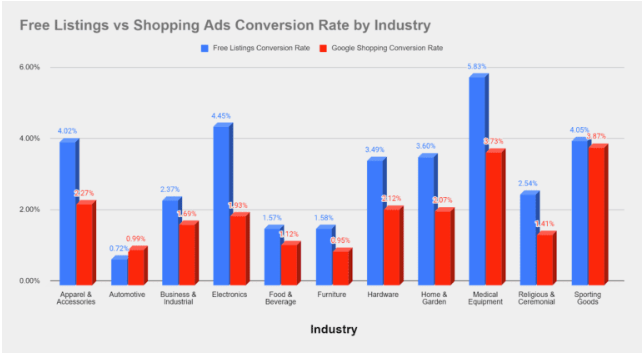
The above infographics show that, in terms of conversion rate, free listings have been more effective than shopping ads across various industries.
Google free listing works with product feeds. A product feed is a file that contains important details about your store’s products, such as titles, prices, images, availability, and other attributes. By creating a WooCommerce Google Merchant product feed and submitting it to Google Merchant Center, you can make your products eligible to appear in free listings on Google Shopping.
Google’s free listing is an excellent opportunity for businesses to expand their product visibility, drive traffic, and gain insights.
Websites do not need to pay to appear on search results, and Google’s free product listing works similarly. This is especially beneficial for smaller businesses looking to enhance their visibility without spending much on advertising.
However, it is not guaranteed that your store products will appear on the Shopping page; it will mainly depend on the quality of the product feed with relevant information and product description.
Google free listings appear in four places: Google Shopping, Google Images, Google Search, and YouTube. These are the four destinations where your store products will be promoted using Google’s free listing program.
1. Product Listing on Google Shopping
Shoppers can look for products from the Shopping tab on the Google search page. To do so, they simply need to enter the product keyword in the search bar and navigate to the Shopping tab.
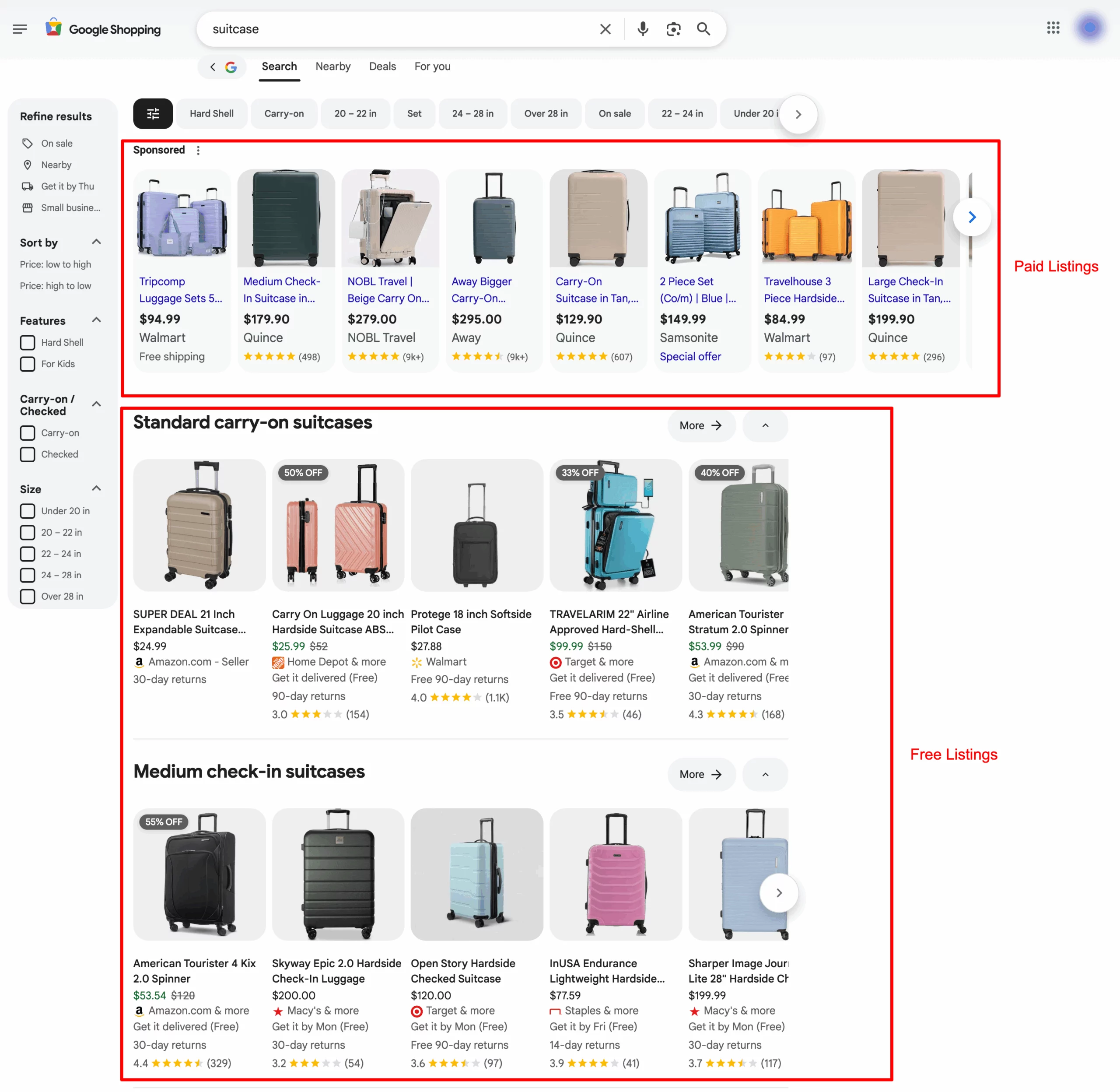
From the above screenshot, you can see two different sections for product listings. The first one is the paid Ads section, on which Google will be compensated by the sellers to display their products in the top position.
Below, you can see the free listings, where sellers do not need to pay to display their store products. These results rely on the quality of product information for your store products relevant to the user search queries.
2. Product Listing on Google Images
Product listings may also appear on Google Images. When people search for products on Google and browse images, they can see products available for purchase.
By clicking on the product image, the product information will appear beneath it.
Below is an example of a product listing on the Google Images page.

Products available for purchase will have a label on the images, letting users know these products can be purchased.
3. Product Listing on Google Search
You can also find product listings on Google search. Customers can find products directly from the search results page, and users can find more information about pricing, availability, and ratings from these results.

You can see two sections here, too. One is the Shopping Ads section, a paid section to promote your store products. Then, you have a Shopping Knowledge Panel that displays product information from various sellers.
If you want to include your product data in the Shopping Knowledge section, your product feed data should include strong product identifiers such as Brand, GTIN, MPN, etc.
4. Product Listing on YouTube
Product listings may also appear on YouTube. When users watch a video on YouTube, they may see a list of products that can be purchased. Also, when a user specifically searches for a product on YouTube, they may see related products in YouTube search results.
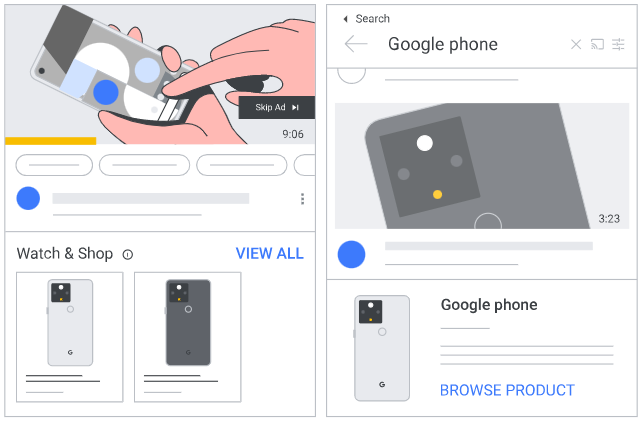
Depending on your product data, your products may be eligible to appear in these formats if they include the product being viewed or searched.
Google’s free listings can be a game-changer for small to medium-sized businesses looking to promote their products. But since it’s free, competition for the top spots is fierce—you can’t simply bid your way up.
Instead, success depends on sharpening your SEO strategies and focusing on Google product feed optimization to ensure your listings align with user search intent.
The following are some tips for effective Google product feed optimization.
1. Optimize Product Titles
Your product title is one of the most important elements in your entire feed. A clear, keyword-rich title helps Google identify what your product is and match it to the right search queries.
A good rule of thumb is to structure your title like this: Brand + Product Type + Key Attribute(s)
For example:
- Good: Nike Men’s Running Shoes – Air Zoom, Size 10, Black
- Poor: Running Shoes Model 2023
The first one instantly tells Google and buyers what the product is. The second one leaves too much guessing.
2. Improve Product Descriptions
Product descriptions are your chance to give Google (and shoppers!) useful details. Make your descriptions clear and benefit-focused. Explain what the product does, why it’s helpful, and who it’s for.
Add relevant keywords naturally, but avoid stuffing the description with repetitive phrases. Google wants helpful content, not keyword spam. The more informative and reader-friendly your description is, the better your product will perform.
3. Use High-Quality Product Images
Images are also an important attribute of products. They are the first thing your customers see from the listing. Images act like a virtual showroom for your products. They play a major role in letting customers decide to purchase your product.
Google has minimum shopping image quality requirements, but going beyond the basics always helps.
Use:
- Bright, high-resolution photos
- Clean backgrounds
- Multiple angles
- Lifestyle images where appropriate
Avoid adding text overlays, watermarks, or borders. Google may reject those images. The better your photos, the more appealing your product looks in free listings.
4. Optimize Product Attributes
Attributes like color, size, material, age group, gender, and pattern may seem minor, but they make a huge difference. Google uses these details to match your products with the right search queries and filters.
This is especially important for apparel and products with variations. If these attributes are missing or incomplete, your products may not appear in relevant searches—so making sure every variant has complete attribute information improves visibility and accuracy.
5. Add Additional Product Identifiers
Apart from the main product attributes, you may add product identifiers like Brand, GTIN, MPN, etc. These are unique identifiers for the product assigned by the manufacturer.
- Brand – Brand name of the product used to identify the manufacturer globally. It should appear on the product packaging.
- GTIN – Global Trade Item Number is a unique product identifier used internationally. It should appear next to the barcode on your product package.
- MPN – Manufacturer Part Number, which includes alphanumeric characters, used to specifically identify a product among all products from the same manufacturer.
6. Add Custom Labels
Custom labels are incredibly helpful, even if you’re not running paid Shopping Ads. They let you group products based on your own internal strategies. For example, you can label items as “bestseller,” “seasonal,” “clearance,” “high-margin,” or anything else that fits your store’s needs.
While customers don’t see these labels, they allow you to monitor and segment products easily inside Merchant Center. This makes it way simpler to identify which types of products perform best in free listings and adjust your strategy accordingly.
7. Optimize Landing Page Speed and User Experience
To get the best results for your product feeds, optimize your website’s page speed and user experience. All your efforts will be in vain if you have a website with a high loading time and a terrible user experience.
You can review your website’s loading time using Google’s PageSpeed Insights. Also, look for the bounce rate to analyze users leaving your website without making a purchase.
8. Manually Map Google Product Categories
Google has a set of predefined categories, so you must map your store categories with relevant Google product categories.
Rather than letting Google map the product categories automatically, it is better to map the store categories manually to improve your chances of getting top rankings on Google product listings.
9. Use Google Customer Reviews
Google customer reviews can indirectly contribute to your product listings. Use them to create social proof for your products and services. This provides a free platform to get valuable feedback from customers who’ve purchased from your store.
Specialized tools, like plugins, can make creating product feeds for Google Shopping easy. Product feed plugins are widely preferred for this purpose because they offer numerous advantages in functionality, efficiency, and ease of use.
Here are the key reasons why:
- Easy Integration – Plugins can be readily integrated with well-known eCommerce platforms such as WooCommerce and Shopify. This makes setting up and managing product feeds easier for users without technical skills.
- Automatic Syncing – Plugins automatically update product data with Google Merchant Center, keeping product listings always current. This helps avoid promoting items that are out of stock or no longer available.
- Customized Feeds – Plugins enable businesses to tailor product attributes, categories, and filters to align with Google Shopping’s standards. This not only ensures compliance but also enhances feed quality for improved visibility.
- Rich Product Data – Most plugins include features that enhance product titles, descriptions, and other essential attributes, which helps improve products’ visibility in search results.
- Multi-channel Support – Some plugins not only enhance feeds for Google Shopping but also cater to other platforms such as Facebook, Instagram, etc., making it easier to manage various product feeds across different channels.
By using plugins, businesses can take advantage of easy automated feed management and improved optimization features without the technical challenges and high expenses associated with custom-built solutions.
If you want to create quality product feeds for Google Shops and Facebook Shops, try our WooCommerce Product Feed for Google Shopping plugin. It is tailored to address these requirements, making it the perfect option for businesses aiming to create optimized product feeds as well as simplify and enhance them for Google Shopping.
Small and medium-sized businesses can use Google’s free listings to increase their product visibility. Google’s intention was clear: to offer a better shopping experience for users and reclaim the lost territory of product searches from Amazon.
Free listings offer an ideal way for eCommerce websites to increase clicks and impressions. Customers can preview product details and easily find the right products and variations.
Store owners should be competitive in grabbing this free opportunity to promote their products on Google Shopping. The chance of displaying your store products on organic listings depends on the quality of the product feeds and product data. So, it is important to optimize Google product feed data.
We hope this article has given you a clear idea of Google product feed optimization for free listings. What are your thoughts on this article? Let us know in the comments.

Got any query? Please leave a comment or reach out to our support
Got any query? Please leave a comment or reach out to our support

Subcribe to our newsletter





Comments (2)
Richard
January 8, 2024
Hi, is it a requirement to have pages indexed on Google in order to appear in the Shopping Knowledge Panel/Product Knowledge Panel? Or is it only required to have an optimized datafeed?
Thanks,
Richard
Vineetha
January 10, 2024
Hi Richard,
Thanks for reaching out! To the best of our knowledge, an optimized data feed alone may not be sufficient, as the search engine relies on various signals from the web to populate its knowledge panels, including relevant content on indexed pages.