
Share:


Table of Contents
Pausing gift card redemption during Black Friday and flash sales is a strategic move that protects profit margins and ensures that promotional inventory is sold at full value. By temporarily restricting the use of gift cards, retailers can maintain revenue integrity and streamline discount management, ultimately enhancing the effectiveness of their sales campaigns.
- Gift cards can negatively impact profit margins when redeemed during high-discount sales, as they reduce the effective revenue from each transaction.
- Pausing gift card redemption allows retailers to allocate inventory to paying customers, maximizing cash flow during peak sales periods.
- Combining gift cards with other discounts can complicate pricing structures, leading to potential losses; pausing redemption simplifies this process.
- High-traffic sales periods increase the risk of fraud, and temporarily disabling gift card use reduces opportunities for fraudulent transactions.
- Keeping gift card redemptions out of sales data provides a clearer picture of campaign effectiveness, aiding future sales planning.
- Retailers can still sell gift cards during the pause, allowing for continued customer engagement while managing redemption timing.
Black Friday discounts and gift cards don’t always play nicely together. A customer can use a gift card balance bought months ago to buy products you’ve already marked down 40%, meaning prepaid revenue ends up buying stock at your lowest margin of the year. Multiply that across hundreds of orders during a flash sale, and the numbers start to sting.
The fix isn’t scrapping gift cards altogether, since they bring in new customers and repeat purchases the rest of the year. In this article, you’ll learn how to pause gift card redemption in WooCommerce for the sale window, keep your discount math intact, and let shoppers know ahead of time so nobody feels caught off guard.
Gift cards are great for your store 11 months of the year. During a flash sale, they can quietly work against you. Here’s why it’s worth pausing redemption for a few days.
Your Margins Are Already Stretched Thin
Black Friday pricing pushes your margins close to the floor. Say you sell a jacket for $100 that costs you $55. At 40% off, it sells for $60, leaving you $5 per sale. That’s a margin you accept because the sale brings in volume and new customers.
Now a shopper pays for that jacket with a gift card bought back in March. You collected that money months ago, and it’s sitting on your books as a liability. When it gets redeemed during the sale, it only covers $60 worth of goods instead of the $100 it would have bought at full price.
Same prepaid cash, a lot less margin.
Sale Inventory Should Go to Fresh Revenue
Most stores plan Black Friday stock carefully, especially doorbuster products. Every unit that goes to a gift card redemption is a unit that didn’t bring in new cash during your busiest sales window.
If your best deals sell out, you want them to have sold to customers who paid at checkout, not to balances you collected earlier in the year.
Stacked Discounts Get Messy Fast
Gift cards rarely show up alone during a sale. A customer might combine a sitewide discount, a coupon code, free shipping, and a gift card balance on the same order. Each one makes sense on its own. Together, they can turn a profitable order into a loss.
Pausing redemption removes one layer from that stack, which makes your coupon rules much easier to manage.
Fraud Attempts Spike During High-Traffic Periods
Flash sales bring heavy traffic, and heavy traffic gives fraudsters cover. Gift card codes are a common target because they work like cash. Bots try code after code at checkout, and stolen balances get drained before the real owner notices.
Turning off redemption for the sale window takes away an easy target when your team is busiest and least likely to spot unusual activity.
Your Campaign Reports Stay Accurate
When gift card redemptions mix into your Black Friday revenue, your numbers look better than they really are. That money was earned months ago, not from your sale campaign.
Keeping redemptions out of the picture gives you a clean view of what your ads, emails, and discounts actually brought in, which makes planning next year’s sale a lot easier.
How to Pause Gift Card Redemption in WooCommerce
WooCommerce doesn’t have a built-in option to block gift card redemption on specific dates, so you’ll need a plugin for this. We’ll use the WebToffee Gift Cards plugin, which lets you exclude gift card usage on selected dates without touching any code.
If you haven’t set up gift cards in your store yet, start with our guide on how to create WooCommerce gift cards, then come back here.
- From your WordPress dashboard, go to Smart Coupons → Gift cards and open the General settings tab.
- In the General section, scroll down to Gift card usage settings.
- Find the Exclude gift card usage on selected dates option.
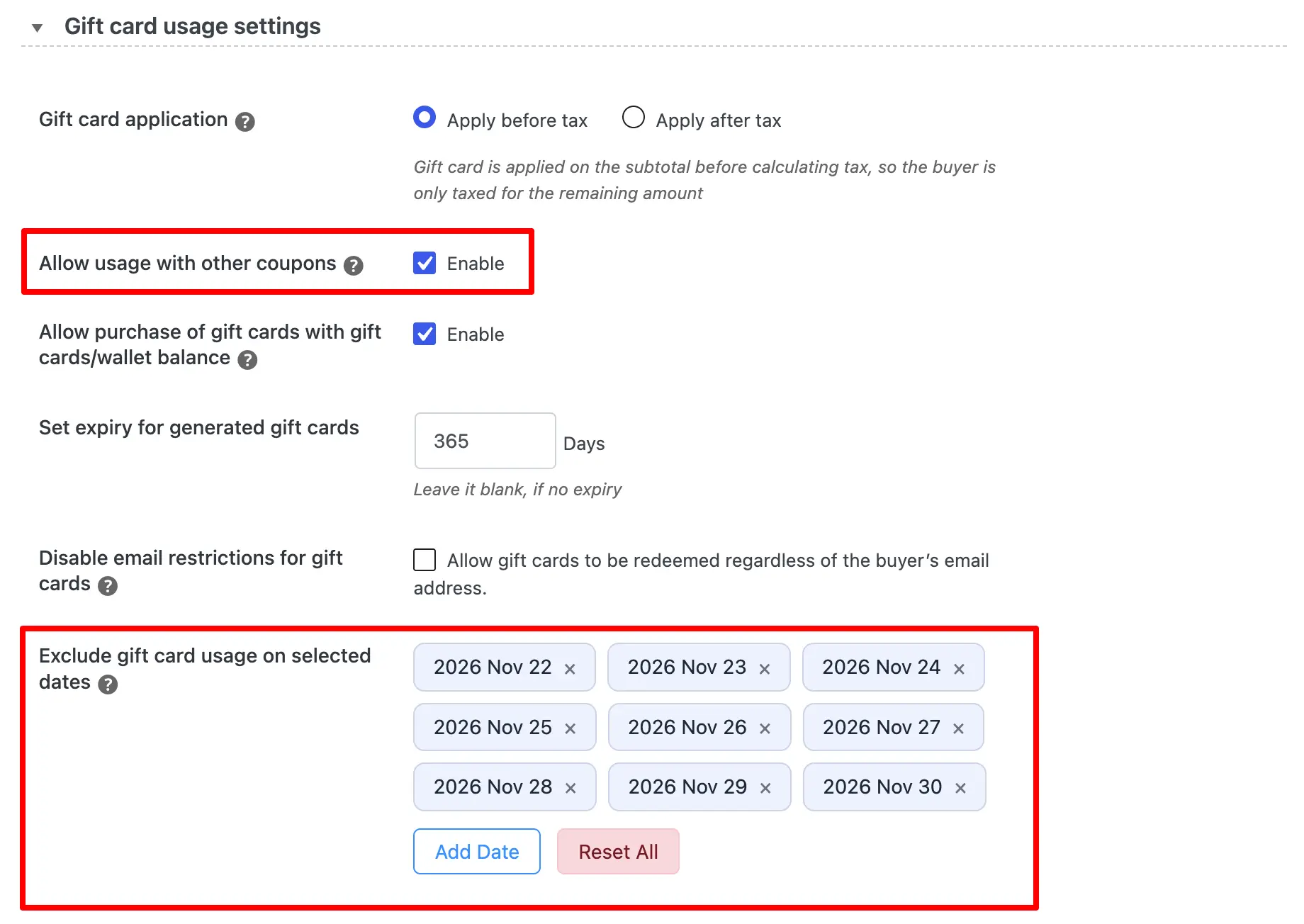
- Click Add Date and pick the first day of your sale. For a Black Friday through Cyber Monday campaign, that might be November 22, 2026.
- Keep clicking Add Date until every day of your sale window is selected. Each date shows up as a tag, so you can quickly confirm the full range (for example, November 22 to November 30, 2026).
- To drop a date you added by mistake, click the × next to it. To clear the whole list and start over, click Reset All.
- Click Save to apply your changes.
Gift cards stay valid on every date not in the list, so redemption picks back up automatically once your sale ends. You only need to come back and clear the dates before setting up your next flash sale.
If a full pause feels too strict for your customers, there’s a softer option in the same section. Uncheck Allow usage with other coupons to stop gift cards from stacking with your sale coupon codes, while still letting shoppers redeem them on their own.
Will customers lose their gift card balance while redemption is paused?
No. Pausing redemption only blocks gift cards from being used on the dates you select. The balance stays on the card, and customers can use it as usual once the sale window ends.
Can customers still buy gift cards while redemption is paused?
Yes. The date exclusion setting controls when gift cards can be redeemed, not when they can be purchased. That means you can keep promoting gift cards as holiday gifts during Black Friday while holding off on redemptions until the sale is over.
Can I pause gift card redemption for just a few hours?
The exclusion setting works on full dates, so you can’t block redemption for a specific time slot within a day. For a short flash sale, exclude the full day the sale runs on, or the days at either end if the sale crosses midnight.
Black Friday and flash sales are all about driving more orders, but that shouldn’t come at the expense of already-tight margins. Temporarily pausing gift card redemption gives you more control over your sale pricing, prevents excessive discount stacking, and keeps prepaid balances from eating into revenue during your busiest sales period.
With the WebToffee Gift Cards plugin, you can exclude gift card usage on specific sale dates and have redemption resume automatically afterward. And if blocking gift cards completely feels too restrictive, disabling their use alongside other coupons gives you a more flexible alternative.
Whichever approach you choose, make sure customers know about the restriction before the sale begins. A clear notice on your gift card terms, sale page, and promotional emails can prevent checkout confusion while keeping your Black Friday campaign running smoothly.


Subcribe to our newsletter