Share:


Table of Contents
Google Shopping ranking is crucial for e-commerce success, as it determines the visibility of products in search results, directly impacting click-through rates and sales conversions. Factors such as product relevance, bid amounts, and overall performance metrics play a significant role in how products are ranked, making it essential for sellers to optimize their listings and campaigns effectively.
- Google Shopping rankings are influenced by product relevance, bid amounts, and performance metrics like click-through rates and conversion rates.
- A well-optimized product feed, including accurate titles, descriptions, and images, is fundamental for improving visibility in search results.
- Competitive pricing and positive customer reviews enhance product appeal and can lead to better rankings.
- Regularly updating product information, including stock and pricing, is vital to maintain compliance and visibility.
- Utilizing targeted ad campaigns and effective bidding strategies can significantly impact product placement in paid Shopping results.
- Implementing Google Promotions can attract more clicks and improve engagement, indirectly boosting rankings.
Google Shopping is one of the most competitive channels for ecommerce stores. When shoppers search for a product, they often compare images, prices, ratings, shipping details, and store names before clicking.
That means showing up is not enough. Your products need to rank prominently enough to attract attention, earn clicks, and convert shoppers into customers.
Google Shopping ranking depends on several factors, including product data quality, search relevance, bids, product performance, pricing, reviews, images, landing page experience, and feed freshness. For Shopping Ads, Google also considers Ad Rank, which includes your bid, ad quality, landing page quality, auction competitiveness, search context, and the expected impact of assets and ad formats.
In this guide, we’ll explain how Google Shopping ranking works and share practical strategies to improve your product visibility across Shopping Ads and free listings.
To rank higher on Google Shopping, start by improving the quality and accuracy of your product feed. Use clear product titles, complete product attributes, high-quality images, accurate pricing, current stock information, and correct product categories.
Then improve performance signals such as click-through rate, conversion rate, reviews, pricing, promotions, and landing page experience. For paid Shopping campaigns, use the right bidding strategy and campaign structure to help Google show your products to more relevant shoppers.
Here is the best order to approach Google Shopping ranking:
- Monitor performance and keep improving low-performing products.
- Fix Merchant Center errors and product disapprovals.
- Optimize product titles, descriptions, images, and categories.
- Add complete product identifiers such as GTIN, MPN, brand, color, size, and product type.
- Keep product price, stock, sale price, shipping, and tax information updated.
- Improve reviews, promotions, pricing, and landing page experience.
- Use Performance Max or Standard Shopping campaigns depending on your goals.
Google Shopping displays your products to shoppers looking for items you offer. Unlike standard search results, it features a visually appealing layout that highlights important information such as product images, prices, and store names right away. It’s not just about being listed; it’s crucial to rank well to catch attention and encourage clicks.
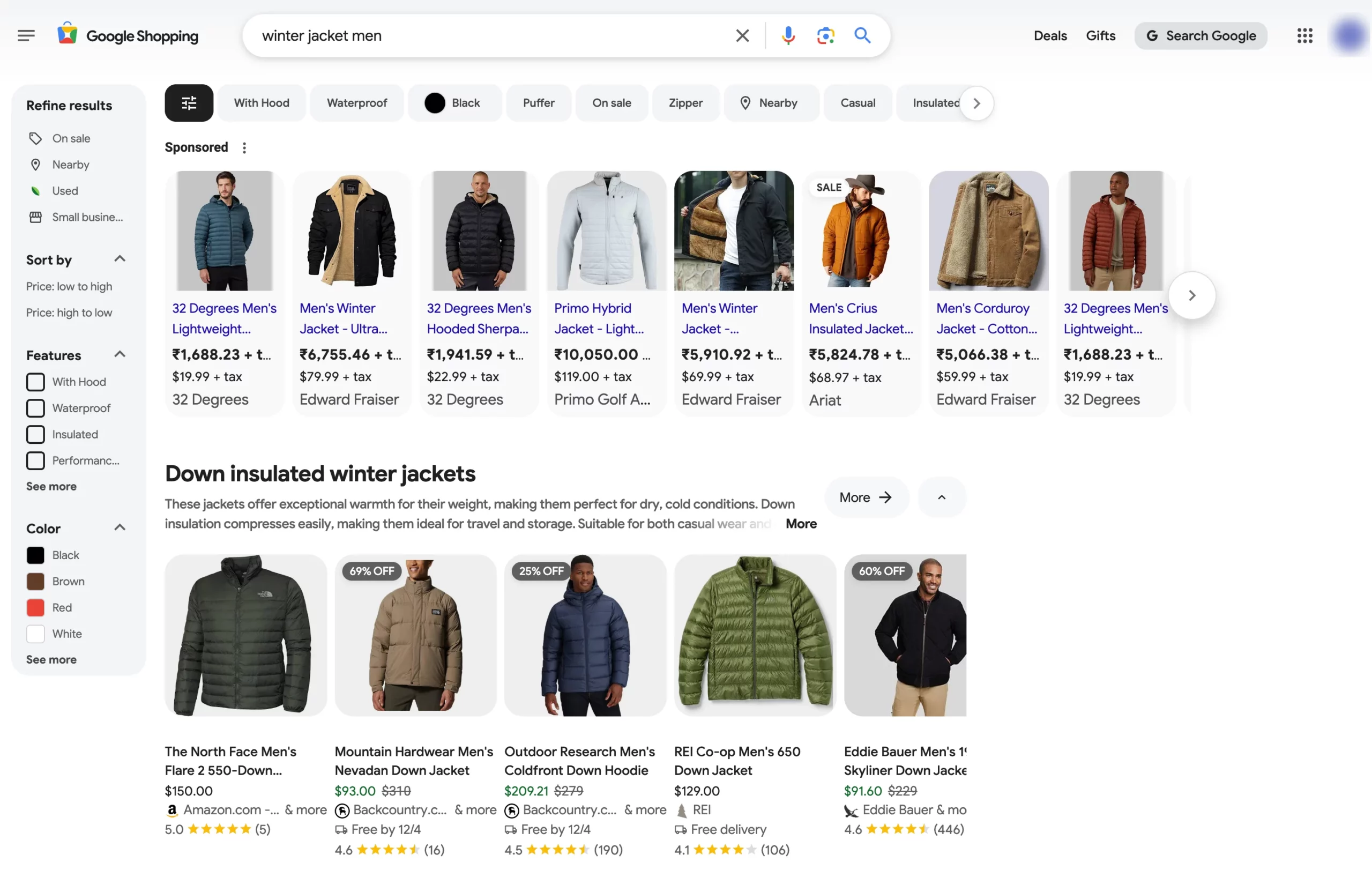
So, how does Google determine which products to feature first? It boils down to three main factors:
- Relevance
Google favors products that align closely with a shopper’s search terms. For example, if someone types in “black leather boots,” products with detailed titles, descriptions, and attributes that include these keywords are more likely to show up.

The more precise and comprehensive your product information, the better your chances of visibility.
- Bid Amount
Similar to Google Ads, you place a bid on how much you’re willing to pay for each click. Higher bids can give your products an advantage, but they aren’t the only factor at play. Even with a lower bid, a well-optimized product listing can still perform competitively.
- Product Performance
Products that demonstrate strong performance metrics, such as high click-through rates (CTR) and favorable reviews are given preference. If your winter jacket listings frequently result in clicks and sales, Google will recognize their relevance and reward you with improved placement.
Your Google Merchant Center houses all your product data, which must be accurate and thorough. Meanwhile, Google Ads oversees your Shopping campaigns and bids. Together, they help ensure your products show up in relevant searches and perform effectively.
By understanding and utilizing these factors, you can enhance your product rankings and draw in more shoppers.
How Google Shopping Ranking Works
Google Shopping rankings are determined by how well your products match a shopper’s search and how likely they are to generate a useful shopping experience.
When someone searches for a product, Google evaluates your product data, campaign settings, bid strategy, landing page, and past performance before deciding where your listing appears.
Here’s a simple visual breakdown:
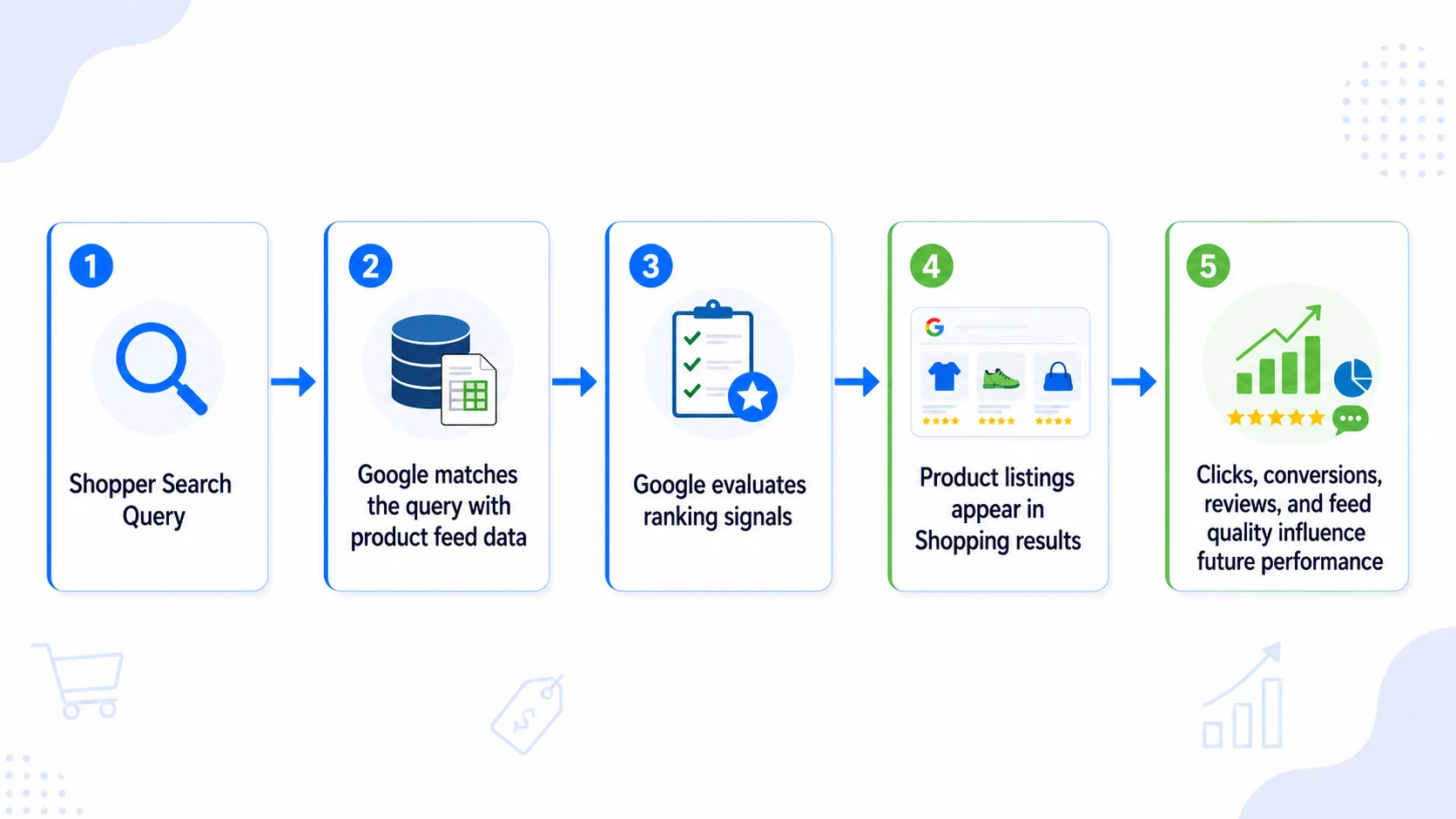
In practice, this means your product listings need to answer three questions clearly:
- Is this product relevant to the shopper’s search?
- Is the product listing complete, accurate, and trustworthy?
- Is the campaign likely to generate useful clicks or sales?
Google Shopping is not just about bidding higher. A product with a well-optimized feed, competitive pricing, strong images, and good performance can often compete more effectively than a poorly optimized listing with a higher bid.
Google Shopping Ranking Factors
Google uses several signals to decide which products appear more prominently in Shopping results. Some are controlled inside your Google Merchant Center feed, while others depend on your Google Ads campaigns and website experience.
| Ranking Factor | What It Means | Why It Matters | How to Improve It |
|---|---|---|---|
| Product relevance | How closely your product matches the shopper’s query | Helps Google show your product for the right searches | Use clear titles, accurate descriptions, correct product categories, and complete attributes |
| Product feed quality | Accuracy and completeness of your product data | Poor feed data can reduce visibility or cause disapprovals | Add GTINs, SKUs, brand, color, size, availability, price, and condition |
| Bid amount | How much you are willing to pay for clicks | Affects competitiveness in paid Shopping placements | Use target ROAS, manual bid testing, and campaign segmentation |
| Product performance | CTR, conversion rate, sales history, and engagement | Google favors products that shoppers interact with positively | Improve titles, images, offers, reviews, and landing pages |
| Price competitiveness | How your price compares with similar products | Shoppers are more likely to click competitive offers | Monitor competitor pricing and use promotions where possible |
| Reviews and ratings | Product and seller trust signals | Strong ratings can improve CTR and buyer confidence | Collect reviews and resolve negative feedback quickly |
| Image quality | The clarity and usefulness of your product image | Shopping is highly visual, so images influence clicks | Use clean, high-resolution product images without text overlays or watermarks |
| Landing page experience | The quality of the product page after the click | Poor pages can hurt conversions and campaign performance | Match product pages to listings, improve speed, and simplify checkout |
| Feed freshness | Whether price, stock, and product details are current | Outdated data can cause disapprovals and poor user experience | Sync product feeds regularly and update changes quickly |
Product Feed Optimization: The Foundation of Google Shopping Ranking
Your product feed is the data source Google uses to understand what you sell. It includes product titles, descriptions, images, prices, categories, availability, brand names, SKUs, GTINs, product types, and other attributes.
A weak feed limits how often your products appear. A strong feed helps Google match your products with more relevant searches.
What Should a Google Shopping Product Feed Include?
At a minimum, your feed should include:
- Product ID or SKU
- Product title
- Product description
- Product image URL
- Product page URL
- Price
- Sale price, if applicable
- Availability
- Brand
- GTIN, MPN, or other product identifiers
- Product category
- Product type
- Condition
- Shipping details
- Tax details, where applicable
- Color, size, gender, age group, and material for apparel products
The more complete and accurate your feed is, the easier it becomes for Google to understand your products.
SKU-level product data matters
Avoid using generic or duplicate data across multiple product variations.
For example, if you sell the same jacket in different sizes and colors, each variation should have unique SKU-level data.
Weak feed data:
- Title: Women’s Jacket
- Color: Mixed
- Size: Multiple
- Availability: In stock
Better SKU-level feed data:
- Title: North Face Women’s ThermoBall Eco Jacket – Black – Medium
- Color: Black
- Size: Medium
- SKU: NF-TB-BLK-M
- Availability: In stock
This helps Google understand exactly which product variant is available and when to show it.
Feed compliance is not optional
Google Merchant Center has strict product data requirements. Missing or incorrect information can lead to product disapprovals, limited visibility, or account warnings.
Common feed compliance issues include:
- Mismatched product price between feed and landing page
- Incorrect availability status
- Missing GTIN for branded products
- Promotional text in product images
- Unsupported product categories
- Broken product URLs
- Missing shipping or tax details
- Inaccurate product condition
For example, if your feed says a product is “in stock” but the landing page says “out of stock,” Google may disapprove the item or reduce trust in your product data.
Product title formatting rules
Product titles are one of the most important feed elements for Google Shopping visibility. They help Google understand what the product is and help shoppers decide whether to click.
A strong title usually includes:
Brand + Product Type + Key Attribute + Color/Size/Material
Examples:
Adidas Men’s Ultraboost Running Shoes – Black – Size 10
Apple iPhone 15 Silicone Case – MagSafe – Pink
North Face Women’s ThermoBall Eco Jacket – Black – Medium
For apparel, use:
Brand + Gender + Product Type + Color + Size + Material
For electronics, use:
Brand + Model + Product Type + Key Specification
For furniture or home products, use:
Brand + Product Type + Material + Size/Dimension + Color
Avoid:
- Keyword stuffing
- All caps
- Promotional phrases like “Best Deal” or “Free Shipping”
- Irrelevant keywords
- Missing variation details
- Vague titles like “Premium Product” or “New Arrival”
Product descriptions should support the title
Your description should expand on the title with useful product details. Include features, benefits, use cases, and important specifications.
Example:
Stay warm with the North Face Women’s ThermoBall Eco Jacket. Designed with lightweight insulation and a durable water-repellent finish, this black medium-size jacket is ideal for cold-weather travel, hiking, and everyday winter wear.
This gives Google more context and helps shoppers understand the product before clicking.
Before diving into all nine strategies, here’s where to focus first, especially if you’re starting from scratch or have limited time.
Where should you start?
| Priority | Focus Area | Why Start Here? |
|---|---|---|
| 1 | Fix feed errors and missing product data | Products cannot rank well if Google cannot read, approve, or match them correctly |
| 2 | Optimize titles, descriptions, images, and categories | These directly affect relevance and CTR |
| 3 | Improve pricing, promotions, reviews, and landing pages | These improve engagement and conversions |
| 4 | Refine bids, campaign structure, and negative keywords | This helps control cost and scale profitable products |
| 5 | Automate feed updates using a plugin or feed tool | This keeps your product data accurate as your catalog changes |
Now let’s look at each strategy in detail.
1. Make Product Titles Clear and Search-Friendly
Your product title is one of the first things that will influence whether your item is shown in relevant search results. To craft compelling titles, use a clear structure that includes the brand, product type, and key attributes.
Use important details such as:
- Brand
- Product type
- Gender or audience
- Color
- Size
- Material
- Model number
- Key feature
- Quantity or pack size
Example:
Instead of: Winter Jacket
Use: North Face Women’s ThermoBall Eco Jacket – Black – Medium
This title is more specific, easier to match with relevant searches, and more useful to shoppers.

Pro Tip: Place the most important keywords near the beginning of the product title, but keep the title natural and readable.
2. Write Product Descriptions That Add Context
Your product description should not simply repeat the title. It should explain what the product offers, who it is for, and why someone should buy it.
A strong product description includes:
- Main features
- Benefits
- Product specifications
- Use cases
- Material or technical details
- Compatibility, where relevant
- Care instructions, if applicable
Your product description should complement the title and offer more detailed information. Use relevant keywords naturally to improve search relevance. For instance, a description for the North Face jacket could read:
“Stay warm and eco-friendly with the North Face Women’s ThermoBall Eco Jacket. Featuring lightweight insulation, this jacket is perfect for cold weather. Available in classic black, with a durable water-repellent finish, it’s ideal for outdoor adventures.”

Focus on the unique qualities of the product and the reasons customers should choose it. Highlight benefits like comfort, durability, and features that make your product stand out from the rest. The more information you provide, the easier it is for customers to make a purchase decision.
3 Use High-Quality Product Images
Google Shopping is a visual platform. Your product image often determines whether shoppers notice your listing.
Use product images that are:
- Clear
- High-resolution
- Well-lit
- Centered
- Accurate to the actual product
- Free from watermarks, borders, or promotional text
For apparel and accessories, show the product from multiple angles if possible. For furniture, electronics, or home products, include lifestyle images on the landing page while keeping the main Shopping image clean and compliant.
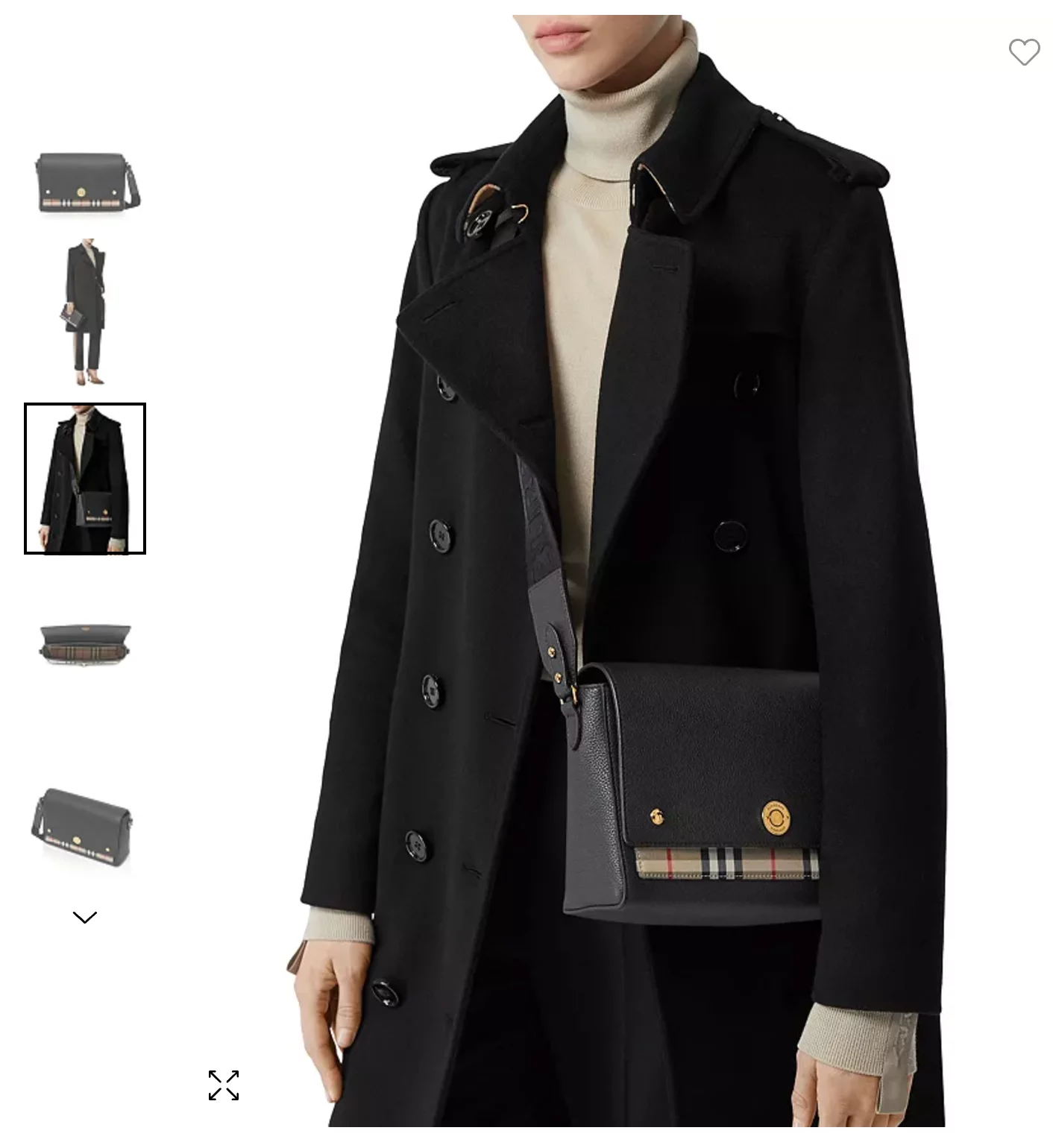
Use images that are clean, focused, and reflect the true look of your product. Avoid using promotional banners or watermarks, as they can affect image quality.
Google’s image recommendations:
- Non-apparel: Minimum 100 x 100 pixels
- Apparel: Minimum 250 x 250 pixels
- Maximum size: 64 megapixels and 16MB per file
Check out the image section of Google Shopping for the full guidelines on product images.
4. Choose the Right Google Product Category
Categorizing your products correctly is vital for helping Google understand what you’re selling, which enhances their discoverability. Make use of Google’s product taxonomy to align your products with the right category.
For instance, a women’s jacket should be placed under “Apparel & Accessories > Clothing > Outerwear & Jackets > Jackets.”

This ensures that your products appear in relevant search results and helps Google index them accurately. If there’s a mismatch between the category and the product type, it can adversely affect your visibility and rankings.
5. Keep Price, Stock, and Product Data Updated
Outdated product data can hurt both rankings and customer experience.
Make sure your feed updates whenever there are changes to:
- Price
- Sale price
- Stock status
- Product URL
- Image URL
- Product variants
- Shipping details
- Tax details
- Product availability
For example, if a product is out of stock on your WooCommerce store but still appears as available in Google Shopping, shoppers may click and leave disappointed. This can waste ad spend and reduce trust.
Frequent feed syncing is especially important for stores with:
- Large catalogs
- Fast-changing inventory
- Seasonal products
- Flash sales
- Multiple product variations
6. Optimize Product Listings with the Right Keywords
Using the right keywords to optimize your product listings is key to achieving better Google Shopping rankings. Effective SEO practices ensure that your products appear in relevant searches, bringing in the right customers and enhancing sales. Here’s how to effectively utilize keywords in your product data:
Why Long-Tail Keywords Matter
Long-tail keywords are specific phrases that reflect what shoppers are actively searching for, like “black leather crossbody bag for women” instead of just “bag.” These keywords face less competition, which helps your products rank higher while reaching shoppers with clear intent.
For instance, a shopper searching for an “ergonomic office chair with lumbar support” is more likely to make a purchase than someone who is simply looking for an “office chair.”

Amply using long-tail keywords in product titles and descriptions helps draw in more qualified traffic, resulting in improved click-through rates (CTR) and conversions.
Using Keyword Research Tools
Keyword research is the key to any result-oriented SEO strategy. Tools like Google Keyword Planner, Ahrefs, etc. can assist you in uncovering what consumers are searching for within your niche.
For example, if your business focuses on fitness gear, you might find that “high-waisted yoga leggings” is a trending search term.
Use these insights to improve your product titles, descriptions, and metadata. It’s also important to monitor seasonal trends. For instance, during the winter months, terms like “thermal running gloves” or “heated jackets” may see a spike in searches, so adjusting your listings accordingly can keep you in the game.
Where to Place Keywords
Strategic keyword placement is essential for enhancing the discoverability of your products:
- Product Titles: Place keywords at the beginning of the title. For example: “Adidas Men’s Ultraboost Running Shoes – Black, Size 10.”
- Descriptions: Naturally incorporate keywords to highlight the product’s features and benefits. For instance, “These high-waisted yoga leggings are ideal for workouts, providing a snug fit and moisture-wicking fabric.”
- Metadata: Include keywords in fields such as “product type” and “tags” within your Google Merchant Center feed.
By utilizing long-tail keywords, performing research, and strategically placing keywords throughout your product data, you’ll enhance visibility and drive traffic to your store.
7. Improve Product Performance Signals
To effectively stand out on Google Shopping and enhance sales, it’s important to concentrate on your products’ performance. Focusing on mobile optimization, increasing click-through rates (CTR), and improving conversion rates will lead to better results. Here’s how you can accomplish this:
Optimizing for Mobile Devices
With mobile-first indexing, Google focuses on the mobile version of your website when determining its rankings. Since most shoppers now browse and shop using their phones, providing a smooth mobile experience is essential.
Consider a shopper searching for “sunglasses” on their phone. If your web page loads slowly and has poor navigation, they will likely leave and choose a competitor’s product instead.

Enhancing Click-Through Rates (CTR)
CTR shows the rate at which shoppers click on your product when it shows in the search results. To boost CTR:
- Craft compelling offers: Highlight discounts like “20% off” or “Buy 1, Get 1 Free” directly in your titles or descriptions. For instance, “Sony Wireless Headphones – Now 25% Off!”

- Show trust signals: Include ratings, reviews, and product certifications to build trust. A product with 4.5 stars and hundreds of positive reviews will naturally attract more clicks than one with no ratings.

Pro Tip: Highlight “Free Shipping” in your listings to attract more clicks. It’s a simple tweak that grabs attention!
Improving Conversion Rates
Getting clicks is only part of the equation; the real task is to convert those visitors into actual buyers.
- Ensure a smooth checkout experience: Cut down on the number of steps in the process. For example, allow guest checkouts and provide different payment options, including PayPal, credit cards, and digital wallets.
- Refine your landing pages: Lead shoppers to pages that correspond with their search intent. For instance, if someone searches for a “red winter jacket,” they should be taken directly to that product page instead of a general store page. Make sure to include clear calls-to-action (CTAs), comprehensive product descriptions, and customer reviews to encourage purchases.
By focusing on mobile optimization, enhancing click-through rates with enticing offers, and simplifying the purchasing journey, you can significantly boost your product performance and increase sales.
8. Use Google Promotions to Stand Out
One of the most effective ways to stand out on Google Shopping is by displaying clear, enticing offers directly alongside your product listings. This is where Google Promotions becomes a powerful tool. Promotions add visual tags such as “10% off,” “Free Shipping,” or “Buy One, Get One Free” right next to your products in search results, making them instantly more appealing to shoppers.
These promotional badges help you rank higher, not through traditional SEO, but through increased engagement signals. When users see an attractive offer, they’re more likely to click, and these increased click-through rates (CTR) contribute to stronger performance in Shopping results. Google naturally surfaces products that generate better engagement, meaning promotions can indirectly help you rise above competitors.
Setting up promotions can be done in two ways:
- For simple, occasional deals, use Google’s built-in Promotion Builder.
- For multiple or frequently changing offers, use a Google Promotions Feed, especially easy to manage with tools like the WooCommerce Product Feed plugin.
9. Optimize Google Shopping Campaigns and Bids
Your product feed helps Google understand your products. Your campaign structure and bids help determine how competitively those products appear in paid Shopping placements.
For paid Shopping campaigns, you can use:
- Performance Max campaigns with a Merchant Center feed
- Standard Shopping campaigns
Both campaign types can promote products from your Merchant Center account, but they are useful in different situations.
| Campaign Type | Best For | Notes |
|---|---|---|
| Performance Max | Scaling across Google channels with automation | Uses Google AI across bidding, targeting, creatives, and attribution |
| Standard Shopping | More control over product groups, bids, and search term visibility | Useful for granular testing and campaign segmentation |
Use Performance Max for Scalable Automation
Performance Max campaigns can use your Merchant Center feed to promote products across Google channels such as Search, Shopping, YouTube, Display, Discover, Gmail, and Maps.
This campaign type is useful when you want automated bidding and broader reach.
To get better results from Performance Max:
- Make sure all products are approved in Merchant Center
- Use accurate and complete product data
- Group products logically by category, margin, or performance
- Add strong creative assets where relevant
- Use audience signals to guide campaign learning
- Monitor asset groups and product performance
- Exclude products that are out of stock or unprofitable
Use Standard Shopping for More Control
Standard Shopping campaigns are useful when you want more control over bidding, product groups, and search term insights.
They can be helpful for:
- Testing new product groups
- Separating high-margin and low-margin products
- Controlling bids more manually
- Analyzing search terms
- Using negative keywords more precisely
- Segmenting campaigns by brand, category, price, or profitability
Set Competitive Bids Without Overspending
Higher bids can improve visibility, but overspending without improving feed quality and conversion rate can reduce profitability.
Start with a bidding strategy that matches your goal.
Common options include:
- Target ROAS
- Maximize conversion value
- Manual CPC for tighter control
For example, if you want to earn $5 for every $1 spent, you may set a target ROAS of 500%. This helps Google optimize bids based on your revenue goal.
For new campaigns or products with limited data, you may need to test different bidding strategies before scaling.
Use Negative Keywords to Refine Targeting
Negative keywords help prevent your ads from showing for irrelevant searches. For example, if you sell premium designer handbags, you may want to exclude searches containing words like:
- cheap
- free
- used
- repair
- DIY
- wholesale, if you only sell retail
By filtering irrelevant traffic, you can reduce wasted spend and focus your budget on shoppers who are more likely to convert.
Tools and Plugins for Google Shopping Feed Optimization
Managing a Google Shopping feed manually can become difficult as your WooCommerce catalog grows. Every product change, price update, stock change, variation, or sale needs to be reflected in your feed accurately.
That is where a product feed plugin can help.
A WooCommerce Google Shopping feed plugin can help you:
- Generate Google Shopping product feeds
- Map WooCommerce product fields to Google attributes
- Include SKU-level product variation data
- Sync prices and stock status
- Add product categories and product types
- Submit accurate product URLs and image URLs
- Create feeds for multiple sales channels
- Schedule automatic feed updates
- Reduce manual feed errors
When managing Google Shopping campaigns, steering clear of common pitfalls can greatly enhance your product visibility and boost sales. Here are some key mistakes to avoid:
Listing Inaccurate or Incomplete Product Data
One of the most significant errors is presenting products with incomplete or incorrect information. This can include missing details like sizes, colors, or descriptions. Google’s algorithm uses precise data to connect your products with relevant searches. Always verify that your product titles, descriptions, and attributes are accurate and comprehensive.
Ignoring Feed Optimization or Keyword Research
Another frequent mistake is overlooking feed optimization or keyword research. Even if your product data is correct, failing to use the appropriate keywords in your titles, descriptions, and metadata means your listings may not reach the right audience.
Overlooking Negative Feedback and Poor Product Ratings
Disregarding negative feedback or low product ratings can damage your reputation and rankings. Google Shopping tends to favor products with positive reviews and high ratings. If your product has received a low rating or frequent complaints, addressing these issues promptly is crucial.
Google Shopping ranking refers to how prominently your products appear in Google Shopping results when shoppers search for relevant products. Ranking depends on product relevance, feed quality, bids, performance, reviews, pricing, images, landing page experience, and feed freshness.
Google ranks Shopping ads using product data, campaign settings, bids, performance signals, landing page quality, and auction factors. For paid Shopping placements, Ad Rank also plays a role in determining whether your ad is eligible to show and where it appears.
To rank higher in Google for ecommerce stores, optimize both organic search pages and Shopping listings. For Google Shopping specifically, improve your product feed, use keyword-rich product titles, add complete product attributes, use high-quality images, keep price and stock data updated, collect reviews, improve landing pages, and run well-structured Shopping campaigns.
The main Google Shopping ranking factors include product relevance, feed quality, bid amount, product performance, pricing, reviews, image quality, landing page experience, and feed freshness. Google uses these signals to decide which products are most relevant and useful for a shopper’s search.
Start by improving product titles, descriptions, images, categories, product identifiers, and SKU-level attributes. Add required data such as brand, GTIN, price, availability, condition, and product URL. For WooCommerce stores, a product feed plugin can automate feed creation and updates.
Yes. Product titles are one of the most important elements in your product feed. Clear titles with brand, product type, color, size, model, or key features help Google match your products with relevant shopper searches.
Yes. Product ratings and seller ratings can improve trust and click-through rates. Listings with strong ratings are more likely to attract shoppers, which can support better campaign performance over time.
No. Higher bids can improve visibility, but they are not enough on their own. Feed quality, relevance, pricing, reviews, images, landing page experience, and conversion performance also influence results.
Update your feed whenever product prices, availability, sale prices, images, or product details change. For WooCommerce stores with frequent inventory changes, scheduled automatic feed updates are recommended.
To improve your Google Shopping rankings, it’s vital to implement effective strategies and keep optimizing your approach. This involves creating precise and detailed product data, using keywords wisely, and fine-tuning your feed.
These elements are essential for enhancing your product visibility and driving conversions. We’ve also covered the importance of mobile optimization, crafting enticing offers, and utilizing negative keywords to improve targeting, which can significantly elevate the performance of your ads.
Whether you’re new to Google Shopping or looking to enhance your current campaigns, applying these strategies will help you succeed.
Remember, Google Shopping isn’t a platform you can just set up and leave. Continuous optimization is crucial for staying ahead of the competition. By staying proactive and continually refining your campaigns, you’ll improve your product visibility and drive long-term success.


Subcribe to our newsletter