


Share:


Table of Contents
Order tracking has become a standard part of the online shopping experience. Shoppers want quick access to updates on their purchases, and offering this option directly on your store builds trust while reducing support requests. Instead of emailing or calling for updates, customers can simply visit a dedicated page and check their order status themselves.
WooCommerce makes this feature available without any plugins or advanced setup. All it takes is a shortcode that you can place on a page of your choice, giving your store a clean and reliable order tracking system. Here, we will look at why adding the WooCommerce order tracking shortcode matters and how you can enable it in just a few minutes.
Key Takeaways
- WooCommerce includes built-in order tracking that can be enabled without plugins.
- A shortcode [woocommerce_order_tracking] is all you need to create a WooCommerce order tracking page.
- Order tracking improves customer experience by reducing support queries and building trust.
Ready to enable order tracking in your WooCommerce store? Let’s jump in!

Customers value transparency. When buyers can check their order status without contacting support, it immediately improves their shopping experience. It reduces frustration, saves time, and creates confidence in your store. For store owners, this means fewer support tickets and more satisfied customers.
Order tracking also helps set clear expectations. Whether the order is confirmed, processed, or shipped, customers can see the latest update in real time. This small addition can make your store feel more professional and reliable, which often leads to repeat purchases.
Now, let’s take a look at how to enable WooCommerce order tracking using a simple shortcode.

WooCommerce includes a built-in order tracking feature that you can enable using a shortcode. You don’t need any additional tools or coding knowledge to set it up.
- From your WordPress dashboard, go to Pages > Add Page.
- Give the page a name, such as “Track Your Order”.
- In the content area, paste the shortcode: [woocommerce_order_tracking]

- Publish the page.

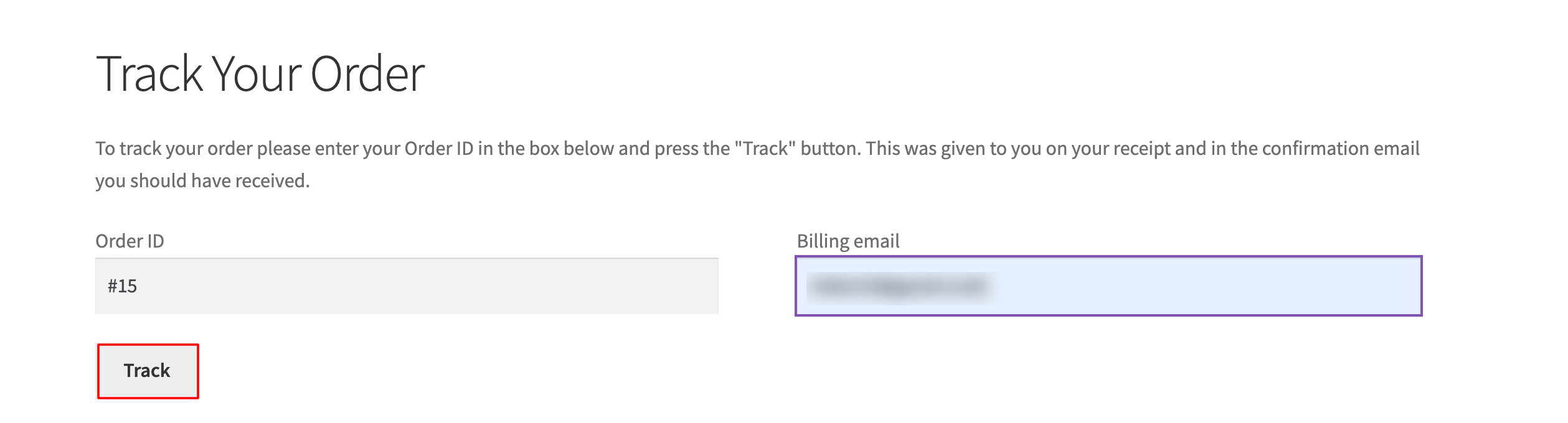
Once published, customers can visit this page from the front-end, enter their order ID and email address, and instantly see the status of their order. You can also add this page to your menu so it’s easy for shoppers to find.
WooCommerce’s built-in order tracking is useful, but stores often need stronger tools to handle quotations, order documentation, and invoicing. WebToffee offers 40+ premium WooCommerce plugins trusted by thousands of store owners worldwide. These solutions are built to simplify store operations, improve efficiency, and provide customers with a smooth post-purchase experience.

Below are some of the key plugins that can simplify your accounting and order documentation process:
WooCommerce PDF Invoices and Packing Slips: This plugin automates invoice generation and attaches them to customer emails instantly after purchase. Store owners can customize invoice templates, add branding, and print packing slips for shipping. It reduces manual effort, keeps documentation consistent, and ensures every order is backed by compliant paperwork.
Shipping Labels, Dispatch Labels & Delivery Notes for WooCommerce: Create ready-to-print shipping labels, dispatch labels, and delivery notes directly from your WooCommerce dashboard. The plugin supports multiple formats and gives you control over design and layout. By integrating labels into the order process, it saves time, minimizes errors, and makes WooCommerce order fulfillment more organized and reliable.
Request a Quote for WooCommerce: This plugin enables customers to request price quotes for products instead of directly purchasing them. It’s beneficial for bulk, custom, or B2B orders. Store owners can review WooCommerce quote requests, send personalized responses, and convert them into orders with a click, making it easy to manage quote negotiations inside WooCommerce.
Sequential Order Number for WooCommerce: WooCommerce assigns random order IDs by default, which can cause confusion. This plugin replaces them with sequential numbers that are easier to track and manage. Store owners can also set custom prefixes and suffixes for better organization. It simplifies reporting, improves accounting, and keeps records in a clear format.
Want to explore more of WebToffee? Check out our full range of WooCommerce plugins here!
Wrapping Up
Order tracking is a simple yet powerful feature in WooCommerce. By adding a WooCommerce order tracking shortcode to a page, you give customers direct access to their order status without extra effort. It improves transparency, builds trust, and reduces support requests, making it a must-have for any online store.
To get the most out of it, make sure the tracking page is easy to find. Adding it to your site menu or footer ensures customers can reach it without searching. Pairing this with timely email updates further strengthens customer confidence and leaves a positive impression after every purchase.
That’s a wrap on this article about enabling WooCommerce order tracking to help customers stay informed and enhance their overall experience. We hope you found it helpful. Feel free to share your thoughts in the comments below.


Subcribe to our newsletter


