
Share:


Table of Contents
Product import and export in WooCommerce is a multifaceted process that goes beyond basic data transfers, often involving complex workflows as catalogs expand. Understanding these workflows is crucial for merchants, as they navigate the intricacies of variable products, different file formats, and the need for automation in managing large datasets.
- Product imports can quickly evolve from simple uploads to complex data management tasks as catalogs grow.
- Variable-product workflows are the most common, requiring careful attention to relationships between parent products and their variations.
- Merchants often overlook the compatibility of various file formats, such as XML and CSV, which can impact the import process.
- Larger stores benefit from batch processing and scheduled imports to streamline operations and manage recurring updates efficiently.
- The import process is influenced by the broader WooCommerce environment, including plugins, hosting conditions, and caching mechanisms.
- Testing with representative samples before full imports can help identify potential issues and ensure accurate data mapping.
Product import and export can sound like a fairly simple WooCommerce task: take product data from one place and move it somewhere else. Real store workflows are rarely that simple.
A merchant may start with a CSV containing a few simple products, but as the catalog grows, the same workflow can involve variable products, attributes, images, supplier feeds, scheduled updates, larger datasets, multiple file formats, and server-side processing.
We wanted to understand what these real-world workflows actually look like. So we reviewed more than 500 support tickets from the last six months involving our Product Import Export plugin and identified 155 cases specifically related to WooCommerce product import or export workflows. We used those 155 tickets as the basis for this analysis.
The analysis shows the kinds of import and export jobs store owners are trying to accomplish, the parts of those workflows that require the most understanding, and how those workflows change as catalogs become more complex.
Looking at the tickets from that perspective revealed several clear patterns.
How We Identified Real Import and Export Workflows
We reviewed more than 500 support tickets from a six-month period and identified 155 cases specifically related to WooCommerce product import and export workflows.
Rather than looking only at the issue reported in the first message, we followed each conversation to understand the broader workflow behind it. This included the type of product data being handled, the file format or source involved, the product structure, the scale of the import or export, and whether the process was manual, scheduled, or part of a recurring data feed.
When several replies or follow-up messages referred to the same underlying workflow, we treated them as a single case. General product questions and unrelated support requests were excluded.
This approach allowed us to use support conversations as a window into how store owners actually work with product data in WooCommerce from simple CSV imports to variable products, large catalogs, external feeds, and automated updates.
Which Workflows Appeared Most Often?
Across the 155 product import and export support tickets, several workflow types appeared repeatedly.
Variable-product imports appeared most often, accounting for 27% of the cases. CSV, XML, and spreadsheet-based workflows followed closely at 25%.
Large or batch-based imports made up 17% of the tickets, while scheduled or automated imports accounted for 12%. Image-related workflows represented 10%, and updates to existing products appeared in 9% of the cases analyzed.
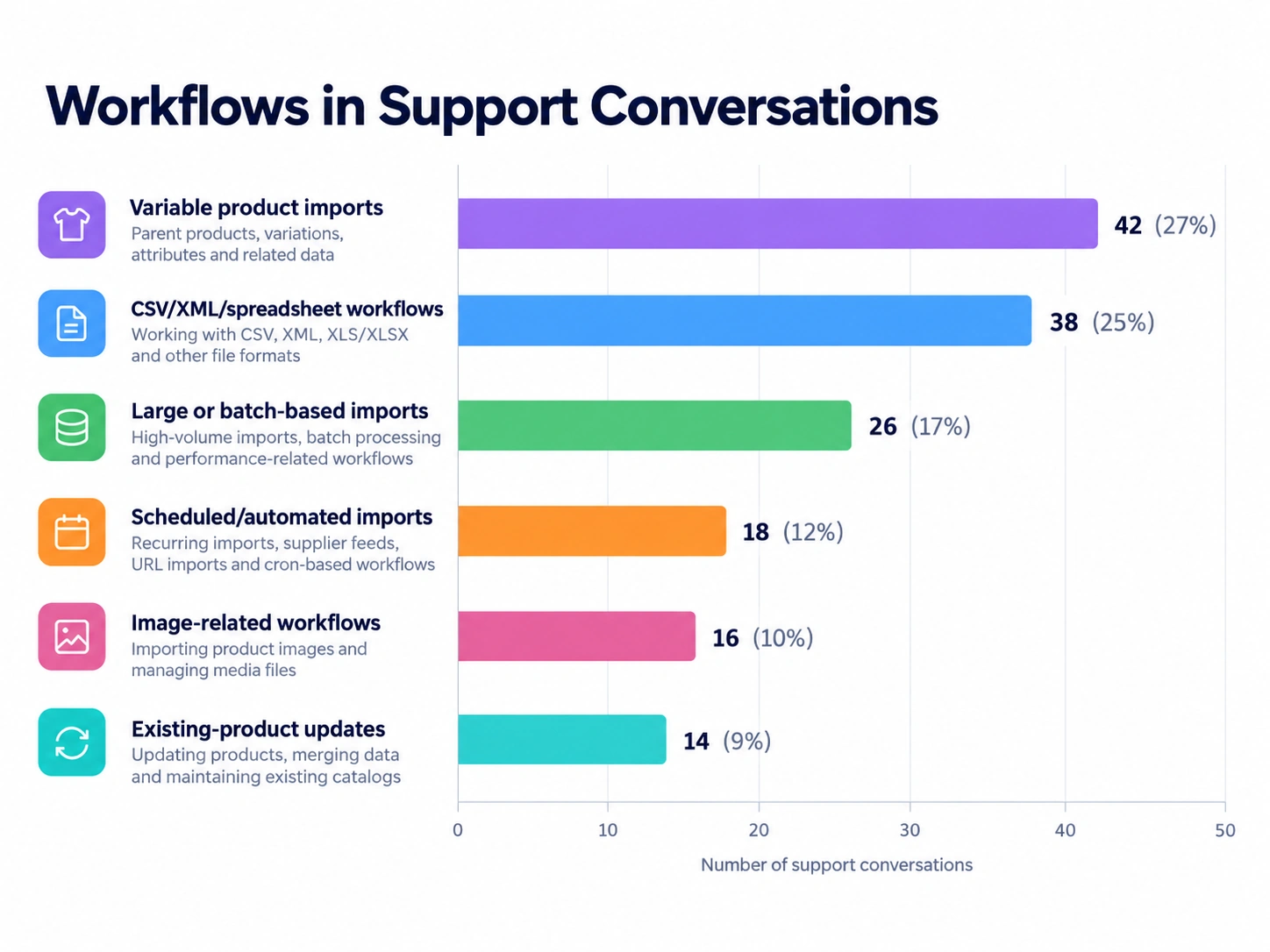
These percentages reflect how often each workflow appeared in the support conversations we reviewed. They should not be interpreted as overall feature usage or adoption across all plugin users.
One of the clearest patterns in the tickets was how quickly an apparently basic import could become a structured data-management task.
For simple products, a spreadsheet containing a title, SKU, price, stock value, and description may be enough. But WooCommerce catalogs frequently contain much richer product structures.
As stores become more complex, import files may also need to represent:
- attributes;
- categories;
- variation relationships;
- parent and child SKUs;
- images;
- product types;
- custom product data; and
- existing products that need to be updated rather than recreated.
At that point, the workflow is no longer simply:
File > WooCommerce
It becomes:
Source data > Product structure > Field mapping > Import rules > Existing WooCommerce catalog
That difference became particularly clear in tickets involving variable products.
Variable products depend on relationships, not just rows
Variable-product workflows appeared in 42 of the 155 tickets analyzed, about 27%, or roughly one in every four cases. This makes them one of the most frequently represented workflow types in the dataset.
Unlike simple products, variable products depend on several connected records. WooCommerce needs to understand how the parent product, its attributes, and each variation relate to one another.
For that structure to work correctly:
- The parent must be identified as a variable product.
- Child rows must be identified as variations.
- The parent needs an SKU that the variation rows can reference.
- Variation attributes must also be configured correctly on the parent product.
For example, the attribute_data configuration may contain: 0 | 1 | 1
These values determine details such as the attribute’s position, visibility, and whether WooCommerce should use it for variations.
This is why a spreadsheet can look correct at first glance but still fail to recreate the intended product structure in WooCommerce if the relationships between records are incomplete.
A working export can be the best import template
One useful pattern from the support tickets was using WooCommerce itself as a reference for complex product structures.
Instead of building a large variable-product file completely from scratch, create one representative variable product correctly in WooCommerce first. Give it the required attributes and a few variations, then export it.
The exported file provides a working reference showing how the parent product, variation rows, SKUs, attributes, product types, and relationships are represented. You can then use that structure as the basis for preparing the larger dataset.
For store owners working with complex catalogs, this can be much easier than trying to infer the required structure from an empty spreadsheet.
One in four tickets (25%) involved CSV, XML, or spreadsheet-based workflows, making file structure and data handling the second-most represented workflow area in the sample.
CSV remains one of the most familiar formats for WooCommerce product import and export, but the support conversations showed that merchants often work with data coming from different systems and in different formats.
That becomes especially important when product data originates outside WooCommerce.
A supplier, ERP, marketplace, inventory system, or another store may already generate product data in a specific structure. Converting everything to CSV simply because CSV feels familiar is not always necessary.
Some users were unaware that XML could be imported directly
Several tickets began with customers assuming that the import workflow supported only CSV.
In one case, a customer was considering abandoning the workflow because their data was provided as XML. But XML itself was supported.
The important question was not whether the file extension was .xml. It was how the product records were structured inside the XML document. XML feeds can have different parent and child node structures, so the importer needs to identify which nodes represent the individual product records.
That reveals an interesting usage pattern.
Sometimes the challenge is not that a feature is unavailable. It is that users do not yet know that the workflow can accommodate the format they already have. That makes feature discoverability just as important as feature availability.
File handling can be as important as the file format
CSV tickets revealed another useful pattern.
A CSV is technically a structured text file, even though most people interact with it through spreadsheet software. That distinction matters.
Opening a valid CSV in a spreadsheet application, editing it, and saving it again can sometimes alter details such as:
- delimiters;
- encoding;
- special characters; or
- formatting inside individual fields.
The support tickets included cases where characters such as ä, ö, and ü changed after files were edited and resaved, along with changes to delimiters and unexpected text fragments appearing inside product descriptions.
The broader takeaway is not that CSV is unreliable. It is that import files are structured data sources. Whenever a file passes through another application or conversion step, it is worth checking that its structure has remained intact.
Use the original source format when practical
If a supplier already provides a usable XML feed, converting it to CSV adds another step to the workflow.
If you already have a correctly structured CSV, repeatedly converting or resaving it can introduce unnecessary changes.
A useful principle is therefore:
Use the source data as directly as possible and avoid transformations that do not add value.
The fewer unnecessary steps between the original product data and WooCommerce, the easier the workflow is to understand and maintain.
Another pattern becomes visible when store size and import frequency increase.
Nearly three in ten tickets (29%) involved either large or batch-based imports or scheduled and automated workflows.
Small imports are often treated as individual tasks. A store owner uploads a file, runs the import, checks the products, and moves on. Larger stores tend to approach the same process differently. The workflow may involve:
- larger product catalogs;
- recurring supplier updates;
- regularly changing prices;
- inventory updates;
- scheduled imports; and
- server-side processing.
At that point, import and export start becoming part of the store’s ongoing operations.
Large imports benefit from batch processing
Importing products involves much more than simply reading rows from a file.
For each group of records, WooCommerce may need to read the data, create or update products, write information to the database, process associated fields, handle images, and then continue to the next group.
Trying to process too many records in one execution cycle can make the workload unnecessarily heavy. That is why batch processing becomes important. Instead of processing the complete catalog in one large operation, the importer handles a smaller number of records at a time.
The support tickets showed many cases where adjusting the number of products processed per batch made large imports easier for the hosting environment to handle.
Reducing the batch size does not reduce the size of the catalog. It simply changes how the workload is divided.
Recurring imports call for a different workflow
A one-time catalog migration and a daily supplier feed are fundamentally different jobs. With a one-time import, manually starting the operation may be perfectly practical. With a recurring feed, automation becomes much more valuable.
One of the support tickets involved a scheduled product-price import from an external feed. The schedule itself was configured correctly, and the import was running as expected. The case demonstrated an important aspect of recurring imports: the complete data pipeline matters.
In that example, an upstream cache was returning an older version of the source feed, so the importer repeatedly received stale prices even though the scheduled job itself was functioning correctly. This suggests a useful way to think about automated imports:
Source > Delivery method > Import schedule > WooCommerce update
When imports become recurring business processes, each part of that chain needs to remain reliable.
Very large recurring jobs can move beyond the browser
The tickets also included merchants working with files containing tens of thousands of records. For workloads at that scale, manually dividing the source file into smaller pieces is not always the most efficient solution.
A scheduled import using a server-side cron process can allow the complete job to continue without depending on an open browser session. Server-side scheduling can be especially useful for large or recurring supplier feeds where the goal is to establish a repeatable process rather than manually initiate every update.
This marks an important transition in how merchants use import tools.
The workflow moves from:
“I need to import this file.”
to:
“I need WooCommerce to keep receiving this product data reliably.”
Another major takeaway from the support tickets is that an import does not happen in isolation. It runs inside a WordPress and WooCommerce environment that may also include:
- other plugins;
- custom code;
- a database;
- caching;
- hosting restrictions;
- PHP resource limits; and
- external data sources.
All of those components participate in the final workflow. A useful mental model is:
Product source
↓
File or feed
↓
Importer
↓
WooCommerce
↓
Database
↓
Hosting environment
Other plugins, caching layers, and customizations may interact with different points in the same chain. This becomes particularly noticeable as product catalogs get larger or stores become more customized.
The same file can behave differently on different stores
A file that works on one WooCommerce site will not necessarily behave identically on another. The product data may be the same, and the import configuration may be the same, while the surrounding environment differs.
Two sites may have different:
- PHP limits;
- plugin combinations;
- database conditions;
- hosting restrictions;
- caching behavior; or
- server configurations.
That is an important insight for anyone moving product data between multiple WooCommerce stores. Import portability depends on more than the source file. It also depends on the environment receiving that data.
Follow the complete data path
The scheduled-price example mentioned earlier illustrates this well.
The importer was receiving the data provided to it. The schedule was running normally. The unexpected result originated upstream because the feed URL was cached.
Thinking about the whole data path makes situations like this much easier to understand. Instead of asking only:
“Is the import configured correctly?”
it can be more useful to ask:
“Where did this data come from, what happened to it before the import, and where does it go afterward?”
That system-level view becomes increasingly valuable as import workflows become more automated.
Nearly 6 in 10 tickets (59%) required additional diagnostic information before the workflow could be properly understood. That means only 41% could be assessed without requesting additional diagnostic context.
Many import questions cannot be understood from the final result alone. If a product looks different after an import, the explanation may depend on the source file, field mapping, import settings, product structure, logs, or the surrounding store environment.
Experienced workflows therefore tend to make the import easier to inspect. One of the simplest ways to do that is by starting small.
Test representative products before importing the complete catalog
Before processing hundreds or thousands of products, take two or three representative records from the actual source data and import those first. This is more useful than creating an unrelated test file because it preserves the structure of the dataset you ultimately intend to import.
If the sample behaves as expected, you have increased confidence in the basic structure and mapping. You can then move on to the full catalog.
If the sample behaves differently than expected, it is much easier to inspect two or three products than thousands.
The support tickets repeatedly showed the value of this approach.
Complex products deserve representative test cases
For a simple-product catalog, the test sample might contain only a few ordinary products. For a more complex catalog, the sample should represent the complexity of the full dataset.
For example, include:
- one variable product;
- its child variations;
- relevant attributes;
- a product with images;
- any important custom fields; and
- an existing product that should be updated.
The goal is not simply to prove that the importer can read a file. The goal is to confirm that the complete product structure is interpreted the way you expect.
What starts as a simple product upload can become a much more structured process as a store grows.
The ticket distribution reflects this progression. While 27% of cases involved variable-product workflows, another 29% involved either large/batch processing or scheduled imports. Together, these patterns show how product-data requirements can move from structuring complex products to managing imports as recurring store operations.
A typical progression looks like this:
Manual CSV import → Complex product structures → Large catalog processing → Scheduled supplier feeds → Automated catalog updates
A merchant handling a small catalog may only need a straightforward CSV import. As the catalog grows, other capabilities become more useful. XML support can help with different data sources, batch controls can make large imports easier to manage, and scheduled imports can support recurring supplier or inventory feeds.
In more complex cases, exporting an existing WooCommerce product can also provide a useful reference for structuring attributes, variations, and other product data before preparing an import file.
The pattern here is less about individual features and more about matching the right capability to the workflow.
A store importing ten simple products may have little need for batch processing, while a store handling 20,000 products may depend on it. Similarly, a merchant uploading a CSV once a year may not need automation, while a store receiving daily supplier updates can benefit significantly from scheduled imports.
As product catalogs and data workflows evolve, the tools needed to manage them tend to evolve as well. Clear documentation, practical examples, and reusable templates can help store owners choose the most appropriate workflow for each stage.
Taken together, the support tickets suggest a simple progression for approaching product imports.
1. Understand the source data
Before configuring the importer, identify what you are actually working with.
Is it CSV, XML, or another spreadsheet format?
Does it contain simple products, variable products, or both?
Are the records coming from another WooCommerce store, a supplier, or another system?
Understanding the source makes the remaining decisions easier.
2. Identify the product relationships
For simple products, this may be straightforward.
For variable products, check the relationship between the parent product and its variations.
Confirm product types, parent SKUs, child references, and attribute configuration before scaling the import.
3. Validate the mapping
Make sure the fields in the source data correspond to the WooCommerce fields you intend to create or update.
If you already have a correctly configured product in WooCommerce, exporting it can give you a useful reference structure.
4. Run a representative sample
Use a small subset of the real file.
Include the product types and data structures that matter most.
Check the result in WooCommerce before committing to the complete import.
5. Match the processing method to the size of the job
A small one-time import and a recurring 20,000-product feed should not necessarily use the same operational approach.
For larger workloads, consider batch size, execution time, scheduling, and server-side processing.
6. Think beyond the importer
If an automated workflow depends on an external feed, check what the source is actually returning.
If behavior differs across stores, compare the environments as well as the files.
Product import is part of a larger data pipeline.
7. Keep a recovery path
An import writes data into the WooCommerce catalog.
Before making large changes, maintaining a current backup gives you a straightforward recovery path if the final result is not what you intended.
The biggest takeaway from the support data is that WooCommerce product imports can represent very different jobs.
For one merchant, that may mean uploading a small CSV of simple products. For another, it may involve variable products, XML supplier feeds, large catalogs, or recurring automated updates.
As these workflows become more complex, merchants rely more on structured product relationships, flexible file handling, batch processing, scheduling, and repeatable processes.
That is the key lesson from these 155 support conversations: product import and export is not just about moving data into WooCommerce. It is about creating a reliable path between the source data and the store that needs to use it.
Once that workflow is understood, even complex imports become easier to plan, test, automate, and maintain.


Subcribe to our newsletter