


Importing the related products, categories, and tags data from your WooCommerce store is as simple as importing regular products. You can use the default WooCommerce importer for this. Follow the given steps to effectively import your WooCommerce related-products, categories, and tags created by Related Products – Product Recommendations for WooCommerce plugin by WebToffee.
Prepare CSV for related product import
Before you import related products to your store, ensure all meta columns associated with related products contain valid data in a valid format.
The given is a sample format for meta columns associated with related products.
| Meta: _crp_related_product_cats | Meta: _crp_related_ids | Meta: _crp_related_product_tags | Meta: _crp_related_product_attr | Meta: _crp_excluded_cats |
|---|---|---|---|---|
| 196 | music | test1, test2 | color:green,size:large,size:small | uncategorized |
Step 1: Choose the Import file
To import your related products:
- Head to WooCommerce > All Products from the WordPress dashboard.
- Click on Import.
- Choose a CSV file from your computer for import.
- Enable Update existing products to avoid the creation of duplicate products and recommendations.
- Click Continue.

Step 2: Map import columns
Ensure to map the columns of CSV as shown below for a smooth import:
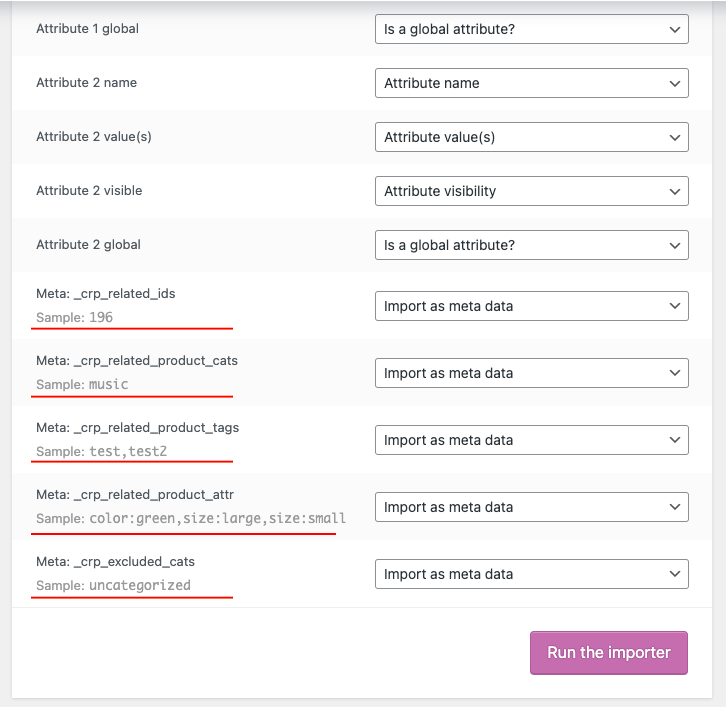
After mapping all the columns, click Run the Importer and wait for the process to complete. The products, along with their related data, will be added to your store. For existing products, the associated data will be updated accordingly.

Pismai
May 21, 2024
Hi,
in the example above, are the CSV columns and the Mapping colums based ot the same example ?
I see no relation between cat 106, 108 and music or the ID’s 102, 103 and 196 or tags 115, 120 and tags test1, test2 ?
Arjun
May 29, 2024
Hi Pismai,
Thank you for reaching out. It appears there was an error in the data provided. We apologize for the inconvenience. The information has been updated accordingly.
Nuno Sousa
October 2, 2021
Hi,
I am trying to use this functionality but it’s not working for me. I pasted the code snippet above and I imported a CSV file with the related category IDs. Although I can see the categories properly listed on the product via the backend, on the front end it’s still not showing the related products within the chosen category. However when I edit that product and simply hit the “update” button, then it works! This would mean editing every single product after the import just to update each one individually. Any suggestions?
Erich
July 1, 2021
Hi Shesna
How do I export the Tag_ID associated with the various tags?
Thanks
Erich
Mark
July 2, 2021
Hi Erich,
Are you referring to exporting the related product tags added via our Related Product for Woocommerce plugin?