Share:


Table of Contents
Managing orders in WooCommerce can quickly become messy when each document relies on a different plugin. Store owners often juggle separate tools for invoices, packing slips, shipping labels, and other order documents. While WooCommerce does create invoices, it lacks the ability to generate invoice PDFs that customers can easily download, print, or share with their accounting teams.
This gap often forces merchants to stack multiple plugins, which leads to higher costs, more updates, and extra compatibility checks. The All-in-One Invoice Bundle for WooCommerce steps in as a smarter alternative. It brings together every essential order document tool into a single package. From invoices to shipping labels, this WebToffee bundle creates a smooth flow for merchants who want better control over their WooCommerce order management.
Key Takeaways
- The WooCommerce invoice bundle combines invoices, picklists, credit notes, packing slips, and labels into one package.
- The WebToffee invoice bundle reduces costs and prevents plugin conflicts by replacing multiple tools.
- Save time and improve efficiency with the all-in-one invoice bundle built for WooCommerce stores.
Ready to automate order documents from proforma invoices to delivery notes for smooth order management? Let’s jump in!
Every order in WooCommerce requires proper documentation, and most merchants end up using multiple plugins to generate invoices, packing slips, shipping labels, and delivery notes. At first, this seems manageable, but over time, it creates unnecessary strain.
Managing multiple plugins leads to frequent updates, potential compatibility issues, and increased costs. Switching between tools from different developers also disrupts daily workflows, making the setup fragmented and inefficient.
An integrated WooCommerce invoice bundle changes this approach. By combining essential tools into one package, store owners simplify order management, reduce expenses, and remove the frustration of handling multiple plugins. This is where the WebToffee invoice bundle makes a real difference. It merges all the core WooCommerce order documentation plugins you need into a single solution, making it easier to manage every step of your order process.
Managing WooCommerce orders is not just about sending an invoice. Each stage of the process calls for a specific document, from the first proforma invoice to the final delivery note.

Many store owners buy individual plugins to handle these tasks, but that often leads to many tools and compatibility issues. The all-in-one invoice bundle simplifies everything by offering a set of compatible plugins that work together to cover the entire order flow.
Here’s how each component fits into the bigger picture:
1. WooCommerce Proforma Invoices Plugin
Before a sale is finalized, especially in B2B or bulk transactions, a proforma invoice sets clear expectations for both buyer and seller. The WooCommerce proforma invoice plugin lets you generate and attach these pre-sale documents instantly.

It helps customers review order details and pricing upfront, while giving businesses a professional way to manage quotations and approvals. It also supports custom branding, custom sequence, and flexible template options that make your documents more reliable and customer-friendly.
2. WooCommerce PDF Invoices & Packing Slips
Once the order is confirmed, the next step is creating a proper invoice for recordkeeping and compliance. The WooCommerce PDF invoices and packing slips plugin automates this by attaching invoices to customer emails and making them available for download. It also ensures tax compliance, saving time and reducing errors in financial documentation.

Beyond invoices, the plugin generates packing slips for shipment accuracy and credit notes to manage refunds or canceled orders effectively.
3. WooCommerce Picklist Plugin
After payment, attention shifts to fulfillment. The WooCommerce picklist plugin gives warehouse teams a structured list of items to collect. This prevents packing mistakes and speeds up the preparation process. With accurate picklists, businesses minimize errors and keep order fulfillment organized. It also offers categorizing options, batch printing, and product-specific details that streamline large-volume orders and help teams pick faster with fewer mistakes.
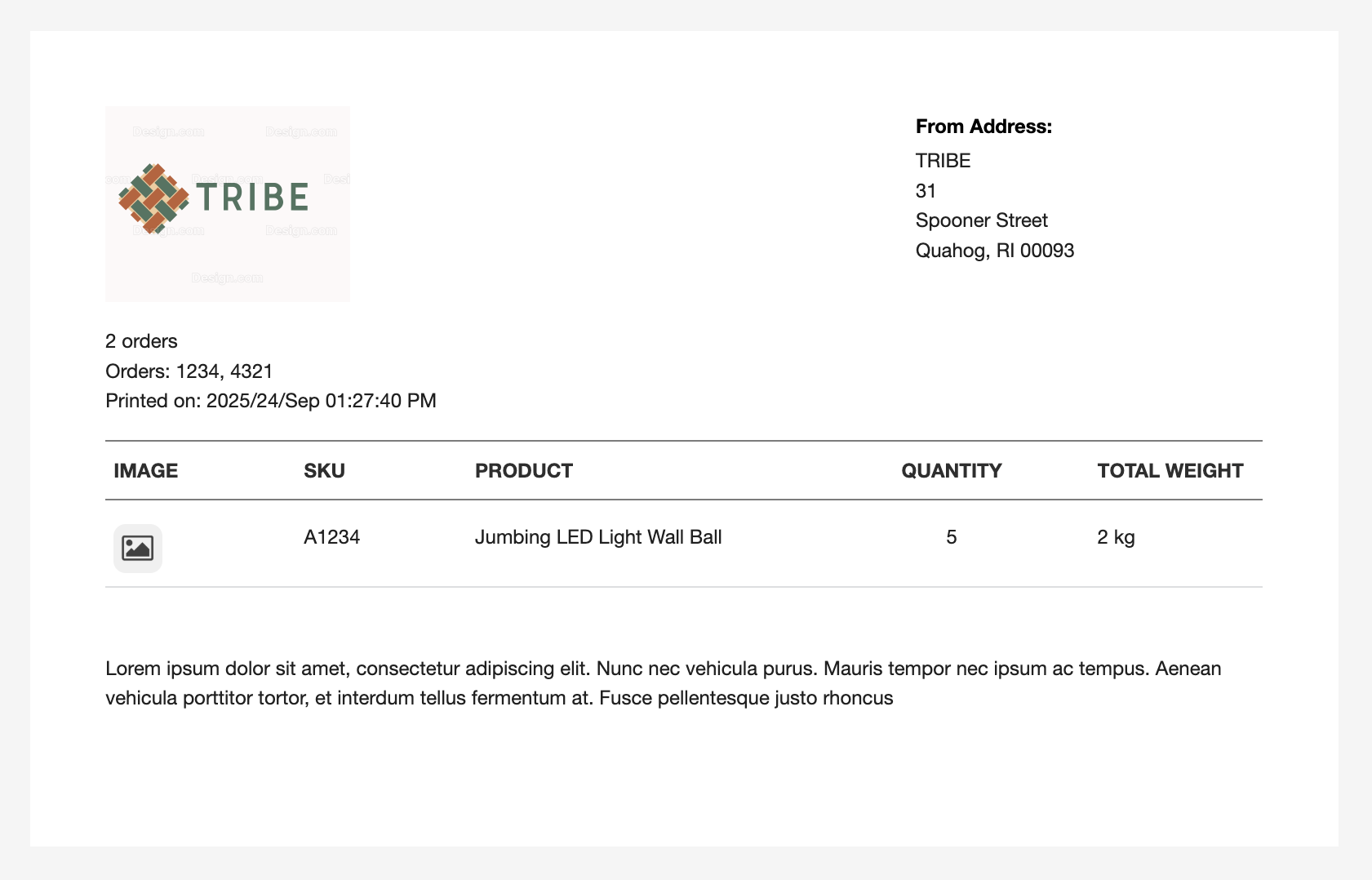
4. WooCommerce Shipping Labels, Dispatch Labels & Delivery Notes Plugin
Once orders are packed, the shipping process begins. This WooCommerce shipping plugin covers the entire flow with courier-ready shipping labels, dispatch labels for packages leaving the store, and delivery notes signed by customers upon receipt. It makes the transition from warehouse to customer smooth and reliable.

With multiple label formats, customizable templates, bulk label printing, and branding control, businesses can create and print professional shipping documents that improve operational accuracy and customer trust.
5. WooCommerce Address Labels Plugin
Address labels are a standard document structured in a specific format that is easily understandable to local delivery agents. Even a small error in the address details can cause costly delivery issues.
The WooCommerce address labels plugin helps avoid this by generating printable labels with accurate customer information. It simplifies packaging and reduces the chances of misplaced orders. The plugin also supports bulk printing, multiple addresses, and customizable templates, ensuring consistent labeling that saves time in high-volume shipments.
At every stage, from the proforma invoice to the final delivery, the WebToffee invoice bundle ensures order management stays efficient and connected. Instead of juggling multiple plugins, store owners get a single package built to work in harmony.
Here’s a quick comparison:
| Individual Invoice Plugins | Purchasing Invoice Bundle | |
| Purchase Type | Multiple purchases | Single purchase |
| Total Cost | Higher combined cost ($255 for 5 plugins, single-site licenses) | Cost-effective ($179 total) |
| Compatibility | Potential conflicts when using plugins from different developers | Fully compatible |
| Updates | Time spent on individual updates | Centralized updates |
Getting started with the WebToffee invoice bundle is simple. Instead of setting up multiple plugins separately, you activate everything you need from a single package. Here’s how it works:
Purchase and Install the All-in-One Invoice Bundle
Download the bundle from WebToffee and install it on your WooCommerce store like any other plugin.
Activate the Invoice/Packing Modules You Need
Go to the Invoice/Packing menu. The bundle includes several components, but you can enable only those required for your workflow.
Configure Templates and Document Settings (Optional)
Customize invoice templates, packing slips, shipping labels, and other documents with your store’s branding, tax details, and order requirements.
Automate Invoice and Label Generation
Set invoices to auto-generate, allow invoices, packing slips, and picklists to be printed directly from the order page, and streamline document handling for each order status.
That’s it! The WebToffee Invoice Bundle is now up and running. You’re all set to enjoy smoother order management and fulfillment with minimal setup.
Order management in WooCommerce is easier when everything works together. The all-in-one invoice bundle removes the need for multiple plugins by combining invoices, packing slips, picklists, and shipping labels in one package.
This way, you can save costs, reduce plugin conflicts, and keep workflows consistent from the first order to final delivery. Instead of juggling multiple tools, store owners can focus on growing their business while staying organized.
That wraps up our complete guide to simplifying order management with the all-in-one invoice bundle. It offers an alternative invoicing solution for businesses looking to streamline invoicing and related documents. If you’re just getting started, you can explore the free version of the PDF invoice plugin before deciding to upgrade or purchase the full WebToffee invoice bundle.
We hope you found this article helpful. Let us know your thoughts in the comments below.
Thanks for reading!


Subcribe to our newsletter