


Displaying product meta, such as categories and weights, in a new column can give customers more detailed information about the product, helping them make informed purchasing decisions. WebToffee’s WooCommerce PDF Invoices, Packing Slips, and Credit Notes plugin helps to display product metadata in a new column inside WooCommerce invoices and packing slips. By adding the custom code snippet provided, the plugin can display product meta in a new column.
Adding the custom code snippet
Add the custom code snippet below to the WordPress site. Add it to the active child theme’s functions.php file or use a third-party code snippet plugin. For more details on adding custom code snippets using a third-party plugin, check out the following article: Adding Custom Codes with a Third-Party Plugin.
In the custom code snippet, replace the column name and product meta key with the desired column name and meta key.
The WooCommerce invoice and packing slip with a new column ‘WEIGHT‘ in it will look like this:
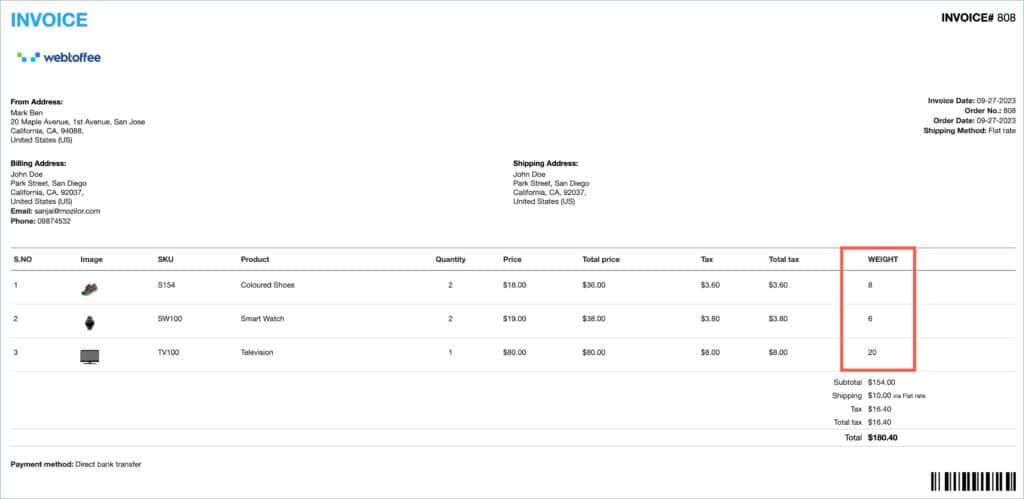
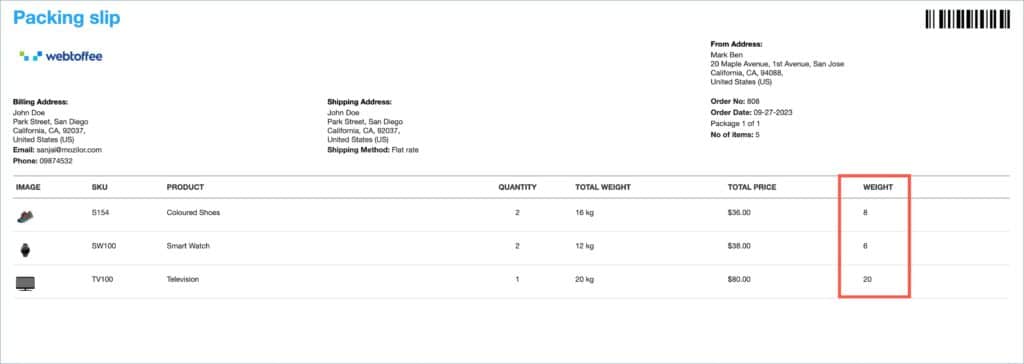
In conclusion, displaying product metadata in a separate column enhances document clarity by organizing additional details more effectively. With a simple code snippet, store owners can present relevant product information in a structured way, improving both usability and customer understanding.

Comments (3)
Camilla
January 22, 2024
I added the code snippet as shown above, but edited it so it becomes SKU instead of weight.
My question is how can I edit the code so the SKU becomes number 2 in the column before products name…
Kind Regards Camilla
Sanjai Valsan
January 23, 2024
Hi Camilla,
Thanks for reaching out!
The plugin itself provides an option to display SKUs on invoices. You can display SKU on invoices before the product name by following these steps:
1. Navigate to Invoice/Packing > Invoice > Customize.
2. In the Customize tab, scroll down and click on the Product Table section of the active invoice template.
3. The Template elements on the right side will display the various elements of the product table.
4. Here, enable the SKU label by marking the checkbox next to it.
5. Finally, click Save to apply the changes made to the template..
Camilla
January 23, 2024
Oh wow. So easy thank you Sanjai.