


Admins can monitor abandoned carts and convert them into quotes. Configure the quote details, including the price, quantity, and any other relevant information, and send it to the customer for consideration. WebToffee’s Request a Quote plugin allows initiating this process from the Admin side by setting the order status to “Quote sent.” Later, Reach out to the buyer via email or any other preferred method to notify them of the quote.
- Monitor the abandoned cart manually.
- Create a Quote for the abandoned cart items manually.
Step 1: Monitor Abandoned cart
Monitor abandoned carts using any WooCommerce plugin. Select the preferred abandoned carts / high-valued carts and potentially convert them into quotes manually.
Step 2: Create a Quote from backend
- From the dashboard, navigate to WooCommerce > Orders.
- Now click on the Add order button. This will open an Add new order page.
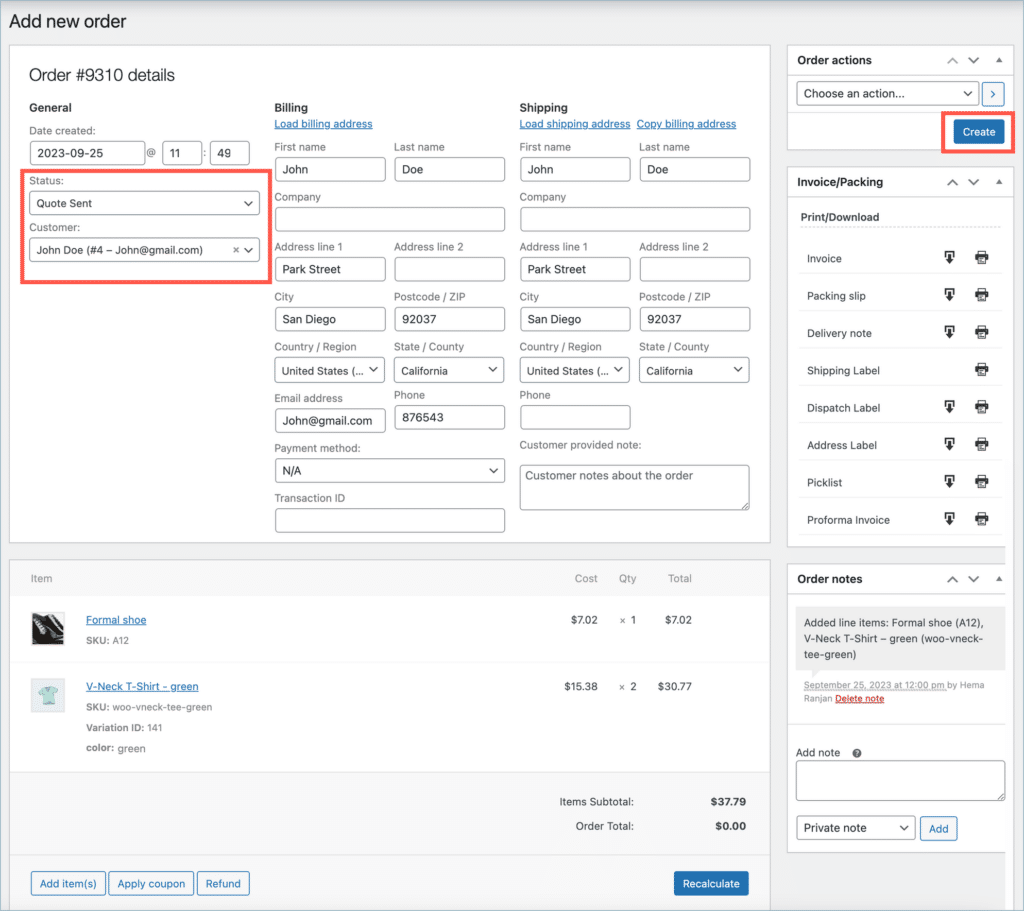
- Now set the Status as “Quote sent”.
- Configure the quote details, product, price, quantity, and any other relevant information.
- Now select the customer name from the Customer list box, to whom the quote must be sent.
- Finally, click on the Create button to create a new quote.
The image below shows a quote sent from the admin side. Here, the status is set as “Quote sent,” and the customer name is selected as John Doe. The products added to the cart are Formal shoes and a V-neck T-shirt.
Admins can now follow these steps and convert an abandoned cart into a quote. The quote can be created by the admin in the backend, sent to the customer for consideration, and possibly recover potentially lost sales.

Apple
April 22, 2026
Hi,
Do you have the live demo foe testing the request a quote plugin?
Apple
Hema
April 28, 2026
Thank you for your interest.
Presently, we do not provide a public live demo or sandbox for the Request a Quote plugin. However, you can go ahead with the purchase and test the plugin on your site or a staging environment.
We offer a 30-day money-back guarantee, so you can try out all the features risk-free and ensure it meets your requirements.
If you have any further queries or need assistance during setup, feel free to reach out to our technical support team here
Cristian
September 19, 2025
Hello WebToffee Team, I am very interested in your WooCommerce Request a Quote plugin, especially the feature that allows the admin to create a quote directly from the backend by selecting products, adjusting quantities and prices, and sending it to the customer; before purchasing I would like to know if you provide any demo access or a way to test this functionality, thank you very much for your support.
Hema
November 3, 2025
Hello Cristian,
Thanks for reaching out. We don’t provide demo for this particular product, you can directly purchase it, and you will be getting a 30-day money-back guarantee.
Szakacs Botond
April 16, 2025
Hi
Would like to ask if is it possible to leave the fontend as a webshop, and to use the quote feature in backend only? So users can buy, but if somebody asks for an offer via phone or contact form, admin can create a personalized quote for him and send it via email as a pdf?
If yes, can the quote be personalized to change the product price?
Thanks,
Botond
Sanjai Valsan
April 22, 2025
Hi Botond,
Thank you for reaching out.
Yes, it is indeed possible to leave the frontend as a regular webshop while using the quote functionality exclusively from the backend. This means customers can continue purchasing as usual, and you can generate personalized quotes manually for specific inquiries received via phone.
To achieve this setup—specifically hiding the quote functionality from the frontend—custom code snippets will be required. For assistance with implementing these customizations and ensuring everything works seamlessly, we recommend reaching out to our customer support team. They’ll be happy to help you with the setup.