


You can effortlessly fulfill all of your export/import demands, both to and from the WooCommerce stores, with the Import Export Suite for WooCommerce plugin. You can check whether a scheduled WordPress cron import has run successfully by reviewing the import logs available in the plugin’s Logs section. The logs display the status of scheduled imports and provide details about successful or failed cron executions.
A cron job is a scheduled task that runs automatically on the server. In the Import Export Suite plugin, cron jobs are used to automate import operations at defined intervals.
Steps to check the cron job status
- Navigate through the WebToffee Import Export (Pro)> Logs.
This page will show a list of all the import logs.

Note: The scheduled WooCommerce cron import logs will be listed with the file name including the term “schedule” in it.

- To check whether the WooCommerce cron import has run successfully, click View. The following screens will appear:
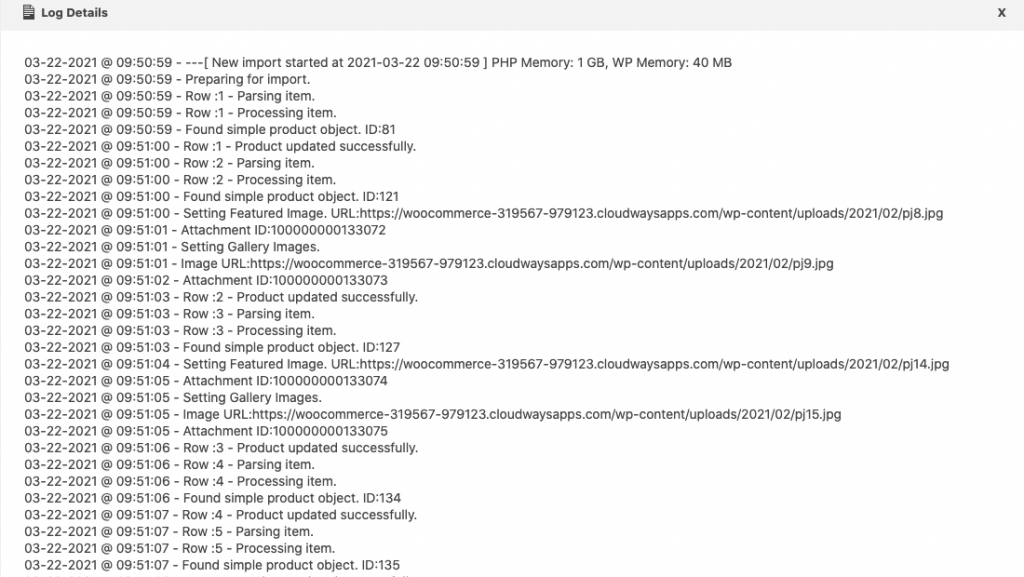
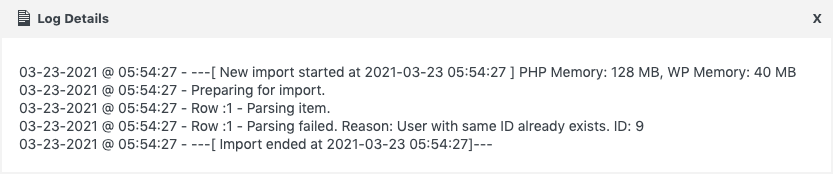
To check if the WooCommerce cron is running successfully, you need to check the cron status. If running, the status would be: Started, running, uploading, downloading. If not running, the status would be: Not started, disabled.
Know more about Scheduled import.

Comments (2)
Frank
June 2, 2021
Hello, I’m currently testing your import plug-in for Woocommerce. When I import the CSV file via a cron job from a web space, can I continue to work on my back end yet
Alan
June 7, 2021
Hi,
Yes, while the cron import is running you can continue working on your site. The import will be done in the background.