


The Import Export Suite for WooCommerce plugin can import products and orders as new items if conflict arises with the existing Post ID. To initiate :
- Navigate to WebToffee Import Export (Pro), after installing and activating the plugin via Plugin Setup .
- Click on Import and select the post type as product or order.
- To initiate import, select the post type and import method> map and reorder import columns.
- On reaching Step 4, set If conflict with an existing Post ID as Import as new item to import the data with new ID.
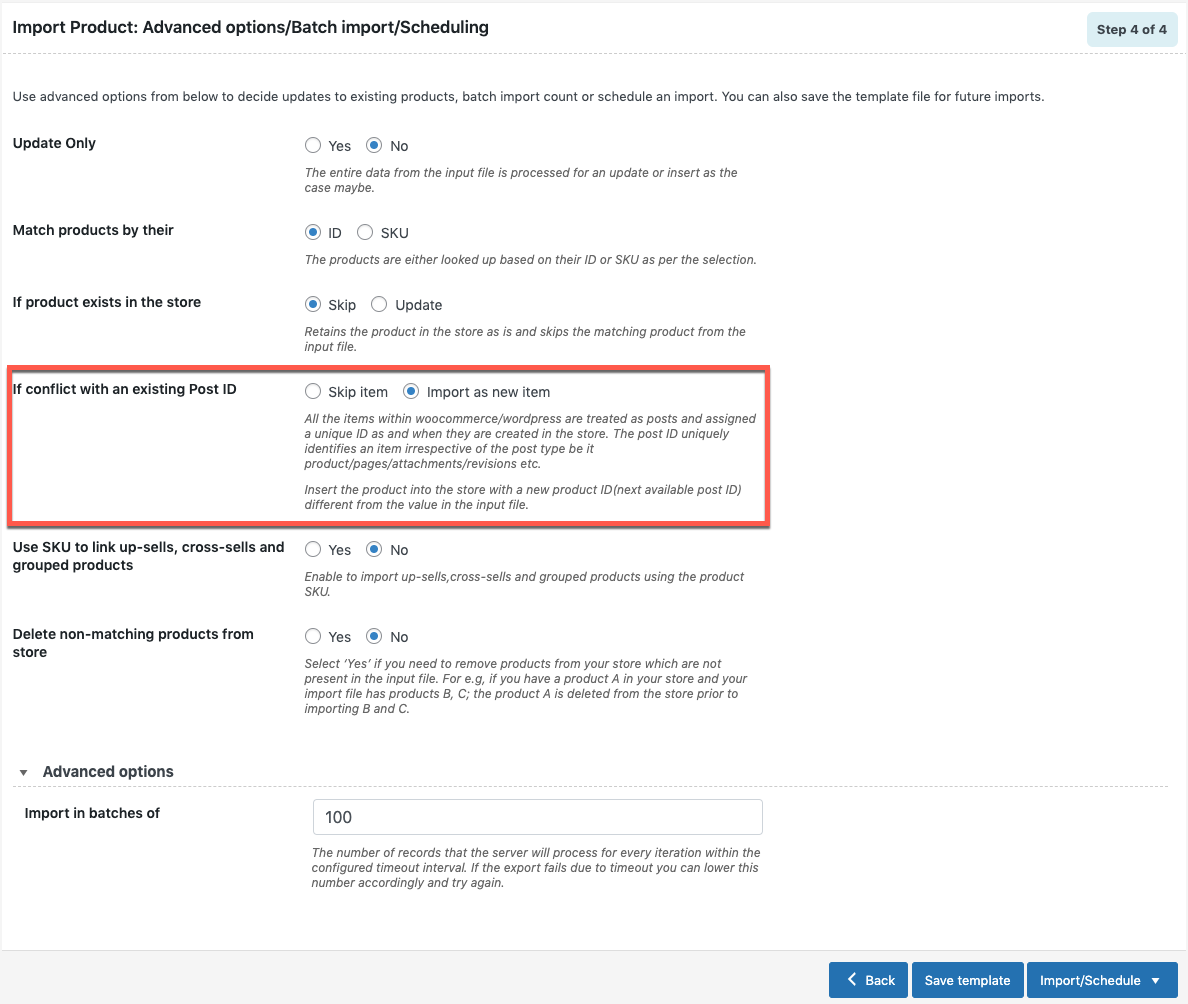
- Click on Import/Schedule to finish.
Note: The parent and child variations in variable products are linked either using ID or SKU. However, the variations will not get linked, if the parent variable product has no SKU with an enabled option.
Visit our documentation to know more about the plugin features.

Comments (2)
Leo
March 6, 2023
Hi
I am transferring all woocommerce data to a new installation. Its a fresh installation, completely blank.
How do i force import to create all new ids like post id, customer id, oder item id etc.
The common linking factor i will keep in between all imports is product sku
Mark
March 9, 2023
Hi Leo,
You can deselect the ID column during the import column mapping step to skip importing the IDs in the CSV. Once the products are imported they will have new IDs automatically assigned by WordPress