


The WebToffee Gift Cards for WooCommerce free plugin allows you to sell digital gift cards and issue store credit to your customers effortlessly. To get started, navigate to Gift Cards > General Settings in your WordPress dashboard and enable the ‘Gift Card Product’ option. This automatically creates a demo gift card in your store that customers can purchase. You can also manually send gift cards to specific users via the ‘Send Gift Cards’ tab to reward loyalty or run promotions.
Understanding Store Credit
Store credit is a prepaid balance that customers can use to shop without paying cash or using a credit card. This balance can be kept in the customer’s account or issued as a voucher, which they can use at checkout for their purchases.
Gift cards provide an easy way for customers to share store credit with friends or family, increasing your store’s revenue while ensuring repeat business.
Sell Gift Cards as a Product in Your Store
Offering gift cards as a product enables customers to purchase store credit for themselves or as gifts.(Gift cards can only be used in the store from which they were purchased)
Steps to Create a Store Credit-Based Gift Card Product:
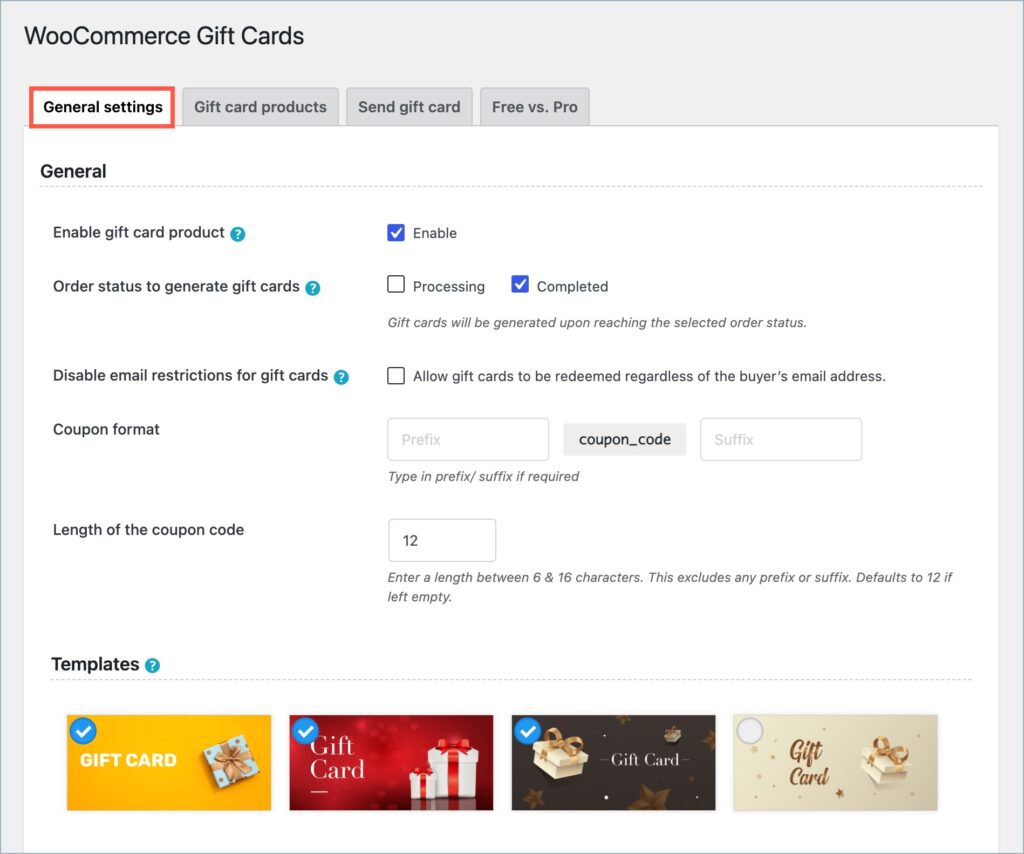
- Go to Gift Cards > General Settings in the dashboard.
- Enable the Gift Card Product option.
- Under Order status to generate gift cards, select the order status that should trigger gift card generation, such as Processing or Completed.
- Under Coupon format, optionally enter a prefix or suffix for the generated gift card codes.
- Set the Length of the coupon code. You can enter a value between 6 and 16 characters. The specified length does not include the prefix or suffix.
- In the Templates section, select the gift card templates you want to make available to customers.
- Click Save to apply the changes.
The plugin automatically creates a demo gift card product in your store.

To customize the product:
- Head to Gift cards > Gift card products tab. You’ll find a demo gift card product.
- Edit the demo gift card product to modify the cover image, name, and gift card values.
In the free version of the plugin, you can have only one gift card product in the store.
Customize the Gift Card Email
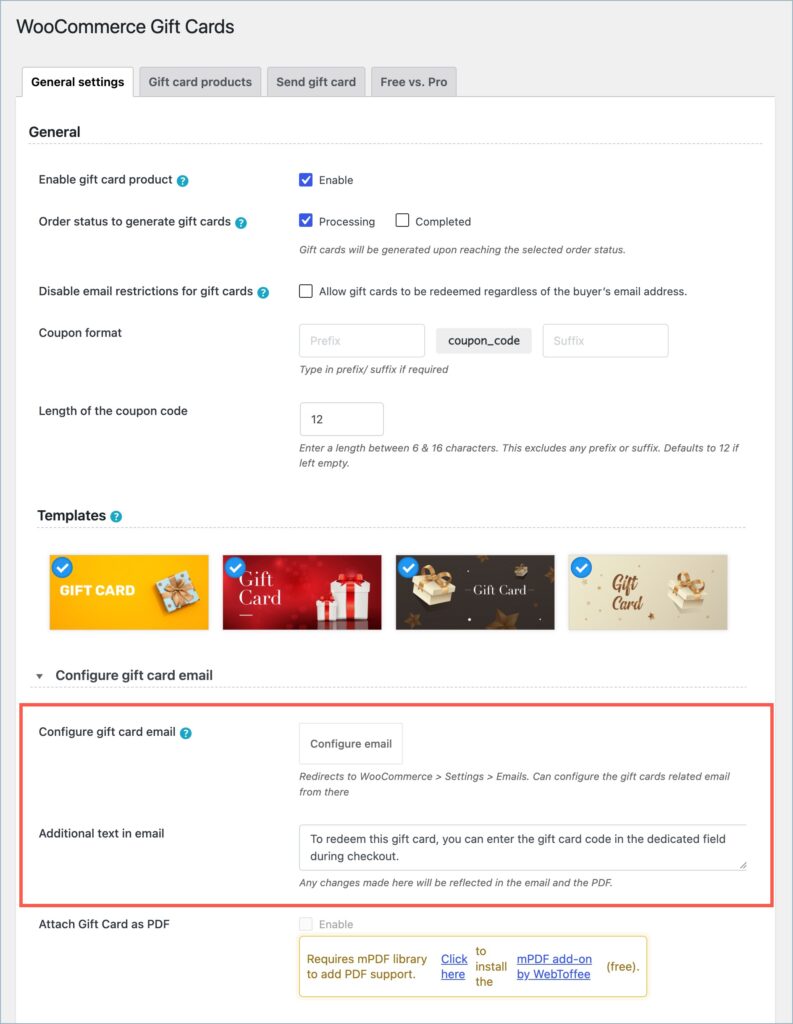
- Go to Gift Cards > General settings and click Configure email to configure the email settings.
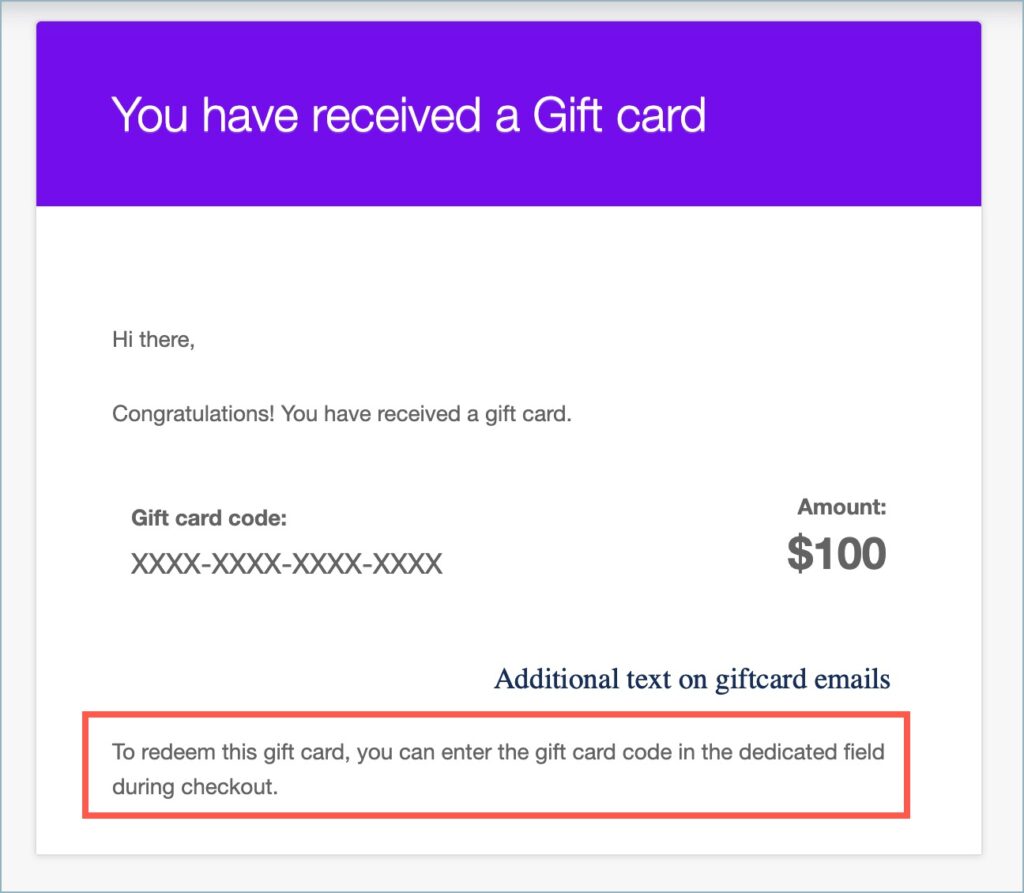
- Under Additional text in email, enter the text you want to include in the gift card email. The changes made to this field are reflected in both the gift card email and the attached PDF.
You can clear the field if you don’t want to display any additional text.
Send Store Credit to Customers as Gift Cards
Store owners can also manually send gift cards to customers from the backend. This allows merchants to issue gift cards for promotions, rewards, or special occasions without requiring a purchase. Customers receive the gift card via email and can redeem it at checkout.
Steps to Send a Gift Card:
- From the dashboard, head to Gift cards > Send gift cards.
- Set a gift card amount.
- Provide recipient info such as Name and email.
- Add custom messages.
- Click on Send Email.


Redeem Gift Cards
Gift cards can either be bought from the store or sent directly to customers by the store owner. Customers can use them similarly to other coupons by applying the coupon code at checkout. The gift card remains valid until the balance is fully used.

Upgrade to WebToffee Gift Cards for WooCommerce (Premium Version)
Unlock advanced features with the Premium version of WebToffee Gift Cards for WooCommerce! The Pro version enhances flexibility, customization, and automation, making gift card management even more powerful.
🔹 Advanced Gift Card Customization
✅ Advanced gift card product – Configure gift card product with enhanced controls and restrictions.
✅ Enable Gift Card Printing – Allow customers to print physical gift cards.
✅ Customize Gift Card Templates – Create a unique design for your gift card gallery.
✅ Advanced Gift Card Code Customization – Create advanced custom gift card code patterns for more control over generated codes.
🔹 Expanded Gift Card Delivery & Redemption
✅ Send Physical Gift Cards – Offer printed gift cards for in-store purchases.
✅ Apply Gift Cards to Taxes & Shipping – Allow gift card balances to cover additional charges.
✅ Enable Currency Switching – Support multiple currencies with Aelia Currency Switcher.
✅ Use Gift Cards with EU VAT Compliance – Ensure proper taxation on gift card sales.
🔹 Bulk & Automation Features
✅ Import & Export Gift Cards – Seamlessly transfer gift card data.
✅ Gift card in Multiple Languages – Configuring Multilingual Gift Card Products with WPML
🔗 Ready to upgrade? Get WebToffee WooCommerce Gift Cards today!
