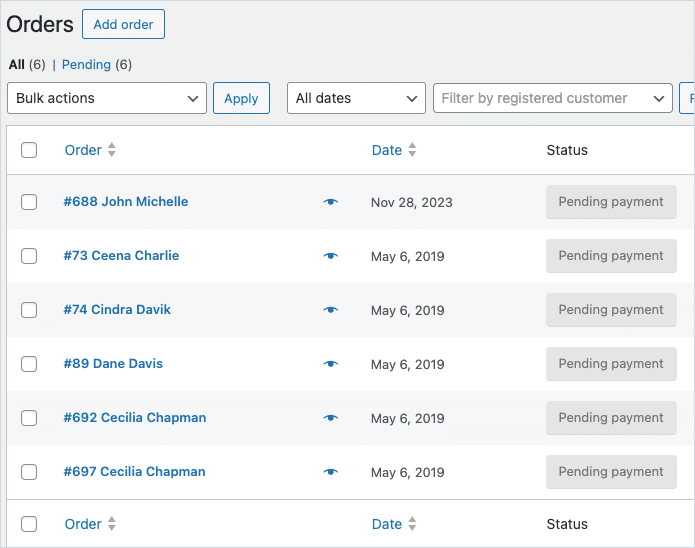
WooCommerce order statuses can be updated in bulk by importing a file using the Order, Coupon, Subscription Import Export plugin and mapping the Order Status field to the desired status value during the import process. This allows multiple existing orders to be reassigned to a new status in a single operation. The plugin also lets you update the custom order statuses created by third-party plugins.
Begin by downloading, installing, and activating the plugin. From the WordPress admin panel, navigate to the WebToffee Import Export (Pro) menu.
- Click on Import and specify the post type as Order.
- Select your import method and Import from location.
- On the mapping screen, edit the Order Status field and specify the status value you want to update the data. Here, we will be updating the status as pending. Click on Apply.
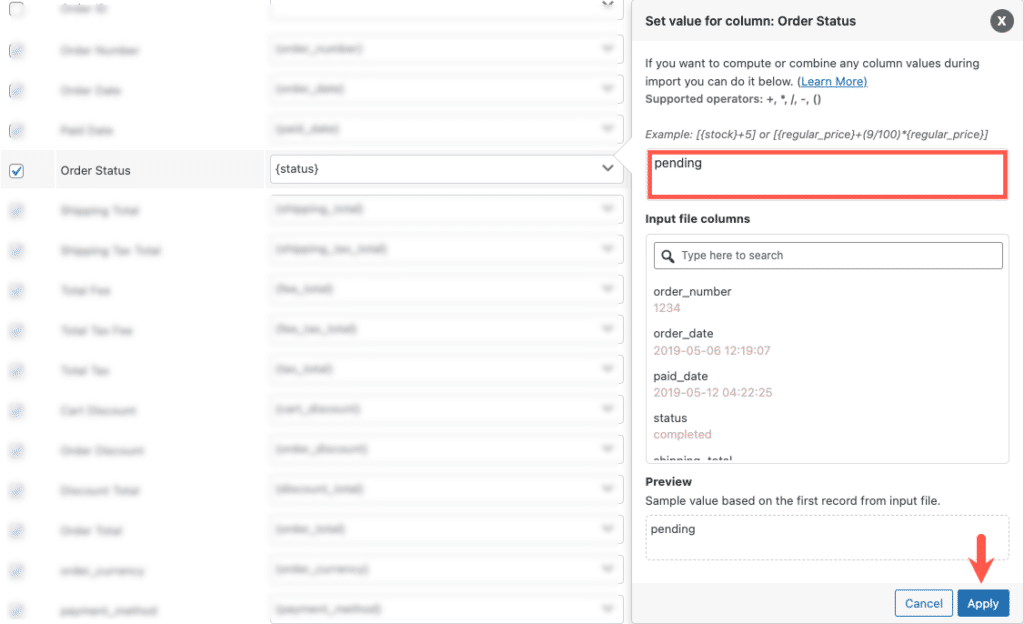
The WooCommerce order statuses along with their values in the column: status are listed here:
| Order statuses | Values in column: status |
| Pending Payment | pending |
| Processing | processing |
| On hold | on-hold |
| Completed | completed |
| Cancelled | cancelled |
| Refunded | refunded |
| Failed | failed |
| Draft | draft |
- In the next step, use the advanced options and click on Import to finish.
For a detailed step-wise procedure, refer to How to import WooCommerce Orders.
On successful import, you can see that all the order status will get bulk updated with the new value(pending) as shown below.