


WooCommerce orders can be exported to CSV or XML format using the Order, Coupon, Subscription Import Export plugin by selecting Order as the post type, choosing the required export method, applying filters if needed, and selecting the desired file format in the advanced options before exporting. This allows order data to be downloaded in a structured file format for backup or migration.
Either download the Sample Order CSV file or follow the steps mentioned below to export the orders from the store.
Steps to export orders
Install and activate the plugin. From the WordPress admin panel, navigate to the menu WebToffee Import Export (Pro).
- Click on Export and follow the steps in How to export orders.
- On reaching step 2, choose Quick export method or Advanced export method.Note: Format of the file downloaded from the Pre-saved template method depends solely on the previously chosen Export file format.
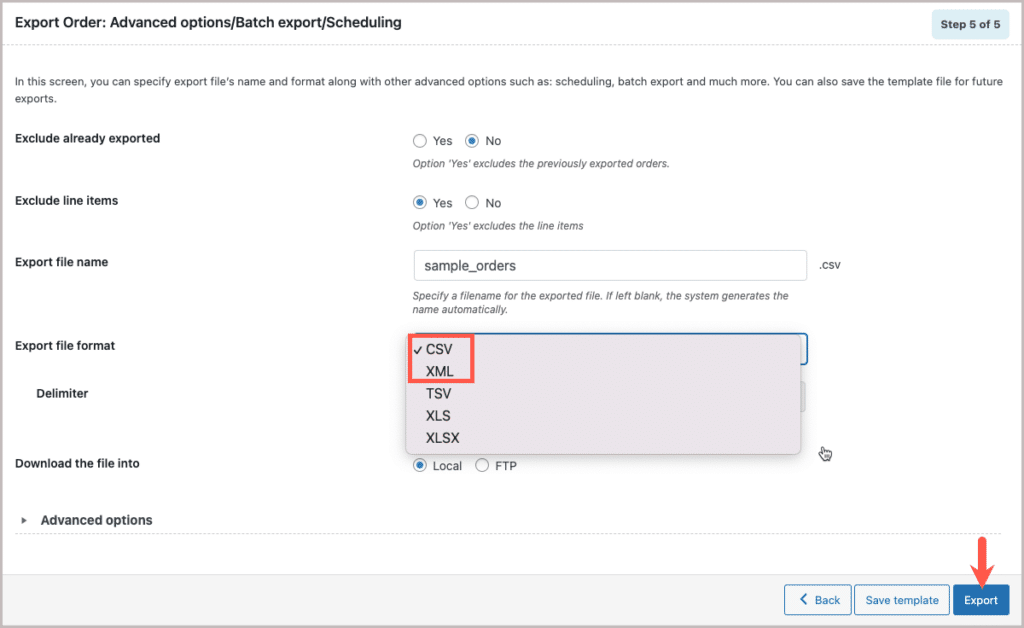
- In the Advanced options/Batch export/Scheduling step and select the required Export file format and Export.
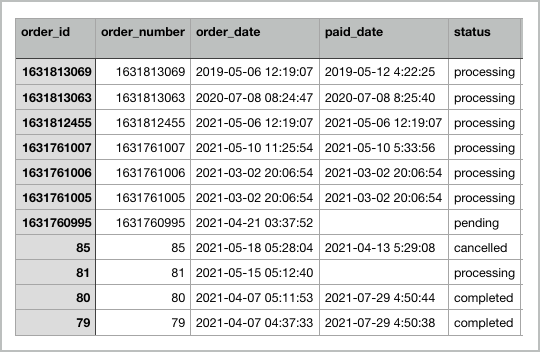
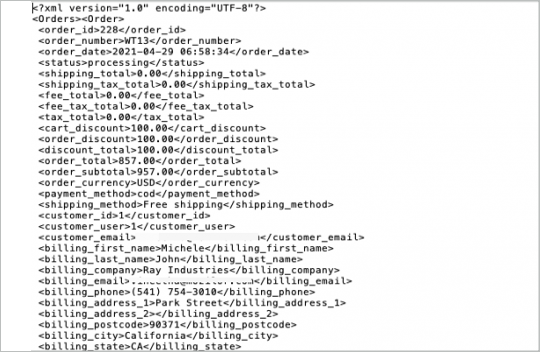
Sample of CSV and XML file formats

Julien
December 5, 2024
Hi,
We are searching for a way to export sales orders from WooCommerce at the item level.
We need a csv file where each order is broken down into 1 line / sku ordered. And the VAT collected to be detailed at the SKU level as well. Is it possible to do that with the plugin?
Thanks!
Hema
December 11, 2024
Hello Julien,
Thanks for reaching out. Yes, this is possible. In Step 5, Kindly export the orders with the Export line items in option set to Separate rows . This will create a new row for every item.
Julien
December 13, 2024
Thanks a lot Hema.
Do you confirm that the VAT collected is also specified at the product level?
I’m asking because we apply different rates (reduced and standard) for different products and we need to make a proper distinction for our accounting.
Thanks for your feedback
Julien
Hema
December 20, 2024
Hi Julien,
As of now, the plugin can only create a new row for every line item. In order to specify VAT at product level, you need customized code. Creating this customized code would need additional data from your side. So, kindly reach to us via customer support to get your specialized custom code.
Yasen
March 27, 2023
Hello,
Is it possible for this plugin to export custom XML of Woocommerce orders? Please explain how this should be done. Thanks.
Vineetha
March 29, 2023
Hi Yasen,
Thank for reaching out. By default, custom XMLs are not supported by the plugin. However, we can check the possibility of providing a custom code snippet for the pro version pluign to export custom XML. Please reach us via support for technical assistance.
Ab R
April 7, 2022
Hi,
Is it possible for include custom fields into the export process? For example, there is a post order field that will be needed but it doesn’t look like you can include those in the export. The same needs to apply for the import when the data is being loaded back in.
Alan
April 13, 2022
Hi,
Yes, the pro version plugin supports exporting and importing of order custom fields. You may please export the orders with the Hidden metadata option enabled and the data will be exported to the CSV. Later on, you can use this exported CSV as a template to import data back.
Luke Morgan
January 6, 2022
hey,
is it possible to run an import so that it will not change the order_number when importing the order but will allow for the order ID to be changed?
basically we have 9150 orders and 377 subscriptions. We will have problems as there are post IDs in the migration destination that will conflict with order id’s that we are exporting.
we need the orders to map to the correct subscription, meaning that this will break if the order numbers changed, but you can change the order id without issue for this.
is there a way to allow for the order number to remain unchanged, so they map to the correct subscription, but for the order id ( post id of the order post type ) to be changed so it doesn’t conflict with an existing post in the new instance?
Alan
January 13, 2022
Hi,
The orders and subscriptions are linked using the ID and not the order number. Please enable the option Link related orders using _wt_import_key while importing subscriptions in order to link the order and subscription even if the ID changes.
michael
December 28, 2021
Hi,
Is there a way of exporting only select items from the line item data. For example, in the line items I only want the SKU and not the product ID, product item total and subtotal.
I would also like to find out if there is a way of doing this for the meta fields as well. For example, from in my meta:_wc_shipment_tracking_items column, I would like to retrieve and export only the customer_tracking_provider and the tracking_number.
David
September 2, 2021
Is it possible to export a list of WooCommerce Users along with the number of orders they made (not the orders themselves) over a specified date range?
Mark
September 8, 2021
Hi,
Sorry to say that by default there is no option to export the total number of orders that are purchased by each customer.
Anton
May 14, 2021
How to add “item price” to csv export
– not “item_total”
Thanx
Alan
May 21, 2021
Hi,
The price of the product will be exported to the line_item column. Can you please check the line item column where all the details of the item purchased will be exported?
Konrad Wielechowski
May 3, 2021
How to delete created template ?
Alan
May 8, 2021
Hi,
Sorry to say that currently there is no option to delete pre-saved templates. We will be including that option soon.
kerli
December 21, 2020
In Brazil we have a document called CPF / cnpj and I need it to be exported together in the report. it’s possible?
Mark
December 22, 2020
Hi,
If the CPF data is stored with the order details as metadata in the database then it can be exported using the plugin along with the order details.
eM
May 25, 2020
Is it possible to set this plugin up to export orders automatically when new order occured?
Alan
May 26, 2020
Hi,
Currently there is no option to export the order automatically when a new order is placed. The plugin supports scheduling the export only by providing an export interval time. Eg: If the interval time is provided as 30 min then the export will occur automatically every 30 minutes.
cameron
April 1, 2020
import won’t work if you are trying to import orders on a different system where a meta->id = the order->id. is there an option to “create new order as import” or do we have to manually change the order id in the csv?
Alan
April 2, 2020
Hi,
You may please import the orders by unmapping the Order ID column during mapping or change the ID in the CSV file to a different number or delete the Order ID column from the CSV. WordPress will automatically assign the next available ID to the imported orders. Please note that unmapping/deleting/changing value in the ID column can result in importing the order with a new order number.
Mark
December 20, 2019
Can this be configured to export orders to a file on server via cron job instead of as download? So don’t have to be logged in to run it?
Alan
December 21, 2019
Hi,
Yes, using the plugin you can schedule an automatic export of orders to an FTP server so that you don’t have to log in to export them.
Ian Darby
November 25, 2019
How do I export different order line items into lines, not columns!
Sage 200 needs each line item on a different line, not a different column!
Alan
November 26, 2019
Hi,
By default, there is no option in the plugin to export the line item data into separate rows. Could you please share with us a sample CSV file format you would like to have in the CSV file so that we can check it. Please reach us via support.
Debbie
September 19, 2019
Sept 18, 2019 I get the following error when trying to export my orders:
Fatal error: Call to undefined method WC_Order_Refund::get_amount() in /home/content/41/11453441/html/wp-content/plugins/order-import-export-for-woocommerce/includes/exporter/class-wf-orderimpexpcsv-exporter.php on line 184
Alan
September 19, 2019
Hi,
Could you please reach us via support. Our support team will follow you up from there.
Dave
December 4, 2018
Hi, I do have a problem with exporting Orders, the Order-Im-Ex returns me empty csv. I don’t have any other options like the screenshot posted above… I only have the “Export Orders” button, and if I click it, it downloads an empty csv… Please help. Thanks!
Mark
December 5, 2018
Hi,
It seems like you are having the basic version of the plugin which doesn’t have the filters to export orders as shown in the screenshot. The premium version of the plugin supports filters to export orders as shown above.
Could you please mention which type of orders you are trying to export using the plugin. Please reaches us via support.
prathinakumar
February 22, 2018
Need Clarification:
a) If i create a new field called as “Field AAA”, after “order note” in checkout page
b) When i go to export order or subscriptions that new field data “Field AAA” will export automatically.