


WooCommerce order imports can be scheduled at regular intervals using the Order, Coupon, Subscription Import Export plugin by selecting Order as the post type, configuring the import settings, and using the Schedule option in the Advanced settings to set up WordPress Cron or Server Cron. This allows orders to be imported automatically on a daily, weekly, monthly, or custom interval basis.
In this article, you’ll learn how to configure and schedule recurring order imports step by step.
Scheduling at regular intervals
To begin, download, install and activate the plugin. From the WordPress admin panel, navigate to the menu WebToffee Import Export (Pro)> Import.
- Specify the post type as Order.
- Select your import method and Import from location.
- Map the import columns as required.
- In the last step, use the advanced options and Click on the Import/Schedule button. For a detailed step-wise import procedure, refer to How to import WooCommerce Orders.
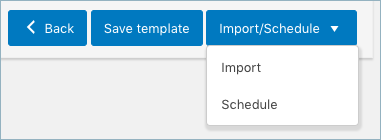
- Hit the Schedule option, and you will be taken to the cron schedule window as shown below:

The plugin supports two different schedule types:
- WordPress Cron: Upon a visit, WordPress Cron will check to see if the time/date is later than the scheduled event/s, and if it is– it will fire those events.
- schedules your job at the specified time.
- is dependent on your website visitors.
- Server Cron: You may need to trigger the URL every minute, depending on the volume of data to be processed. You can use this option :
- to generate a unique URL that can be added to your system in order to trigger the events.
- if you have a separate system to trigger the scheduled events.
- Also, the import/export can be scheduled on a daily, weekly, monthly, or custom basis. One can also configure the time at which the import has to be scheduled.
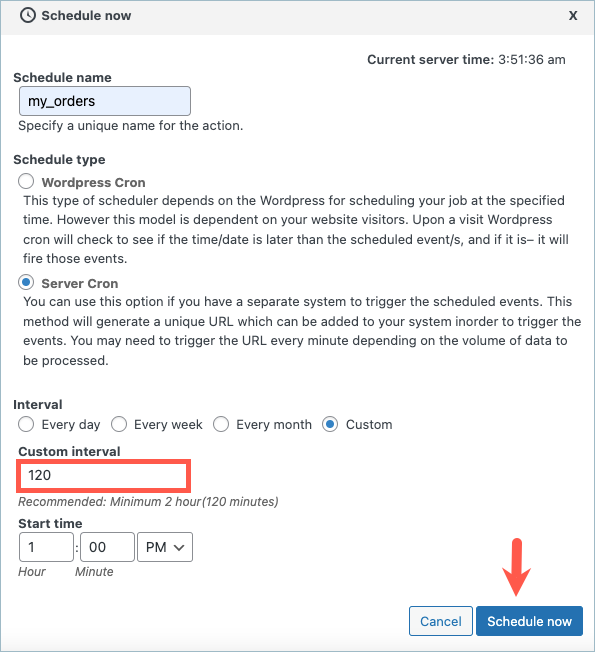
- Click on the Custom option, and enter the interval in minutes. You can also specify the Start time to schedule the import. This will import the orders every ‘120’ minutes.
- Click on Schedule now. Now the orders will get imported at regular intervals.
