


To auto-apply a coupon in WooCommerce, append ?wt_coupon=COUPONCODE to your site URL (for example, https://yoursite.com/cart/?wt_coupon=flat30). When a customer visits the link, the coupon is automatically applied to the cart, provided all usage conditions are met.
URL Coupons is a feature of the Smart Coupons for WooCommerce plugin that lets you pass a coupon code via a URL and apply it automatically to any page while preserving usage restrictions. To implement the URL Coupon, simply use the following syntax:
<site_url>/?wt_coupon=<coupon_code>
For example, to implement a URL coupon in the cart page of a website www.webtoffee.com with the coupon code FLAT30, specify the URL coupon in the following format:
https://www.webtoffee.com/cart/?wt_coupon=flat30
Automate Cart Discounts with URL Coupons and Smart coupon shortcodes
As mentioned above, there are multiple ways to embed a coupon that can automatically apply a cart discount. Consider an example of linking the URL with the coupon shortcode.
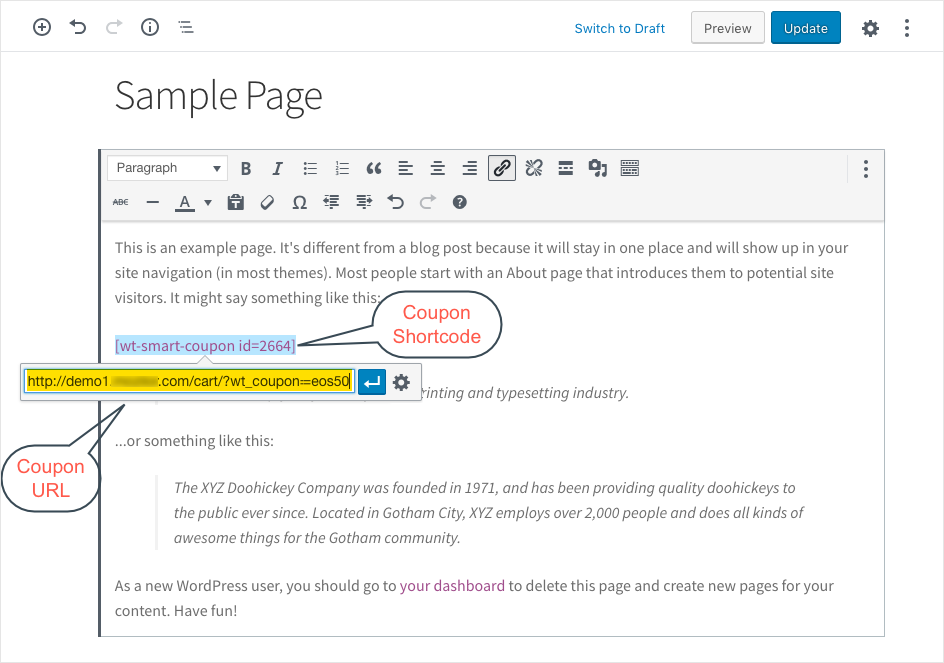
- Create a post where you want to display the redirecting text/image/any other element. In this case, the coupon’s shortcode.
- Enter the element(shortcode) on the page.
- Create a hyperlink to the element and enter the site URL in the given format(https://www.webtoffee.com/cart/?wt_coupon=flat30).
- Finally, click on Publish/Update.
Now you can simply click on the coupon element on the published page to get redirected to the cart, where the coupon will automatically apply.
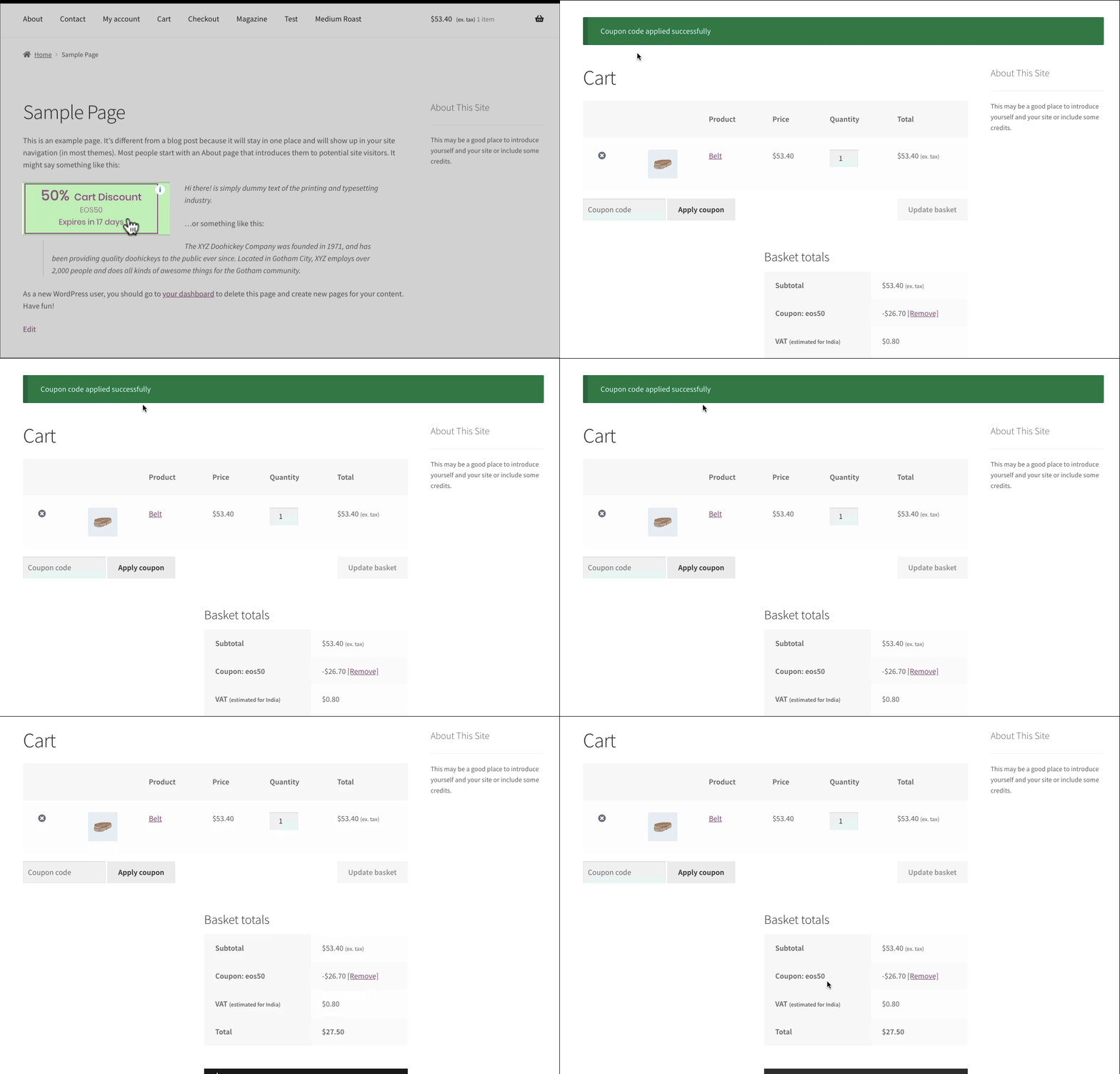
Alternatively, you can use images, text, or any other element to automate discounts with URL coupons.
If you want to enhance the functionalities of your URL-based coupons, like automatically adding products to the cart upon coupon application, generating a QR code for your coupon, and personalizing your URL coupons with your own branding and logo, explore our dedicated URL Coupons for WooCommerce plugin.

Knut
November 27, 2024
Hello. Is there a way to add several discount codes in one url? I see that some other plugins work when they are comma separated, but it does not work with this plugin?
Arjun
November 29, 2024
Hi Knut,
Thank you for reaching out. We understand your requirement. Currently, Smart Coupons for WooCommerce does not support applying multiple coupons through a single URL. However, we’ve noted your request, and this feature is planned for inclusion in a future update.
Laura
October 13, 2023
I am using Smart Coupons and I am trying to automatically add a certain quantity of products to the cart and apply a coupon (the coupon has usage restrictions that a certain quantity of a specific product has to be applies for the coupon to work). I want this all to work with one URL. I am trying to use:
https://benbellabooks.com/cart/?add-to-cart=157734&variation_id=166874&quantity=250?wt_coupon=tmm25
This works in that it adds the proper product/quantity to the cart but it does not apply the coupon. I had to set the coupon to apply automatically to get this to work. We now want to add another URL that adds 500 of the product to the cart but does not apply a coupon so having the coupon applied automatically makes this impossible.
Is it possible to get that URL to work with your plugin to both add the items to the cart and apply the coupon?
Thanks!
Laura
Rebecca Shamblin
January 19, 2024
Laura, did you ever find a solution? I am trying to add a product to the cart along with my coupon code, but can’t find the way.
Arjun
January 23, 2024
Hi Rebecca,
Thank you for reaching out. To clarify, it seems you’d like to add a product to the cart along with applying the coupon on clicking the coupon URL. To do so, you can use the URL Coupons for WooCommerce add-on plugin. The plugin enables to apply the coupon to the cart while also adding selected products to the cart on clicking the coupon URL.
Arjun
January 22, 2024
Hi Laura,
Thank you for reaching out. To clarify, it seems you’d like to include a specific number of products in the cart (let’s say 250, as observed on your website) and have the coupon applied automatically. However, when attempting to add 500 products to the cart with another link without applying the coupon, the auto-apply feature activates due to surpassing the 250-product threshold.
To address this challenge, I suggest utilizing the product restrictions’ maximum and minimum quantity settings. In the given example, if you set both the minimum and maximum quantities to 250, the coupon will be applied when there are precisely 250 products in the cart and will be removed as soon as the 251st product is added.