
Offering discounts on specific days encourages customers to come back on those days, for example, for a weekend sale. With Smart Coupons for WooCommerce, you can make a coupon work only on the days of the week you choose.
To restrict a coupon to be active on only selected days of the week:
- From the WordPress dashboard, go to Smart Coupons > All coupons.
- Open the coupon you want to restrict, or click Add coupon to create one.
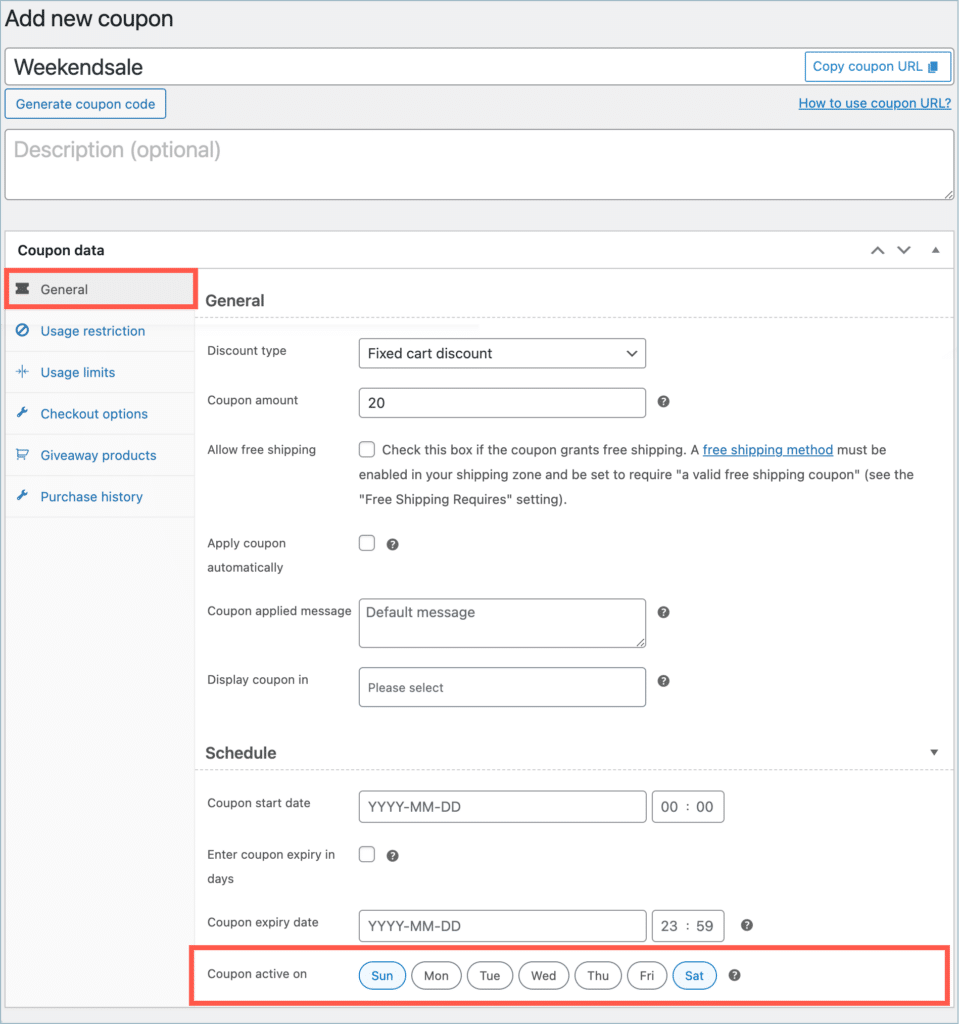
- In Coupon data > General, scroll down to the Schedule section.
- In Coupon active on, select the days when the coupon should work. In this example, the coupon works only on Saturdays and Sundays.
- Click Publish or Update.
If you don’t select any days, the coupon works every day of the week.


Comments (2)
Ka Wai
January 8, 2024
Hi, I can’t seems to see this “Set a Coupon to be Active on Selected Days of the Week in WooCommerce” with my smart coupon features?
Arjun
January 8, 2024
Hi Ka Wai,
Thanks for getting in touch. The coupon scheduling options can be found in the General tab of the Add coupon page. If you’re unable to locate the option in that tab, please verify that you’re using the premium version of the plugin and that the plugin version is 2.1.1 or higher. If you are still facing any technical difficulties, feel free to reach out to our support team.